
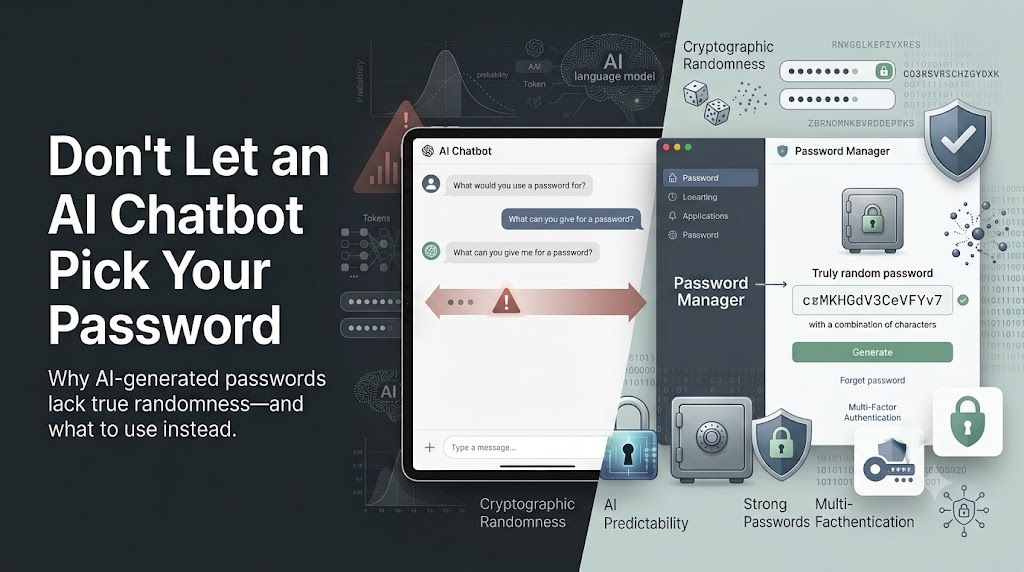
Don’t Let an AI Chatbot Pick Your Password: The Security Risks Explained
When you need a new login credential, asking ChatGPT or another AI chatbot to generate a complex password may seem convenient. A long string of random-looking characters can appear secure at first glance. However, letting an AI chatbot pick your password is not a safe security practice.
Large language models (LLMs) are excellent tools for writing, coding, research, and productivity tasks. However, they are not designed to create cryptographically secure credentials. Their purpose is to predict and generate text, not produce truly random security keys.
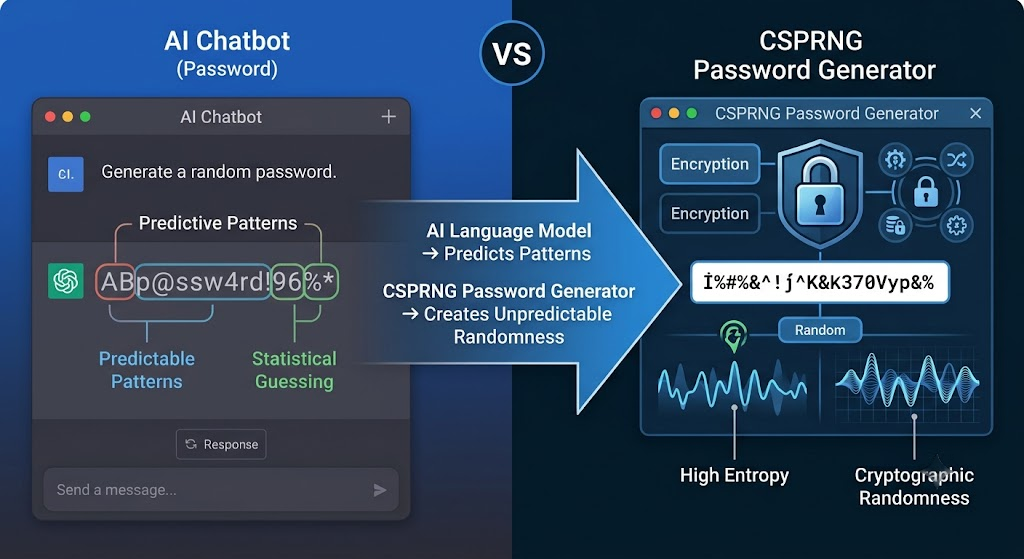
AI models work by predicting the most likely next token based on patterns learned from massive datasets. They do not create passwords using true randomness or cryptographic processes. This difference is critical because strong passwords depend on unpredictability. You can learn more about how language models generate responses from OpenAI’s explanation of how ChatGPT works
When you ask an AI chatbot for a “random 16-character password,” the output may look random to you. However, the model is still producing text through statistical patterns. Those patterns can create weaknesses that attackers may exploit.
In this article, we will explain why AI-generated passwords can be risky, how language models create output, and what safer methods you should use instead.

How do I protect myself and my family from AI chatbots?
Artificial intelligence chatbots are becoming part of everyday digital life. They can answer questions, create content, and assist with many tasks. However, protecting your privacy while using AI tools requires careful data-sharing habits.
The best way to protect your household from AI chatbots is to create clear rules about what information should never be shared. Public AI systems may store conversations for service improvement, safety reviews, or other operational purposes, depending on their policies.
Avoid entering sensitive details such as:
- Passwords or login credentials
- Financial information
- Government identification numbers
- Private family details
- Security questions or recovery answers
Teach children and relatives that AI tools can sound human but are still automated systems. Encourage everyone to think before sharing personal information online.
Establish Strict Household Data Sharing Rules Today
Creating household rules for AI chatbot use helps prevent accidental privacy leaks. Every family member should understand what information is safe to share and what details should remain private.
Start by explaining that AI conversations are not the same as private conversations with trusted people. Avoid sharing personal identifiers, daily routines, travel plans, or answers to common security questions.
Useful household guidelines include:
- Never share passwords, authentication codes, or private documents.
- Avoid entering personal information unless it is necessary.
- Review AI tool privacy settings before regular use.
- Ask children to tell an adult before sharing unusual requests.
Good digital habits reduce risks from many online threats, not only AI systems. Regular conversations about online safety help family members recognize suspicious questions and protect personal information.
Is 123456789 a Good Password?
The password 123456789 is one of the weakest choices for protecting an account. Simple number sequences are easy for automated tools to test during password attacks.
Cybercriminals often begin with common passwords because many users still choose predictable combinations. A password should be difficult for attackers to guess while remaining manageable for the account owner.
Some users ask whether an AI chatbot can pick your password or create a secure password suggestion. While an AI chatbot can generate ideas, users should never share existing passwords or private login information with any AI tool.
Better password practices include:
- Use long passwords or passphrases.
- Avoid names, dates, and common patterns.
- Create unique passwords for every account.
- Use a trusted password manager when possible.
Password strength depends heavily on length and unpredictability. A random phrase with multiple words is usually safer than a short password with minor changes.
Replacing simple sequences like 123456789 improves account security and reduces the risk of unauthorized access.
Avoid Common Sequential Patterns in Your Security Strategy
Sequential passwords, keyboard patterns, and repeated characters create unnecessary security risks. Attackers use automated systems that quickly test popular combinations and leaked password lists.
Common examples of weak choices include:
- 123456789
- Password123
- Repeated letters or numbers
- Personal information-based passwords
A stronger security strategy focuses on unique and complex credentials. Combine different words, use longer passphrases, and avoid information that others can easily discover.
If you ask an AI chatbot to pick your password, treat the suggestion only as a starting point. A secure password should be unique, unpredictable, and protected with additional security measures.
Account protection also improves when you enable multi-factor authentication. Even if a password is exposed, an additional verification step can block unauthorized access.
Good password habits are one of the simplest ways to improve online security. Small changes in how you create and manage passwords can significantly reduce digital risks.
Is Guessing a Password Illegal?
Guessing a password may seem harmless, but attempting to access an account without permission can violate cybersecurity laws. Unauthorized access is illegal in many countries, even if the attempt only involves trying common passwords.
Security professionals test passwords only with proper authorization. Ethical hackers perform approved security assessments to help organizations identify weaknesses.
Activities that can create legal problems include:
- Trying to enter someone else’s account
- Using automated password-guessing tools without permission
- Accessing private systems without authorization
- Attempting to bypass security protections
Protecting your own accounts is different from testing someone else’s security. Always use approved methods when checking account safety.
Strong cybersecurity practices include using unique passwords, enabling multi-factor authentication, and keeping recovery information secure. Respecting digital boundaries helps protect both individuals and organizations.
Know the Legal Boundaries of Unauthorized System Access
Digital security requires understanding the difference between legitimate testing and unauthorized access. Even simple actions, such as repeatedly guessing another person’s password, may be considered a cyber offense.
Cybersecurity laws exist to protect personal information, business systems, and online services. Penalties for unauthorized access can include fines, legal action, and other consequences.
To stay within legal boundaries:
- Test only systems you own or have permission to evaluate.
- Use professional security tools responsibly.
- Report security problems through approved channels.
- Never attempt to access another person’s account.
Learning cybersecurity skills can be valuable when practiced ethically. Authorized security testing helps improve protection, while unauthorized attempts can create serious risks.
Which AI chatbot doesn t need login?
Finding a conversational assistant that bypasses registration requirements can be difficult because most major technology providers require user accounts for tracking, safety enforcement, and data persistence. Platforms like OpenAI allow limited trial access without an account for basic web interfaces in specific regions, but advanced features always demand authentication. Without an account, systems cannot save chat history, manage API rate limits, or apply personalized context across sessions. This lack of identity verification also helps maintain basic anonymity for casual users who want quick answers without sharing email addresses. However, skipping registration often means sacrificing security controls, data privacy protections, and access to specialized models that require verified user profiles. Weighing convenience against privacy is essential when choosing how to interact with digital assistants online.
Understanding Anonymous Access Limitations
Operating without an account significantly restricts what language models can accomplish for you. Anonymous sessions lack persistent memory storage, meaning every conversation starts from scratch without prior context. Additionally, service providers apply strict rate limits on unregistered traffic to prevent automated abuse and bot attacks. Users must carefully evaluate whether temporary convenience outweighs the loss of personalized settings and secure data management.
Can we do sexting with a chatbot?
Engaging in romantic or sexually explicit conversations with conversational agents has become a popular topic as virtual companionship applications grow in popularity. While many mainstream platforms implement strict content filters that immediately block sexually explicit prompts, specialized alternative platforms permit unrestricted roleplay. However, participating in intimate exchanges with automated software carries hidden risks regarding data privacy and emotional dependency. Private chat logs stored on remote servers could potentially be exposed during security breaches or reviewed by platform administrators for moderation purposes. Users must carefully consider whether sharing deeply personal or intimate details with software algorithms aligns with their long-term privacy boundaries and emotional well-being.
Privacy Risks of Intimate AI Chats
Intimate interactions generate sensitive personal data that commercial platforms may log or analyze for model improvement. Unlike end-to-end encrypted messaging between humans, conversations with virtual models pass through third-party servers where data retention policies vary widely. Users should review platform privacy statements thoroughly before sharing explicit content, as personal disclosures can sometimes resurface in unexpected ways or compromise personal digital security.
Frequently Asked Questions About AI-Generated Passwords
Can I Ask an AI Chatbot to Create a Passphrase?
No. You should avoid using an AI chatbot to generate passphrases for important accounts.
Although passphrases use words instead of random characters, they still require strong randomness. AI models generate language based on patterns and relationships between words. This means they may choose combinations that sound natural rather than truly random.
For example, an AI might create a phrase where the words have a logical connection. While the phrase may look unique, attackers can use language-based cracking methods to test similar combinations.
A better option is to use a dedicated passphrase generator or a random word selection method. Tools based on secure randomness can create combinations that do not follow predictable language patterns.
If you need a memorable password, choose several unrelated words generated through a secure process. Then store the password safely in an encrypted password manager.
Are Password Manager Generators Safer Than AI Models?
Yes. Password manager generators are significantly safer than AI chatbots for creating passwords.
Password managers use cryptographically secure pseudorandom number generators (CSPRNGs). These systems are designed specifically for creating unpredictable values. They rely on secure algorithms and device-generated entropy.
AI chatbots serve a different purpose. They generate text by predicting likely sequences based on learned information. This makes them useful for writing and communication but unsuitable for security-critical tasks.
A password manager can generate:
- Longer passwords.
- Random character combinations.
- Unique credentials for every account.
- Secure storage inside encrypted vaults.
The difference comes down to purpose. AI models create probable text. Password generators create unpredictable security credentials.
For protecting online accounts, unpredictability matters more than appearance.
What Happens to Password Prompts Sent to AI Platforms?
When you send a prompt to an AI chatbot, your message is processed through the provider’s systems. Depending on the service settings and policies, conversations may be stored, reviewed, or used for improving services.
This creates unnecessary privacy risks when discussing account security. For example, asking an AI tool to “create a password for my company email” reveals information about your account type and usage.
Even if the generated password is not directly exposed, sensitive context connected to your request could create security concerns.
Avoid entering private account details, passwords, or security information into AI platforms. Use dedicated security tools instead.
Password generation should happen locally through trusted applications whenever possible.
Can Brute-Force Tools Crack AI-Generated Passwords More Easily?
AI-generated passwords may appear complex, but automated cracking tools can take advantage of their predictable patterns. Modern attackers do not rely only on simple brute-force methods. They combine large password databases, statistical models, and advanced guessing techniques to improve their chances.
Because AI chatbots often create passwords using familiar structures, attackers can optimize their tools around these patterns. For example, many generated passwords may place uppercase letters at the beginning, numbers near the end, or special characters in predictable positions.
A password-cracking system can prioritize these common formats instead of testing every possible combination equally. This reduces the search space and can make attacks more efficient.
A secure password generator avoids this problem by creating credentials with true cryptographic randomness. It does not follow language patterns, formatting habits, or predictable structures.
For important accounts, use passwords generated by trusted security tools. The goal is not simply creating a password that looks complicated. The goal is creating one that attackers cannot reasonably predict.
What Is the Safest Way to Store New Passwords?
The safest way to store passwords is by using an encrypted password manager. A reliable password manager keeps your credentials inside a protected vault that requires a strong master password and, ideally, multi-factor authentication.
Some users may ask an AI chatbot pick your password or suggest ways to manage their credentials. However, AI tools should not be used to store passwords or receive sensitive login details. Passwords should always be kept inside secure storage systems designed for protecting private information.
Password managers encrypt stored information so unauthorized users cannot easily access your credentials. Even if a service provider experiences a security incident, properly encrypted vault data remains protected because attackers still need the encryption key.
Good password storage practices include:
- Use a trusted password manager.
- Create a strong and unique master password.
- Enable multi-factor authentication.
- Avoid storing passwords in plain text documents.
- Avoid saving sensitive credentials inside chat histories.
- Do not reuse passwords across multiple accounts.
Web browsers often provide basic password storage, but dedicated password managers usually offer stronger security features, better auditing tools, and more control over your credentials.
Your passwords are the keys to your digital identity. Protecting them requires secure storage methods designed specifically for that purpose.
Conclusion: Choose Secure Password Tools Over AI Chatbots
Understanding why you should avoid letting an AI chatbot pick your password is an important step toward improving your overall online security. Generative artificial intelligence has changed how people work, communicate, and solve problems. AI tools are valuable for many tasks, including writing, research, coding assistance, and productivity improvements. However, creating security credentials is not one of their strengths.
Letting an AI chatbot pick your password introduces unnecessary risks. AI-generated passwords may contain predictable patterns because language models create responses through statistical prediction rather than cryptographic randomness.
The biggest concerns include:
- Lack of true entropy.
- Predictable character patterns.
- Possible repeated outputs.
- Exposure of sensitive prompts.
- Increased risk from automated password attacks.
Strong cybersecurity depends on unpredictability. Passwords should be generated using tools designed specifically for security, such as password managers and cryptographic utilities.
For accounts that require manual login, use long and randomly selected passphrases. For everything else, rely on a trusted password manager that can generate and store unique credentials securely. You can also learn more about creating stronger credentials and improving your overall protection in this detailed password security guide.
Review your important accounts today. Replace any passwords created by AI chatbots and switch to proven security methods. Small changes in your password habits can significantly improve your online protection.