
How Long Can an Ethernet Cable Be Before It Slows Down?
Setting up a home or office network often raises questions about ethernet cable length. You may wonder whether a longer cable reduces speed, increases latency, or causes connection problems.
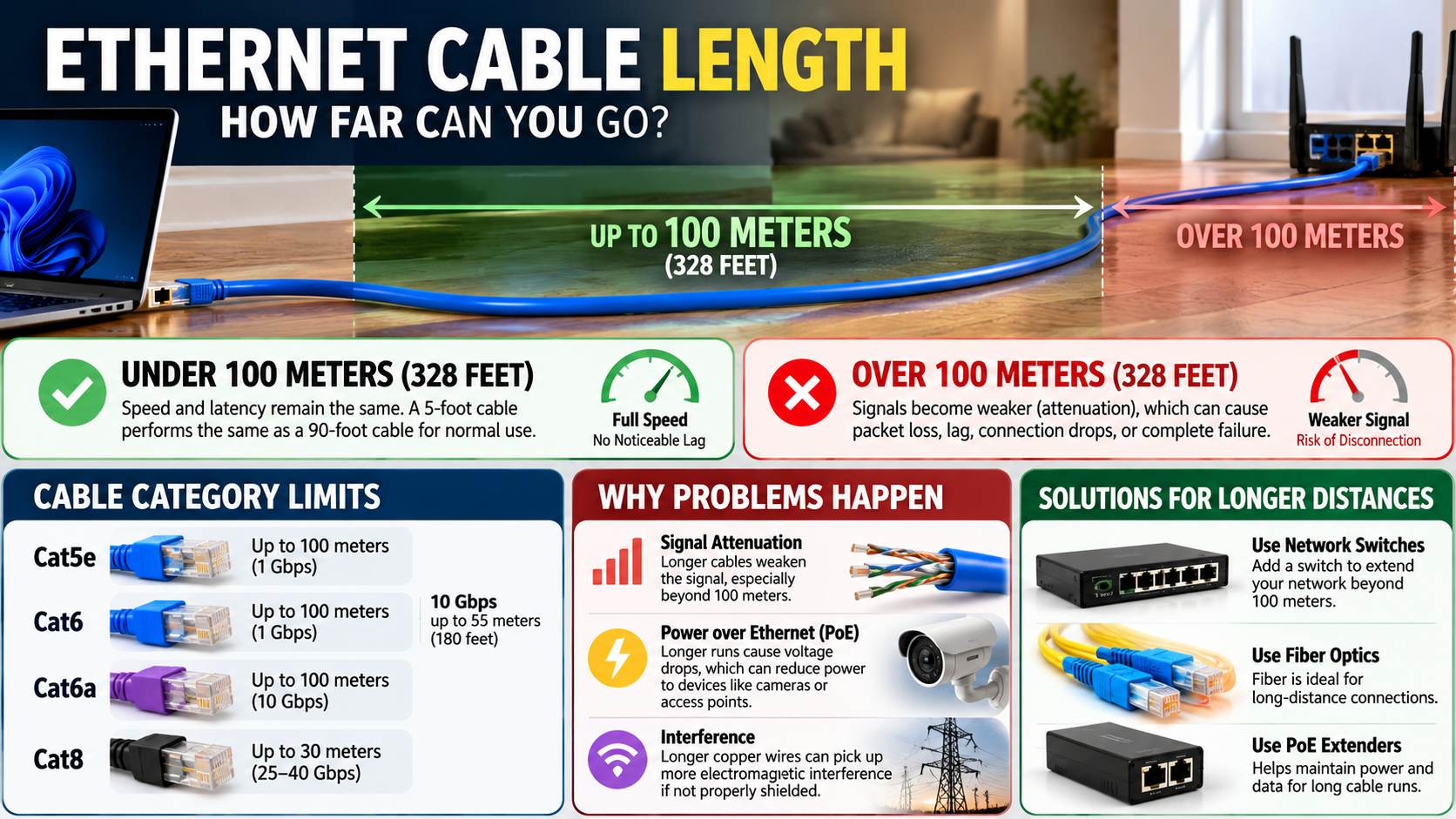
For most home networks, cable length is not a major concern. Standard twisted-pair Ethernet supports channels up to 100 meters (328 feet) under normal structured-cabling specifications. That total includes the permanent link and patch cords.
Longer copper cables do experience more signal loss. However, normal Ethernet runs stay within carefully defined electrical limits. A properly installed cable can maintain its rated connection without noticeable performance problems.
In this guide, you will learn how ethernet cable length affects network performance. We will cover Cat6, gigabit Ethernet, 100-foot cables, and the limits of longer copper runs.
You will also learn what to do when you need to connect devices more than 100 meters apart. Finally, we will look at whether Cat6 is worth using in a typical home network.
Does Ethernet Cable Length Affect Performance?
Yes, ethernet cable length can affect network performance, but normal cable lengths rarely cause noticeable problems. Copper Ethernet cables experience signal loss as electrical signals travel through the conductors. Longer runs naturally create more loss than shorter ones.
For standard structured cabling, the overall Ethernet channel is normally limited to 100 meters, or about 328 feet. The permanent link can typically use up to 90 meters. The remaining distance allows for patch and equipment cords.
This means a 100-foot Ethernet cable is comfortably within the normal operating range. A properly installed cable should maintain its supported connection speed without slowing down simply because it is longer.
However, cable length is not the only factor that affects reliability. Cable quality and installation methods can also introduce problems, making it useful to understand the potential drawbacks of using Ethernet cables at home.
A damaged or poorly terminated cable can cause problems even when the run is short. Therefore, staying within the recommended ethernet cable length is important, but proper installation matters just as much.
How Ethernet Cable Length Affects Latency and Signal Loss
Longer Ethernet cables technically add propagation delay. However, the difference is extremely small at normal household distances. Ethernet signals travel through copper at a significant fraction of the speed of light.
Adding dozens of feet of cable therefore adds only a tiny amount of transmission time. For gaming, streaming, browsing, and video calls, this delay is effectively insignificant.
The more important issue is signal attenuation. This occurs when the electrical signal becomes weaker as it travels through the cable.
Ethernet standards account for signal loss when defining maximum channel lengths. Staying within those limits helps network equipment maintain reliable communication.
A properly installed 150-foot cable should not suddenly create noticeable gaming lag. The equipment should negotiate the supported Ethernet speed when the connection meets the required electrical characteristics.
Problems become more likely when a cable approaches or exceeds its design limits. Faulty connectors, excessive bending, poor-quality cable, and electromagnetic interference can also reduce reliability.
For everyday networking, focus less on avoiding long cables. Instead, choose suitable cable and keep the ethernet cable length within the supported distance.
Is Cat6 Enough for 1000Mbps?
Yes. Cat6 is more than capable of supporting 1000Mbps, or 1Gbps, Ethernet across standard channel distances.
Cat6 supports bandwidth up to 250 MHz. It is designed to handle gigabit Ethernet across the standard 100-meter channel.
That makes Cat6 suitable for most home networks using gigabit routers, switches, computers, gaming consoles, and other network devices.
Cat6 also provides more performance headroom than Cat5e. Its construction improves crosstalk performance and supports higher-frequency signals.
However, Cat6 does not automatically support 10Gbps across the full 100-meter distance. 10GBASE-T over Cat6 is distance-dependent.
Typical guidance places 10Gbps Cat6 operation around 37 to 55 meters. The exact distance depends on the cabling and interference conditions.
For new installations that require 10Gbps across a complete 100-meter channel, Cat6A is the more appropriate choice.
For ordinary gigabit internet, however, Cat6 is easily sufficient. Your router, switch, and network adapters must also support gigabit speeds.
The ethernet cable length matters when planning higher-speed connections. But for a normal 1Gbps home network, Cat6 provides plenty of capacity.
Cat6 Headroom for Local Network Transfers
Cat6 can remain useful even when your internet connection is slower than 1Gbps. Your local network can transfer data between devices independently of your internet service.
For example, a home with network-attached storage can benefit from a reliable gigabit connection when moving large files. The same applies to local backups, media libraries, and computer-to-computer transfers.
Cat6 provides useful headroom for these applications. It is also widely available and works with standard RJ45 Ethernet equipment.
However, cable category alone does not determine your actual network speed. Your router, switch, network adapter, connectors, and connected devices must support the desired speed.
A Cat6 cable connected to a 100Mbps device will still operate at 100Mbps. The cable cannot increase the capability of slower networking hardware.
The same principle applies to gigabit connections. If your router or network adapter supports only 100Mbps, installing Cat6 will not turn it into a gigabit connection.
Therefore, treat Cat6 as one part of your complete network. It can prevent the cable from becoming a bottleneck, but it cannot upgrade other hardware.
For most homes, Cat6 offers a practical balance between cost, availability, and performance. It can also provide useful flexibility for future networking upgrades.
Is a 100-Foot Ethernet Cable Too Long?
No. A 100-foot Ethernet cable is well within the normal 100-meter channel limit for standard twisted-pair Ethernet installations.
One hundred feet equals approximately 30.5 meters. That leaves substantial distance before reaching the typical 100-meter channel limit.
A good-quality 100-foot cable can therefore support gigabit Ethernet without slowing down simply because of its length. This makes 100-foot cables practical for many home and office installations.
You can use one to connect a router or switch to another room, office, gaming setup, television, or desktop computer. A 100-foot cable can be especially useful when building a home office setup in another room or on a different floor.
However, not every 100-foot cable will perform identically. Cable construction, connector quality, installation conditions, and networking hardware all affect reliability.
Physical handling also matters. Excessive pressure, sharp bends, or damaged connectors can create problems even when the ethernet cable length itself is well within the recommended range.
For permanent installations, route the cable carefully and avoid unnecessary electrical interference.
In short, 100 feet is not an unusually long Ethernet run. It is a practical length for many residential networks.
Practical Tips for Long Ethernet Cable Runs
A longer Ethernet run still requires careful installation. Staying within the recommended ethernet cable length does not protect a cable from physical damage.
Avoid tightly bending the cable or crushing it under furniture. If the cable must cross a room or run along a wall, consider ways to hide Ethernet cables around the house while keeping the cable accessible and free from excessive pressure.
You should also avoid securing Ethernet cables with staples that can crush the jacket or conductors. Use suitable cable clips or supports instead.
Where practical, avoid running Ethernet directly alongside high-voltage electrical wiring for long distances. Keeping some separation can help reduce potential electromagnetic interference.
When installing cable inside walls, ceilings, or crawlspaces, choose cable designed for that environment. Indoor and outdoor installations can require different jacket and safety ratings.
For long runs, keep these points in mind:
- Avoid sharp bends and crushing.
- Do not tightly staple Ethernet cable.
- Keep permanent runs organized and supported.
- Use cable suitable for the installation environment.
- Protect connectors from moisture and physical damage.
- Check connectors if you experience intermittent speeds.
A poorly terminated connector can cause more trouble than the cable’s overall length.
The goal is not simply to use the shortest possible cable. Instead, create a clean, properly installed connection that stays within the supported electrical limits.
Can I Run an Ethernet Cable 500 Feet?
A 500-foot copper Ethernet run exceeds the normal 100-meter channel specification for standard twisted-pair Ethernet.
Five hundred feet is approximately 152 meters. That is substantially longer than the usual 328-foot channel limit.
This does not necessarily mean a 500-foot cable will always fail immediately. Some specialized cables and networking equipment can support longer distances under specific conditions.
However, such installations should not be treated as ordinary standards-based Ethernet connections. Standard copper Ethernet relies on electrical performance characteristics such as insertion loss and crosstalk.
As distance increases, maintaining the required signal quality becomes harder. The connection may become unreliable or fail to operate at the expected speed.
If you need to connect two locations 500 feet apart, simply buying a much longer standard Ethernet cable is usually not the best approach.
An active network device can regenerate the signal and create another network segment. Ethernet extenders can also be suitable for certain installations.
For outdoor or building-to-building connections, fiber optic cable is often a better option. Fiber does not have the same copper-distance limitations.
It also provides electrical isolation between buildings, which can be useful for reducing certain grounding and electrical risks.
The best solution depends on distance, required speed, installation environment, and available power.
Using Fiber for Long-Distance Ethernet Connections
Fiber becomes particularly useful when the ethernet cable length required exceeds the normal copper limit.
This can happen when connecting a home with a detached garage, workshop, office, or another building.
Unlike copper Ethernet, fiber transmits information using light rather than electrical signals. This makes it suitable for much longer distances.
Fiber can also provide electrical isolation between buildings. That can be valuable for building-to-building network connections.
For a 500-foot connection, you can design a fiber link using suitable outdoor-rated fiber and compatible networking equipment.
Depending on your hardware, this may involve switches with SFP or SFP+ ports. Media converters can also connect fiber to standard Ethernet equipment.
Fiber can be particularly useful when you expect higher network speeds in the future. A building-to-building connection may eventually require more bandwidth than a copper run can provide comfortably.
However, fiber is not necessary for every long connection. If both endpoints remain within the standard copper range, Cat5e, Cat6, or Cat6A may be simpler and less expensive.
The key factors are the actual distance, required speed, installation environment, and budget.
For runs beyond the normal copper range, fiber or an active extension solution is usually more practical than simply increasing the ethernet cable length.
Is Cat6 Overkill for Home Use?
For most homes, Cat6 is not overkill, but it is not mandatory either.
Cat5e can already support 1Gbps Ethernet across the standard 100-meter channel. If your network only requires gigabit speeds, Cat5e may be completely adequate.
Cat6 provides higher bandwidth capability and improved crosstalk performance. That makes it a practical choice when installing new network cabling.
The decision becomes more important when cable will remain inside walls for many years. Replacing permanent cabling later can be more difficult than installing the appropriate category from the beginning.
However, upgrading to Cat6 will not automatically make your internet faster. Your internet plan, router, switch, and network devices still determine the connection speed.
Cat6 becomes more attractive when you want reliable gigabit networking or better headroom for local transfers. It can also support certain higher-speed applications over shorter distances.
If your goal is 10Gbps across a full 100-meter channel, Cat6 is not the ideal choice. Cat6A is designed for 10GBASE-T across that full channel.
Therefore, choose your cable category based on your actual network requirements. Consider both today’s needs and how long you expect the installation to remain in place.
Balancing Cost and Long-Term Ethernet Cable Value
The most expensive cable is not automatically the best choice. Your cable should match your network equipment, required speed, installation environment, and expected future needs.
For a basic home network, Cat5e can still be perfectly adequate for gigabit Ethernet. Cat6 provides additional bandwidth headroom and is a sensible option for many new installations.
If you are installing cable permanently inside walls, ceilings, or conduits, choosing a higher category can reduce the chance of replacing the infrastructure later.
For users planning 10Gbps networking across longer distances, Cat6A is more appropriate than ordinary Cat6. It is designed for 10GBASE-T across the full 100-meter channel.
Before buying Ethernet cable, consider:
- Your current internet and LAN speeds.
- The capabilities of your router and switches.
- The distance between network devices.
- Whether the cable will be permanently installed.
- Whether you expect to upgrade to multi-gigabit networking.
- The installation environment and cable rating.
For most home users, Cat6 offers a useful balance between current gigabit requirements and future networking needs.
Ultimately, ethernet cable length matters most when a run approaches or exceeds the limits of the Ethernet standard. For ordinary home distances, cable quality and proper installation are usually more important than simply choosing the shortest cable.
Conclusion
Ethernet cable length matters, but it is rarely a problem for normal home networking. Standard copper Ethernet can support channels up to 100 meters when the cable and installation meet the required specifications.
For reliable installations, it is worth following established cabling practices from the Telecommunications Industry Association (TIA). Its standards cover important requirements for structured telecommunications cabling and help ensure network installations meet recognized performance specifications.
When you need to go beyond the normal copper limit, do not simply keep adding cable. An active Ethernet extender or fiber optic connection can provide a more reliable solution.
The key is to choose the right cable for your distance, speed requirements, and installation environment. With proper cabling and installation, you can build a fast and reliable network without worrying about unnecessary cable-length limitations.