ChatGPT Virtual Try On Clothes: Try Outfits Before Buying
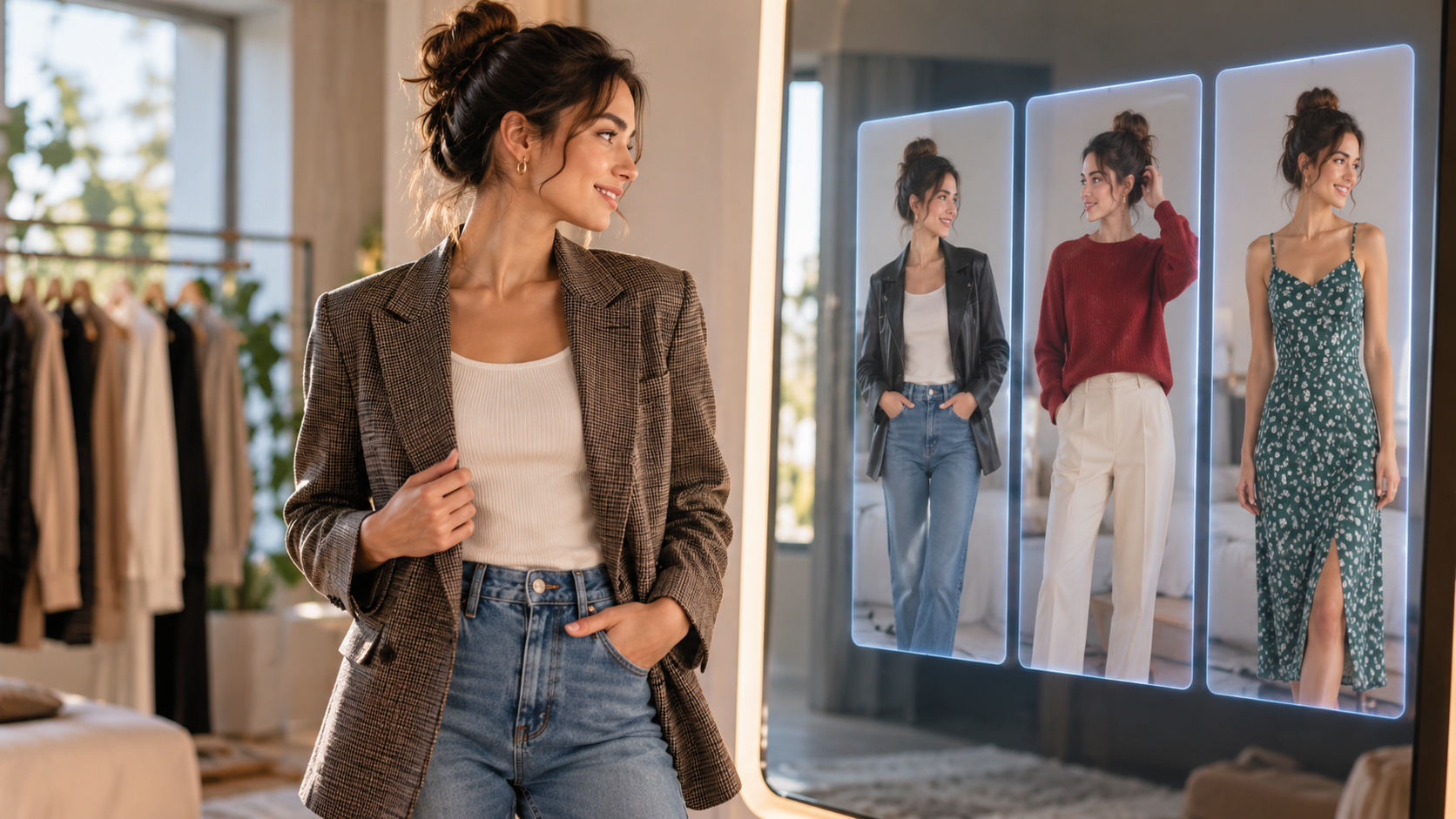
ChatGPT virtual try on clothes is making online fashion shopping more visual and interactive. Instead of relying only on product photos or images of professional models, shoppers can use AI-generated images to visualize how clothing might look on them.
As a result, choosing an outfit online can become less of a guessing game. By combining a personal photo with a clothing image or an eligible product, an AI-powered workflow can create a personalized preview of an outfit. ChatGPT Images also lets users create and edit images using uploaded images and natural-language instructions.
However, virtual try-on is about more than simply putting a digital shirt or jacket onto a photograph. With the right workflow, users can experiment with colors, layers, silhouettes, and complete outfit combinations. In addition, conversational AI can allow users to describe the changes they want using ordinary language.
At the same time, there is an important limitation to keep in mind: an AI-generated try-on image is a visual approximation, not a guarantee of physical fit. Measurements, fabric stretch, construction, comfort, and garment proportions still need to be considered separately.
How Does ChatGPT Virtual Try On Clothes Work?
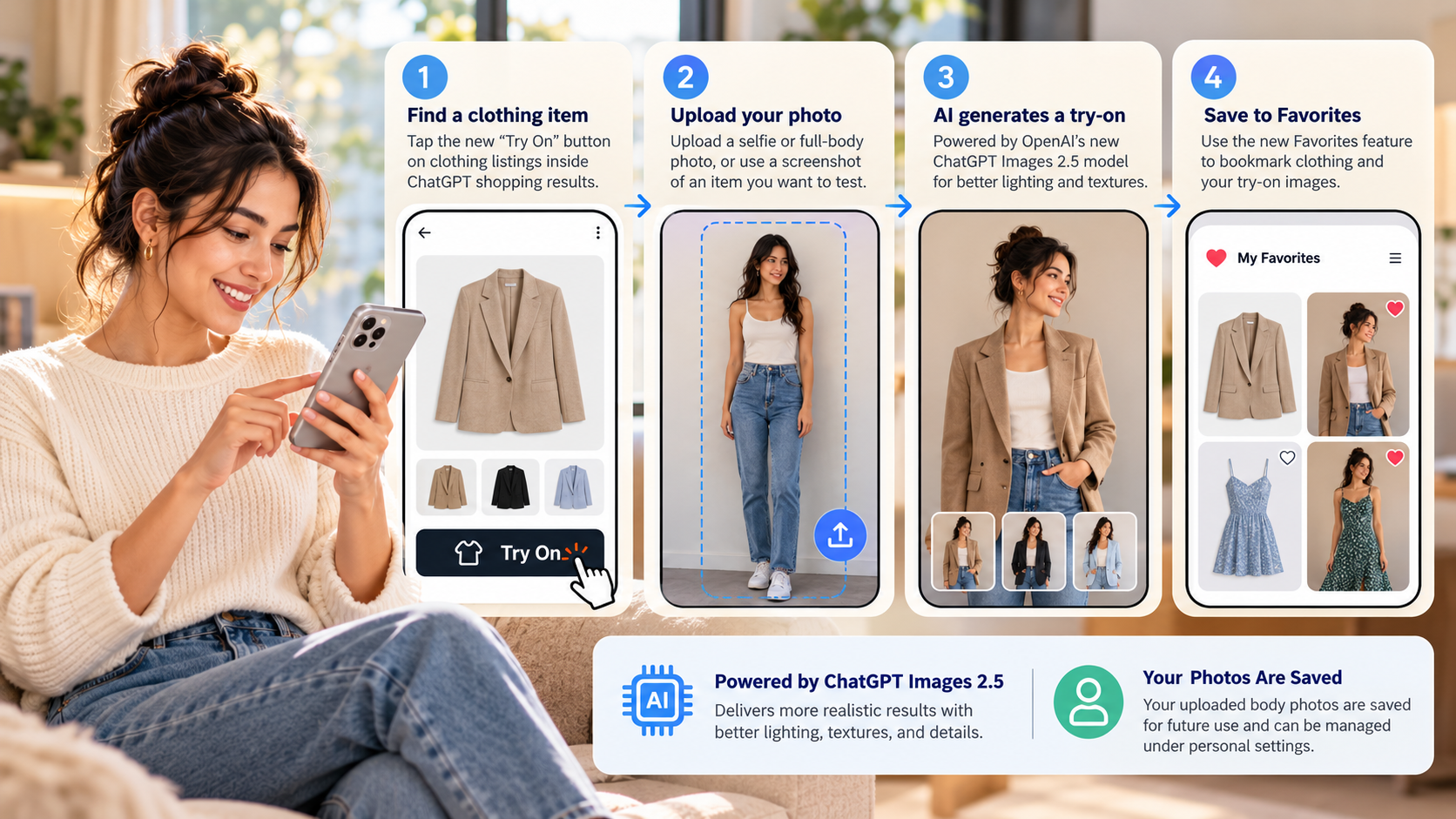
The basic concept behind ChatGPT virtual try on clothes is straightforward. First, you provide a photo of yourself. Then, you provide a reference for the garment you want to visualize.
Depending on the available ChatGPT workflow and product experience, you may be able to select an eligible clothing product and use a try-on option. You can then provide a personal photo so the system can generate a visual preview.
Alternatively, you can work with a clothing image or product screenshot in a ChatGPT conversation. This can be particularly useful when the garment comes from a store, thrift shop, wardrobe, or another source that is not directly connected to an integrated shopping experience.
For example, you might provide:
-
A clear photo of yourself
-
A screenshot of a jacket from an online store
-
A photograph of a thrift-store garment
-
A picture of something already in your wardrobe
-
A product image from a fashion website
Once the references are available, the AI can use them to create a visualization of how the garment might look on you.
Furthermore, because you can describe your preferences in natural language, the experience can go beyond a basic clothing swap. You can ask to change colors, add layers, preserve specific details, or create several outfit variations.
How to Virtually Try On Clothes With ChatGPT
In general, the process can be divided into three simple stages: prepare your images, give clear instructions, and refine the result.
Step 1: Prepare Your Source Images
First, choose a clear photograph of yourself.
A full-body photo can be especially useful when you want to visualize an entire outfit. On the other hand, a half-body photograph may be sufficient for garments such as shirts, sweaters, blazers, and jackets.
For better results, try to use an image with:
-
Clear visibility of your body position
-
Consistent or natural lighting
-
Minimal background distractions
-
A relatively simple pose
-
Good image resolution
-
Enough visibility of the area where the new garment will appear
A neutral background is not essential. Nevertheless, it can make the generated result easier to interpret.
If you are using an integrated product-specific try-on experience, you may not need to upload a separate garment image. In that case, the selected product can serve as the clothing reference.
However, if you are experimenting with an item from another website or your own wardrobe, you can upload a photograph or screenshot of the garment.
Ideally, the clothing reference should make important characteristics easy to see, including:
-
Color
-
Shape
-
Collar or neckline
-
Sleeve design
-
Buttons or fasteners
-
Patterns
-
Texture
-
Overall silhouette
The clearer the reference, the easier it is for the AI to reproduce the intended appearance.
Step 2: Give a Clear Instruction
When an integrated try-on feature is available, you may not need to write a detailed prompt. Nevertheless, specific instructions can be helpful when you upload your own garment image.
For example:
“Use this photo of me as the person reference and the uploaded charcoal blazer as the clothing reference. Create a realistic visualization of me wearing the blazer. Preserve my face, body proportions, pose, hairstyle, and background. Keep the blazer’s original color, texture, buttons, and visible design details.”
This type of instruction clearly separates the two references. In other words, it tells the AI which image represents you and which image represents the clothing.
You can also explain what should remain unchanged. For instance, you might ask the system to:
-
Preserve your facial features
-
Keep your original body proportions
-
Maintain the same pose
-
Preserve the existing background
-
Keep the garment’s original color
-
Retain visible patterns and details
-
Make the clothing appear naturally worn
Consequently, the generated image has clearer constraints and is less likely to make unnecessary changes.
Step 3: Refine the Result
Even when the first result looks convincing, it may not perfectly represent the original garment. Therefore, it is worth reviewing the image carefully.
For example, AI-generated clothing images can sometimes change:
-
Body proportions
-
Fabric thickness
-
Sleeve length
-
Garment proportions
-
Patterns
-
Buttons and other small details
-
Layering
-
Folds and wrinkles
If a heavy wool coat looks unusually thin, for example, you can ask for a heavier fabric appearance and more natural folds.
Similarly, if the system changes your appearance unnecessarily, you can ask it to preserve your original face, body proportions, hairstyle, and pose.
This refinement process is one of the useful aspects of conversational AI. Instead of manually editing the image, you can explain what needs to change and request another version.
Tips for Better AI Clothing Try-On Results
Although AI can handle much of the visualization process automatically, a few simple practices can improve the outcome.
Use a Clear Person Reference
First, choose a well-lit photograph in which your body position is easy to understand.
Avoid heavily blurred photographs or images where your body is partially hidden. In addition, try to avoid poses where your arms or clothing cover the areas you want to visualize.
Use a Clear Garment Reference
Next, make sure the clothing image shows the important parts of the garment.
For example, if you are trying on a jacket, it helps if the sleeves, collar, front closure, and overall length are visible. Likewise, if the garment has a distinctive pattern, the reference image should show enough of that pattern to reproduce it accurately.
Preserve Important Details
If a garment has an unusual print, logo, button arrangement, pocket design, or texture, mention that specifically.
For instance, instead of saying:
“Put this jacket on me.”
You could say:
“Keep the jacket’s original navy color, double-breasted button arrangement, wide lapels, and visible pocket details.”
As a result, the AI has more specific instructions about what matters to you.
Be Specific About Layers
Layering is another area where clear instructions can help.
Rather than simply asking to add a blazer, explain what should remain underneath it.
For example:
“Keep the white shirt underneath the blazer and leave the shirt tucked into the trousers. Preserve the existing trousers and shoes.”
This provides more context and can reduce unwanted changes to the rest of the outfit.
Keep the Pose Simple
A straightforward pose generally gives the AI a clearer reference.
For this reason, a standing photograph with your arms and legs reasonably visible may work better than a complicated pose where large portions of the body are hidden.
Treat the Result as a Preview
Most importantly, remember that an AI try-on image does not prove that a physical garment will fit.
The image can help you understand the visual appearance of a garment. However, it cannot reliably determine whether the shoulders will feel comfortable, whether the sleeves are the correct length, or whether the fabric will stretch sufficiently.
Therefore, always check actual measurements and product specifications before purchasing.
What Is the 3-3-3 Rule for Clothes?
The 3-3-3 rule is a minimalist wardrobe framework based on choosing three tops, three bottoms, and three pairs of shoes.
The idea is to create a relatively small collection of versatile clothing pieces that can be combined in multiple ways.
For example:
| Category | Example Items | Purpose |
|---|---|---|
| 3 Tops | White Oxford shirt, charcoal knit, striped T-shirt | Formal, casual, and layered outfits |
| 3 Bottoms | Dark jeans, beige chinos, pleated trousers | Different levels of formality |
| 3 Shoes | White sneakers, brown Chelsea boots, black loafers | Casual through formal styling |
In theory, these three categories can create 27 basic combinations:
3 × 3 × 3 = 27
However, the 3-3-3 rule is not a requirement that every wardrobe needs to follow. Instead, it is a simple framework for thinking about versatility.
For example, someone living in a hot climate may need more lightweight clothing. Meanwhile, someone working in a formal office may require additional tailored pieces.
Ultimately, the principle is to choose items that work well with several other pieces rather than buying garments that only match one specific outfit.
What App Can I Use to Virtually Try On Clothes?
There are several types of tools that can help with virtual clothing visualization.
Some are specifically designed for AI virtual try-on, while others are general-purpose image-generation or image-editing systems. In addition, some retailers have built virtual fitting-room features directly into their shopping experiences.
Therefore, the right option depends on what you want to accomplish.
Dedicated AI Virtual Try-On Apps
Dedicated virtual try-on applications are designed specifically to visualize clothing on a person.
Some focus on still images, while others support more advanced clothing transformations or video-based experiences. However, their capabilities can vary considerably.
When evaluating a dedicated virtual try-on tool, consider whether it:
-
Accepts your own garment image
-
Preserves clothing patterns
-
Supports the image format you need
-
Provides control over the generated result
-
Supports still images or video
-
Explains how uploaded images are stored and used
Even then, the generated image can contain visual artifacts. Therefore, it should still be treated as an approximation rather than a measurement tool.
Retailer-Integrated Virtual Try-On
Some shopping platforms also integrate virtual try-on directly into their product pages.
This can be convenient because the clothing reference is already connected to the product listing. Consequently, you may not need to download a garment image or find a separate virtual try-on application.
However, availability can vary by retailer, product, location, and time.
More importantly, a retailer’s virtual try-on image should not automatically be interpreted as a guarantee that a particular size will fit.
Actual fit can depend on:
-
Garment measurements
-
Your body measurements
-
Fabric stretch
-
Garment construction
-
Cut and pattern
-
Manufacturing tolerances
-
Personal comfort preferences
ChatGPT vs. Dedicated Virtual Try-On Apps
Conversational AI and specialized virtual try-on systems can serve different purposes.
For example, a ChatGPT virtual try on clothes workflow can combine image-based visualization with natural-language instructions, outfit planning, and styling ideas.
By contrast, dedicated VTON systems are generally built around the clothing transformation itself.
| Feature | ChatGPT / Conversational AI | Dedicated VTON Apps |
|---|---|---|
| Main use | Styling and visual exploration | Garment visualization |
| Input | Images plus natural-language instructions | Usually person and garment images |
| Styling flexibility | Can be highly flexible | Depends on the application |
| Wardrobe planning | Useful | Usually more limited |
| Garment visualization | Useful | Core purpose |
| Exact sizing | Not guaranteed | Not necessarily guaranteed |
| Best suited to | Outfit exploration and combinations | Focused virtual try-on |
That said, the two approaches are not necessarily competitors. Instead, they can serve different stages of the same shopping process.
For example, you might use conversational AI to explore several outfit combinations and then use a retailer’s product information to check measurements, materials, and available sizes.
Is There an AI Tool That Can Swap Clothes Online?
Yes. AI clothes-swapping tools can digitally replace clothing in an image by using a photograph of a person and a reference image of a garment.
This technology is closely related to virtual try-on. The system attempts to integrate the new garment with the person’s existing image while accounting for factors such as:
-
Body position
-
Pose
-
Lighting
-
Image background
-
Existing proportions
The objective is to make the clothing appear naturally worn rather than simply placing a flat image over an existing shirt or jacket.
Similarly, ChatGPT virtual try on clothes can support visual outfit experimentation when suitable person and garment references are available.
Nevertheless, AI clothing swaps have limitations. For example, the system may unintentionally change parts of the image that were not supposed to change. It can also modify fabric texture, proportions, patterns, or small design details.
Because of this, these tools are particularly useful for questions such as:
-
Does this color work with my wardrobe?
-
How might this jacket look with my jeans?
-
Does this outfit combination look cohesive?
-
Would this silhouette work with my existing clothes?
-
What could I wear with this new garment?
On the other hand, they are less suitable for determining whether a particular size will physically fit.
Can ChatGPT Design Clothes?
Yes. ChatGPT can also help with clothing design, although design ideation is different from manufacturing-ready fashion engineering.
For creative development, AI can help generate:
-
Collection concepts
-
Color palettes
-
Silhouette ideas
-
Material directions
-
Styling concepts
-
Design briefs
-
Mood-board descriptions
-
Garment variations
For instance, a designer might begin with a theme such as minimalism, streetwear, vintage tailoring, futuristic sportswear, or a historical fashion period.
From there, ChatGPT can help turn that theme into a structured design concept.
A design brief could include:
-
Garment type
-
Intended silhouette
-
Fabric direction
-
Color palette
-
Collar style
-
Closure type
-
Pocket placement
-
Seam details
-
Hardware
-
Lining
-
Styling direction
Afterward, AI-generated imagery can help communicate the visual direction.
However, a visual concept is not the same as a production-ready technical specification. Consequently, professional pattern making, fabric testing, measurements, construction details, and manufacturing expertise may still be necessary before a garment can be produced.
Final Thoughts
ChatGPT virtual try on clothes can make online fashion shopping more visual, interactive, and personalized.
Instead of relying entirely on studio photographs, shoppers can combine personal images with clothing references to explore how different garments might look on them. Moreover, conversational instructions make it possible to experiment with colors, layers, silhouettes, and complete outfit combinations.
The technology can also be useful for wardrobe planning. For example, you can test potential purchases against clothes you already own, explore capsule-wardrobe combinations, or experiment with different styling directions before buying anything.
For fashion designers, AI can provide additional support during the early creative stages. It can help develop concepts, silhouettes, color palettes, materials, mood boards, and visual references.
Nevertheless, there is an important distinction between seeing how something might look and knowing how it will physically fit.
An AI-generated try-on image should therefore be treated as a visual preview. Before making an actual purchase or manufacturing decision, you should still consider measurements, garment specifications, fabric properties, construction details, physical samples, and professional technical advice where appropriate.
Ultimately, ChatGPT virtual try on clothes is not simply about replacing the fitting room. Instead, it provides another way to explore fashion, compare possibilities, plan outfits, and make online clothing discovery more interactive before committing to a purchase.