4 Ray-Ban Meta Privacy Settings You Should Change Before Wearing Them
Before wearing your glasses, review your Ray-Ban Meta privacy settings in the Meta AI app. Some options control voice recordings, optional device analytics, and AI-powered camera features. Understanding these controls helps you decide what information you share with Meta.
Many new owners rush through the initial pairing process. They accept permission requests without reviewing their privacy implications. Taking a few minutes to examine these settings can reduce unnecessary data sharing.
This guide explains four important privacy controls, how to find them, and what changing them actually does. We also examine recording concerns, everyday safety, and the disadvantages of owning Meta smart glasses.
1. Turn Off “Hey Meta” Wake-Word Listening
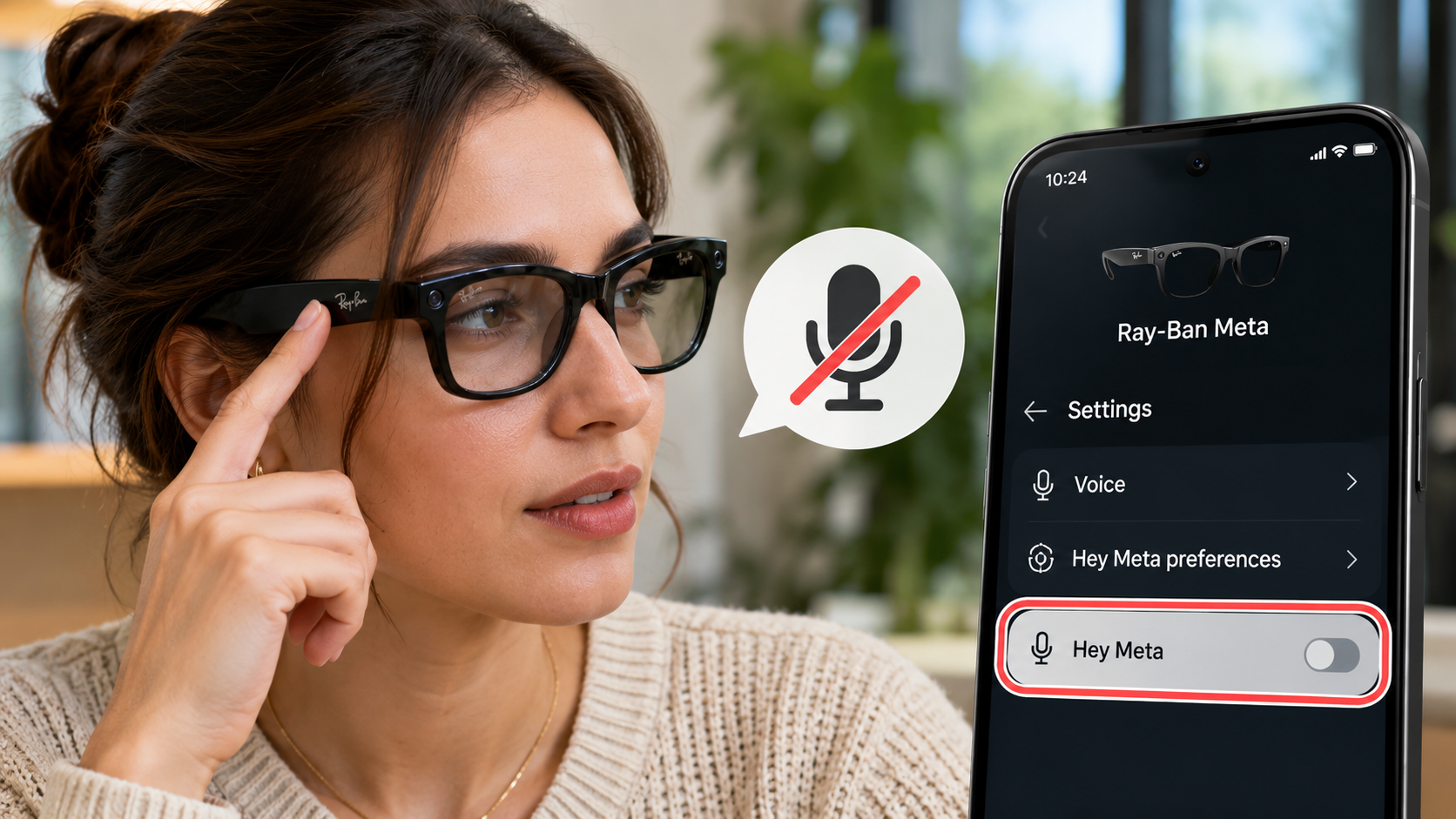
Ray-Ban Meta glasses support hands-free voice commands through the “Hey Meta” wake phrase. This feature allows you to ask questions, control certain functions, and interact with Meta AI. However, some users may prefer activating voice features manually.
Wake-word detection requires the microphones to monitor for the activation phrase. This does not mean every surrounding conversation automatically gets uploaded to Meta. However, voice interactions can involve audio processing and data storage, depending on your privacy preferences.
You can disable the wake word without necessarily disabling every voice feature. This gives you more control over when you interact with the assistant.
How to change it:
- Open the Meta AI app on your smartphone.
- Select your connected glasses.
- Open Settings and navigate to Voice.
- Select Hey Meta preferences.
- Turn off the Hey Meta toggle.
What changes: Your glasses will no longer respond to the wake phrase. You can still use supported manual controls, depending on your software version and configuration. Your microphones may remain available for other functions, including calls and recordings.
2. Review Voice Recording and Transcript Storage
Voice commands make Ray-Ban Meta glasses convenient. However, your privacy settings also determine how Meta handles stored voice interactions.
Meta’s Voice Controls Privacy Notice explains that voice recordings, transcripts, and related information can remain stored for up to one year. This information may help Meta improve its products. Trained reviewers may also review eligible voice interactions.
You can manage these storage preferences through the Meta AI app. Disabling voice interaction storage provides greater control over previously stored and future interactions. Importantly, this setting differs from disabling the “Hey Meta” wake word.
How to change it:
- Open the Meta AI app.
- Navigate to Settings.
- Find the voice interaction or voice storage preferences.
- Review the options for audio recordings and transcripts.
- Disable storage options where available.
What changes: Meta states that when both storage options are disabled, voice interactions are deleted after processing. You also lose the ability to review those stored recordings and transcripts. Previously stored interactions may remain until you delete them separately.
For additional information, consult Meta’s Voice Controls Privacy Notice.
3. Review Meta AI and Camera Permissions
Ray-Ban Meta glasses can use their cameras to answer questions about objects, places, and surroundings. For example, you can ask Meta AI to identify an object or describe something in front of you.
However, these AI experiences involve additional data processing. When you ask Meta AI about something you see, your glasses send an image to Meta’s cloud for processing. Meta’s published information explains that AI-processed images can be stored and used to improve its products and train its AI models.
This creates an important privacy consideration. You should decide whether you actually need AI-powered camera features before enabling them.
How to change it:
- Open the Meta AI app.
- Navigate to Settings.
- Select Meta AI or your connected glasses.
- Review the available Meta AI and camera permissions.
- Disable the features you do not want to use.
What changes: Disabling Meta AI or camera access prevents the associated visual AI experiences from working. Standard photo and video capture may remain available, depending on your configuration.
4. Stop Sharing Additional Device Data
Meta collects certain device information to maintain the functionality, security, and reliability of its smart glasses. However, not all collected information is essential for basic operation.
Meta separates device information into two categories: Essential Data and Additional Data. Essential Data helps maintain device functionality and is automatically shared with Meta. Additional Data includes information about device usage and performance.
You can choose whether to share Additional Data. Meta uses this information to improve existing products, develop new features, and personalize user experiences.
Disabling optional data sharing gives you greater control over device analytics. It does not eliminate every form of data collection, but it limits the additional information you voluntarily share.
How to change it:
- Open the Meta AI mobile app.
- Select your connected glasses.
- Open Device settings.
- Select your glasses under the device section.
- Navigate to Glasses privacy.
- Find the Additional Data sharing option.
- Turn off the sharing preference.
What changes: Meta stops receiving the optional Additional Data covered by this preference. Essential Data collection continues because Meta uses it to maintain device functionality and security.
Read Meta’s official Additional Data guidance to understand the distinction.
Are Ray-Ban Meta Safe to Wear?
Ray-Ban Meta glasses are designed for everyday use, but physical safety and digital privacy are separate concerns. The frames combine conventional eyewear with cameras, microphones, wireless connectivity, and open-ear audio. If you are considering replacing your regular prescription frames, compare AI glasses and prescription eyewear before making the switch.
Their recording indicators help people nearby recognize when the glasses capture photos or videos. However, users should never assume these indicators eliminate every privacy concern. Respecting other people’s boundaries remains important, particularly in private environments.
Audio awareness also deserves attention. Open-ear speakers allow you to hear surrounding sounds while listening to music or taking calls. However, excessive volume can still distract you from traffic and other environmental hazards.
Before wearing your glasses regularly, understand their controls and limitations. Follow the manufacturer’s instructions for charging, handling, and operating the device. Avoid wearing them where cameras are prohibited or recording would violate someone’s privacy.
Updating your Ray-Ban Meta privacy settings can reduce unnecessary data sharing. Responsible usage is equally important. Ask permission before recording people in sensitive situations, and avoid using camera features in restricted spaces.
What Are the Privacy Concerns Surrounding Meta Glasses?
The biggest privacy concerns involve camera recording, voice processing, cloud-based AI, and information collected about device usage. Unlike traditional cameras, smart glasses look similar to ordinary sunglasses. This can make recording less obvious to people nearby. If you want a broader understanding of their features, capabilities, and everyday use, explore our complete Meta glasses guide.
Ray-Ban Meta glasses include a front-facing capture LED. It indicates when the glasses capture photos or videos for the gallery. However, this indicator does not replace the need for consent and responsible recording practices.
Another concern involves cloud processing. When you use Meta AI to ask questions about your surroundings, the glasses send visual information to Meta’s servers. Meta explains that these AI-processed images may be stored and used to improve its products.
Voice interactions introduce additional considerations. Depending on your settings, Meta may retain recordings, transcripts, and related information. Optional device analytics also provide information about how you use your glasses.
These concerns do not mean every captured photo automatically reaches Meta’s servers. Standard gallery captures remain on the glasses until you choose to import them into your phone. AI processing and ordinary camera capture follow different data-handling processes.
Reviewing your Ray-Ban Meta privacy settings helps you understand these differences. It also allows you to make informed decisions about which features deserve access to your information.
How Can I Prevent My Meta Glasses From Recording Me?
You can reduce unwanted recording by understanding the physical controls and disabling features you do not need. Ray-Ban Meta glasses include dedicated camera controls, voice activation, and a physical power switch.
For everyday privacy, consider these precautions:
- Disable voice activation: Turn off the “Hey Meta” wake word if you prefer manual control.
- Review camera permissions: Disable AI camera features when you do not need visual assistance.
- Avoid accidental captures: Familiarize yourself with the capture button before wearing the glasses.
- Use the power switch: Turn off the glasses when you want to stop using their electronic features.
- Check recording indicators: Understand what the capture LED communicates before using the camera.
The physical power switch provides another layer of control. Switching off the glasses shuts down their electronic operation, including camera and microphone functionality.
Remember that disabling voice activation does not disable the camera. Similarly, disabling AI features does not necessarily prevent ordinary photo and video recording.
For complete privacy, switch off the glasses when you do not want their electronic functions operating. Also, review your Ray-Ban Meta privacy settings regularly after software updates.
What Are the Disadvantages of Ray-Ban Meta?
Ray-Ban Meta glasses offer convenient hands-free features, but they have several limitations. Their biggest disadvantages involve battery life, software dependency, camera performance, and privacy considerations. You can also explore the biggest disadvantages of AI glasses to understand the broader limitations of this technology.
1. Limited battery life
Frequent photography, video recording, music playback, and AI interactions consume battery power. Heavy usage can require more frequent charging. Actual battery life depends on your usage patterns and device configuration.
2. Dependence on the Meta ecosystem
Many smart features rely on the Meta AI app and a compatible smartphone. You also need an appropriate Meta account to access supported services. This creates additional dependence on Meta’s software ecosystem.
3. No conventional display
Standard Ray-Ban Meta glasses do not provide a traditional visual display. You cannot directly view navigation maps, read incoming messages, or browse applications through the lenses.
4. Camera limitations
The built-in camera offers convenient hands-free photography. However, it cannot replace a dedicated smartphone camera in every situation. Low-light photography and certain recording conditions can produce disappointing results.
5. Privacy and social concerns
Some people may feel uncomfortable around camera-equipped eyewear. You must also understand how Meta processes voice interactions and AI-generated requests.
Reviewing your Ray-Ban Meta privacy settings helps address some digital privacy concerns. However, it cannot eliminate every limitation associated with smart eyewear.
Conclusion
Ray-Ban Meta glasses offer a convenient combination of traditional eyewear, hands-free photography, and AI-powered assistance. However, these features introduce privacy considerations that every owner should understand.
Before wearing your glasses regularly, review your Ray-Ban Meta privacy settings. Pay particular attention to voice activation, voice storage, AI camera permissions, and optional device data sharing.
Remember that disabling optional data sharing does not stop all information collection. Meta still processes certain essential device information to maintain its services. Similarly, ordinary camera captures and AI-powered visual interactions follow different data-handling processes.
Responsible usage also matters. Respect recording restrictions, consider the privacy of people nearby, and switch off your glasses when you do not need them.
Ultimately, smart eyewear should make everyday activities more convenient without compromising your awareness of digital privacy. Understanding the available controls helps you decide which features deserve access to your personal information.
Before heading outside, spend a few minutes reviewing your settings and understanding how your glasses handle voice, images, and device data.