
Where Did the YouTube Dislike Button Go? What You Need to Know
If you recently opened a YouTube video and noticed something missing, you are not imagining things. The YouTube dislike button still exists, but its public count disappeared in November 2021. YouTube introduced this change globally after testing different ways to protect creators from targeted dislike attacks.
For over a decade, viewers relied on public dislike counts to identify misleading tutorials, clickbait thumbnails, and low-quality content. These numbers helped people evaluate videos before investing their time.
However, hiding the counts changed how viewers judge online content. Many users still wonder why YouTube made this decision and whether public dislike numbers will return.
In this guide, we explain why the YouTube dislike count disappeared, what happened to the button, and how you can view estimated dislike numbers using third-party tools.
Why Is There No Dislike Button on YouTube?
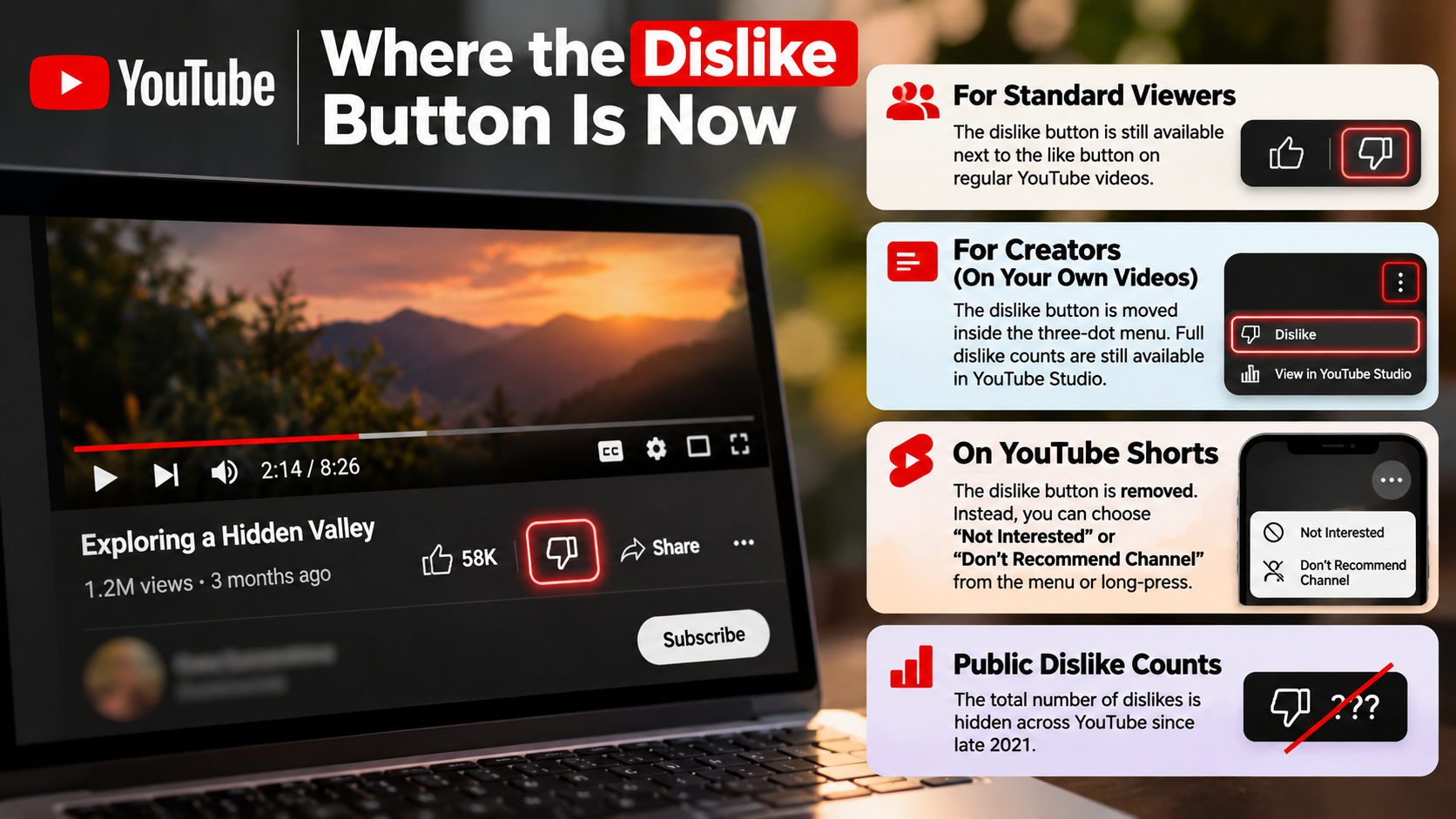
The YouTube dislike button has not been completely removed. However, YouTube changed how viewers interact with negative feedback. The familiar thumbs-down icon still appears beside the like button on regular video pages. You can click it to express your opinion about a video.
The main difference is that YouTube no longer displays the public dislike count. This change makes it impossible to see how many other viewers disliked a video through the standard interface. Your dislike still works as private feedback.
YouTube announced this update in November 2021. The company introduced it to reduce coordinated dislike attacks, particularly against smaller creators. It also wanted to create a safer environment for people publishing content.
Although the change removed an important public metric, it did not eliminate the ability to dislike videos. Creators can still access their dislike metrics through YouTube Studio.
Understanding the YouTube Dislike Button’s Interface Change
The most noticeable change is the missing number beside the thumbs-down icon. Previously, viewers could see both like and dislike totals directly below a video. Now, the standard interface displays the public like count without showing the dislike total.
The button itself remains functional. When you click it, YouTube records your feedback and uses it to improve your recommendations. It can also help the platform understand which videos individual viewers prefer.
Here is what changed after the November 2021 update:
- Like button: Still available with a publicly visible count.
- Dislike button: Still available for viewer feedback.
- Public dislike count: Hidden from regular viewers.
- Creator analytics: Dislike metrics remain available through YouTube Studio.
YouTube has also made interface adjustments for creators. In October 2026, it clarified that a redesigned dislike control on creators’ own uploaded videos was not a general change for viewers. This distinction matters if you notice a different layout.
Why Can’t I See Dislikes on YouTube Anymore?
You cannot see public dislike numbers because YouTube made these metrics private in November 2021. Before this update, viewers could check the total number of dislikes directly below a video. After the rollout, YouTube stopped displaying those numbers across its public interface.
This change affected the regular YouTube viewing experience on desktop computers, smartphones, and other supported devices. However, it did not stop viewers from submitting negative feedback.
The platform also changed how developers could access dislike information. YouTube subsequently stopped providing public dislike counts through its Data API. As a result, third-party tools could no longer retrieve the original live totals through the same public data source.
Creators still have access to their own dislike metrics through YouTube Studio. Regular viewers, however, cannot access exact dislike totals for other channels through YouTube’s standard interface.
Where Does YouTube Dislike Data Go Today?
YouTube has not deleted dislike feedback entirely. Instead, it keeps the information available to creators through their private analytics dashboard. This allows channel owners to understand how audiences respond to their videos without displaying negative totals publicly.
If you manage a YouTube channel, you can check these metrics through YouTube Studio.
The process is straightforward:
- Open YouTube Studio.
- Select Analytics from the left-hand menu.
- Open the Engagement section.
- Review the available likes and dislikes metrics for your content.
The exact information available depends on the selected report and video.
Regular viewers do not have the same access. YouTube no longer provides an official public dislike counter for other people’s videos. Third-party extensions may display estimated numbers, but these should not be confused with verified YouTube analytics.
This distinction is important. The original feedback system still operates, but public access to its numerical results has changed.
Why Was the YouTube Dislike Count Removed?
YouTube removed public dislike counts primarily to reduce targeted harassment against content creators. According to its November 2021 announcement, the company had tested different approaches to understand how hidden counts affected viewer behaviour.
During this experiment, YouTube found that people were less likely to target videos with dislikes when the public counter was unavailable. The company also reported that smaller channels experienced a higher proportion of targeted dislike attacks.
These attacks often involved groups deliberately increasing negative ratings. Sometimes, participants disliked videos without properly watching their content.
Public dislike counts could therefore encourage people to follow negative trends rather than evaluate videos independently. YouTube believed hiding these numbers would reduce this behaviour.
However, the decision remained controversial. Many viewers depended on dislike ratios to identify misleading information, poor tutorials, and questionable content.
How Hiding Dislike Counts Helps Reduce Dislike Attacks
A public dislike counter can influence how people perceive online content. When viewers notice a high number of dislikes, they may form negative opinions before watching the entire video.
Coordinated groups can also exploit this behaviour. They can encourage others to dislike specific videos, creating an increasingly negative public rating.
YouTube’s experiment suggested that hiding the counter reduced this type of behaviour. The company also found that smaller creators were disproportionately affected by targeted dislike attacks.
The change does not prevent people from expressing negative opinions. Viewers can still dislike videos, and creators can still review their feedback privately.
However, removing the visible scoreboard changes how audiences interact with negative ratings.
There is also a trade-off. Viewers lose a quick way to identify potentially unhelpful content. YouTube acknowledged this concern when announcing the update.
Ultimately, the company prioritised reducing coordinated harassment over maintaining public dislike ratios.
Are YouTube Dislikes Coming Back?
YouTube has not announced a return of public dislike counts. Since the November 2021 update, the platform has continued keeping these numbers private for regular viewers.
The company has explained that the change helps protect creators, particularly smaller channels and people who are new to publishing videos. Its 2022 leadership update also discussed the benefits of reducing targeted dislike attacks.
However, this does not mean YouTube has permanently ruled out every possible future interface change. There is currently no official announcement promising that public dislike counts will return.
For now, viewers must use the existing like and dislike controls without seeing the total negative votes. Creators can still access their own dislike metrics through YouTube Studio.
Third-party tools offer another option for viewers who want additional feedback. However, their displayed numbers may be estimates rather than exact counts.
What Is YouTube’s Long-Term Position on Public Dislikes?
YouTube’s public position remains focused on creator protection and reducing harassment. The company believes that hiding dislike counts makes coordinated attacks less visible and less rewarding.
Its leadership has also acknowledged that public dislike numbers helped some viewers decide whether videos were worth watching. This was one of the main concerns raised after the announcement.
However, YouTube has maintained the distinction between submitting feedback and publicly displaying its total.
Here is the current situation:
- Regular viewers: Cannot see official public dislike totals.
- Video creators: Can access dislike metrics through YouTube Studio.
- Third-party extensions: May display estimated dislike numbers.
- Official restoration: YouTube has not announced plans to restore public counts.
Therefore, viewers should not expect the original public dislike counter to reappear through a simple YouTube setting.
Until the company announces another change, the existing system remains in place. If you want to compare audience feedback, third-party estimates and other video engagement signals are currently the available alternatives.
How to Get YouTube Dislikes Back?
You can use third-party browser extensions to view estimated YouTube dislike counts again. One popular option is Return YouTube Dislike. It is an open-source community project that attempts to recreate the missing dislike counter.
The extension supports popular desktop browsers, including Google Chrome and Mozilla Firefox. It also offers compatibility with certain Chromium-based browsers, such as Brave and Microsoft Edge.
Unlike YouTube’s original public counter, Return YouTube Dislike does not have access to every video’s current official dislike total. Instead, it combines archived information, extension-user votes, and statistical estimates.
This means the displayed numbers may not match the actual figures inside YouTube Studio. Accuracy can also vary depending on a video’s age, popularity, and available historical information.
If you understand these limitations, the extension can provide an additional reference when evaluating videos. However, avoid treating its estimated numbers as verified engagement data.
How to Install Return YouTube Dislike Safely
Installing Return YouTube Dislike is relatively straightforward on supported desktop browsers. However, before installing any browser extension, it is worth understanding how your browser handles security and extension permissions. You can compare Google Chrome and Microsoft Edge security to understand their different approaches to browser protection.
Follow these steps to get started:
- Visit the official Return YouTube Dislike website.
- Open the available browser extension installation option.
- Choose your supported browser.
- Check that the extension comes from the correct project publisher.
- Select Add to Browser or the equivalent installation option.
- Confirm the requested permissions.
- Open or refresh a YouTube video to check whether the estimated count appears.
Once installed, the extension can display estimated dislike numbers alongside the existing video controls.
Important: The extension is not an official YouTube product. Its estimates rely on archived data and community contributions. Some videos may have incomplete information or no available estimate.
For mobile users, compatibility is more limited. Some browsers support extensions, but availability and functionality vary by browser and device. Do not assume the extension works inside the official YouTube mobile app.