
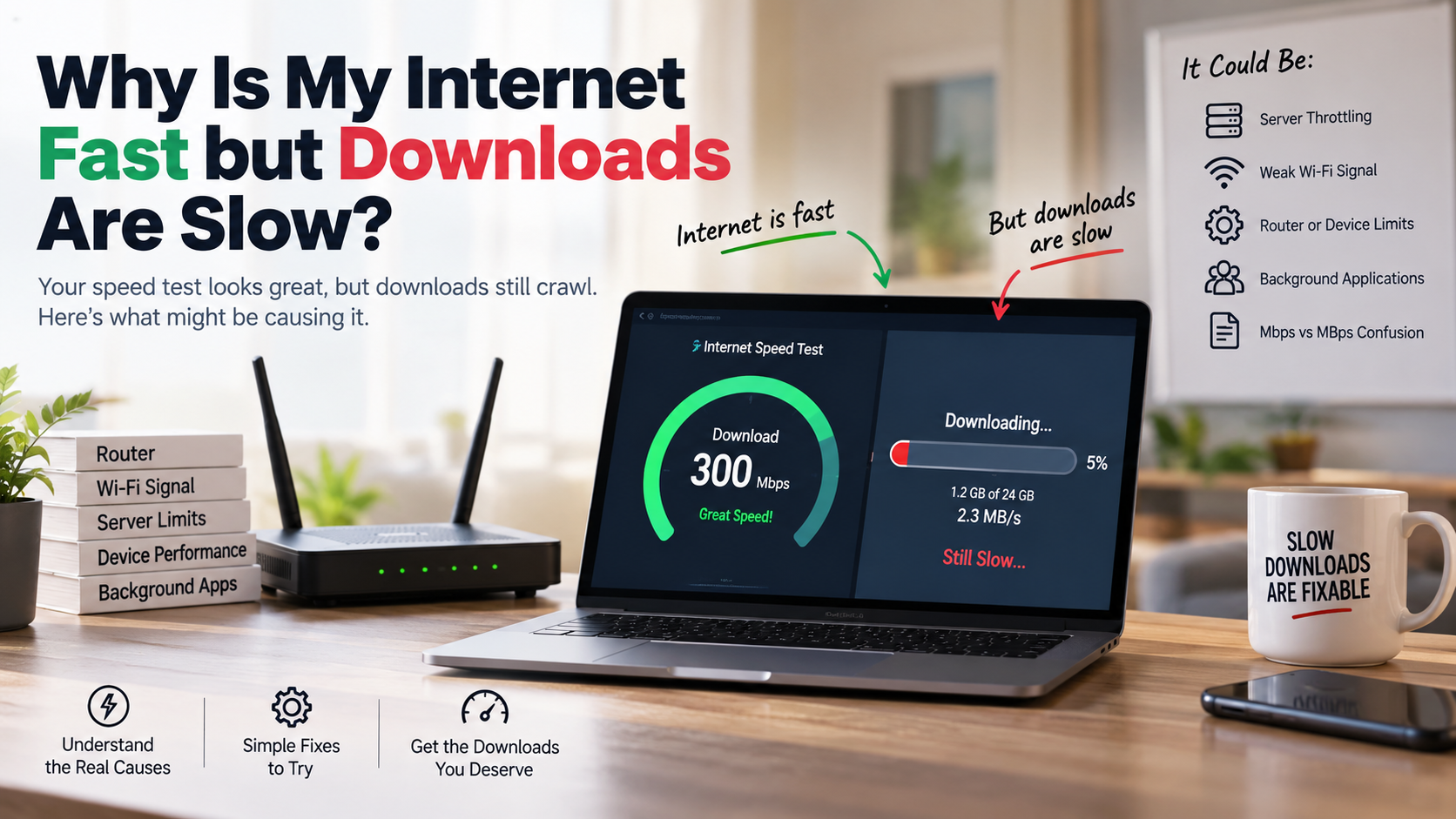
Why Is My Internet Fast but Downloads Are Slow?
Few internet problems feel more frustrating than paying for fast broadband and watching a download crawl. A speed test may show excellent performance, yet a game update or large video file can take hours. If you’re wondering, “Why is my internet fast but downloads are slow?”, the answer usually involves more than your advertised internet speed.
According to networking benchmarks published by the Federal Communications Commission, advertised broadband tiers reflect maximum capacity under optimal circumstances rather than guaranteed individual server transfers.
Your broadband plan describes the connection capacity between your home and your internet service provider. It does not guarantee a specific download speed from every website or server. Remote servers may limit transfer rates, especially during busy periods. Your router, Wi-Fi signal, device, storage drive, and background applications can also affect performance.
Another common source of confusion is Mbps versus MBps. Internet plans use megabits per second, while many download tools use megabytes per second. Since one byte equals eight bits, an 80 Mbps connection has a theoretical maximum of 10 MBps.
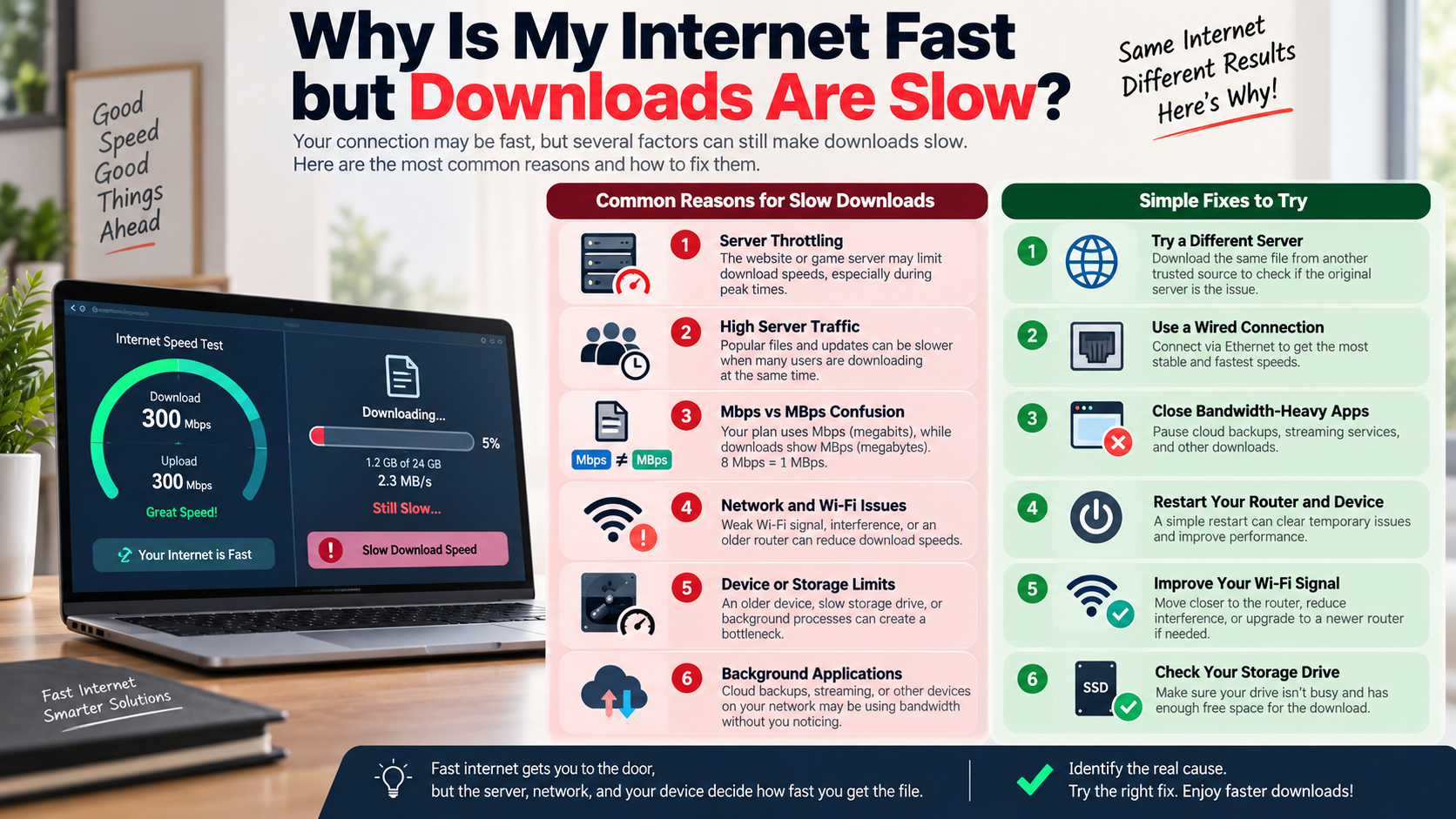

Why Is My Internet Fast but Downloads Are Slow?
When a speed test looks excellent but downloads remain slow, you may wonder, “Why is my internet fast but downloads are slow?” The problem may sit outside your broadband connection. The remote server hosting the file can limit how quickly data reaches your device. Some websites also use busy servers or content delivery networks that affect download performance.
Your own network can create another bottleneck. Cloud backups, software updates, streaming services, and connected devices may consume bandwidth without obvious warnings. A weak Wi-Fi signal can also reduce throughput, even when your internet plan is fast.
It is also important to understand the difference between Mbps and MBps. An 80 Mbps connection theoretically provides up to 10 MBps. Real-world speeds are usually lower because of network overhead and other limitations.
Try downloading the same file from another trusted source. If other downloads are fast, the original server may be the bottleneck. If every download is slow, investigate your Wi-Fi, router, device, or ISP connection.
Server Throttling and Hardware Limitations
A fast internet plan cannot overcome a slow remote server. Websites and download platforms may limit individual connections to manage server capacity. Heavy traffic can also reduce available bandwidth, especially when many users request the same large files.
Your home hardware can create similar limitations. Older routers may struggle with high-throughput connections when many devices connect simultaneously. You can also learn more about what your Wi-Fi router can do to improve performance and manage your home network. Wi-Fi performance can also fall because of distance, walls, interference, or congestion on nearby wireless channels.
Your computer can become a bottleneck too. An older storage drive may struggle while receiving and writing large amounts of data. Heavy CPU usage, security scans, or other demanding processes can also affect download performance.
If you are asking why your internet is fast but downloads are slow, check the entire connection path before upgrading your plan:
- Test the download over Ethernet.
- Close bandwidth-heavy applications.
- Restart your router and device.
- Try another download server.
- Check whether your storage drive is busy.
These simple checks can help identify the source of the slowdown.
Is 40 Mbps very slow?
A 40 Mbps internet connection is not very slow for basic household use. It provides a theoretical maximum of about 5 MBps, although actual download speeds are usually lower. For one or two users, this speed can comfortably handle web browsing, email, video calls, music streaming, and everyday online activities.
The main limitation appears when several demanding activities happen simultaneously. Video streaming, large downloads, cloud backups, and gaming updates can quickly consume available bandwidth. A large game can therefore take several hours to download at 40 Mbps.
For example, a 100 GB download would require roughly 5.6 hours under ideal conditions at a sustained 40 Mbps. Real-world performance may take longer because of server limits and network overhead.
Forty Mbps can work well for:
- Individuals and couples with moderate usage.
- Web browsing and remote work.
- HD video streaming.
- Music and cloud applications.
- Several lightweight connected devices.
However, larger households may benefit from a faster plan. The right speed depends on simultaneous usage, not simply the number of connected devices.
Ideal Use Cases for 40 Mbps Plans
A 40 Mbps plan can suit individuals, couples, and small households with moderate internet needs. It provides enough bandwidth for everyday browsing, music streaming, video calls, cloud documents, and standard entertainment. Several devices can remain connected without automatically creating a problem.
The biggest challenge is simultaneous heavy usage. A large game download can consume much of the available bandwidth while another person streams video or joins a video conference. Users may then notice slower downloads or increased latency.
Forty Mbps is particularly practical when most household activities are relatively light. It can support:
- Remote work and online meetings.
- Web browsing and social media.
- Music and video streaming.
- Smart home devices.
- Regular file transfers.
Heavy downloaders may prefer a faster connection. Competitive gamers should also consider latency, packet loss, and server quality rather than bandwidth alone. A faster plan does not automatically reduce gaming ping.
If you are wondering why your internet is fast but downloads are slow on a 40 Mbps connection, test downloads through Ethernet. Also check background applications and compare different download sources.
Is 20 Mbps a slow download speed?
A 20 Mbps connection is relatively modest by current broadband standards, but it can still handle basic internet activities. It provides a theoretical maximum of about 2.5 MBps. Actual download speeds depend on the server, network conditions, and your equipment.
For a single user, 20 Mbps can support web browsing, email, social media, video calls, and some video streaming. Problems become more noticeable when several demanding activities run together. Multiple streams, large downloads, cloud backups, and software updates can quickly consume available bandwidth.
A 20 Mbps connection may therefore feel slow when several people share it. Downloading a large game or operating-system update can also take many hours.
To get better performance from a 20 Mbps plan:
- Use Ethernet for important downloads.
- Pause unnecessary cloud backups.
- Limit simultaneous high-bandwidth activities.
- Schedule large updates for quieter periods.
- Disconnect devices that are not being used.
For a single light user, 20 Mbps can remain practical. For a busy family, however, a faster connection provides more useful headroom.
Managing Constraints on a 20 Mbps Connection
Managing bandwidth becomes important when your connection provides only 20 Mbps. Because available capacity is limited, several simultaneous activities can quickly cause congestion. This may lead to slower downloads, buffering, or higher latency during busy periods.
Start by identifying which devices use the most bandwidth. Video streaming, cloud synchronization, game downloads, and automatic software updates can consume substantial capacity. Pause non-essential transfers when you need stable performance for work or calls.
Using an Ethernet connection can also improve consistency. Ethernet avoids many interference and signal-strength problems associated with Wi-Fi. It cannot increase your plan’s maximum speed, but it can help your device use the available connection more reliably.
If you are asking why your internet is fast but downloads are slow, check whether another device is consuming bandwidth. Other useful steps include:
- Schedule large downloads overnight.
- Stop unnecessary cloud synchronization.
- Reduce simultaneous streaming.
- Keep your router firmware updated.
- Monitor connected devices regularly.
These changes can make 20 Mbps feel more responsive. If several household members regularly perform demanding tasks, upgrading your plan may be more practical.
Is 30 Mbps fast or slow internet?
A 30 Mbps connection sits between basic and moderate broadband speeds. It provides a theoretical maximum of about 3.75 MBps. For one or two users, that can be enough for browsing, video calls, social media, music, and regular streaming.
The experience changes when several high-bandwidth activities happen at once. A large game update can use much of the available capacity. Someone else streaming video or backing up files may then notice reduced performance.
Large downloads will also take time. Under ideal conditions, a 100 GB file would take around 7.4 hours at 30 Mbps. Real-world downloads can take longer because servers may limit speeds and network overhead reduces usable throughput.
A 30 Mbps connection generally works well for:
- Basic home browsing.
- Remote work and video meetings.
- HD entertainment.
- Music streaming.
- Light smart-home usage.
It is less suitable for households with frequent large downloads or many simultaneous high-bandwidth activities. If you are asking why your internet is fast but downloads are slow despite a good speed-test result, investigate the download server, Wi-Fi, router, and device before assuming the plan is the problem.
Realistic Expectations for 30 Mbps Speeds
A 30 Mbps connection can reliably support many everyday online activities. Browsing, email, video conferencing, music streaming, and HD entertainment should generally work well for a small household.
However, available bandwidth matters when several activities run simultaneously. Suppose one person downloads a large game while another streams video. A third person may then experience slower browsing or increased latency.
Peak-hour congestion can also affect performance. Your ISP may experience heavier network demand, while the remote server may have its own capacity limits. This means a speed test and an individual download can produce very different results.
If you are trying to understand why your internet is fast but downloads are slow, consider these practical steps:
- Connect important devices through Ethernet.
- Pause large downloads during video calls.
- Limit unnecessary background synchronization.
- Check which devices consume the most bandwidth.
- Compare downloads from different servers.
Thirty Mbps is neither universally fast nor slow. It depends on household size and usage patterns. Households that regularly transfer large files may benefit from a faster plan.
Is 100 Mbps too slow?
A 100 Mbps connection is not too slow for most households. It provides a theoretical maximum of 12.5 MBps. That is enough bandwidth for several common activities to run simultaneously under normal conditions.
A household can stream video, browse the web, attend video meetings, use cloud services, and download files without constantly competing for bandwidth. Large downloads will still take time, however. A 100 GB file would take roughly 2.2 hours under ideal conditions at a sustained 100 Mbps.
Actual download performance may be lower. Remote servers can impose speed limits, while Wi-Fi, router performance, network congestion, and device hardware can reduce throughput.
A 100 Mbps plan is particularly suitable for:
- Families with several connected devices.
- Remote workers and students.
- Multiple simultaneous video streams.
- Regular gaming and large updates.
- Cloud storage and everyday file transfers.
Users who frequently transfer enormous media files may benefit from faster service. Even then, server speed and upload capacity can matter more than the advertised download tier.
Why 100 Mbps Satisfies Most Homes
A 100 Mbps connection offers a useful balance between performance and capacity for many modern households. It provides substantially more headroom than 20, 30, or 40 Mbps plans when several devices operate simultaneously.
That extra capacity helps prevent one activity from dominating the connection. For example, a large download is less likely to interfere with ordinary browsing or a video call when the network has sufficient spare bandwidth.
However, 100 Mbps does not guarantee 100 Mbps downloads from every website. The remote server must also provide enough bandwidth. Your router, Wi-Fi setup, Ethernet adapter, and computer can create additional limits. If your wireless equipment is older, comparing Wi-Fi 6 and Wi-Fi 7 can also help you decide whether an upgrade is worthwhile.
If you are still wondering why your internet is fast but downloads are slow, check the complete connection path before buying a faster plan. To make the most of 100 Mbps:
- Use a modern router that supports your broadband speed.
- Prefer Ethernet for large transfers.
- Position your Wi-Fi router centrally.
- Reduce unnecessary background traffic.
- Keep network equipment updated.
For most everyday households, 100 Mbps provides comfortable bandwidth. Persistent slow downloads usually require troubleshooting rather than an immediate plan upgrade.
Frequently Asked Questions
What is the difference between Mbps and MBps?
Internet service providers advertise network bandwidth in Megabits per second (Mbps), whereas file transfer managers and operating systems measure downloaded data in Megabytes per second (MBps). Because there are eight bits in every byte, you must divide your advertised Mbps rating by eight to calculate your actual maximum download speed. A 100 Mbps broadband tier therefore delivers a theoretical peak transfer speed of 12.5 MBps under optimal conditions.
Can a slow hard drive cause slow download speeds?
Yes, your local storage drive can act as a direct hardware bottleneck during downloads. When you download files, your computer receives packets across the network and writes that information onto your internal storage. If you use an older mechanical hard disk drive (HDD) or a drive executing heavy background read-write tasks, the drive cannot commit data fast enough. The downloader intentionally throttles data intake to prevent data corruption.
Why does Wi-Fi make my downloads slower than Ethernet?
Wi-Fi connections rely on radio frequencies that are inherently vulnerable to physical obstruction, radio interference, and signal degradation over distance. Solid walls, nearby electronic devices, and competing network channels add packet loss and latency. An Ethernet cable provides an insulated, physical pathway directly to your router, eliminating external interference and providing significantly faster, more consistent throughput for hefty digital downloads.
Does a VPN slow down my download speed?
Yes, using a Virtual Private Network (VPN) almost always reduces your download speeds to some degree. If you are unfamiliar with how this technology works, what a VPN is and why you need one provides useful background. A VPN routes all inbound and outbound web traffic through an encrypted tunnel to a remote proxy server before reaching your computer. The cryptographic overhead, combined with the extra physical distance your data travels through intermediary servers, naturally adds latency and reduces your maximum available transfer rates.
Conclusion
Slow downloads can be frustrating, especially when your internet speed test reports excellent performance. If you keep asking, “Why is my internet fast but downloads are slow?”, remember that your broadband plan is only one part of the equation.
The remote server, Wi-Fi connection, router, storage drive, background applications, and VPN can all affect download performance. Unit confusion can also create unrealistic expectations. For example, 100 Mbps equals a theoretical maximum of 12.5 MBps, not 100 MBps.
Different broadband tiers also suit different usage patterns. A 20 Mbps plan can work for light individual use. Thirty or 40 Mbps offers more flexibility for small households. A 100 Mbps connection provides substantially more headroom for families and multiple simultaneous activities.
Before upgrading your plan, troubleshoot the existing setup. Try Ethernet, pause background transfers, restart your router, and test another download source. These simple checks can reveal the real bottleneck and help you get the performance your connection can actually provide. If you use a VPN, also consider the disadvantages of using a VPN, as it can affect download performance.