

Think Incognito Mode Protects You? Here’s the Truth
Many web users open a private browsing window and assume they have become invisible online. They use it to check finances, research personal concerns, or shop for surprise gifts. But does incognito mode actually protect you as much as you might think?
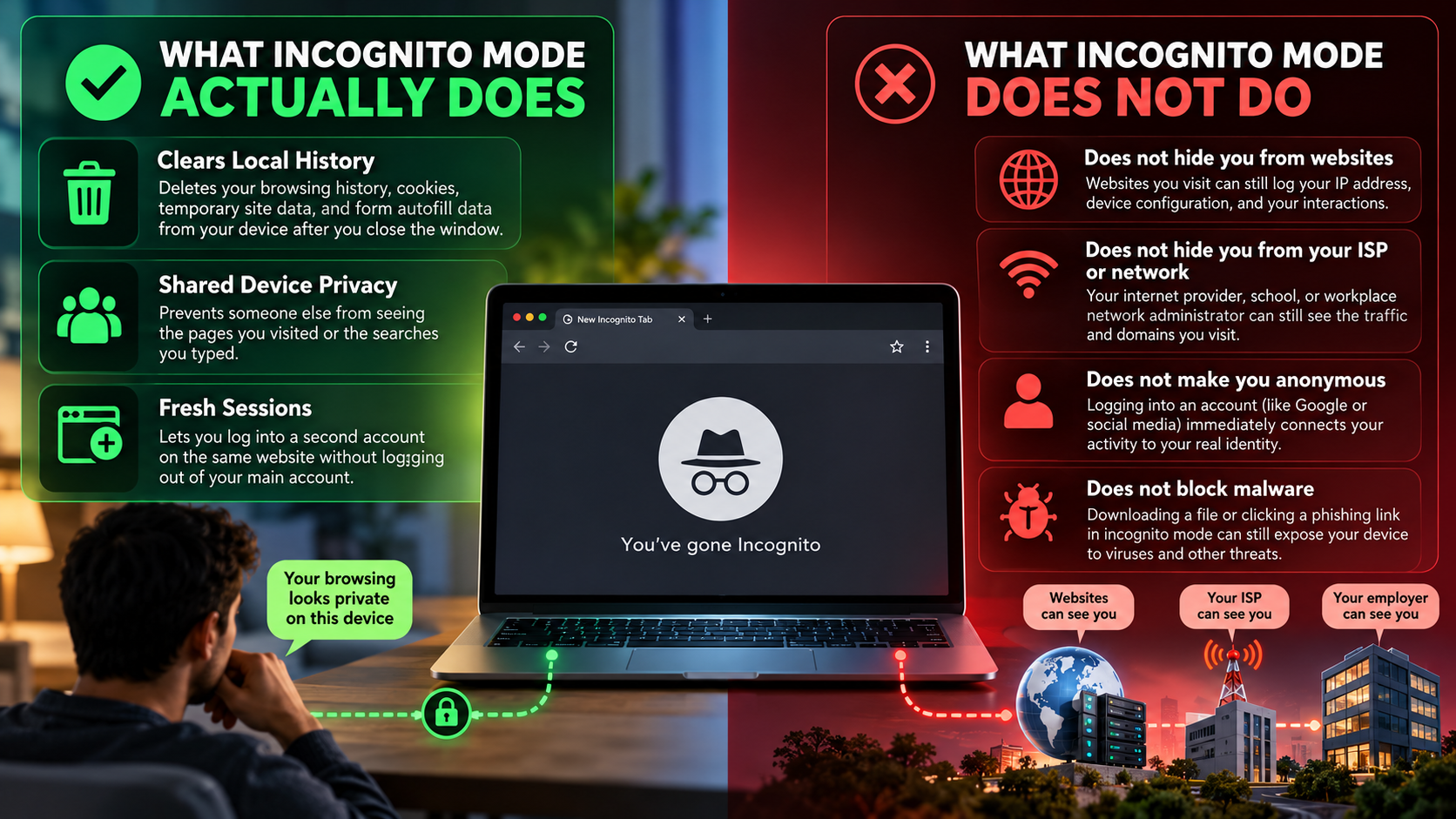
According to Google Chrome Help, Incognito mode limits the browsing information saved on your device. After you close all Incognito windows, Chrome removes the session’s browsing history, cookies, and site data. However, downloaded files and saved bookmarks remain on your device.
The important distinction is that local privacy does not equal online anonymity. Your internet service provider (ISP), network administrators, and visited websites may still observe aspects of your activity. What they can see depends on the connection, network configuration, and services involved.
In this guide, we examine the limits of private browsing. You’ll learn whether law enforcement can obtain browsing records, whether hackers can monitor your activity, and how websites identify visitors. We’ll also explain what someone sharing your computer or home network might discover.

Does Incognito Mode Actually Protect You?
Incognito mode offers limited privacy on your device, not complete protection across the internet. It helps prevent your browsing history, cookies, and temporary site data from remaining in Chrome after the session ends. Understanding how first-party and third-party cookies work also helps explain how websites track visitors and personalize their browsing experiences. This makes private browsing useful when sharing a computer or shopping for gifts.
However, does incognito mode actually protect you from external tracking? Not entirely. Websites can still collect information about your visits, while your employer, school, or ISP may observe aspects of your internet activity. Signing into an account also allows that service to associate your activity with your identity.
Incognito mode does not replace encryption, antivirus software, or other security measures. It primarily controls what your browser retains locally.
Where Local Protection Ends and Real Tracking Begins
Private browsing separates your session from your regular browsing history. It does not automatically hide your IP address or encrypt your internet connection beyond the protections already provided by HTTPS.
Websites can collect information such as your IP address, browser characteristics, and interactions. Your precise location may also be inferred from available data, although an IP address does not necessarily reveal your exact address.
Network operators may identify destination domains or other connection details. HTTPS generally protects the contents of your connection, including the specific page path and information you submit, from ordinary network observers.
If you sign into an account while browsing privately, the service can associate your activity with that account. Incognito is useful for reducing local browsing traces, but it is not an anonymity tool.
Can the FBI See My Search History Incognito?
Yes, the FBI may obtain records of your online activity, even if you used Incognito mode. However, that does not mean investigators can automatically access every private search or that every search is permanently recorded.
Closing an Incognito window removes the session’s browsing history from Chrome. It does not delete records that websites, search engines, or other services may already have collected.
During a lawful investigation, authorities can seek relevant records from service providers using applicable legal processes. Depending on the circumstances, these records may include account information, IP addresses, timestamps, or search activity.
The information available varies by provider, retention practices, and the type of data requested. Some records may not exist or may have been deleted before investigators request them.
How Federal Investigators Obtain Digital Server Logs
Investigators may request records from internet providers, search engines, website operators, or other relevant services. In the United States, legal procedures under laws such as the Stored Communications Act can govern certain requests for stored electronic information.
The applicable process depends on the type of information sought and the circumstances of the investigation. A request for basic subscriber information may involve different requirements from a request for more sensitive records.
An ISP may retain connection records, while a search engine may retain search-related data according to its policies. These records do not necessarily reveal every page viewed or every action performed.
Incognito mode does not prevent lawful access to records held by third parties. However, investigators cannot retrieve information that was never recorded simply because a private browsing session occurred.
Is Incognito 100% Private?
No. Incognito mode does not provide complete online privacy or anonymity. Its primary purpose is to limit the browsing information stored locally after a session ends.
Websites can still collect information about your visits. Your employer, school, or internet provider may also observe aspects of your activity, depending on the network and security tools in use.
Private browsing does not automatically encrypt your connection or conceal your public IP address. Those protections require separate technologies or services.
Browser fingerprinting presents another potential privacy concern. Websites may combine browser settings, device characteristics, and other signals to distinguish visitors. However, fingerprinting does not identify every user reliably, and Incognito mode does not make every fingerprint identical.
For stronger privacy, understand what information each tool protects. HTTPS secures data in transit, while a reputable VPN can hide your traffic destinations from some local network observers. Your browser choice also matters, so comparing Google Chrome and Microsoft Edge security features can help you understand the privacy protections each browser offers. Neither a browser nor a VPN guarantees complete anonymity.
Advanced Fingerprinting Methods That Bypass Browser Modes
Browser fingerprinting uses technical characteristics to help distinguish one browser from another. Depending on the browser and website, these characteristics may include screen dimensions, installed fonts, graphics rendering, and other detectable properties.
Some websites combine these signals with IP addresses, cookies, or account activity. This can help them recognize returning visitors even when ordinary cookies are unavailable.
Incognito mode does not eliminate every fingerprinting signal. However, its effectiveness against tracking varies by browser, version, and website implementation. Some browsers introduce privacy protections that reduce fingerprinting opportunities.
A fingerprint alone does not always identify a specific person. It can nevertheless contribute to a broader identification process when combined with other information.
To reduce tracking, limit unnecessary permissions, keep your browser updated, and consider privacy-focused browser settings. Avoid assuming that opening a private window automatically prevents websites from distinguishing your visits.
Can Hackers See My Incognito History?
Yes, hackers may monitor your activity while you browse in Incognito mode. Private browsing is not a cybersecurity shield. It does not automatically protect your device from malware, phishing attacks, compromised networks, or malicious browser extensions.
If your computer contains spyware or a keylogger, an attacker may capture information entered during a private session. A compromised device can also expose browsing activity through screenshots, monitoring software, or other forms of surveillance.
Public Wi-Fi creates additional risks, particularly when websites or applications use insecure connections. However, HTTPS encrypts data in transit and makes it harder for ordinary network observers to read the contents of your browsing sessions.
Incognito mode does not prevent you from downloading malicious files or visiting fraudulent websites. It also cannot remove malware already installed on your device.
Intercepting Data Streams Over Compromised Networks
Attackers on compromised networks may attempt to monitor traffic, manipulate connections, or redirect users to fraudulent websites. The information they can access depends on the attack, network security, and encryption used by the websites you visit.
HTTPS helps protect the contents of communications between your browser and a website. It does not guarantee that the website itself is trustworthy or that your device is free from malware.
A keylogger or other malicious program operating on your device may capture activity before encryption protects the data in transit. This is one reason device security matters as much as network security.
To reduce these risks, keep your operating system and browser updated. Use reputable security software, avoid suspicious downloads, and verify website addresses before entering sensitive information.
If you suspect that your device is compromised, investigate the device itself rather than relying on Incognito mode to conceal your activity.
Can My Wife See My Incognito History?
Possibly, but Incognito mode does not automatically make your browsing history visible to someone else. A person sharing your computer or home network may discover certain activity through other records or monitoring tools.
After you close all Incognito windows, Chrome removes the session’s browsing history and temporary site data. Someone opening Chrome’s regular history page generally will not find those visits there.
However, your activity may remain visible through other channels. Examples include parental monitoring software, employer-managed devices, security tools, or records maintained by websites and online services.
A home router may provide limited information about connected devices and network activity. The details available depend on the router, its logging features, and any monitoring software installed.
Signing into shared accounts can also expose activity through account histories or recommendations. The existence of these possibilities does not mean another person can automatically recover every page you visited.
Uncovering Hidden Web Trails Through Local DNS Caches
The Domain Name System (DNS) translates website domain names into IP addresses. Devices and network services may temporarily cache DNS results to speed up future connections.
On some computers, a person with sufficient access can inspect the local DNS cache. It may contain recently resolved domain names, including some associated with private browsing sessions.
However, a DNS cache is not a complete browsing history. Entries may expire, disappear, or fail to appear because of browser settings, DNS configuration, caching behavior, or the use of encrypted DNS services.
A domain appearing in a cache also does not prove that someone viewed a particular page or completed a specific action on that website.
Router logs and parental monitoring tools vary considerably in what they record. Some may show connection details, while others can collect more extensive activity information.
The key takeaway is simple: Incognito mode reduces local browser records, but it cannot guarantee that every other source of activity data disappears.
Conclusion: Does Incognito Mode Actually Protect You?
Incognito mode offers limited privacy, but it does not make you invisible online. It helps keep your browsing history and temporary site data off your device after you close the private window. This is useful when sharing a computer or signing into a second account.
However, websites can still collect information about your activity, and your internet service provider or network administrator may monitor aspects of your connection. Signing into personal accounts can also link your activity to your identity. Incognito mode does not prevent malware, phishing attacks, or every form of online tracking.
The bottom line: Use Incognito mode to protect your local browsing privacy, not to guarantee online anonymity. For stronger protection, use secure HTTPS websites, keep your device updated, and consider privacy-focused browser settings or a reputable VPN when appropriate. Understanding these limitations helps you make safer decisions about your online privacy.