
Should You Switch to Linux? A Complete Practical Guide
Many computer users are becoming frustrated with forced operating system updates, unnecessary background processes, and increasing hardware demands. If you share these concerns, deciding to switch to Linux could be worth considering.
Linux has become a major part of modern computing. According to the Linux Foundation, open-source technologies play an important role in cloud infrastructure, supercomputing, and other digital systems. Today, you can enjoy many of these technologies on your personal computer.
Modern Linux distributions are also much easier to use than they were years ago. You can browse the internet, write documents, edit multimedia files, and manage personal photos. Many open-source applications provide practical alternatives to popular proprietary software.
However, switching operating systems comes with legitimate concerns. You might worry about losing personal files, incompatible hardware, or unfamiliar software. You may also wonder whether Linux is suitable for everyday computing.
This guide explores the most important questions before making the switch. We explain installation, data safety, software compatibility, security, and everyday usability. By the end, you will have a clearer idea of whether Linux suits your needs.
Is It a Good Idea to Switch to Linux?
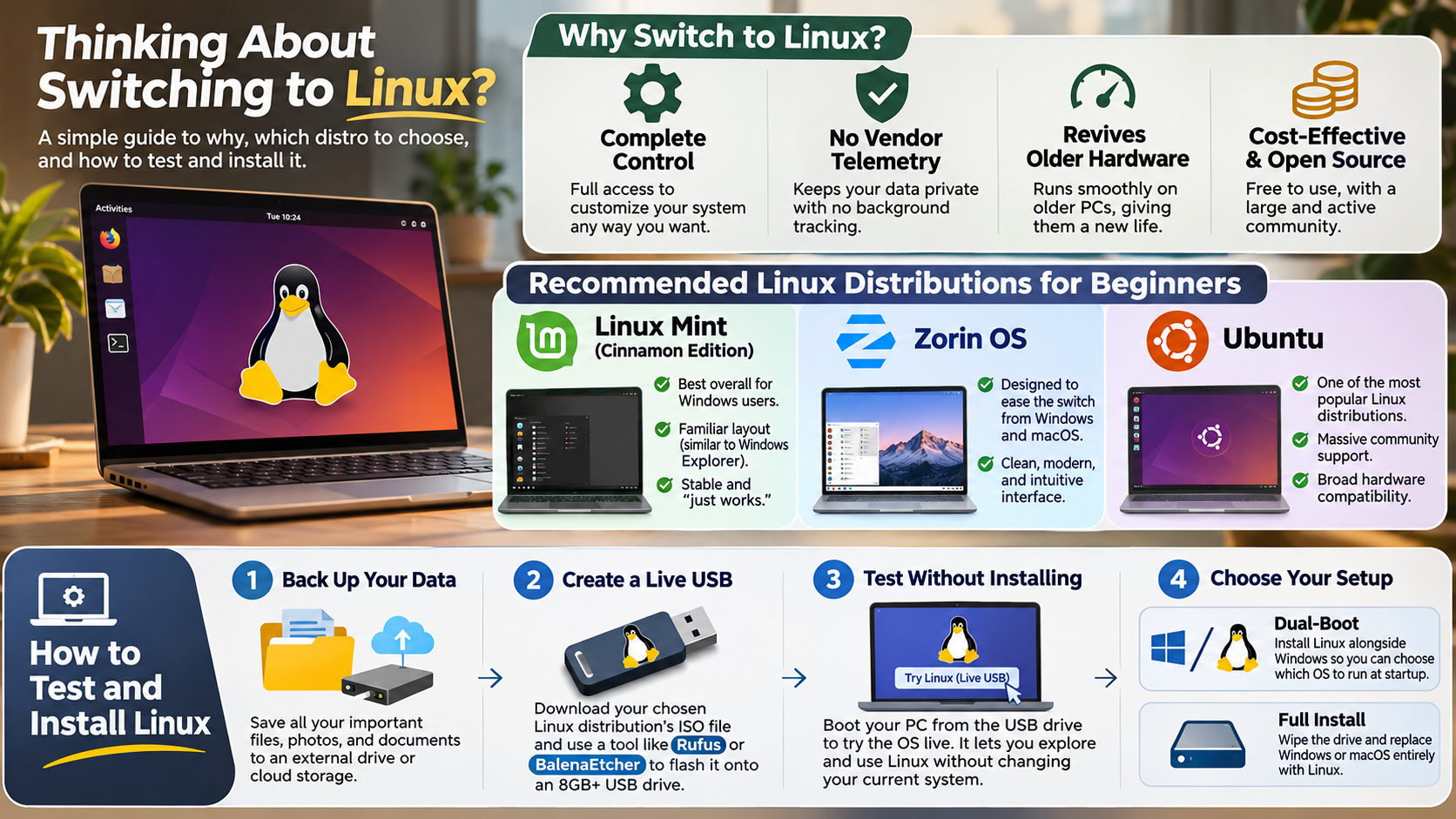
Switching to Linux can be a good decision if you value privacy, customization, and control over your computer. Unlike Windows, many Linux distributions provide greater control over background services, system updates, and installed applications. You can choose what runs on your computer and customize the desktop to suit your preferences.
Linux can also work well on older hardware. Lightweight distributions often require fewer system resources than modern Windows installations. However, actual performance depends on your hardware, distribution, and installed applications.
There are several other advantages worth considering:
- Privacy: Many distributions collect less personal information by default.
- Customization: You can change desktop environments, themes, and system settings.
- Software freedom: Open-source applications offer greater transparency.
- Development: Linux provides powerful tools for programming and server management.
- Hardware efficiency: Lightweight distributions can extend the usefulness of older computers.
However, Linux is not suitable for everyone. Some proprietary applications, games, and specialized professional tools have limited support. Check your essential software before replacing your current operating system.
Key Considerations Before Migrating
Before installing Linux, identify the applications and services you use regularly. Some popular programs work natively, while others require alternatives.
For example, LibreOffice can replace Microsoft Office for many document-related tasks. GIMP provides image editing capabilities similar to some features of Adobe Photoshop.
Also, check whether your printer, Wi-Fi adapter, graphics card, and other peripherals support Linux. Compatibility varies between manufacturers and hardware models.
If you are uncertain, consider dual-booting Linux alongside Windows. This lets you use both operating systems on one computer. You can gradually move your everyday activities to Linux without immediately abandoning Windows.
Do I Lose Everything If I Switch to Linux?
No, switching to Linux does not automatically mean losing your personal files. However, the installation method you choose determines what happens to your existing data.
A clean installation can format your storage drive or selected partitions. This process permanently removes the files stored in those locations. Therefore, installing Linux without backing up your important data can result in permanent data loss.
Before installation, copy your documents, photographs, videos, music, and other important files. You can use an external hard drive, USB flash drive, or cloud storage service.
Most common file formats remain accessible after migration. These include PDF, DOCX, JPEG, MP3, and MP4 files. You can open them using compatible Linux applications without converting everything.
Remember that application settings, installed programs, browser profiles, and some specialized files may require separate migration steps.
Safeguarding Your Personal Data Safely
Backing up your files should be your first priority before changing operating systems. A reliable backup strategy reduces the risk of accidental data loss during installation.
Consider following the 3-2-1 backup rule:
- Keep three copies of your important data.
- Store those copies on two different types of storage media.
- Keep at least one backup in a separate physical location.
For example, retain your original files on your computer. Create another copy on an external hard drive. Store a third copy in a cloud backup service.
Also, verify that your backups actually work. Open a few files from your backup storage before starting installation.
Never assume that your files are safe simply because you selected an installation option that claims to preserve existing data.
Is It Difficult to Switch to Linux?
Switching to Linux is considerably easier today than it was several years ago. Many modern distributions offer beginner-friendly interfaces and straightforward graphical installation processes.
Distributions such as Linux Mint, Ubuntu, and Zorin OS are popular starting points. Their desktop environments provide familiar features, including application menus, taskbars, file managers, and system settings.
You also do not need to use the terminal for most everyday activities. Browsing websites, connecting to Wi-Fi, managing documents, and installing applications can usually be handled through graphical interfaces.
Many distributions include software managers that let you search for and install applications. System updates are also available through dedicated graphical tools.
However, some tasks still require additional technical knowledge. Troubleshooting unusual hardware problems, installing certain drivers, and configuring advanced settings may involve terminal commands.
Your experience will largely depend on your chosen distribution and hardware. Testing Linux before installation can help you understand its interface and identify potential compatibility problems.
Testing Live USB Environments First
A Linux Live USB lets you explore an operating system without permanently installing it. You can create a bootable USB drive containing a Linux distribution and start your computer from it.
The live environment runs without replacing your existing operating system. This makes it useful for checking compatibility before installation.
During testing, pay attention to these important features:
- Wi-Fi connectivity: Check whether your wireless adapter works.
- Audio: Test speakers, headphones, and microphones.
- Display: Confirm that your screen resolution looks correct.
- Bluetooth: Connect compatible wireless devices.
- Peripherals: Test your printer, webcam, and other accessories.
Some live environments run more slowly than an installed system. This is because they operate from USB storage and system memory.
Testing first helps you identify problems before making permanent changes to your computer.
Why Do Hackers Prefer Linux?
Many cybersecurity professionals use Linux because it provides extensive control over system operations, networking, and security tools. Its flexible architecture makes it useful for penetration testing, digital forensics, vulnerability assessment, and network administration.
Linux distributions also support powerful command-line utilities. These tools help professionals automate repetitive tasks, inspect network traffic, manage remote servers, and investigate suspicious system activity.
Specialized distributions such as Kali Linux include collections of security testing tools. Professionals use these environments to evaluate systems and identify potential weaknesses.
Another important advantage is transparency. Many Linux components are open source, allowing researchers to examine their code and report security vulnerabilities.
However, Linux is not automatically more secure simply because its source code is available. Security depends on proper configuration, timely updates, strong authentication, and responsible system administration.
Windows and macOS also provide advanced security features. The right platform depends on the user’s requirements and technical environment. These security advantages are another reason some professionals switch to Linux for their specialized workflows. If you still use Windows 10, understanding the security risks of Windows 10 in 2026 can help you make informed decisions about your operating system.
Unrestricted System Visibility and Auditing
Linux offers cybersecurity researchers considerable visibility into system processes, permissions, and network activity. Administrators can inspect logs, monitor running services, and investigate how applications interact with the operating system.
Open-source software also allows developers to examine available source code. This makes independent auditing possible and helps researchers identify potential vulnerabilities.
Linux provides several useful capabilities for security professionals:
- Network monitoring: Inspect network connections and traffic.
- Process management: Identify and manage running applications.
- System auditing: Review logs and investigate unusual activity.
- Automation: Create scripts for repetitive security tasks.
- Access control: Configure permissions for users and applications.
These capabilities make Linux valuable for professional security work. However, code transparency does not guarantee that every vulnerability will be discovered or fixed immediately.
Proper configuration and regular security updates remain essential.
Is Linux Easier Than Windows?
Whether Linux is easier than Windows depends on your experience and everyday requirements. Linux can simplify several routine maintenance tasks through centralized software repositories and integrated update managers.
Many distributions let you update the operating system and installed applications from one location. This reduces the need to download individual installers from different websites. Windows handles updates differently, and understanding why Windows constantly needs to update provides useful context when comparing both operating systems.
Linux also offers greater control over desktop customization and background services. You can choose lightweight desktop environments and remove applications you do not need.
However, Windows users may initially struggle with unfamiliar software installation methods. Traditional Windows .exe installers generally do not work natively on Linux. You may need alternative applications or compatibility tools.
Gaming and professional software compatibility can also create challenges. Some applications work through compatibility layers, while others have no reliable Linux alternative.
Therefore, neither operating system is universally easier. If your daily activities involve browsing, programming, document editing, and general computing, Linux can provide a comfortable experience after a short adjustment period.
Streamlined Maintenance Without Unwanted Bloat
One advantage of many Linux distributions is their centralized software management system. Instead of downloading applications from numerous websites, you can install compatible software through trusted repositories.
These repositories contain applications maintained by distribution developers and software providers. Package managers also help manage dependencies and application updates.
This approach can make system maintenance more organized and predictable. You can update multiple applications without manually searching for separate installers. Regular updates are also important for security, so understanding what happens when you skip Windows updates can help you appreciate the importance of keeping your operating system current.
Other useful advantages include:
- Centralized updates: Manage system and application updates together.
- Application repositories: Access software through distribution-managed sources.
- Fewer unnecessary applications: Install only the software you actually need.
- Customization: Remove or replace components that do not suit your workflow.
However, not every application is available through official repositories. Some developers distribute software through their own websites or package formats.
Always check software sources before installing applications. Using trusted repositories and verified packages helps maintain a secure and reliable Linux environment. If you want greater control over software management and system maintenance, these benefits may encourage you to switch to Linux.
Conclusion
Switching to Linux can be a worthwhile decision if you want more control, better customization, and a flexible computing experience. Modern distributions make everyday tasks easier, even for users with limited technical experience. However, software compatibility, gaming support, and hardware drivers still require consideration.
Before replacing Windows, test a beginner-friendly distribution such as Linux Mint, Ubuntu, or Zorin OS using a Live USB. Back up your important files and check whether your essential applications work properly.
Ultimately, Linux is not necessarily better for everyone, but it offers a powerful alternative to Windows. If privacy, flexibility, and open-source software matter to you, now could be the right time to switch to Linux.