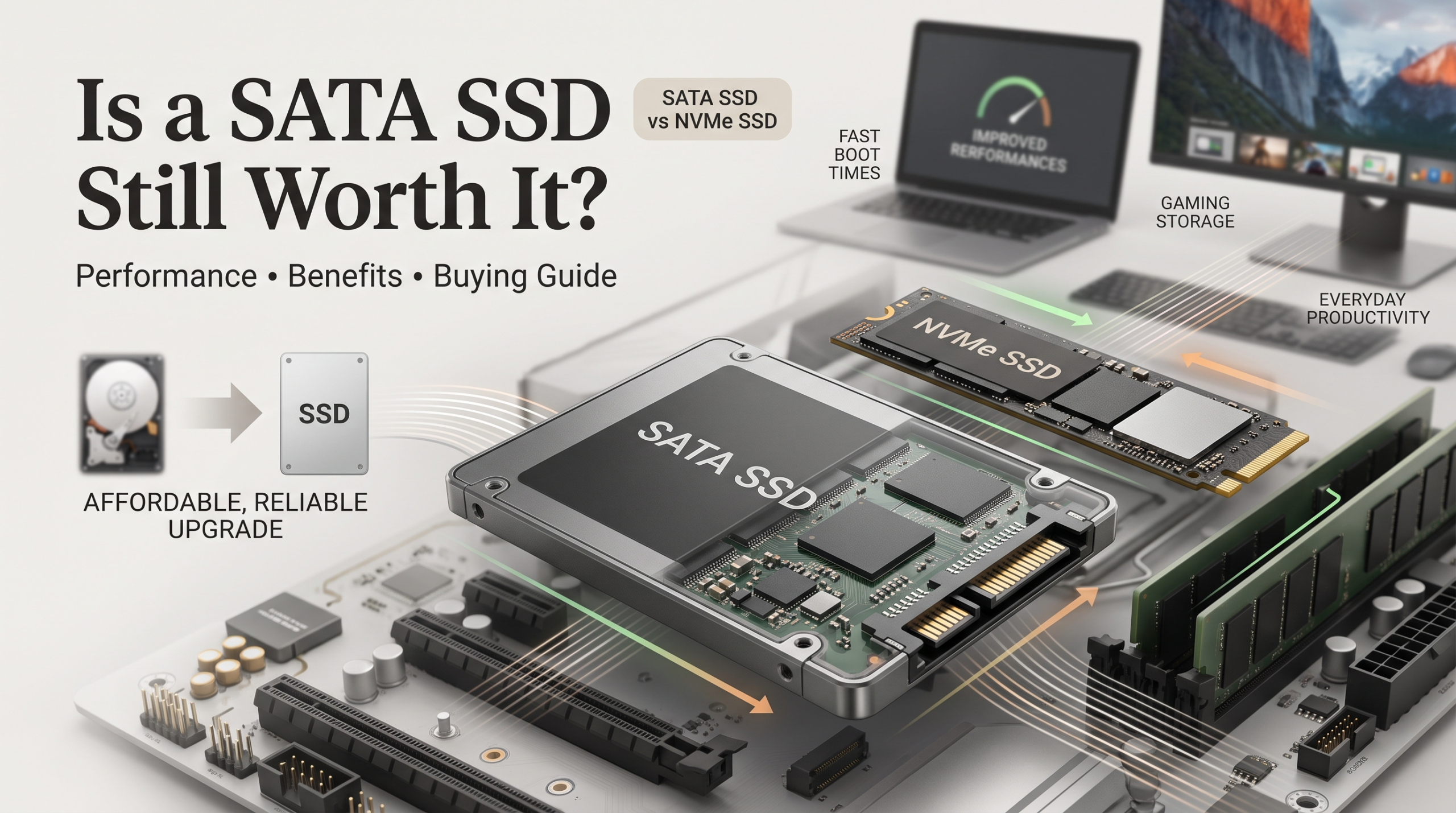
Is a SATA SSD Still Worth It? Performance, Benefits, and Buying Guide
If you want to speed up an older laptop or build an affordable desktop, a SATA SSD remains one of the smartest storage upgrades available. While NVMe drives dominate performance discussions, SATA solid-state drives still offer excellent speed, reliability, and compatibility.
Replacing an old mechanical hard drive with a SATA SSD can completely transform a computer’s performance. Boot times drop from minutes to seconds, applications open faster, and the overall system feels much more responsive.
The SATA interface may be older, but it continues to play an important role in modern storage. You can learn more about the development, specifications, and technical standards behind this interface through the Serial ATA International Organization on its official website: SATA-IO official standards information.
In this guide, we will explore how SATA SSDs work, how they compare with NVMe drives, their best use cases, and whether they are still worth buying today.
Understanding the Technology Behind a SATA SSD
A SATA SSD uses the Serial Advanced Technology Attachment (SATA) interface to connect storage hardware to a computer’s motherboard. This connection standard has been used for many years in desktops, laptops, and other computing devices.
When solid-state storage became popular, manufacturers designed SATA SSDs to work with existing computer hardware. This made upgrading much easier because users could replace older hard drives without replacing their entire system.
Most SATA SSDs use the familiar 2.5-inch form factor, which is the same size commonly used by laptop hard drives. This compatibility makes them an ideal upgrade option for older computers.
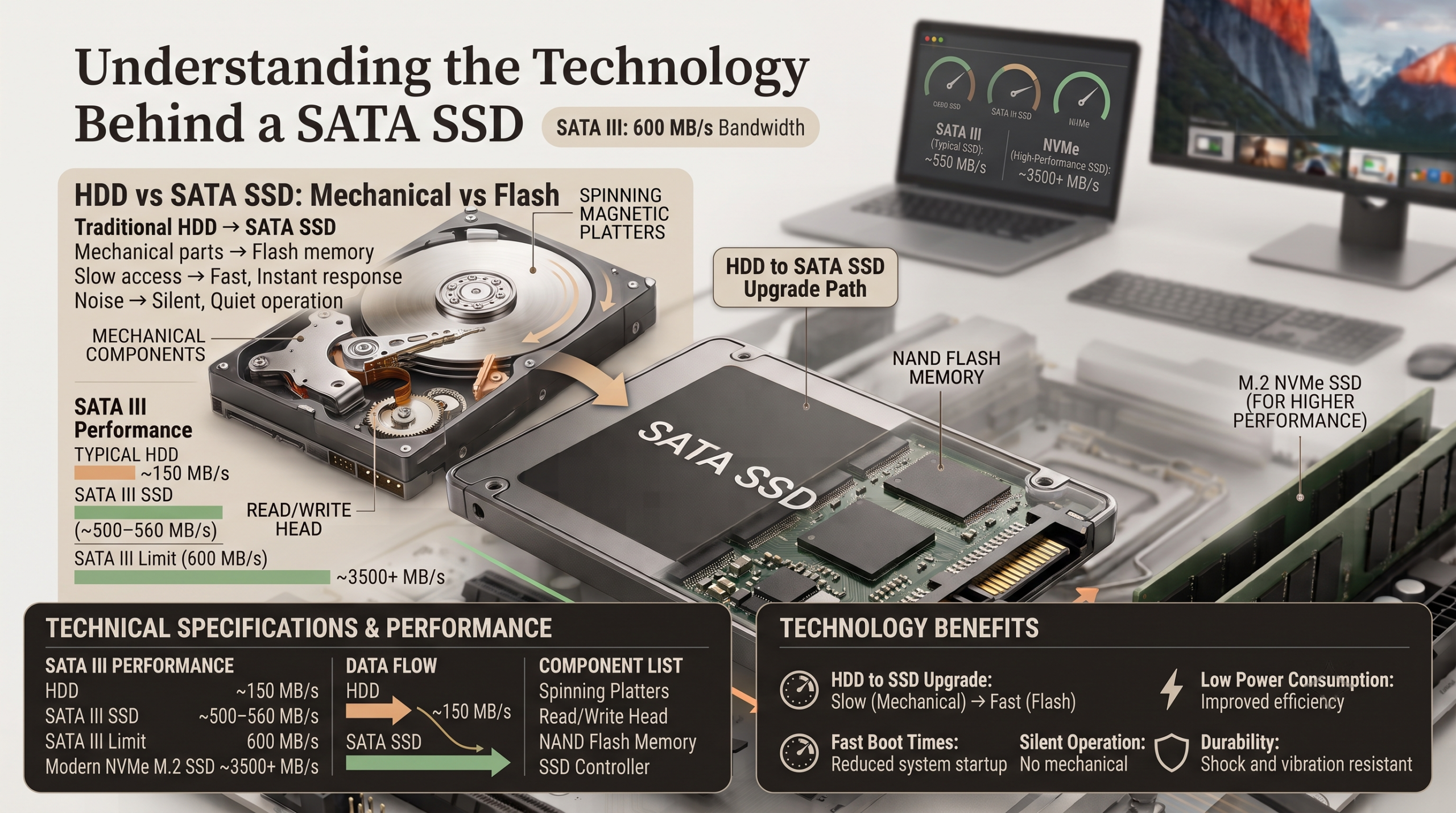
However, the technology inside is completely different. Traditional hard drives rely on spinning magnetic platters and mechanical parts. SATA SSDs use NAND flash memory, which stores data electronically without moving components.
This design provides several advantages:
- Faster boot times
- Lower power consumption
- Silent operation
- Better resistance to physical shocks
- Improved overall system responsiveness
For many users, upgrading from a hard drive to a SATA SSD creates the biggest performance improvement they will ever notice from a single hardware change.
The Speed Limit: Understanding SATA III Performance
The current version of the interface is SATA III, which has a theoretical maximum bandwidth of 600 MB/s. Most high-quality SATA SSDs operate close to this limit.
In real-world conditions, many drives achieve sequential read and write speeds between 500 MB/s and 560 MB/s. These speeds are much faster than traditional hard drives, which usually struggle to exceed 150 MB/s.
Although SATA SSDs cannot compete with modern NVMe drives in benchmark tests, their performance remains more than enough for everyday computing.
Tasks such as:
- Starting Windows
- Opening applications
- Browsing the web
- Watching videos
- Working with documents
feel significantly faster compared with a mechanical hard drive.
The main limitation of SATA SSD technology is not its speed for normal tasks. Instead, the restriction appears during large file transfers, professional workloads, and data-heavy applications.
For most home users, students, and office workers, the SATA III speed limit is rarely a problem.
SATA SSD vs. NVMe SSD: What Is the Difference?
When choosing a new storage drive, many buyers compare SATA SSDs with NVMe SSDs. Both use flash memory, but they connect to computers differently.
SATA SSDs communicate through the older SATA interface, while NVMe drives use the faster PCIe connection. This difference allows NVMe drives to achieve much higher speeds.
| Feature | SATA SSD | NVMe SSD |
|---|---|---|
| Maximum Sequential Speed | Around 560 MB/s | Up to 7,500+ MB/s |
| Interface | SATA III | PCIe Gen 3, Gen 4, or Gen 5 |
| Common Form Factor | 2.5-inch and some M.2 models | Mostly M.2 |
| Main Advantage | Compatibility and affordability | Maximum performance |
The speed difference looks massive on paper. However, everyday usage does not always show the same gap.
Most operating system tasks involve thousands of small file operations rather than large continuous transfers. Because SSDs already provide extremely low access times, both SATA and NVMe drives feel fast during normal use.
For browsing, office work, streaming, and general productivity, the difference is often difficult to notice.
When Does NVMe Actually Make a Difference?
Although SATA SSDs handle everyday tasks very well, NVMe drives become valuable for demanding workloads.
Users who regularly perform intensive tasks can benefit from NVMe’s higher bandwidth. Examples include:
- 4K and 8K video editing
- Large database operations
- Professional content creation
- Frequent movement of huge files
- Advanced workstation applications
These activities involve transferring large amounts of data quickly. In such situations, the PCIe connection of an NVMe drive can save significant time.
For gaming and regular home computing, however, the difference is usually smaller. A SATA SSD still provides a major improvement over a hard drive.
The right choice depends on your needs. If you want maximum speed and your computer supports NVMe, it is a strong option. If you need affordable, reliable storage with broad compatibility, a SATA SSD remains an excellent choice.
Best Use Cases for a SATA SSD
Despite the popularity of NVMe drives, a SATA SSD remains a practical choice for many users. Its combination of affordability, compatibility, and reliable performance makes it suitable for different computing needs.
For older computers, SATA SSDs are often the easiest and most cost-effective upgrade. They can extend the useful life of existing hardware without requiring a complete system replacement.
They are also useful as secondary storage. Many users install their operating system on a faster NVMe drive while using a SATA SSD for additional files, games, or media libraries.
The main advantages of SATA SSD storage include:
- Wide compatibility with older desktops and laptops
- Lower cost compared with high-end NVMe drives
- Faster performance than traditional hard drives
- Lower power usage and silent operation
Whether you are upgrading an aging computer or building a budget-friendly system, SATA SSD technology still provides excellent value.
Reviving Older Laptops and Desktop Computers
One of the biggest advantages of a SATA SSD is its compatibility with older hardware. Many computers built before NVMe became common do not include an M.2 slot for modern PCIe storage.
A traditional 2.5-inch SATA SSD can usually replace an existing laptop hard drive with minimal effort. Desktop users can also install these drives using standard SATA data and power cables.
This upgrade can dramatically improve older systems. A computer that feels slow and outdated can become responsive enough for everyday tasks.
Common uses after upgrading include:
- Web browsing
- Online learning
- Office applications
- Video streaming
- Basic photo editing
For many older computers, the processor and memory may still be usable. Replacing a slow mechanical drive with a SATA SSD can remove the biggest performance bottleneck.
This makes SATA SSDs a popular choice for users who want better performance without purchasing a new computer.
Secondary Storage for Gaming Libraries
Modern games continue to grow larger, with many titles requiring more than 100 GB of storage space. While an NVMe SSD is ideal for maximum performance, a SATA SSD remains a cost-effective option for expanding game storage.
Installing games on a SATA SSD provides much faster loading times compared with a traditional hard drive. Players spend less time waiting through loading screens and more time enjoying their games.
A common setup for gamers is:
- NVMe SSD for the operating system and frequently played games
- SATA SSD for a larger game library
- Hard drive for backups and archived files
Most current games run smoothly from a SATA SSD. Although some newer technologies, such as DirectStorage, are designed to take advantage of faster NVMe speeds, the difference is still limited for many titles.
For gamers who need more capacity without spending heavily, a SATA SSD offers a strong balance between speed and price.
Building a Home NAS or Media Server
A SATA SSD can also be useful in home storage systems, including Network Attached Storage (NAS) devices and personal media servers.
Solid-state drives offer several benefits compared with mechanical hard drives. They consume less power, produce no operating noise, and generate less heat during operation.
For home networks, the SATA SSD speed limit is rarely a concern. Many household networks use 1 Gbps Ethernet connections, which provide around 125 MB/s of practical transfer speed.
Since network speeds are usually slower than SATA III bandwidth, the drive itself is not the limiting factor.
SATA SSDs work well for:
- Media streaming servers
- Home file storage
- Backup systems
- Small personal cloud setups
Their reliability and silent operation make them especially attractive for always-on home environments.
Key Factors to Consider Before Buying a SATA SSD
Not every SATA SSD delivers the same level of performance and reliability. Before purchasing a drive, consider important factors such as endurance, internal components, and manufacturer reputation.
A cheaper drive may look attractive initially, but lower-quality components can affect long-term performance.
Here are the most important features to check:
DRAM Cache
A DRAM cache helps an SSD manage data more efficiently. Budget drives often use DRAM-less designs to reduce costs.
DRAM-less SATA SSDs can still work well for basic storage. However, they may slow down during large file transfers or heavy workloads.
For a primary operating system drive, choosing a model with dedicated DRAM is often a better long-term investment.
Terabytes Written (TBW)
Terabytes Written (TBW) measures how much data an SSD can write before reaching its rated endurance limit.
A higher TBW rating usually indicates stronger flash memory and better durability.
For everyday users, most quality SATA SSDs can last many years. Normal activities such as browsing, gaming, and office work rarely produce enough writes to quickly wear out the drive.
Brand Reputation
Choosing a trusted manufacturer can improve reliability and support quality.
Established brands typically provide:
- Better firmware updates
- More consistent performance
- Longer warranty coverage
- Improved quality control
Popular SSD manufacturers include Samsung Electronics, Crucial, Western Digital, and SanDisk.
Buying from a reputable brand reduces the chances of performance issues and unexpected failures.
Frequently Asked Questions About SATA SSDs
Can I Install a SATA SSD in Any Computer?
A SATA SSD works with most desktop computers and older laptops that include standard SATA connections. Desktop systems usually require a SATA data cable and a power connector from the power supply.
Many older laptops include a 2.5-inch storage bay where a SATA SSD can be installed directly. This makes upgrading relatively simple compared with newer storage technologies.
However, some modern ultra-thin laptops do not allow storage upgrades. Their drives may be permanently attached to the motherboard.
Before purchasing a SATA SSD, check your computer’s specifications or user manual. Confirm that your device supports a compatible storage connection and physical drive size.
For older systems, a SATA SSD is often one of the easiest hardware upgrades available.
Is a SATA SSD Good for Gaming?
Yes, a SATA SSD is still a good choice for gaming. It provides much faster loading speeds compared with traditional hard drives.
Games installed on a SATA SSD launch faster, load environments more quickly, and provide a smoother overall experience.
While NVMe SSDs offer higher speeds, the difference in gaming is often smaller than benchmark numbers suggest. Many games do not fully use the additional bandwidth provided by NVMe storage.
A SATA SSD is especially useful for gamers who need affordable storage space. It offers a strong balance between:
- Faster loading times
- Large storage capacity
- Affordable pricing
- Reliable performance
For most gaming setups, upgrading from a hard drive to any SSD creates the biggest improvement.
How Long Does a SATA SSD Last?
A quality SATA SSD can typically last between 5 and 10 years under normal consumer use. The actual lifespan depends on usage patterns, drive quality, and total data written.
Manufacturers measure SSD endurance using Terabytes Written (TBW). For example, many 1 TB SSD models offer endurance ratings around 600 TBW.
This means the average user would need to write a very large amount of data every day for many years to reach the rated limit.
Normal activities such as browsing, gaming, streaming, and office work usually create far fewer writes. Choosing a reliable brand and maintaining regular backups can help protect your data over the long term.
Does a SATA SSD Need Special Software or Drivers?
No, SATA SSDs are generally plug-and-play devices. Modern operating systems, including Windows 10, Windows 11, and macOS, already include the necessary drivers.
After installation, users usually only need to initialize and format the drive through the operating system’s storage management tools.
Many SSD manufacturers also provide optional software. These programs can help users:
- Monitor drive health
- Check storage information
- Update firmware
- Improve maintenance settings
While manufacturer software is useful, it is not required for basic operation.
What Happens When a SATA SSD Fails?
Unlike mechanical hard drives, SATA SSDs do not contain moving parts. They usually do not produce warning sounds such as clicking or grinding before failure.
When flash memory cells reach their endurance limit, the drive may enter a read-only state. This safety feature can help users recover important files before replacing the device.
However, SSD failures can sometimes happen unexpectedly. No storage device is completely immune to failure.
To protect important data, always maintain regular backups. A backup strategy is more important than relying on any single storage device.
Final Thoughts: Is a SATA SSD Still Worth Buying?
A SATA SSD remains a valuable storage option despite the growth of faster NVMe technology. It may not deliver the highest benchmark speeds, but it continues to provide excellent everyday performance.
For users upgrading older computers, SATA SSDs offer outstanding value. They are affordable, widely compatible, and significantly faster than traditional hard drives.
They are also useful for secondary storage, gaming libraries, home servers, and budget-focused PC builds.
The biggest advantages of a SATA SSD are:
- Easy installation
- Strong reliability
- Low cost
- Broad compatibility
- Fast everyday performance
If your computer does not support NVMe, a SATA SSD is often the best upgrade available. Even on newer systems, it can still serve as affordable additional storage.
While NVMe drives lead in maximum speed, SATA SSD technology continues to deliver what many users actually need: a faster, quieter, and more responsive computing experience.
Choosing the right storage is only one part of building or upgrading a high-performance computer. Your processor also plays an important role in overall system performance. To understand how popular CPUs compare, explore our detailed guide on AMD Ryzen 7 vs Intel Core i7 performance differences.