
Here’s How to Prevent Smart Home Devices From Going Offline
Keeping your smart home devices connected requires a reliable wireless network. Your router must handle multiple devices communicating throughout the day. Without proper network management, even simple tasks can become frustrating.
When connected gadgets go offline, everyday convenience quickly disappears. Security cameras may stop recording, smart thermostats can lose connectivity, and automated routines may stop working.
Fortunately, you do not need an IT degree to improve your smart home network. A few practical adjustments can prevent many common connectivity problems.
In this guide, we will explore why smart home devices disconnect and how to keep them online. You will also learn whether smart homes work without internet access. Additionally, we will explain Wi-Fi visibility, common device problems, and the disadvantages of home automation.

Why Do My Smart Devices Keep Going Offline?
Your smart home devices usually disconnect because of weak Wi-Fi signals, network congestion, or compatibility issues. Most smart gadgets depend on stable wireless connections to communicate with routers and companion apps. When these connections become unreliable, devices may appear offline or respond slowly.
Several factors can affect your home network:
- Weak Wi-Fi signals: Thick walls, metal objects, and long distances reduce wireless signal strength.
- Router congestion: Too many connected devices can overwhelm older routers.
- Frequency incompatibility: Some smart bulbs and plugs only support 2.4 GHz Wi-Fi.
- Outdated firmware: Older router and device software can cause connectivity problems.
- Power interruptions: Smart devices cannot reconnect when their power supply becomes unstable.
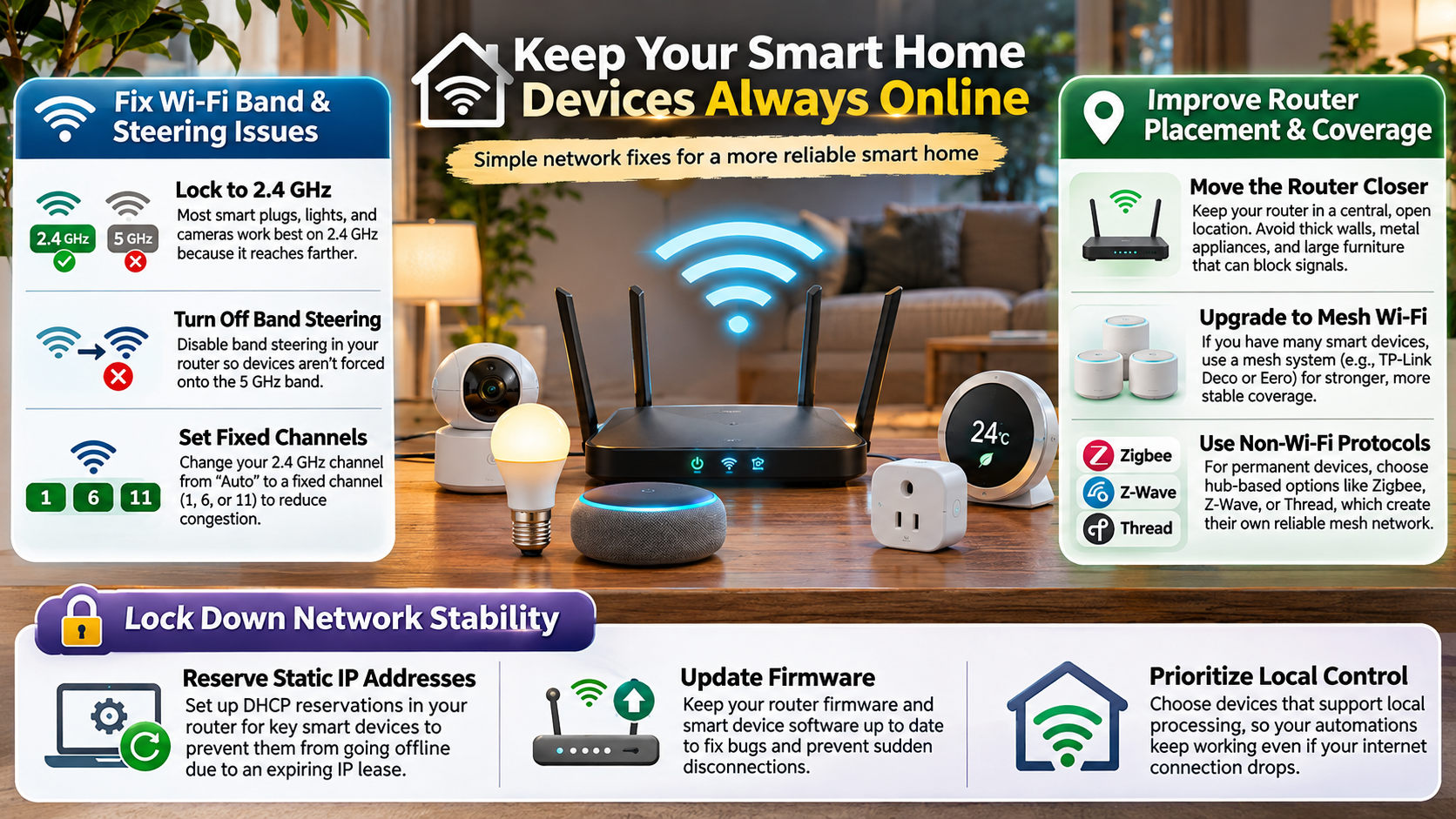
Another common problem involves dual-band routers. Some routers use band steering to move devices between 2.4 GHz and 5 GHz networks. Certain older gadgets struggle with this process.
Upgrading Your Network Backbone
A reliable network is essential for keeping smart home devices online. If your existing router struggles with multiple connections, consider upgrading its hardware. A modern router or mesh Wi-Fi system can improve coverage throughout your property.
Mesh systems use multiple access points to distribute wireless signals across larger homes. They can reduce dead zones and improve connectivity in distant rooms.
You can also make several practical network adjustments:
- Create a dedicated 2.4 GHz network: Connect compatible smart bulbs, plugs, and sensors to this frequency.
- Separate network traffic: Use suitable guest network settings to reduce unnecessary traffic. Check device isolation settings because isolation can prevent local communication.
- Update router firmware: Install available updates to fix security and connectivity problems.
- Use DHCP reservations: Reserve IP addresses for important devices to make network management easier.
- Improve router placement: Keep your router away from thick walls, metal objects, and electronic interference.
These adjustments can improve network stability without replacing every smart home product.
Can a Smart Home Work Without Internet?
Yes, a smart home can continue performing certain functions without an active internet connection. However, this depends on the devices, communication protocols, and automation hub you use. Some smart home systems rely heavily on cloud servers, while others support local control.
Technologies such as Zigbee, Z-Wave, and Thread allow compatible devices to communicate locally. Matter also supports local smart home communication over Wi-Fi, Ethernet, and Thread.
When your internet service provider experiences an outage, locally controlled automations may continue working. For example, motion sensors can trigger hallway lights through a compatible local hub. Some smart locks can also accept previously configured keypad codes without internet access.
However, certain features may become unavailable:
- Remote smartphone access outside your home.
- Cloud-based voice assistant services.
- Automations that depend on online services.
- Cloud camera recordings and notifications.
Your smart home does not necessarily become useless during an internet outage. Its offline capabilities depend on how you configure the system.
Prioritizing Local-First Ecosystems
If you want your smart home to work during internet outages, prioritize devices that support local communication. A local-first ecosystem reduces dependence on external cloud servers. It also gives you more control over everyday automation.
Before purchasing new equipment, check its supported communication standards. Look for Matter, Thread, Zigbee, or Z-Wave compatibility where appropriate.
Consider platforms such as Home Assistant, Hubitat, or Apple Home. However, remember that these platforms have different hardware and hub requirements. If you use Google Home, understanding the best features of Google Home can also help you explore its smart home control and automation capabilities. Apple Home, for example, requires a compatible home hub for certain remote access and automation features.
Follow these practical recommendations:
- Choose devices that support local control.
- Check whether automations run without internet access.
- Use a compatible hub to connect different devices.
- Avoid depending entirely on cloud-based services.
- Test essential routines during a temporary internet disconnection.
A local-first setup cannot guarantee that every feature will remain available. However, it can keep important household automations working when your internet connection fails.
How Do I Make My Wi-Fi Undetectable?
You can make your Wi-Fi network less visible to casual users by disabling SSID broadcasting through your router settings. An SSID is simply the name displayed when someone searches for available wireless networks.
To hide your network name, open a web browser and enter your router’s IP address. Log in using your administrator credentials. Next, navigate to the wireless settings section and find an option such as “Enable SSID Broadcast.”
Disable this option and save your changes. Your network name should disappear from ordinary Wi-Fi network lists on nearby phones and laptops.
However, hiding your Wi-Fi network does not make it completely invisible. Devices that already know the network name may continue connecting normally. You will also need to enter the exact SSID manually when connecting certain new devices.
Understanding Hidden Network Limitations
Hiding your Wi-Fi network may reduce its visibility, but it does not provide strong protection against unauthorized access. Anyone using appropriate network monitoring tools can still discover a hidden wireless network.
There are also practical disadvantages to consider. Some smart home devices experience connection problems when configured to use hidden networks. Reconnecting certain gadgets after a router restart or factory reset can also become more difficult.
Instead of relying on hidden network settings, prioritize stronger security measures.
- Use WPA3 encryption: Choose WPA3 when your router and connected devices support it. WPA2-AES is a suitable alternative for compatible older equipment.
- Create a strong password: Avoid predictable passwords, personal information, and commonly used phrases.
- Update router firmware: Security updates help protect against known vulnerabilities.
- Disable WPS: Turn off Wi-Fi Protected Setup if you do not need it.
- Use a separate IoT network: Isolate smart gadgets from computers and personal devices where practical.
These measures provide more meaningful protection than hiding your Wi-Fi network alone.
What Are the Downsides of Owning a Smart House?
Owning a smart house offers convenience, automation, and greater control over household devices. However, these benefits come with several disadvantages. Understanding the potential problems can help you decide whether investing in home automation is worthwhile.
One major disadvantage is the initial investment. Smart switches, security cameras, connected locks, and thermostats often cost more than traditional alternatives. Smart heating products also come with specific benefits and drawbacks, as explained in this guide to smart home heaters and their advantages and disadvantages. Some manufacturers also charge monthly subscriptions for cloud storage and advanced features.
Privacy is another important concern. Internet-connected cameras, microphones, and sensors may collect personal household information. Poor security practices can increase the risk of unauthorized access.
Compatibility can also become frustrating. Different manufacturers may use separate applications and communication standards. As technology changes, some older products eventually lose software support.
Other common disadvantages include:
- Internet dependency: Certain features stop working during connectivity outages.
- Maintenance requirements: Devices need firmware updates and occasional troubleshooting.
- Subscription costs: Some advanced features require recurring payments.
- Technical complexity: Automation problems can take time to diagnose.
- Vendor dependency: Switching ecosystems may require replacing existing equipment.
Smart homes can simplify everyday activities, but they also introduce additional responsibilities.
Avoiding Vendor Lock-In
Vendor lock-in happens when your smart home depends heavily on products from one manufacturer. Switching to another ecosystem can become expensive when devices lack cross-platform compatibility.
Before purchasing smart home equipment, check whether it supports widely adopted standards. Matter compatibility can improve interoperability, although it does not guarantee that every device feature works across every platform.
You should also research the manufacturer’s update policy and long-term product support. A cheaper device may become expensive if its cloud service disappears or essential features require subscriptions.
Consider these precautions before making a purchase:
- Choose products compatible with multiple smart home platforms.
- Check whether essential features work without subscriptions.
- Research firmware support and security update policies.
- Avoid purchasing unnecessary devices from one manufacturer.
- Keep your existing automation system compatible with future upgrades.
These steps can reduce replacement costs and make future upgrades easier. Most importantly, choose products based on their long-term usefulness rather than attractive introductory prices.
What Are Some Common Problems With Smart Home Devices?
Smart home devices can experience several problems, even when your internet connection appears stable. Common issues include unresponsive voice commands, delayed automation triggers, pairing failures, and unexpected disconnections.
Sometimes, the solution is surprisingly simple. For example, a smart bulb may appear offline because someone accidentally switched off its physical power supply. Without electricity, the bulb cannot communicate with your network.
Other problems involve weak wireless signals and interference from neighboring networks. This is particularly common in apartment buildings where multiple routers operate nearby.
You may also experience battery problems with wireless motion sensors and door contacts. Low batteries can cause delayed responses or unexpected disconnections.
Additional issues include:
- Application fragmentation: Different manufacturers require separate control applications.
- Firmware problems: Software updates can occasionally interrupt existing automations.
- Pairing failures: Incorrect passwords or unsupported network frequencies can prevent installation.
- Automation delays: Cloud-dependent routines may respond slowly.
- Device incompatibility: Certain products cannot communicate with specific smart home platforms.
Identifying the actual cause is the first step toward fixing these problems.
Simple Daily Maintenance Habits
Regular maintenance can prevent many common smart home connectivity problems. You do not need to check every device manually each day. Instead, establish a few simple habits that keep your network and connected gadgets running smoothly.
Start by checking your router’s firmware and installing available security updates. Review your connected device list occasionally. Remove products you no longer use and investigate devices that repeatedly disconnect.
You can also follow these practical maintenance tips:
- Check your Wi-Fi signal: Make sure important devices receive a stable wireless connection.
- Monitor battery levels: Replace batteries in wireless sensors before they become completely depleted.
- Update device firmware: Install updates to address bugs and improve security.
- Restart problematic devices: Power-cycle individual gadgets when they become unresponsive.
- Review automation settings: Check routines that fail to trigger as expected.
- Protect physical switches: Prevent accidental power interruptions to smart bulbs and connected switches.
- Maintain router settings: Avoid unnecessary configuration changes that could disrupt connectivity.
You can also schedule router restarts if your particular model supports them and they address recurring problems. However, weekly reboots are not necessary for every network.
With consistent maintenance and suitable network equipment, you can reduce interruptions and enjoy a more reliable smart home experience.
Final Thoughts: Keep Your Smart Home Devices Connected
Keeping your smart home devices online does not require expensive equipment or complicated technical knowledge. A reliable Wi-Fi network, updated firmware, and proper device configuration can prevent most common connectivity problems.
Start by improving your router placement, managing connected devices, and choosing compatible smart home products. If you want greater reliability during internet outages, consider local-first devices that support Zigbee, Z-Wave, Thread, or Matter.
Remember that convenience should never come at the expense of security. Use strong Wi-Fi passwords, enable modern encryption, and regularly update your connected devices. You can also explore the Wi-Fi Alliance’s official website to learn more about Wi-Fi technology, standards, and wireless connectivity.
Ultimately, a well-maintained smart home should make everyday life easier, not create additional problems. With the right setup and regular maintenance, you can enjoy a more secure, reliable, and connected home.