Pixel Care: The Complete Guide to Protection, Costs, and Value
Pixel Care provides additional protection for Google Pixel smartphones against eligible accidental damage and hardware failures. Modern phones remain expensive to repair, especially when OLED displays, camera modules, or internal components get damaged. A single accidental drop or liquid spill can lead to unexpected repair expenses. Understanding how Pixel Care works can help you decide whether additional smartphone protection is worth the cost.
Google offers optional device protection through programmes such as Pixel Care+ and previously Preferred Care. These plans provide additional protection against eligible accidental damage and hardware failures. Availability and coverage depend on your country, device, and selected plan. You can explore the Google Store for official protection options.
However, purchasing extended protection requires careful consideration. You should compare the plan price, service fees, and potential repair expenses before enrolling. Different Pixel models also have different protection costs and service conditions.
In this guide, we explain how Pixel Care works, what it covers, and how much it costs. You’ll also learn about its availability in India, claim limits, and purchase eligibility. This information will help you decide whether additional smartphone protection offers enough value for your needs.
Is Pixel Care Worth Getting?
Pixel Care can be worth purchasing if you frequently expose your smartphone to accidental damage. Modern OLED displays and advanced camera systems can be expensive to repair. Even one accidental drop could result in a significant repair bill. A protection plan can reduce these unexpected expenses through eligible repairs or replacements.
However, the plan isn’t automatically worthwhile for every smartphone owner. Your decision should depend on your daily habits, device value, and available repair options. Someone who regularly uses their phone outdoors may face greater accidental damage risks. In contrast, careful users with protective cases might rarely need insurance.
Compare the total protection cost against potential repair expenses before enrolling. Include both the upfront subscription price and applicable claim fees. Also, check whether your device qualifies for accidental damage protection. The best decision depends on your actual risk rather than the promise of peace of mind.
Evaluating Your Personal Risk Factors
Your daily routine plays an important role when choosing smartphone protection. Consider where you use your phone, how frequently you travel, and your previous repair history. These factors help determine whether an additional protection plan makes financial sense.
You should consider purchasing coverage if you:
- Frequently use your phone outdoors or while travelling.
- Have previously damaged smartphone screens.
- Regularly work in environments where accidental drops are possible.
- Own an expensive Pixel flagship or foldable device.
- Want predictable repair expenses instead of unexpected bills.
However, protection might offer less value if you rarely damage your devices. A rugged case and screen protector can also reduce everyday risks. They cannot eliminate every possibility of damage, though.
Before purchasing, compare the plan’s total cost with local authorised repair prices. Remember to include deductibles, exclusions, and claim restrictions. This comparison provides a more realistic picture of the financial benefits.
Is Pixel Care+ Available in India?
Google’s Pixel Care+ availability depends on the country where you purchase your device. The programme is not universally available across every Pixel market. As of November 2026, Google’s published protection information does not provide a confirmed India-specific Pixel Care+ purchase price or enrolment option. Therefore, Indian buyers should not assume that plans advertised internationally apply locally.
Google does provide authorised Pixel repair services in India. Customers can access supported walk-in repair centres and postal repair services. However, these services are different from purchasing an additional insurance policy. Standard manufacturer warranty coverage also remains separate from accidental damage protection.
Indian customers can explore independent smartphone protection policies through eligible retailers or insurance providers. However, these products are not automatically affiliated with Google. Their coverage, claim procedures, and repair arrangements depend on individual policy terms.
Always check the provider’s documentation before purchasing. Confirm whether authorised service centres accept the policy and whether genuine replacement parts are used.
How Indian Buyers Can Secure Protection
Indian Pixel buyers should explore available protection options before completing their smartphone purchase. Some retailers and independent insurance providers offer additional device protection. However, the availability of these policies varies by retailer, device, and insurer.
Follow these steps when comparing protection plans:
- Check whether the retailer offers accidental damage protection during checkout.
- Confirm the insurer’s name and policy administration details.
- Review coverage for cracked screens, liquid damage, and internal failures.
- Check the claim limits, deductibles, and policy duration.
- Confirm whether repairs are available through authorised service centres.
- Understand whether the insurer provides repairs or replacement devices.
Pay particular attention to the repair process. A low-cost policy might have restrictive conditions or limited service locations. Ask whether genuine replacement parts are available and how repairs affect your existing manufacturer warranty.
You should also retain your purchase invoice and insurance documents. These records can help when submitting a claim. Never assume that a retailer’s protection package provides the same benefits as Google’s official Pixel Care+ programme.
What Does Pixel Care Cover?
Pixel Care+ provides additional protection against eligible accidental damage and certain hardware failures. However, the exact coverage depends on your country, device, and policy terms. Common covered incidents can include accidental drops, cracked screens, and liquid damage. Some plans also cover mechanical or electrical breakdowns after the manufacturer’s warranty expires. If you’re concerned about liquid exposure, read our guide on whether the Google Pixel 11 is waterproof. Remember that water resistance does not guarantee protection against every liquid-related accident or confirm insurance coverage.
Depending on the selected programme, customers may receive an authorised repair or replacement device. Replacement devices can sometimes be refurbished rather than brand new. The final decision depends on the applicable service agreement and claim assessment.
Not every type of damage qualifies for coverage. Intentional damage, misuse, and certain cosmetic issues may be excluded. Theft and loss also require separate coverage where available. You should never assume these incidents are automatically included.
Before purchasing, review the complete policy documentation. Pay attention to service fees, claim limits, repair eligibility, and exclusions. Understanding these conditions prevents unexpected expenses when you actually need assistance.
Understanding Claim Limits and Deductibles
A protection plan does not necessarily mean every repair will be free. Depending on your policy, you may need to pay a deductible or service fee before receiving an approved repair or replacement. These charges vary by device model, damage type, and country.
For example, a screen-only repair might have a different service fee from a complete device replacement. Foldable phones can also have separate conditions for their inner and outer displays. Always check the applicable charges before submitting a claim.
Claim limits are another important consideration. Some older Preferred Care agreements allowed two accidental damage claims within a rolling twelve-month period. However, newer Pixel Care+ programmes can have different limits. Certain programmes also distinguish accidental damage claims from post-warranty mechanical breakdown claims.
Keep these points in mind:
- Check the maximum number of eligible claims.
- Confirm whether each repair requires a deductible.
- Review replacement device conditions.
- Check the deadline for reporting an incident.
- Read exclusions before accepting the agreement.
Your specific policy determines the final claim entitlement.
What Is the Cost of Pixel Care?
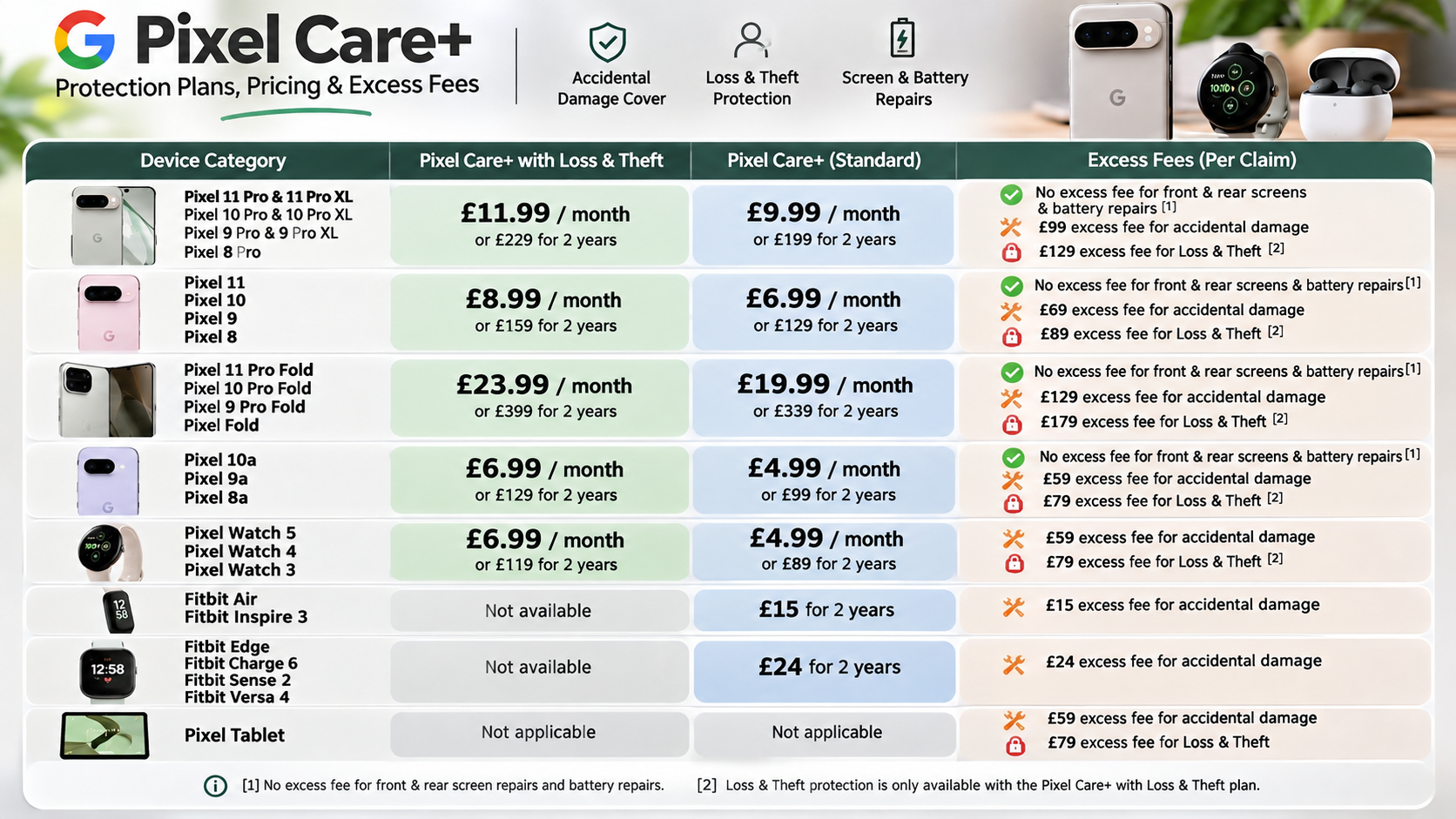
The cost of Pixel Care depends on your smartphone model, location, and selected protection programme. Google does not offer one universal price for every Pixel device. Monthly subscriptions and upfront protection packages may also have different pricing structures.
For example, Google’s older US Preferred Care pricing listed monthly plans from $5 to $15. Two-year plans ranged from $99 to $279 for selected Pixel models. These figures belong to the older Preferred Care programme. They should not be treated as current universal Pixel Care+ prices.
Customers may also need to pay additional service fees when making eligible accidental damage claims. Screen repairs and complete device replacements can have different charges. Taxes and regional insurance conditions may also affect the final amount.
If you purchase your Pixel in India, check local protection options separately. Do not convert US prices directly into Indian rupees and assume they apply locally. Always verify current prices through the relevant official checkout or insurance provider.
Monthly Billing Versus Upfront Payment
Some Google protection programmes offer monthly subscriptions, while others provide fixed-term plans with upfront payments. The available payment methods depend on your location and eligible device. Therefore, check the current purchase options before making a decision.
A monthly plan can provide flexibility if you prefer smaller recurring payments. It may also allow cancellation under the applicable terms. However, monthly payments can become expensive over an extended ownership period.
An upfront plan offers a fixed payment for its stated coverage period. This makes budgeting easier because you know the initial protection expense. However, you should consider whether you will keep the smartphone for the entire coverage period.
Compare both options using these factors:
- Total plan cost: Calculate the complete payment over the coverage period.
- Deductibles: Include possible repair and replacement charges.
- Cancellation terms: Check available refunds and cancellation conditions.
- Coverage duration: Confirm when protection begins and ends.
- Device eligibility: Verify that your specific Pixel model qualifies.
Choose the payment method that provides suitable coverage without unnecessary expense.
Can I Buy Pixel Care After Purchase?
You may be able to purchase Google’s protection plan after buying an eligible Pixel device. However, post-purchase enrolment depends on the programme, country, and device eligibility. Google has offered a 30-day purchase window for certain Preferred Care plans. This should not be treated as a universal rule for every Pixel Care+ market.
Some programmes require customers to purchase protection during the original checkout process. Others allow eligible buyers to enrol through their Google Store account. The available options can also change when Google updates its protection services.
Before attempting to enrol, check your device’s eligibility through the official Google Store. Confirm the purchase deadline and any additional requirements. You should also verify whether your device’s original purchase location matches the protection plan’s supported region.
Do not wait until an accident occurs before checking your eligibility. Existing damage generally does not qualify as a new insured incident. Purchasing coverage early can help avoid missing the applicable enrolment window.
Verifying Device Health Before Adding Protection
Before purchasing a protection plan after buying your smartphone, check its physical condition. Your device should meet the eligibility requirements specified by the insurer or service provider. Existing damage may prevent enrolment or affect future claim approval.
Start by checking the display, camera lenses, charging port, buttons, and overall body condition. Make sure the phone does not have existing cracks or liquid damage. Also, confirm that the device is eligible under the selected programme.
You should complete these checks before paying for additional coverage:
- Verify the device model and IMEI.
- Keep your original purchase invoice.
- Review the plan’s enrolment deadline.
- Check any required device inspection or diagnostics.
- Read the policy’s existing-damage exclusions.
- Save your confirmation email and policy documents.
Remember that eligibility requirements differ between protection providers. Completing these checks does not guarantee approval. Always follow the official enrolment process and wait for confirmation that your coverage is active.
Conclusion: Is Pixel Care Worth the Investment?
Pixel Care can provide valuable protection against unexpected smartphone repair expenses. However, its benefits depend on your device, location, daily usage, and selected protection plan. Before purchasing coverage, compare the total plan cost, accidental damage protection, deductibles, and claim limitations.
For Google Pixel owners in India, checking locally available protection options is particularly important. Official Google repair services and independent insurance policies offer different benefits. Always review the provider’s terms before making a purchase.
Ultimately, Pixel Care is worth considering if you want additional financial protection for your smartphone. However, it isn’t necessary for everyone. Compare potential repair expenses with the cost of coverage to make an informed decision. Choose a plan that matches your needs rather than paying for protection you may never use.