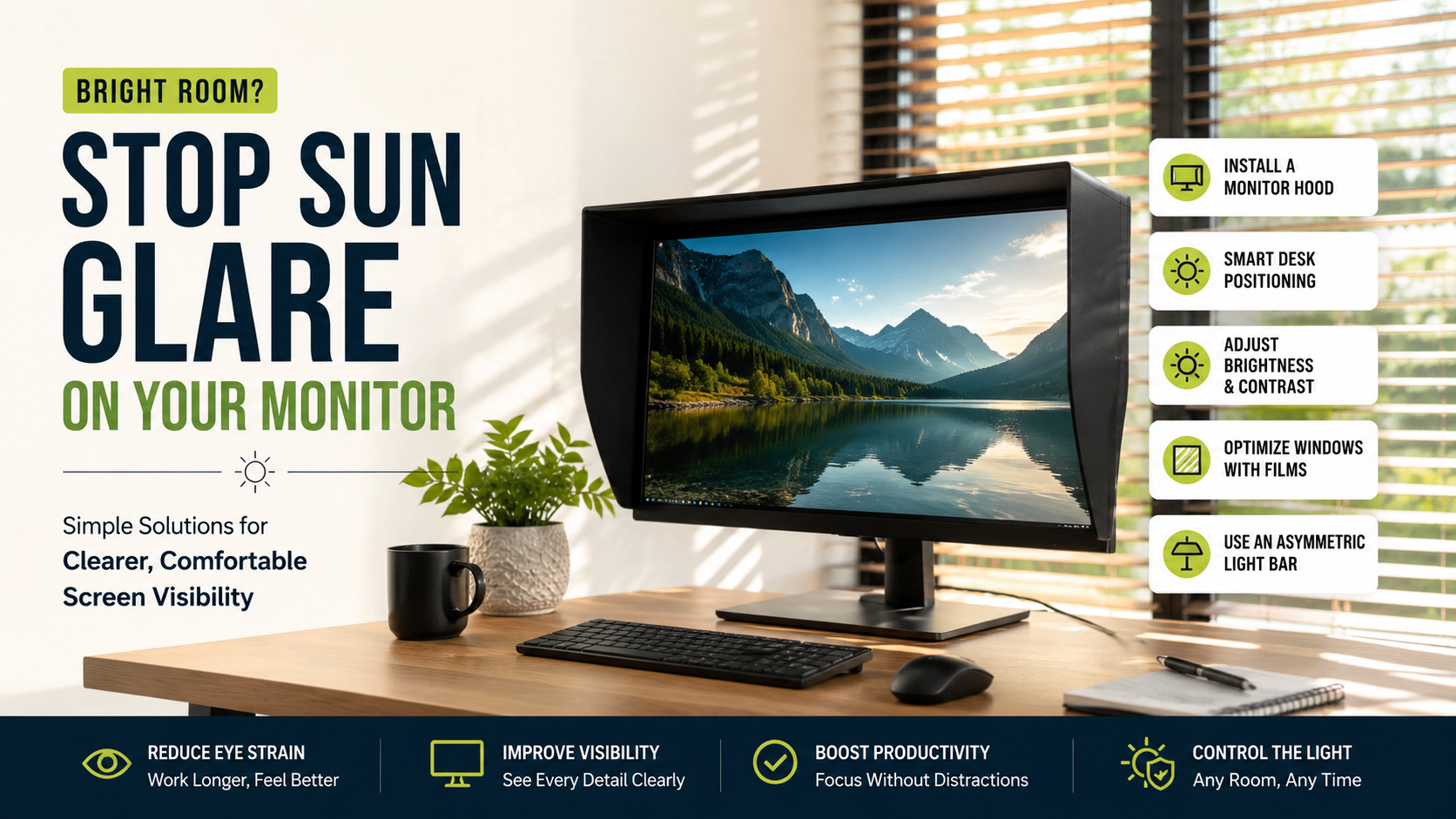
If Your Monitor Is Stuck In A Bright Room, Try This
Working in a sunlit room can feel pleasant until sun glare on monitor screens makes your display difficult to see. Harsh daylight can wash out text, flatten colors, and cause you to squint. Poor screen visibility and excessive reflections can also contribute to eyestrain, headaches, and physical fatigue.
When moving your desk away from a window is not practical, you need to control the light around your display. Managing sun glare on monitor screens often requires a mix of positioning, display adjustments, and simple accessories.
According to ergonomics research from the Occupational Safety and Health Administration (OSHA), poor screen visibility and excessive reflections contribute directly to eyestrain, headaches, and physical fatigue.
If those changes are not enough, consider a matte anti-glare filter or monitor hood. Window treatments can reduce incoming sunlight before it reaches your workspace. These solutions work together to create a clearer and more comfortable viewing environment.
How to get rid of sun glare on monitor?
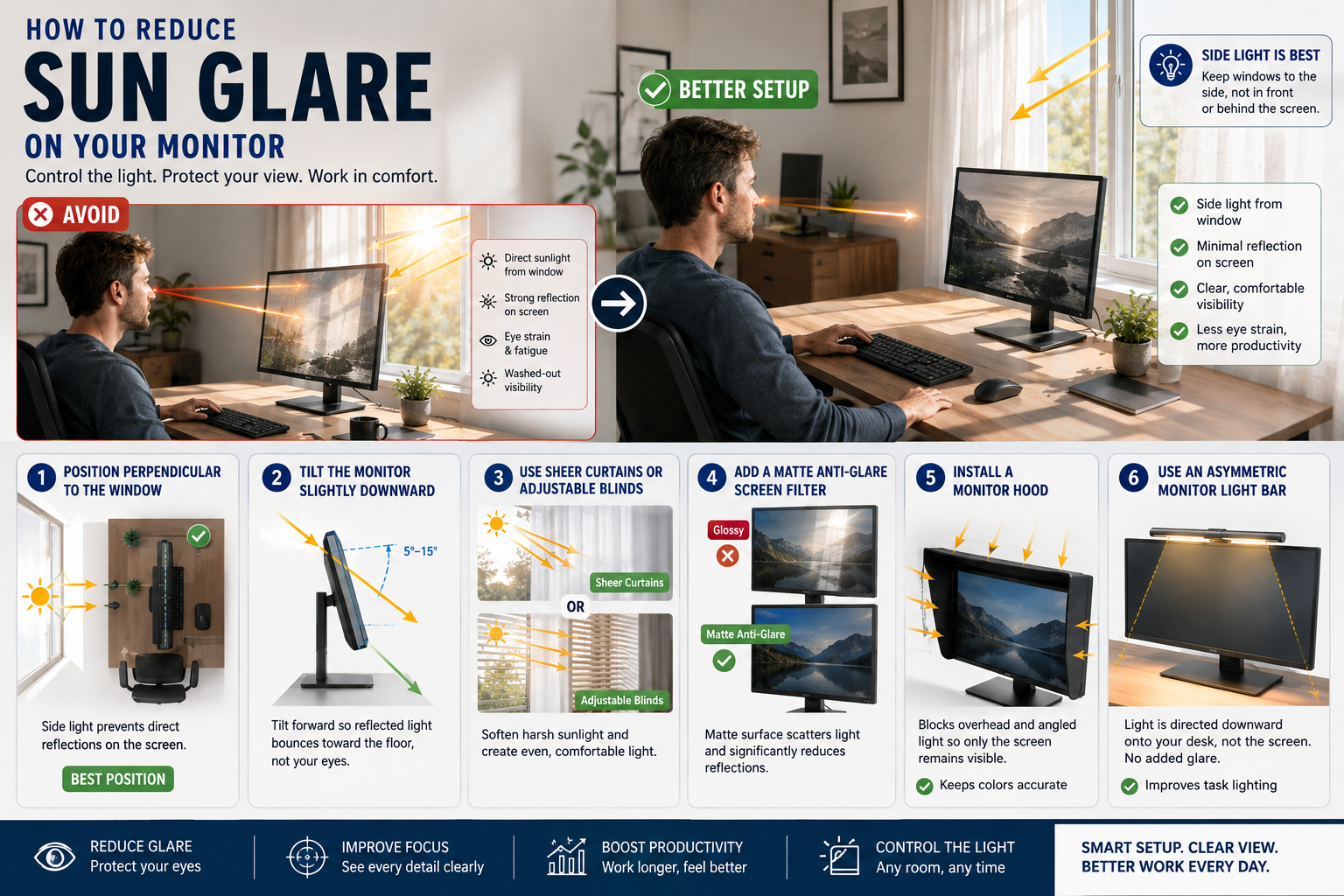
To get rid of sun glare on monitor displays, start with the physical setup. Tilt your screen slightly forward or downward. This can redirect incoming light toward the floor instead of your eyes. Avoid placing the monitor directly opposite a bright window.
Next, adjust your display brightness to match the room. A brighter screen can help overcome moderate daylight without making text difficult to read. Fine-tune contrast as well so letters and interface elements remain clear.
If reflections continue, add a matte anti-glare screen filter. These filters scatter incoming light across the panel. They reduce mirror-like reflections without requiring you to move your entire desk. If you are also choosing a new display, understanding how to choose the perfect gaming monitor can help you select a screen better suited to your environment.
A monitor hood offers another effective option. It creates a shaded area around the display and blocks light from several directions.
For persistent glare, combine these solutions. Proper positioning, suitable brightness, and physical glare protection usually provide better results than relying on one adjustment alone.
Install a Monitor Hood
A dedicated monitor hood works like a three-sided visor around your display. It blocks overhead light and reduces sunlight entering from angled directions. This makes it useful when your desk cannot move away from nearby windows.
Monitor hoods are especially helpful for people who work with detailed visuals. Designers, photographers, and video editors often need consistent screen visibility. A hood can reduce reflections without changing the monitor’s built-in display characteristics.
The biggest advantage is simplicity. You do not need to modify your operating system or replace your monitor. The hood physically limits how much ambient light reaches the panel.
Choose a hood that fits your monitor dimensions. It should sit securely without covering ventilation areas. Avoid models that interfere with buttons, ports, speakers, or adjustable stands.
For the best results, combine a monitor hood with proper screen positioning. Keep windows to the side whenever possible. This setup reduces both direct reflections and bright background contrast.
A hood will not remove every reflection, but it can significantly improve visibility in bright rooms.
How to stop sun glare on screen?
Stopping sun glare on screen displays starts with smart desk positioning. Avoid placing your monitor directly opposite a window. Direct sunlight can create strong reflections that make text and images difficult to see.
You should also avoid placing the display directly in front of bare glass. A bright window behind the monitor creates strong contrast between the screen and surrounding area. This can make your eyes work harder.
Instead, position your desk perpendicular to the window. Side lighting usually creates fewer direct reflections while still providing useful natural light.
A monitor light bar can also improve the workspace. Choose an asymmetric LED screen light bar that directs light toward your desk instead of the display. This provides task lighting without adding unnecessary reflections.
Keep overhead lights from shining directly onto the screen as well. Small changes to lamp positions can make a noticeable difference.
If glare remains severe, combine better positioning with curtains, blinds, or a matte screen filter. These measures address both the source and the reflection.
Optimize Windows with Polarized Films
A thin solar window film can reduce intense daylight before it reaches your workspace. These films are applied directly to window glass and can reduce the amount of harsh light entering the room.
Polarized or solar-control films can help manage excessive brightness while preserving your outdoor view. They are useful when curtains or blinds would make the room too dark. They also provide a more consistent solution throughout the day.
Window films are particularly helpful for desks located near large windows. They address the problem at its source instead of only treating reflections on the monitor.
However, the right film matters. Choose a product designed for glare and solar control rather than one intended only for privacy. Check the manufacturer’s specifications before installation.
You can also combine window film with sheer curtains or adjustable blinds. This gives you more control when sunlight becomes stronger during certain hours.
Reducing incoming sunlight can make other monitor adjustments more effective. Your display will not need to compete with extremely bright surroundings, making text and images easier to view.
What is glare in a monitor?
Glare on a computer monitor happens when external light interferes with the screen’s visibility. Light can reflect from the display surface or create excessive brightness around the screen. Both situations reduce perceived contrast and make content harder to read.
Specular glare creates sharp, mirror-like reflections. You may see windows, lamps, or bright skies reflected directly on the panel. These reflections can cover important parts of your display.
Diffuse glare is different. It creates a hazy or washed-out appearance across the screen. Colors can look weaker, while dark areas lose definition.
Both forms can make your eyes work harder. Your pupils must constantly adjust between bright surroundings and darker screen content. Long periods of visual effort may contribute to discomfort, tired eyes, or headaches.
Your monitor’s surface coating also affects glare. Glossy panels tend to reflect more light. Matte coatings scatter incoming light and usually perform better in bright workspaces. The choice of display technology can also influence how a screen looks and performs, making OLED vs QLED display technology worth considering when selecting a monitor.
Understanding the type of glare helps you choose the right solution.
The Impact of Display Coatings
Display coatings have a major effect on how your monitor handles bright rooms. Glossy screens can produce strong colors and deep blacks. However, their smooth surfaces can reflect windows, lamps, and other light sources.
Matte displays use microscopic surface textures to scatter incoming light. This reduces sharp reflections and generally improves visibility under strong ambient lighting. The trade-off can be slightly lower perceived contrast or image clarity.
Your ideal choice depends on your workspace and daily tasks. A glossy screen may work well in a controlled room with limited light. A matte screen is usually more practical when daylight changes throughout the day.
If you already own a glossy monitor, you do not necessarily need to replace it. A high-quality matte screen filter can reduce reflections and improve usability.
Keep in mind that some filters can slightly affect sharpness or color saturation. Choose a quality product designed for your display size.
For most bright rooms, controlling the surrounding light remains the most effective first step.
How do I reduce glare naturally?
You can reduce screen glare naturally by controlling how sunlight enters your room. You do not need to block every ray of daylight. Instead, aim to soften and redirect the incoming light.
Sheer curtains can diffuse strong sunlight while keeping your workspace bright. Light-filtering cellular shades provide another option. Adjustable Venetian blinds are useful when you need precise control.
Angle blind slats upward to direct sunlight toward the ceiling. This spreads daylight more evenly throughout the room. It also reduces the chance of direct beams reaching your monitor.
Large indoor plants can provide another natural layer of diffusion. Broad leaves can break up intense light near windows. They will not replace proper window treatments, but they can soften harsh lighting.
You should also avoid highly reflective surfaces around your desk. Glossy furniture, polished walls, and bright decorations can bounce light toward the screen.
These changes can reduce sun glare on monitor setups without making your workspace feel dark. The goal is balanced ambient lighting, not complete darkness.
Paint Walls with Matte Finishes
Wall surfaces can influence how much light reaches your monitor. Bright, glossy walls reflect incoming sunlight more strongly than softer, non-reflective finishes. This reflected light can increase overall room brightness and create secondary screen reflections.
If your workspace has highly reflective walls, consider using matte or eggshell paint. Neutral colors can also help create a more balanced lighting environment. They absorb or scatter some incoming light instead of reflecting it sharply.
You do not need to repaint an entire room to see an improvement. Focus on the wall directly behind or beside your monitor. These surfaces can have a noticeable effect when strong daylight enters nearby windows.
Avoid extremely glossy finishes around workstations. They can bounce light between windows, walls, and your display.
A matte wall finish works best when combined with other glare-reduction measures. Position your monitor away from direct sunlight and use adjustable window coverings when needed.
This approach creates softer ambient lighting without eliminating natural daylight. It can make your workspace more comfortable while also improving screen visibility during bright parts of the day.
How to protect a monitor from sunlight?
Protecting your monitor from direct sunlight is important because excessive heat can affect electronic components and display materials. Strong solar exposure can also contribute to discoloration and long-term wear.
Keep the monitor housing completely outside direct sunbeams whenever possible. Pay attention to changing sunlight throughout the day. A display that is shaded in the morning may receive direct afternoon sunlight later.
If sunlight moves across your desk, use a roller shade or adjust the monitor’s position. Window treatments can prevent repeated exposure without forcing you to work in darkness.
Direct heat is especially concerning when it warms the back of the monitor. Excessive temperatures can place additional stress on internal components. Good ventilation helps manage normal operating heat, just as proper laptop cooling can help prevent excessive heat buildup in other computer systems.
Do not place objects over ventilation openings. Leave enough clearance around the monitor housing for air to circulate.
Protecting the display from sunlight also helps maintain a consistent viewing environment. Less heat and fewer reflections can make the monitor more comfortable to use.
A simple combination of shading, positioning, and airflow can protect your screen without expensive equipment.
Maintain Proper Chassis Airflow
Proper airflow helps keep monitor electronics within their normal operating temperature range. Direct sunlight can add unwanted heat to the housing, especially when the display sits near a sunny window.
Start by keeping the monitor’s ventilation openings clear. Dust can restrict airflow and make heat management less effective. Clean the vents carefully according to the manufacturer’s recommendations.
Leave sufficient space behind and around the monitor. Avoid pushing the display tightly against a wall if its design requires rear ventilation.
You should also prevent sunlight from heating the chassis for long periods. Use blinds, curtains, or a monitor hood to reduce direct exposure. Moving the display slightly can also make a difference.
Good airflow does not eliminate glare, but it supports the monitor’s long-term operation. It becomes particularly important when the room itself becomes hot during sunny afternoons.
Combining ventilation with sunlight protection creates a safer setup. Keep the display shaded, maintain clear vents, and avoid unnecessary heat buildup.
These simple habits can help your monitor operate more comfortably. They also reduce the need to compensate for sunlight through excessive brightness.
Frequently Asked Questions
Do anti-glare screen protectors ruin display quality?
Modern matte protectors can slightly reduce sharpness or maximum saturation. However, high-quality filters can significantly reduce reflections while preserving good text clarity and color performance.
Is a curved monitor better for bright rooms?
Usually, no. Curved screens can catch light from wider angles. A flat monitor with a matte coating is often easier to manage in a bright workspace.
What monitor brightness level is best for bright spaces?
A display around 350 to 500 nits can work well in very bright rooms. Your ideal setting depends on the surrounding light and the monitor itself. Avoid brightness levels that cause eye discomfort.
Does dark mode help with screen glare?
Dark mode does not always help in bright rooms. Dark interfaces can make reflections more noticeable because the surrounding light stands out against darker areas.
The best approach is to balance screen brightness with ambient lighting. Positioning, window control, and a suitable display surface usually matter more than software settings alone.
Final Thoughts
Working in a bright room should not mean struggling with sun glare on monitor screens. Simple changes can make a major difference without requiring an expensive office makeover.
Start with your physical setup. Position your desk so windows sit to the side rather than directly behind or opposite the screen. Tilt the monitor slightly and adjust brightness until text looks clear.
If reflections remain strong, consider a matte anti-glare filter, monitor hood, or asymmetric light bar. Window films, sheer curtains, and angled blinds can further reduce harsh daylight.
Your surroundings matter too. Matte wall finishes and non-reflective surfaces can reduce secondary reflections. Keep direct sunlight away from the monitor housing to limit unnecessary heat exposure.
The key is to control both the light entering the room and the light reaching the display. With these practical adjustments, you can reduce sun glare on monitor screens, improve visibility, and create a more comfortable workspace.