Is Google Chrome Safer To Use Than Microsoft Edge?
Choosing the right browser matters because your browser handles passwords, downloads, websites, and sensitive accounts every day. Many users ask: is Google Chrome safer to use than Microsoft Edge? The answer depends on the security and privacy features you value most.
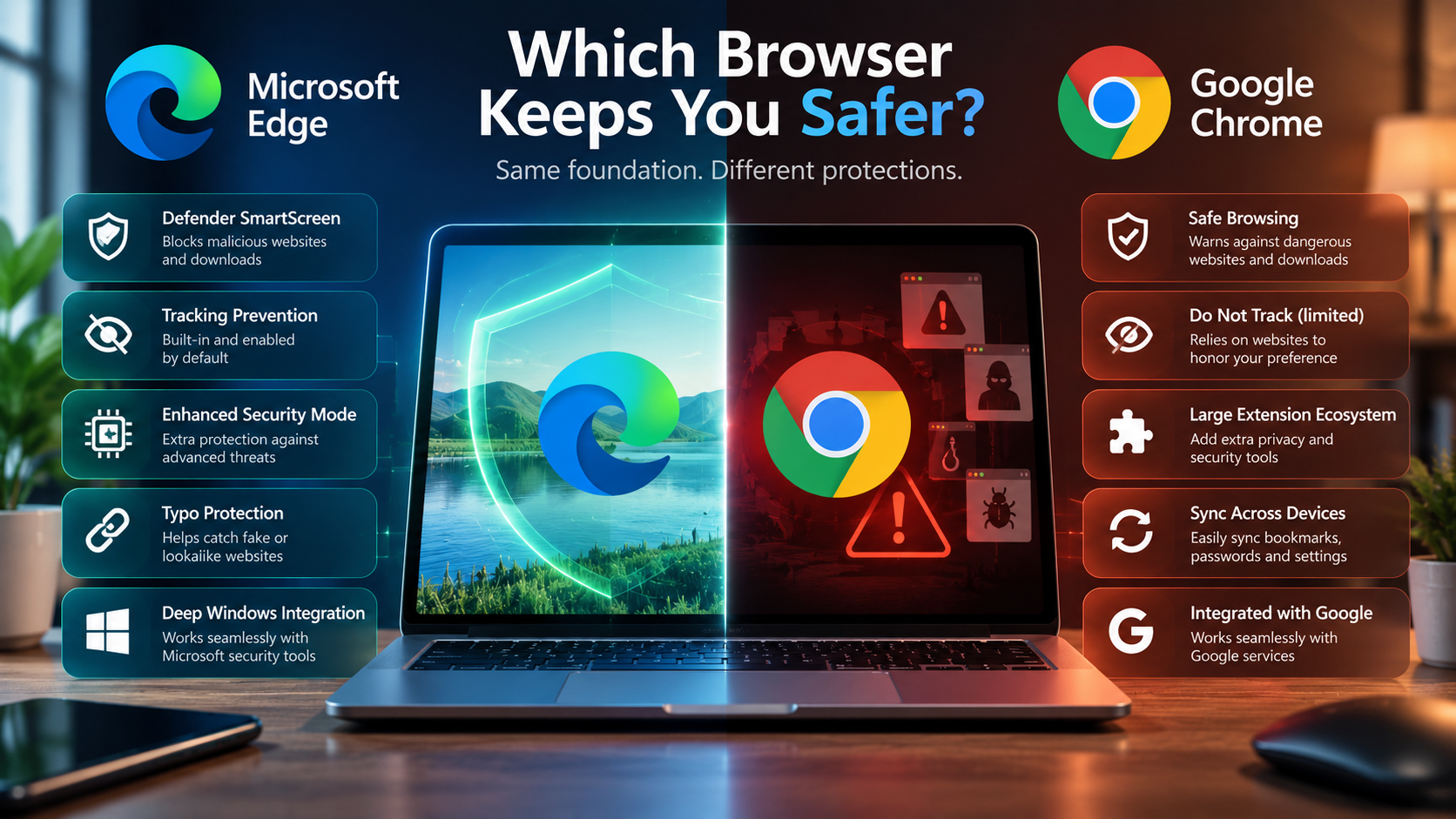
Both browsers use Chromium and include strong security technologies. Chrome uses Google Safe Browsing, automatic security updates, password protection, and Safety Check. You can learn more about these protections in Google’s official Chrome security guide. Edge uses Microsoft Defender SmartScreen, tracking prevention, and additional security features designed to protect users from phishing and malicious downloads.
Both browsers also use sandboxing to reduce the potential impact of malicious web content. However, security is only one part of the comparison. Privacy controls, extensions, account protection, operating system updates, and browsing habits also affect your overall safety.
This guide compares Chrome and Edge across security, privacy, performance, synchronization, and platform integration. It also explains what Apple actually says about Chrome and Safari. By the end, you can decide which browser better matches your needs.
Who Is Better, Chrome Or Edge?
There is no universal answer to whether Chrome or Edge is better. Both browsers receive regular security updates and use Chromium’s security architecture. They also provide protection against phishing, malware, malicious downloads, and compromised websites.
Chrome uses Google Safe Browsing to identify potentially dangerous websites and downloads. It also provides Safety Check, which reviews important browser security settings. Enhanced Safe Browsing can provide additional protection against suspicious websites and files.
Edge uses Microsoft Defender SmartScreen to check websites and downloads against known threats. It also provides tracking prevention with different protection levels.
For everyday users, the practical security difference may be smaller than expected. Browser updates and safe account practices matter more than brand preference.
So, is Google Chrome safer to use than Microsoft Edge? Neither browser can be described as universally safer. Both provide strong mainstream security, but they approach some protections differently.
Your operating system and online habits should therefore influence your choice.
Resource Efficiency And System Impact
Browser performance does not automatically determine browser security. However, resource usage can affect your overall experience, especially on laptops with limited memory or battery capacity. If Chrome is using unusually high processor resources, understanding why Google Chrome uses so much CPU can help identify performance problems.
Microsoft Edge includes Sleeping Tabs, which can pause inactive tabs and reduce resource usage. Microsoft designed the feature to help reduce CPU and memory consumption when many tabs remain open.
Edge also provides performance features such as Startup Boost. These tools can improve responsiveness when opening the browser or returning to regular browsing.
Chrome also includes memory-management features that can reduce resource usage from inactive tabs. Therefore, it is inaccurate to claim that Chrome always consumes more memory or that Edge is always faster.
Your actual results depend on several factors. These include the number of open tabs, installed extensions, websites, hardware, and browser settings.
If RAM usage and battery life matter to you, test both browsers on your own device. A clean browser installation with fewer extensions will usually perform better than one filled with unnecessary add-ons.
Performance should therefore be considered separately from security when comparing Chrome and Edge.
Why Do People Use Google Chrome Instead Of Microsoft Edge?
Google Chrome remains popular because it fits naturally into Google’s broader ecosystem. People who already use Gmail, Google Drive, YouTube, Google Password Manager, and Android may find Chrome convenient.
Chrome can synchronize supported information across devices when users sign into their Google account. Depending on the settings enabled, this can include bookmarks, passwords, settings, and open tabs.
Familiarity also plays a major role. Chrome has been widely used for years, and many websites, developers, organizations, and online tutorials support it extensively.
Its extension ecosystem is another reason people choose Chrome. Extensions can add productivity tools, password managers, accessibility features, development utilities, and other functions.
However, popularity does not prove that Chrome provides better security. Market share and browser security are different measurements.
Edge offers many comparable Chromium security technologies. It also adds Microsoft-specific protections such as SmartScreen and integrates closely with Windows.
The better choice depends on your ecosystem. Google users may prefer Chrome, while Windows and Microsoft 365 users may prefer Edge.
The Power Of Cross-Device Synchronization
Cross-device synchronization is one of Chrome’s most convenient features. When synchronization is enabled, Chrome can make supported browser information available across multiple devices.
Depending on your settings, this can include bookmarks, passwords, history, settings, and open tabs. This is useful when you regularly move between a desktop computer, laptop, smartphone, or tablet.
Chrome works across Windows, macOS, Android, and iOS, making it convenient for people who use several platforms. Android users who want to compare alternatives can also explore web browser apps for Android when choosing how they browse on mobile.
Edge provides a similar synchronization system through a Microsoft account. It can synchronize supported favorites, passwords, history, settings, extensions, and other browser information.
The main difference is therefore not that Chrome offers synchronization while Edge does not. The bigger difference is the ecosystem connected to each browser.
Google users may find Chrome more convenient because their existing services already use a Google account. Microsoft 365 and Windows users may prefer Edge for similar reasons.
Synchronization also creates security responsibilities. Only enable syncing on trusted devices. Protect your account with a strong password and multifactor authentication.
Convenience should never replace basic account security.
Which Is The World’s Safest Browser?
There is no single browser that can objectively be called the world’s safest for every person and situation. Security, privacy, anonymity, compatibility, and convenience are separate considerations.
Tor Browser is designed around anonymity and routes traffic through the Tor network. This makes it useful for specific privacy-sensitive situations. However, it can involve performance and compatibility trade-offs.
Chrome and Edge are mainstream browsers with extensive security protections. Chrome provides Safe Browsing, Safety Check, automatic updates, password protections, and additional security settings.
Edge provides SmartScreen, tracking prevention, password protection, and enhanced security options.
This means the answer to is Google Chrome safer to use than Microsoft Edge depends partly on what you mean by “safer.” Protection against malicious downloads is different from protection against tracking. Anonymous browsing is different from everyday malware protection.
Privacy also deserves separate consideration. A browser can provide strong malware protection while still collecting certain diagnostic or usage information.
Instead of looking for one universal winner, compare the specific security and privacy features that matter to you.
Sandboxing Defenses Versus Data Privacy
Browser security and browser privacy should not be treated as the same thing. Sandboxing helps isolate browser processes from other parts of the operating system.
This isolation can reduce the potential impact of malicious web content if an attack succeeds. Chrome and Edge both benefit from Chromium’s security architecture and related isolation technologies.
However, the browser is only one part of your security setup. Operating system updates, browser updates, account passwords, extensions, and browsing habits also influence your risk.
Privacy involves different questions. You may want to know how much information your browser collects, how tracking is controlled, and which data is shared with online services. Understanding first-party and third-party cookies can also help explain how websites remember users and track activity across the web.
Chrome provides privacy controls and different Safe Browsing options. Enhanced Safe Browsing can provide additional protection against dangerous websites and downloads, but it involves sending relevant browsing information to Google for protection.
Edge provides Tracking Prevention with Basic, Balanced, and Strict options. SmartScreen also checks potentially dangerous websites and downloads.
If privacy matters most, review the settings of both browsers rather than assuming security features automatically provide maximum privacy.
Should I Keep Microsoft Edge Or Use Google Chrome?
For many Windows users, there is no security requirement to replace Edge with Chrome. Edge already provides protection against phishing, malware, and dangerous downloads through features such as Microsoft Defender SmartScreen.
Chrome offers similarly strong mainstream protection through Safe Browsing, automatic updates, password checks, and Safety Check.
Your decision can therefore depend on the ecosystem you use most. Chrome may be convenient if you rely heavily on Google services, Android, or Google’s synchronization features.
Edge may be more convenient if you use Windows, Microsoft 365, or Microsoft’s security ecosystem. It also provides built-in features that can reduce the need for additional software.
Both browsers support modern websites and extensions. Edge can also install compatible extensions from the Chrome Web Store after enabling the appropriate setting.
Before switching browsers, review your existing security settings. Enable automatic updates, use strong passwords, activate multifactor authentication, and remove unnecessary extensions.
These habits can provide a larger security improvement than switching browsers without changing your security practices.
The important question is not simply is Google Chrome safer to use than Microsoft Edge. Instead, consider which browser gives you the features and controls you will actually use.
Taking Advantage Of Edge Extensions
Microsoft Edge supports extensions through its own add-on ecosystem and can also support compatible extensions from the Chrome Web Store. Students who use Chrome can also find useful Chrome extensions for students that support focus, productivity, and everyday study tasks.
This makes Edge easier to use for people who depend on specific Chrome extensions. Password managers, developer tools, productivity utilities, accessibility tools, and customization extensions may work across both Chromium-based browsers.
However, compatibility should not be assumed to be perfect. Extensions can behave differently because of permissions, browser policies, settings, or implementation differences.
Extensions can also create security risks. A malicious or compromised extension may access information covered by its permissions.
Before installing an extension, check the developer, permissions, reviews, update history, and reputation. Remove extensions you no longer need.
Fewer trusted extensions generally create a simpler security environment.
Edge’s built-in security protections continue to operate alongside supported extensions. SmartScreen can help identify dangerous websites and downloads. Tracking Prevention can also limit certain forms of online tracking.
The main advantage is flexibility. You do not necessarily need to install Chrome simply because you want access to a particular Chromium extension.
However, an extension’s availability does not guarantee that it is trustworthy. Treat every browser extension as software that deserves security scrutiny.
Why Does Apple Say Not To Use Chrome?
The original claim that Apple tells users not to use Chrome is too strong. Apple promotes Safari’s privacy, performance, and battery advantages, but that does not mean Apple has declared Chrome unsafe.
Apple’s Safari materials emphasize Intelligent Tracking Prevention, privacy protections, and performance on Apple devices. Apple also promotes Safari as a privacy-focused browser and encourages users to make it their default browser.
Apple publishes performance comparisons involving Safari and Chrome under specific testing conditions. These comparisons can highlight Safari’s battery efficiency, but they should be understood as Apple’s own product testing.
That evidence does not establish that Chrome is inherently insecure on Mac or iPhone. Chrome remains available on Apple’s platforms and includes its own security protections.
Chrome provides Safe Browsing, automatic updates, password management, Safety Check, and other security controls.
The more accurate comparison is therefore about privacy, performance, ecosystem integration, and security features.
So, when asking is Google Chrome safer to use than Microsoft Edge, Apple’s position should not be used as evidence that Chrome is unsafe. Safari’s advantages on Apple hardware are a separate issue.
Users should compare the features they actually need instead of treating Apple’s marketing comparisons as universal security conclusions.
System Optimization And Battery Endurance
Safari can be an attractive option for Apple users who prioritize platform integration and battery efficiency. Apple develops Safari specifically for its operating systems and hardware.
Actual battery performance can vary between users. Browser settings, extensions, websites, video playback, screen brightness, background activity, and hardware can all affect battery life. If your laptop battery is draining unusually quickly, understanding why your laptop battery drains so fast can help identify the underlying cause.
However, Safari’s optimization does not mean Chrome automatically creates a security problem on a Mac. Chrome provides its own security technologies, including Safe Browsing, automatic updates, password checks, and security settings.
Actual battery performance can vary between users. Browser settings, extensions, websites, video playback, screen brightness, background activity, and hardware can all affect battery life.
For Mac users, Safari may be suitable if battery efficiency and Apple’s privacy features are priorities. Chrome may be preferable for users who rely heavily on Google’s services or need Chrome-specific workflows.
The same principle applies when comparing Chrome and Edge on Windows. Performance differences should be measured on the device being used.
Ultimately, security and performance are separate considerations. A browser that uses fewer resources is not automatically more secure.
The best approach is to compare security controls, privacy settings, performance, and ecosystem compatibility together.
Conclusion
So, is Google Chrome safer to use than Microsoft Edge? There is no universal security winner. Both browsers provide strong protection against phishing, malware, malicious downloads, and other common online threats.
Chrome stands out for its Safe Browsing technology, Google ecosystem, and cross-device synchronization. Edge offers SmartScreen, tracking prevention, Windows integration, and useful performance features.
Your choice should depend on your devices, privacy preferences, and the services you use most. More importantly, keep your browser updated, use strong passwords, enable multifactor authentication, and install only trusted extensions.
For most users, either Chrome or Edge can provide a secure browsing experience when properly configured and regularly updated.