
Understanding Intel Core Ultra Processors: A New Era of PC Performance
Intel Core Ultra processors represent a major transformation in personal computing. They are designed to handle everyday tasks, professional workloads, creative applications, and artificial intelligence features more efficiently.
For many years, processor development focused mainly on increasing CPU core counts and improving clock speeds. While this approach delivered better performance, modern computing requirements have changed significantly. Today’s users expect laptops to manage AI-powered applications, advanced video editing, gaming, communication tools, and productivity software while maintaining excellent battery life.
Traditional processors mainly depended on CPU cores and integrated graphics to manage workloads. However, modern software requires more specialized hardware. AI applications, advanced video tools, and demanding productivity software need faster and smarter processing methods.
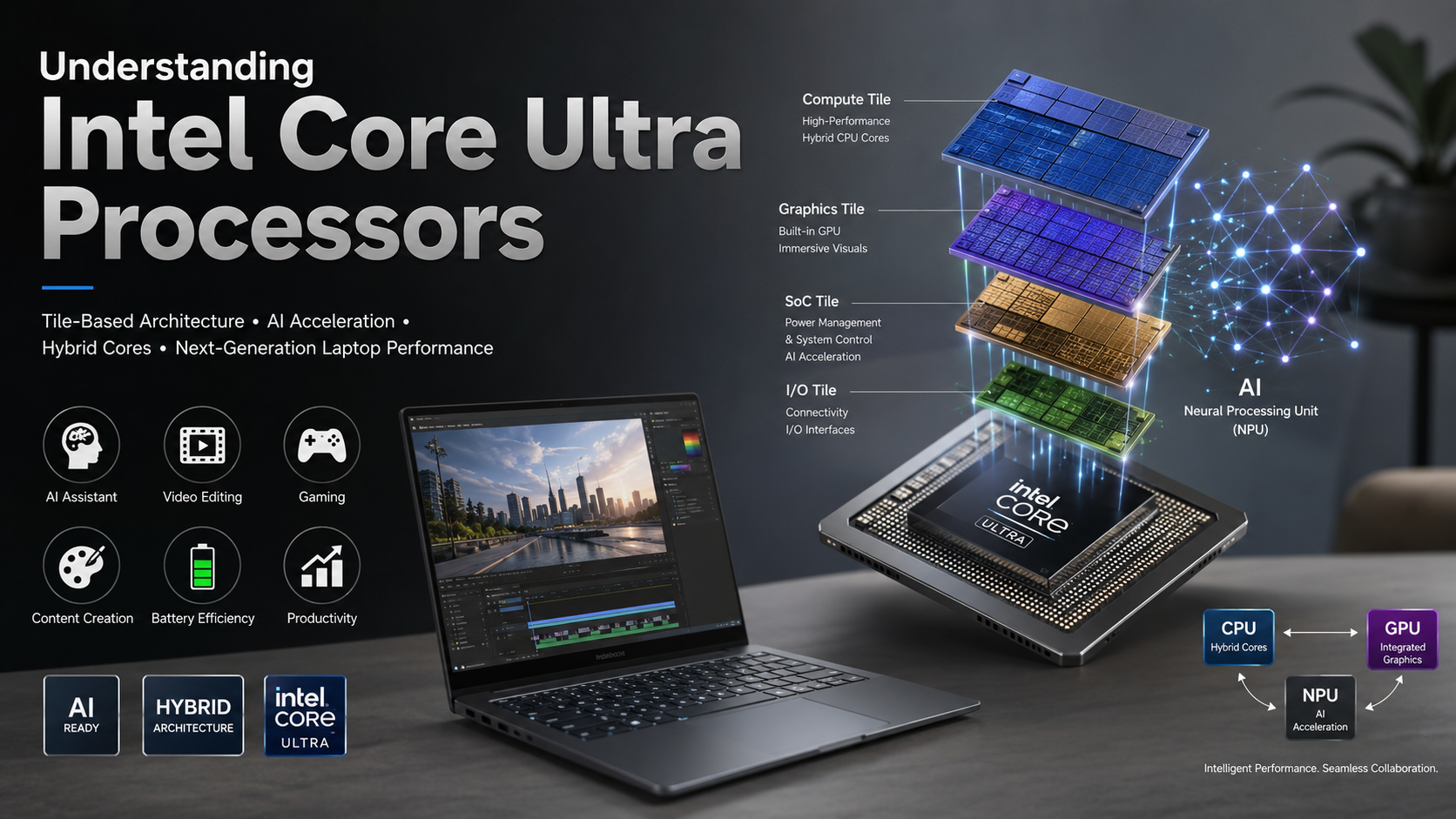
Intel introduced a new disaggregated tile-based architecture to address these changing demands. Instead of placing every component on one silicon design, these processors separate computing, graphics, input/output, and low-power functions into different tiles.
This approach improves flexibility, efficiency, and performance. It also allows each component to handle specific tasks more effectively.
With improved power management, stronger integrated graphics, and dedicated AI acceleration, Intel Core Ultra processors create a foundation for the next generation of laptops and mobile computers.
The introduction of Intel Core Ultra marks the beginning of a new category of AI-ready personal computers. These processors are designed not only for faster performance but also for smarter workload management.

What Are Intel Core Ultra Processors?
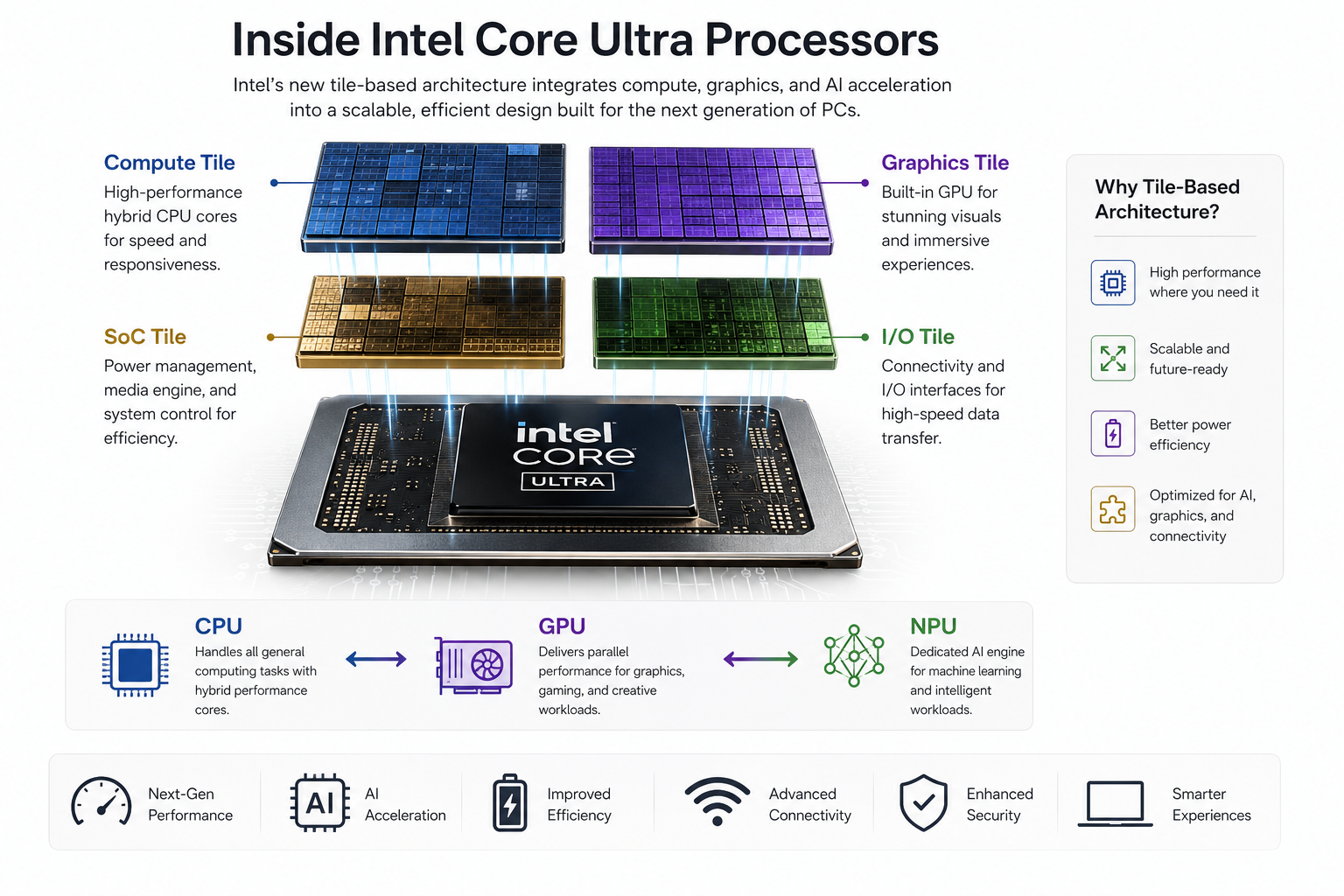
Intel Core Ultra processors represent a major shift in how Intel designs and builds consumer processors. Instead of using a traditional single-chip design, Intel introduced a tile-based architecture that separates the processor into dedicated compute, graphics, SoC, and input/output tiles. This modular approach improves manufacturing efficiency, thermal performance, and power management.
Another major innovation is the built-in Neural Processing Unit (NPU). The NPU is designed to handle AI workloads directly on your device with minimal power consumption. It processes machine learning tasks without placing additional strain on the CPU or GPU. As a result, laptops stay cooler, quieter, and more responsive during demanding workloads.
These improvements also deliver better battery life, stronger integrated graphics, and enhanced performance for modern applications. Together, they make Intel Core Ultra processors well suited for AI-powered computing, productivity, creative work, and everyday multitasking.
The Role of the Neural Processing Unit
One of the biggest upgrades in Intel Core Ultra processors is the dedicated Neural Processing Unit (NPU). Previous Intel processors relied mainly on the CPU or GPU for AI workloads. The NPU changes this by handling AI tasks independently while consuming far less power.
This dedicated hardware accelerates everyday AI features such as background blur during video calls, live audio transcription, predictive text, and noise reduction. Because these workloads no longer compete with the CPU, the system remains smooth and responsive even when several applications run simultaneously.
The NPU also helps extend battery life by processing AI tasks more efficiently. As more software incorporates artificial intelligence, this hardware will become increasingly valuable. It allows modern laptops to deliver better performance without generating excessive heat or reducing overall efficiency.
Is the Intel Ultra 7 the Same as the i7?
The Intel Core Ultra 7 occupies a similar performance tier as older Intel Core i7 processors, but they are not the same. Core Ultra 7 processors are built on Intel’s newer architectures, beginning with Meteor Lake, and include technologies that traditional Core i7 chips never offered.
Unlike previous i7 processors, the Ultra 7 features a dedicated NPU for AI acceleration, advanced Intel Arc integrated graphics, and a redesigned hybrid core architecture. It also introduces Low-Power Island Efficiency cores, which handle light background tasks while using very little energy.
These architectural improvements allow Ultra 7 laptops to deliver stronger graphics, longer battery life, and better efficiency during everyday use. While older Core i7 processors still provide excellent performance, the Ultra 7 is designed for modern AI workloads, improved portability, and better overall power management.
Architectural Differences and Performance
Traditional Intel Core i7 processors used a monolithic die, where every component was integrated onto one piece of silicon. In contrast, Intel Core Ultra 7 processors use Intel’s advanced tile-based packaging technology. This separates computing, graphics, I/O, and SoC functions into dedicated tiles that work together efficiently.
This modular design improves manufacturing yields and allows Intel to optimize each tile independently. It also enhances thermal management by distributing workloads more effectively across the processor.
For users, these improvements translate into better sustained performance during demanding tasks such as video editing, software development, and content creation. Combined with improved power scaling, the processor delivers consistent performance without excessive heat. The result is a more efficient laptop that performs well under heavy workloads while maintaining excellent battery life.
Is Core Ultra 9 Better Than i9?
Whether the Intel Core Ultra 9 is better than a traditional Intel Core i9 depends on how you use your computer. Desktop Core i9 processors still deliver higher peak performance for intensive gaming, professional rendering, and other workloads that benefit from high sustained power.
However, the Core Ultra 9 focuses on balancing performance with efficiency. It includes a dedicated NPU, advanced Intel Arc graphics, and improved power management. These features make it especially attractive for premium thin-and-light laptops.
If your priority is maximum raw processing power, a desktop Core i9 remains the stronger option. If you want excellent battery life, AI acceleration, better integrated graphics, and modern laptop efficiency, the Core Ultra 9 offers a more versatile experience for everyday productivity and professional workloads.
Efficiency Gains Over Raw Speed
Traditional Core i9 processors are designed to achieve the highest possible clock speeds, often at the cost of increased power consumption and heat. In contrast, the Core Ultra 9 focuses on maintaining strong performance while using energy more efficiently.
Its hybrid architecture intelligently assigns demanding applications to high-performance cores. Meanwhile, background processes run on low-power efficiency cores. This approach reduces unnecessary energy usage without sacrificing responsiveness.
The result is a laptop that stays cooler and quieter during long work sessions. Battery life also improves significantly compared to many previous high-performance systems. Although the Core Ultra 9 may not always match desktop-class i9 processors in raw benchmarks, it delivers an excellent balance of performance, efficiency, portability, and AI capabilities for modern mobile computing.
Which Is the Best Intel Core Ultra Processor?
The best Intel Core Ultra processor depends on your workload, budget, and daily computing needs. Intel offers several models that target different types of users, making it easier to choose the right balance of performance and efficiency.
For most professionals, students, and everyday users, the Core Ultra 7 provides an excellent combination of speed, battery life, AI features, and value. It easily handles productivity, creative software, multitasking, and casual gaming.
Users with more demanding workflows may benefit from the Core Ultra 9, which offers additional processing power for professional content creation, software development, and intensive multitasking. Meanwhile, the Core Ultra 5 delivers outstanding value for web browsing, office work, video streaming, and general productivity. Selecting the right processor ultimately depends on the applications you use most often.
Matching Your Needs to the Right Chip
Choosing the right Intel Core Ultra processor starts with understanding your daily workload. Buying more performance than you need often increases cost without providing noticeable benefits.
Consider these recommendations:
- Core Ultra 5: Best for students, office work, web browsing, and entertainment.
- Core Ultra 7: Ideal for professionals, multitasking, content creation, and light gaming.
- Core Ultra 9: Best for demanding creative applications, software development, and professional workloads.
If portability and battery life matter most, both Ultra 5 and Ultra 7 offer excellent efficiency. Users running intensive editing software, virtual machines, or advanced creative applications will benefit from the additional headroom provided by the Ultra 9. Matching your processor to your workload ensures the best balance of performance, efficiency, and long-term value.
Is Intel Ultra Better Than Core?
Comparing Intel Core Ultra with older Intel Core processors reflects Intel’s shift toward a new generation of computing rather than a simple product upgrade. Core Ultra processors introduce modern technologies that previous Core processors were not designed to support.
These improvements include tile-based architecture, dedicated AI hardware through the NPU, stronger integrated Intel Arc graphics, and significantly better power efficiency. Together, these technologies improve battery life, multitasking, and support for modern AI-powered software.
Older Core processors remain capable for many workloads. However, they lack many of the hardware features that future applications increasingly rely on. For anyone purchasing a new laptop today, Intel Core Ultra processors provide a more future-ready platform that balances performance, efficiency, graphics capabilities, and AI acceleration more effectively than previous generations.
The Shift Toward AI-Ready Computing
The move from traditional Intel Core branding to Intel Core Ultra reflects a broader shift toward AI-ready computing. Modern software increasingly relies on artificial intelligence to improve productivity, communication, security, and creative workflows.
Core Ultra processors combine the CPU, GPU, and dedicated NPU so each processor handles the workloads it performs best. This shared approach improves responsiveness while reducing overall power consumption.
As operating systems and applications continue adopting AI-powered features, this architecture will become increasingly important. Users benefit from faster local AI processing, improved privacy because more tasks stay on the device, and longer battery life. By integrating specialized hardware for different workloads, Intel has created a platform designed to support the next generation of computing while remaining efficient, powerful, and ready for future software advancements.
Frequently Asked Questions About Intel Core Ultra Processors
What makes Intel Core Ultra processors different from older Intel Core chips?
Intel Core Ultra processors introduce a new architecture that separates important components into specialized tiles. Unlike older monolithic designs, these processors divide computing, graphics, and low-power operations into optimized sections.
This design improves efficiency, graphics performance, and thermal management. Another major difference is the built-in Neural Processing Unit, which provides dedicated hardware acceleration for AI applications.
Do Intel Core Ultra processors need a dedicated graphics card for gaming?
No. Intel Core Ultra processors include improved integrated graphics based on modern architecture. They can handle many casual games and creative applications without additional graphics hardware.
However, users who play demanding AAA games at high settings or perform advanced 3D rendering may still benefit from a dedicated GPU.
How does the Neural Processing Unit improve daily computer use?
The NPU processes AI tasks directly on the device. This helps features such as background removal, video effects, noise reduction, and smart productivity tools run faster.
Local AI processing can also improve privacy because some workloads do not need to rely on cloud servers.
Are Intel Core Ultra processors mainly designed for laptops?
These processors are primarily focused on thin, lightweight laptops and mobile workstations. Their design emphasizes battery life, efficient performance, and improved thermal control.
They are especially suitable for users who need portability without sacrificing modern computing capabilities.
What is the difference between Efficient-cores and Low-Power Efficient-cores?
Efficient-cores manage multitasking and background workloads while working alongside Performance-cores. Low-Power Efficient-cores handle lighter activities such as media playback and system maintenance.
Their purpose is to reduce power usage during everyday tasks and extend battery life.
What is tile-based architecture in processors?
Tile-based architecture divides a processor into multiple functional sections instead of building everything on one silicon piece.
Each tile performs specific functions, such as computing, graphics, or connectivity. This improves scalability, manufacturing flexibility, and overall processor efficiency.
Conclusion: The Future of Computing With Intel Core Ultra Processors
Intel Core Ultra processors represent a major step forward in personal computer technology. Their combination of tile-based architecture, hybrid cores, advanced graphics, and dedicated AI acceleration creates a more efficient computing experience.
By intelligently distributing workloads between the CPU, GPU, and NPU, these processors deliver strong performance while maintaining energy efficiency.
Users benefit from faster applications, improved battery life, better graphics performance, and smarter AI-powered features. Whether you are editing high-resolution videos, creating content, managing professional workloads, or completing everyday tasks, Intel Core Ultra processors provide a modern platform built for future computing needs.
Choosing the right processor also depends on your performance requirements, budget, and usage needs. Understanding how different CPUs compare can help you make a better purchasing decision. For a detailed comparison of two popular processor families, explore our guide on AMD Ryzen 7 vs Intel Core i7 to understand their performance differences and ideal use cases.
As software continues to evolve, hardware must become more adaptable. Intel’s architectural shift provides the flexibility and efficiency required for the next generation of personal computers.