
Integrated vs Discrete Graphics for Content Creation: Which Is Best?
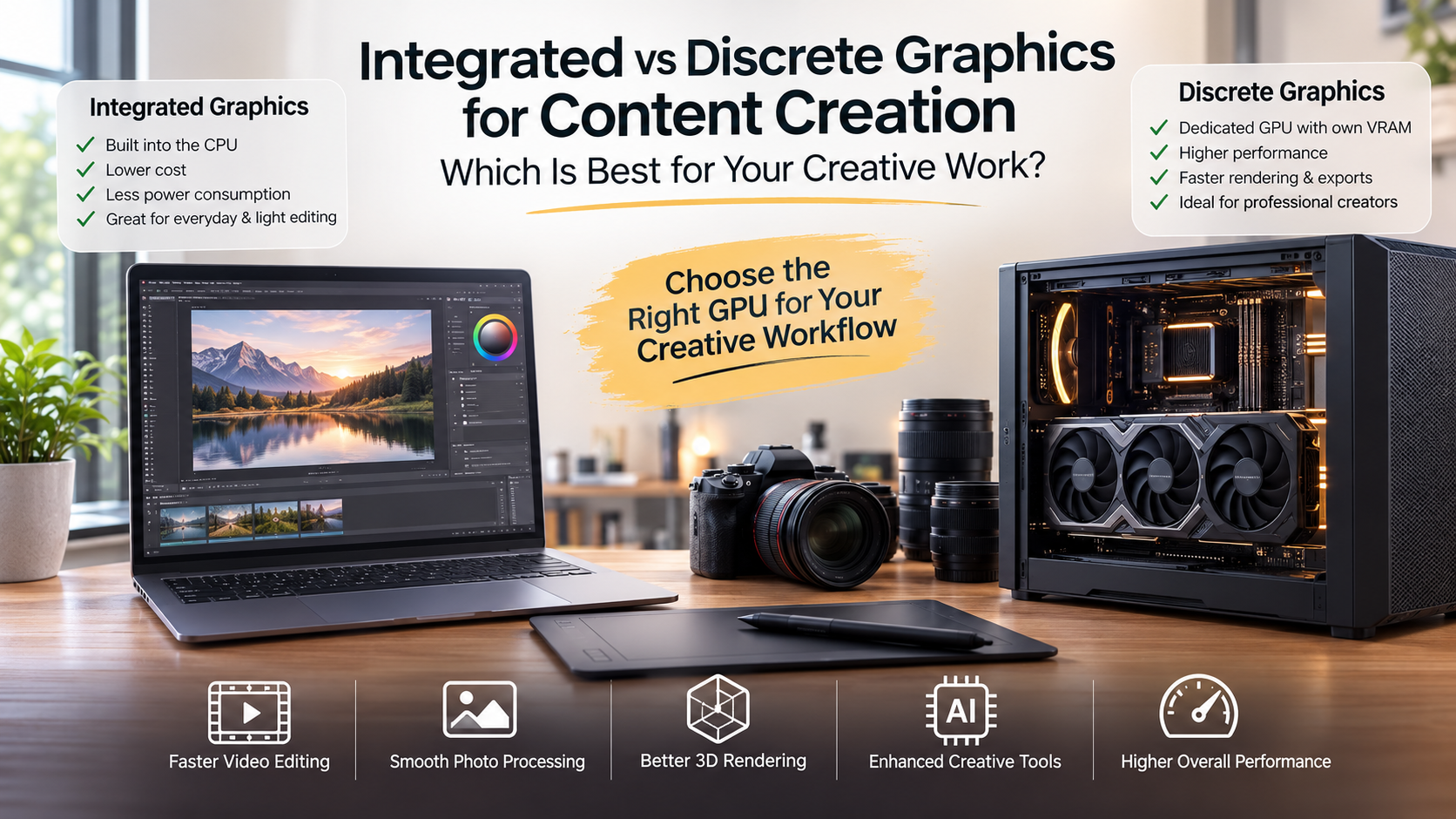
Choosing between integrated and discrete graphics for content creation is one of the most important hardware decisions for creative professionals. Your graphics solution affects video editing speed, rendering performance, 3D modeling, and overall workflow efficiency.
A suitable GPU helps your creative software run smoothly. It reduces delays during editing and prevents performance issues during demanding projects. To better understand how modern graphics processors are designed and optimized, you can explore the official GPU technology resources from NVIDIA, one of the leading graphics hardware manufacturers.
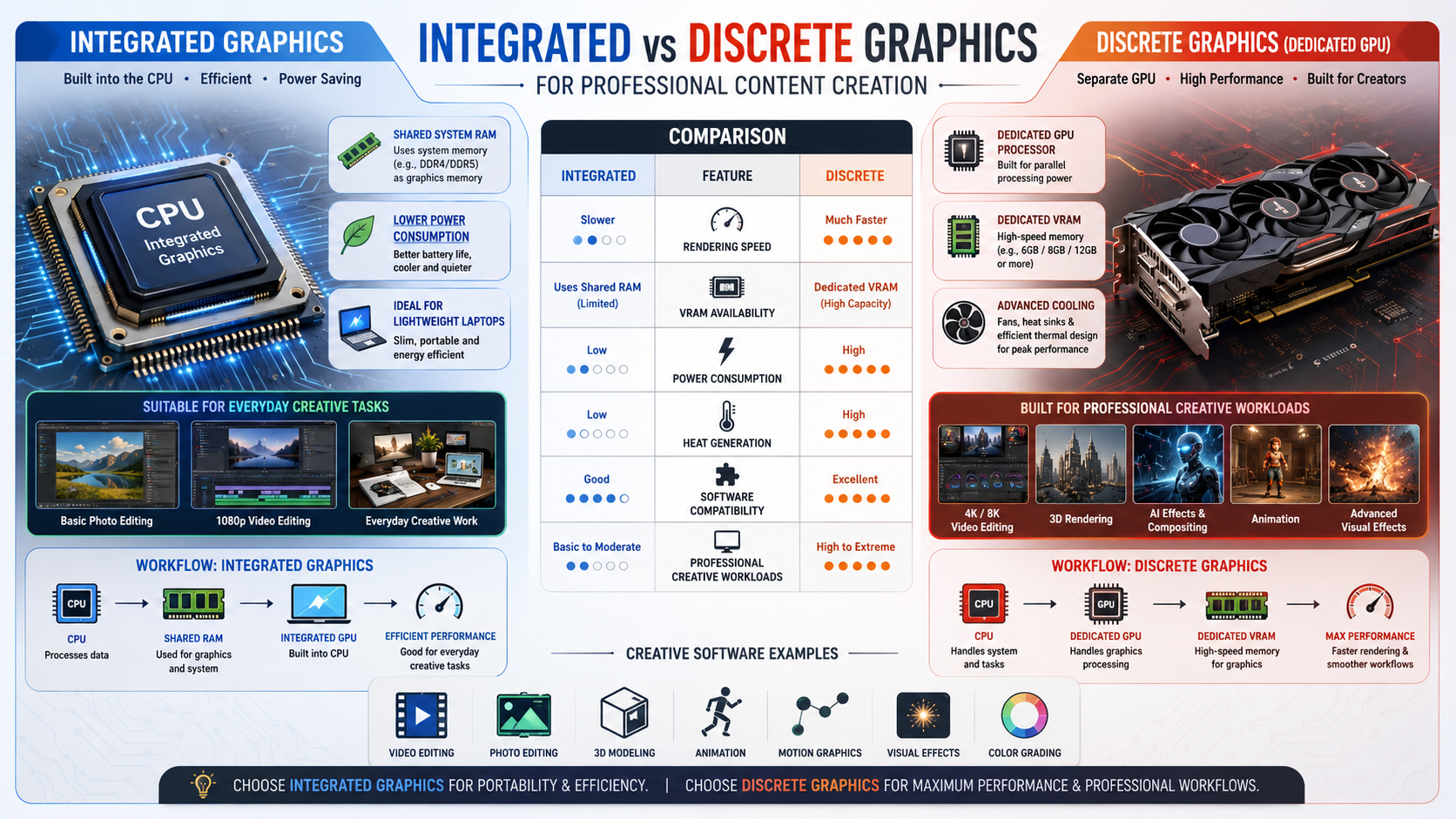
Integrated graphics share system resources with your processor. They offer strong efficiency and affordability for everyday tasks. Discrete graphics cards, however, include dedicated processors and VRAM designed for demanding creative workloads.
Understanding these differences helps you choose hardware that matches your needs. You can avoid overspending on unnecessary power or purchasing a system that struggles with your projects.
Which Is Better: Discrete or Integrated Graphics?
Discrete graphics generally outperform integrated graphics when handling demanding creative applications, gaming, 3D workloads, and professional editing tasks. The main reason is that discrete graphics cards include their own dedicated processing cores and video memory.
Integrated graphics share resources with the CPU. They use system RAM instead of having dedicated VRAM, which limits performance during heavy workloads. This design works well for everyday activities such as browsing, office work, streaming, and basic photo editing.
Discrete GPUs include specialized hardware designed for complex visual calculations. They can process large textures, advanced effects, and high-resolution media more efficiently.
For professional creators, the extra performance of a discrete graphics card provides smoother workflows, faster rendering, and better long-term reliability. However, integrated graphics remain a practical choice for users who prioritize battery life, affordability, and portability.

Dedicated Video Memory Advantages
One of the biggest benefits of discrete graphics is dedicated video memory. Graphics cards use high-speed VRAM, such as GDDR memory, to store textures, video frames, and rendering data.
Because this memory operates separately from system RAM, the computer can manage creative applications more efficiently. This reduces performance limitations during demanding tasks like video editing, 3D modeling, and visual effects production.
Dedicated VRAM also improves multitasking because the system memory remains available for other applications. Creators working with large projects benefit from smoother previews, faster exports, and fewer performance interruptions.
For professional content creation, having enough VRAM is often just as important as choosing a powerful GPU.
Which Graphics Card Is Best for Content Creation?
The best graphics card for content creation depends on the software you use and the type of projects you create. Applications such as Adobe Premiere Pro, Blender, DaVinci Resolve, and After Effects rely heavily on GPU acceleration.
NVIDIA GeForce RTX graphics cards are popular among creators because they offer strong CUDA performance, advanced ray tracing capabilities, and excellent software support. These features help accelerate rendering, effects processing, and AI-powered tools.
AMD Radeon graphics cards are also strong options, especially for users looking for competitive pricing and higher VRAM capacity. They provide excellent performance for video editing, animation, and design applications.
When selecting a graphics card, consider:
- GPU performance and architecture
- Available VRAM capacity
- Software compatibility
- Power consumption
- Budget requirements
A balanced graphics solution ensures faster workflows without unnecessary spending.
Hardware Acceleration Benefits
Modern creative applications use GPU hardware acceleration to improve performance. Instead of relying only on the CPU, software transfers demanding calculations to the graphics processor.
This approach improves responsiveness during editing and rendering tasks. Creators can preview effects faster, apply filters more smoothly, and export projects in less time.
Hardware acceleration is especially valuable for video editing, 3D rendering, and motion graphics. A capable GPU reduces processing pressure on the CPU and creates a more efficient workflow.
Which computer is best for content creation?
Finding the best computer for content creation depends heavily on the specific types of software applications you run daily. Heavy creative projects like 4K video editing, complex 3D animation, and motion graphics demand robust computing power. A powerful machine equipped with a dedicated discrete graphics card generally provides the massive parallelism needed to render complex effects smoothly. Without this dedicated hardware, your workflow might suffer from severe frame drops, prolonged export times, and sluggish timeline scrubbing. Professionals who handle intensive rendering tasks benefit immensely from powerful desktop workstations or high-end creator laptops configured with dedicated graphics processors. On the other hand, lighter creative duties such as basic photo retouching, vector illustration, and simple audio production can run seamlessly on modern systems utilizing integrated graphics solutions. Ultimately, evaluating your primary software requirements helps you invest wisely in a computer that matches your exact productivity goals without overspending on unnecessary hardware power.
Understanding Hardware Bottlenecks in Creative Workflows
Identifying potential bottlenecks in your system prevents unexpected slowdowns during critical project deadlines. When RAM and CPU cores work hard, a weak graphics setup stalls the entire rendering pipeline. Upgrading your graphics configuration eliminates these frustrating stalls, ensuring smoother playback and faster rendering times for all your intensive creative multimedia projects.
Is integrated graphics good for video editing?
Integrated graphics can handle basic video editing tasks surprisingly well when working with lower resolutions and simple cuts. Modern processors feature built-in graphics capabilities that leverage system memory to decode and encode standard video formats efficiently. If you edit short social media clips or 1080p footage without heavy color grading or complex transitions, an integrated GPU provides sufficient performance. However, video editing demands scale dramatically once you introduce high-resolution 4K files, multi-cam sequences, and advanced visual effects plugins. Integrated graphics share system RAM instead of having dedicated high-speed VRAM, which quickly creates a major performance bottleneck during heavy rendering sessions. Editors working with professional-grade timelines often experience stuttering playback and frequent application crashes when relying solely on integrated graphics solutions. Therefore, while integrated graphics suffice for casual hobbyists or mobile editors on a budget, serious video producers require dedicated graphics cards for reliable, professional workflows.
Is Integrated or Dedicated Graphics Better for Video Editing?
For professional video editing, dedicated graphics are usually the better choice. Modern editing projects often involve 4K and 8K footage, multiple camera angles, color grading, and complex effects.
Integrated graphics can manage basic editing tasks, especially simple 1080p projects. However, they often struggle with larger timelines because they depend on shared system memory.
A dedicated graphics card provides additional processing power and specialized video engines. This improves timeline playback, reduces export times, and creates a smoother editing experience.
Creators who regularly edit professional video content should consider a dedicated GPU with sufficient VRAM. This investment helps maintain performance as projects become larger and more complex.
GPU Video Encoding Engines
Many modern graphics cards include dedicated video encoding and decoding engines. These hardware components handle formats such as H.264, HEVC, and other professional video codecs.
By processing video tasks independently, these engines reduce the workload placed on the CPU. This allows creators to edit, preview, and export content more efficiently.
For video professionals, strong encoding support can significantly improve productivity. Faster exports and smoother playback make a noticeable difference during large production workflows.
Which Laptop Is Best for Content Creation?
The best content creation laptop combines a powerful processor, sufficient RAM, fast storage, and a capable graphics card. A balanced system prevents performance issues during demanding creative projects.
Laptops with NVIDIA RTX graphics, SSD storage, and accurate displays are popular choices among designers, editors, and digital artists. Thermal management is also important because rendering and editing generate significant heat.
A good creative laptop should offer:
- Powerful multi-core processor
- At least 16GB RAM for most workflows
- Fast SSD storage
- Dedicated graphics capability
- High-quality color-accurate display
Portability, battery life, and build quality also matter. The ideal laptop depends on your software, workload, and how often you work away from a desk.
Display Color Accuracy Importance
Graphics performance is not the only factor that matters for content creation. A high-quality display is essential for accurate design and editing work.
Professional creators often need displays that support wide color ranges such as sRGB and DCI-P3. Accurate colors ensure that projects appear correctly across different devices and platforms.
A powerful laptop with a poor display can create problems during editing. Color inaccuracies may affect final designs, videos, and client projects.
What Is the Disadvantage of Integrated Graphics?
The biggest disadvantage of integrated graphics is their dependence on shared system resources. Because integrated GPUs use system RAM instead of dedicated VRAM, performance decreases during demanding workloads.
This limitation becomes noticeable in applications that require heavy graphics processing. Tasks such as 3D rendering, advanced effects, and high-resolution video editing can become slow or unstable.
Integrated graphics also have fewer specialized processing features compared with discrete GPUs. They may lack the dedicated cores needed for advanced rendering, AI acceleration, and professional creative tools.
For casual users, these limitations are rarely a problem. For professional creators, however, a dedicated graphics card provides a significant performance advantage.
System RAM Resource Sharing
Integrated graphics borrow memory from the computer’s main RAM. This means less memory remains available for the operating system and creative applications.
During demanding tasks, this shared resource model can reduce overall system performance. Applications may respond slowly, multitasking may become difficult, and large projects may take longer to complete.
Creators working with professional software benefit from systems with dedicated graphics because the GPU has separate memory resources.
Frequently Asked Questions
Can I use integrated graphics for basic video editing?
Yes. Modern integrated graphics can handle basic video editing tasks, especially with 1080p footage. They work well for simple cuts, transitions, and smaller projects.
However, performance can decrease when working with 4K footage, heavy color grading, or advanced visual effects. Creators with more demanding editing needs will usually benefit from a dedicated GPU.
Do I need a dedicated GPU for Photoshop?
A dedicated GPU is not required for basic Photoshop work. Integrated graphics can manage standard editing, retouching, and common filters.
However, professionals working with large files, AI-powered features, or advanced creative workflows may notice better responsiveness with a dedicated graphics card.
How much VRAM do I need for content creation?
For most 4K video editing and moderate 3D workloads, 8GB of VRAM is a comfortable starting point.
Creators working with 8K video, architectural visualization, or complex 3D scenes may benefit from 12GB or 16GB of VRAM.
The right amount depends on your software, project size, and workflow requirements.
Are integrated graphics better for laptop battery life?
Yes. Integrated graphics generally provide better battery efficiency than discrete GPUs.
Because they consume less power and generate less heat, they are ideal for mobile creators who focus on writing, browsing, and lightweight creative tasks.
Can I upgrade from integrated to discrete graphics later?
Desktop users can usually install a dedicated graphics card if their system supports it.
Laptop users generally cannot upgrade integrated graphics because they are built into the processor or motherboard. Choosing the right laptop configuration at purchase time is important.
Does RAM speed affect integrated graphics performance?
Yes. Integrated graphics depend heavily on system memory speed because they share RAM with the CPU.
Faster RAM and dual-channel memory configurations can improve graphics performance. This allows integrated solutions to achieve their best possible results.
Conclusion
Choosing between integrated and discrete graphics for content creation depends on your workload, software, and future goals.
Integrated graphics provide excellent efficiency and value for casual creators, students, and users with lighter projects. They deliver enough performance for writing, basic editing, and everyday creative tasks.
Discrete graphics cards offer the power required by professionals working with video production, 3D rendering, animation, and advanced visual effects. Their dedicated processing power, VRAM, and acceleration features make demanding workflows faster and smoother.
Before choosing your hardware, evaluate the applications you use most often. Consider your project complexity, budget, and long-term creative plans. Your overall system performance also depends on other components, including the processor. Comparing options such as AMD Ryzen 7 vs Intel Core i7 processors can help you build a balanced workstation that matches your creative requirements.
The right graphics solution is not always the most powerful option. It is the one that provides the performance you need while supporting your creative workflow effectively.