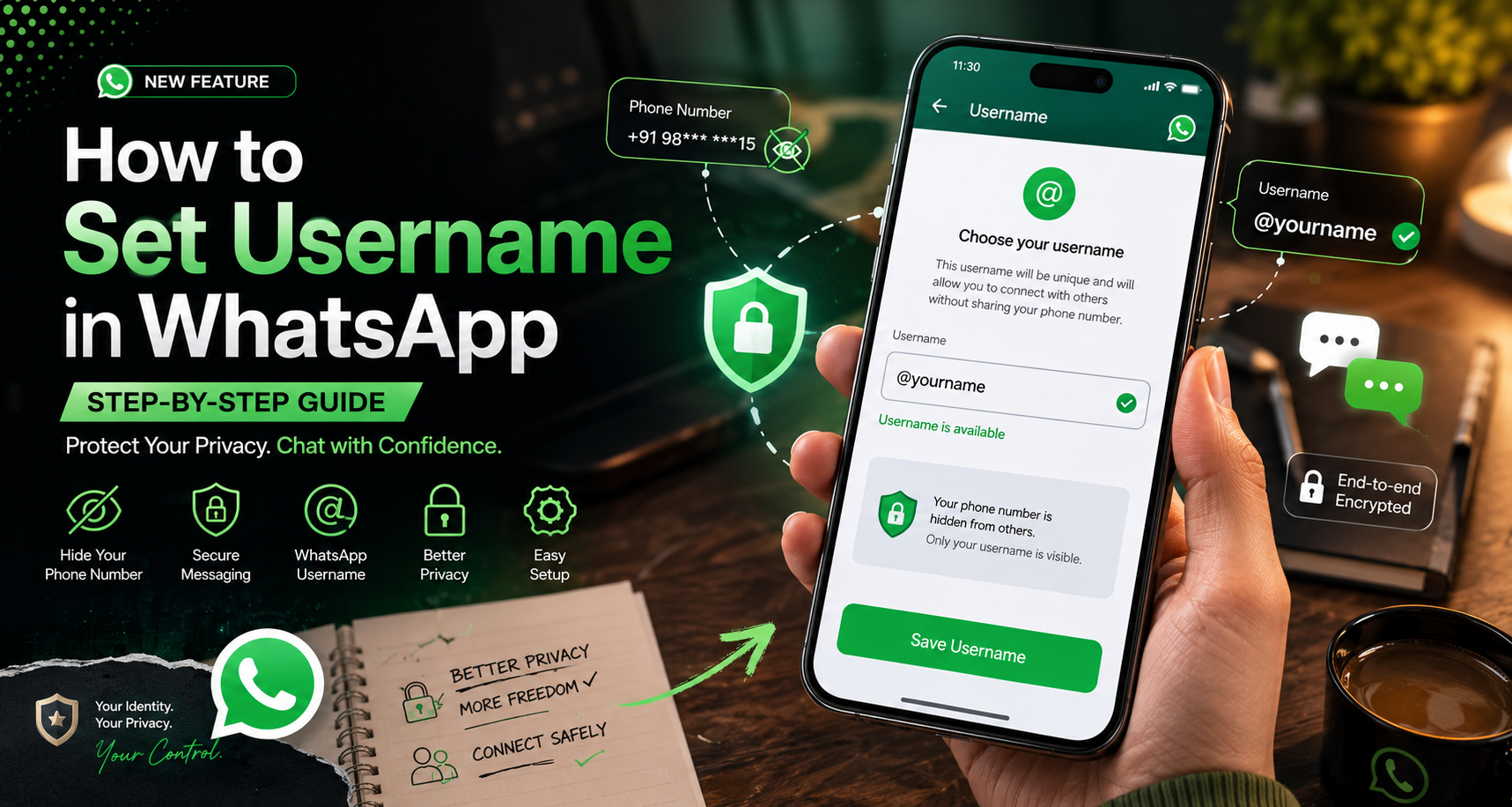
How to Set Username in WhatsApp: Step-by-Step Guide
For years, WhatsApp users had to share their phone numbers to connect with new people. This often created privacy concerns, especially in group chats and online communities. Learning how to set username in WhatsApp is now one of the best ways to protect your personal information. Meta has introduced WhatsApp usernames, allowing users to chat without exposing their mobile numbers. The feature is rolling out globally and gives users more control over their privacy while making it easier to connect with others.
If you’re wondering how to set username in WhatsApp, now is the perfect time to learn. By creating a unique username, you can protect your phone number and safely connect with new contacts without revealing your personal details. Since the feature is rolling out in phases, reserving your preferred username early can help you secure the handle you want before it becomes unavailable. This guide explains what WhatsApp usernames are, how to create one, and how to use the new privacy features to keep your account secure. You can also read About usernames, the official WhatsApp help page, for the latest information about the feature.
Step-by-Step Guide: How to Set Username in WhatsApp
If you’re wondering how to set username in WhatsApp, the process is simple and only takes a few minutes. Setting up a WhatsApp username helps protect your privacy by allowing you to connect with new people without sharing your phone number. Instead, you can share your unique username while keeping your personal contact details private. Follow the step-by-step instructions below to create, reserve, and secure your WhatsApp username.
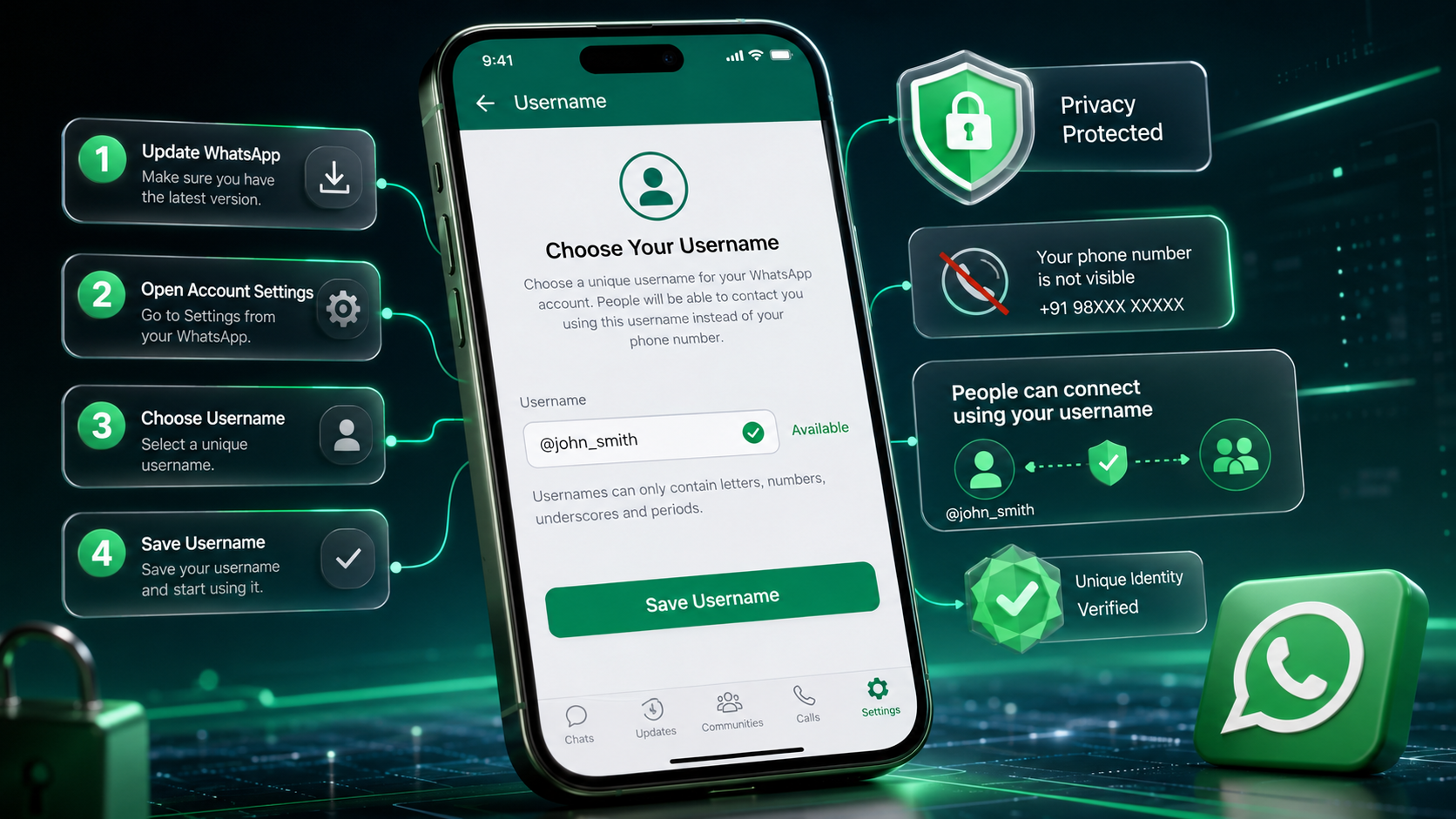
Step 1: Update WhatsApp
First, open the Google Play Store or Apple App Store on your device. Search for WhatsApp and install the latest available update. The username feature works only on updated versions of the app, so make sure you are using the newest release.
Step 2: Open Account Settings
After updating the app, open WhatsApp on your phone. On iPhone, tap the Settings icon at the bottom. On Android, tap the three-dot menu in the top-right corner and choose Settings. Then open the Account section and find the new Username option.
Step 3: Choose Your Username
After opening the Username section in your WhatsApp account settings, tap Create username (or Reserve username if the feature is still rolling out in your region).
In the username field, enter the handle you want to use. Your username should be unique, easy to remember, and represent your identity or brand. WhatsApp will instantly check whether your chosen username is available. If the username is already taken, you’ll be prompted to try a different one until you find an available option.
For Android:
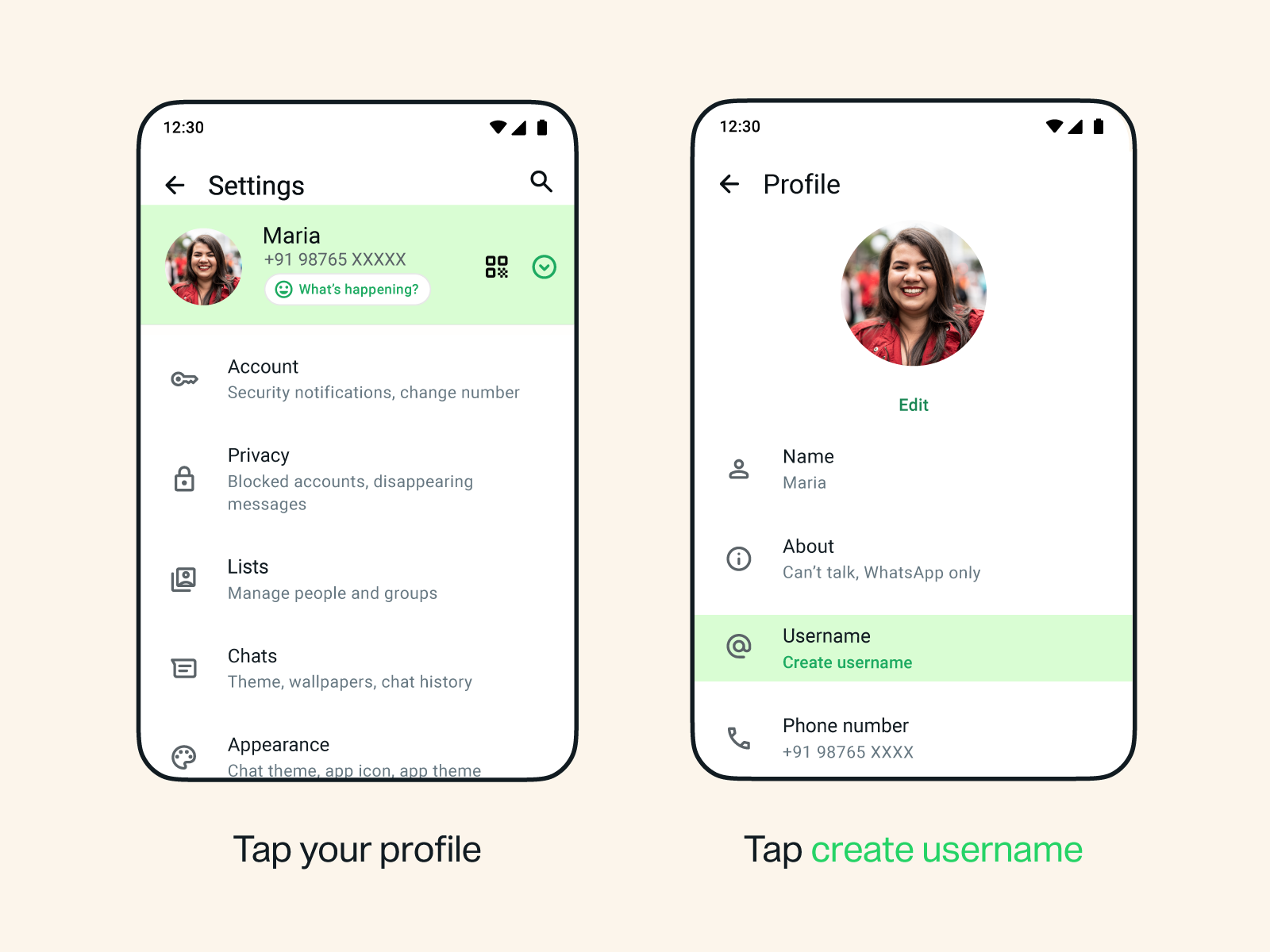
For ios:
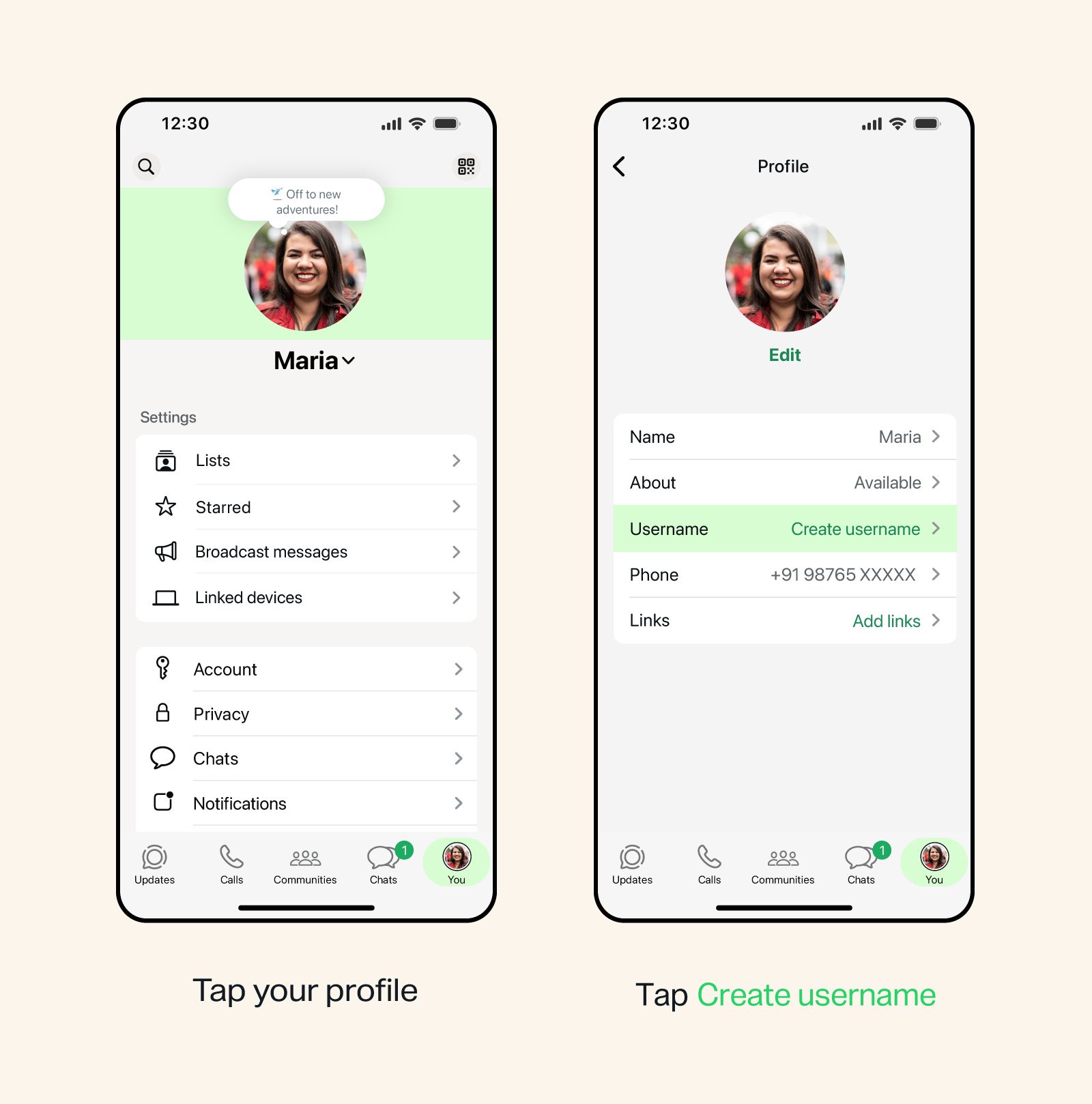
Step 4: Save Your Username
Once you enter your preferred username, WhatsApp will check its availability. If you see a green checkmark, the username is ready to use. Tap Save or Reserve to confirm your choice. After saving, the username will be linked to your account and protected from being claimed by another user.
What Is the WhatsApp Username Feature?
The new username feature gives every user a unique identity, such as @yourname. Instead of sharing your phone number, you can simply share your username. People can start a conversation using that username while your phone number stays hidden.
Your mobile number is still required for account verification and recovery. However, it is no longer your public identity. This makes WhatsApp more similar to apps like Instagram, Signal, and Discord.
Meta also allows eligible users to sync existing usernames from Instagram or Facebook. This helps businesses and creators keep the same identity across Meta platforms.
Why Should You Use a WhatsApp Username?
Using a WhatsApp username offers a simple but powerful way to protect your privacy while communicating with others. In the past, sharing your WhatsApp contact meant giving out your personal phone number. This exposed users to spam calls, unwanted messages, and potential privacy risks, especially when joining large group chats or online communities. With the new username feature, you can connect with people by sharing a unique handle instead of your mobile number.
A WhatsApp username is especially useful for professionals, freelancers, creators, students, and business owners who regularly communicate with new contacts. It allows you to stay connected without revealing sensitive personal information. You also have greater control over who can contact you, making conversations safer and more private.
Some of the biggest benefits of using a WhatsApp username include:
- Keep your phone number hidden from new contacts.
- Reduce spam messages, marketing calls, and unwanted communication.
- Share a simple username instead of your mobile number.
- Protect your identity when joining public, community, or workplace groups.
- Create a consistent online identity across WhatsApp, Instagram, and Facebook.
- Make it easier for customers, clients, and friends to find you.
- Add an extra layer of privacy while still enjoying all WhatsApp features.
As more people adopt this feature, using a WhatsApp username will become one of the easiest ways to improve your online privacy without changing how you use the app. It offers a safer and more convenient way to connect while keeping your personal phone number private.
Understanding the New WhatsApp Username Key Security
To improve user privacy, Meta has introduced an additional security feature called the WhatsApp Username Key. This optional feature adds another layer of protection for people who use usernames instead of sharing their phone numbers. Since WhatsApp does not have a public username directory, other users cannot search or browse random usernames. However, someone who already knows or correctly guesses your username could still try to send you a message request.
The Username Key helps prevent unwanted contact in these situations. You can create a unique four-digit PIN that works as an extra verification step. When this feature is enabled, anyone messaging you through your username for the first time must enter the correct Username Key before their message request is delivered. If they enter the wrong PIN or do not know the code, the request will not reach your inbox.
This feature gives users greater control over who can contact them. It is especially useful for creators, professionals, business owners, and anyone who shares their WhatsApp username publicly. Even if your username is visible on social media or a website, strangers cannot message you without the correct Username Key.
You can change, reset, or disable your Username Key at any time from the WhatsApp account settings. Updating the PIN regularly can further improve your account security and reduce unwanted messages. Combined with WhatsApp’s end-to-end encryption, the Username Key provides an extra privacy layer, helping users communicate more securely while keeping their phone numbers hidden.
FAQs: Common Questions Answered
Is the WhatsApp username feature available?
Yes, the WhatsApp username feature is gradually rolling out to users worldwide. Meta is releasing it in phases, so not everyone will receive access at the same time. If you don’t see the Username option in your WhatsApp settings yet, your account may still be waiting for the update.
To improve your chances of getting the feature sooner, make sure you’re using the latest version of WhatsApp from the Google Play Store or Apple App Store. Once available, you can create a unique username under Settings > Account > Username. This allows you to connect with new people without sharing your phone number.
WhatsApp usernames are optional, so you can continue using the app as usual if the feature hasn’t reached your account. Meta is expected to expand the rollout to more users over time, making usernames available across supported devices and regions.
What is the username on WhatsApp?
A WhatsApp username is a unique identifier that lets people connect with you without seeing your phone number. It works like a handle, such as @alex_dev, and can be shared instead of your mobile number when starting new conversations. This feature is designed to improve user privacy while making it easier to communicate with friends, customers, or colleagues.
Although you use a username publicly, your phone number is still linked to your WhatsApp account for verification, login, and account recovery. It remains hidden from new contacts who message you through your username. Usernames are optional, so you can continue using WhatsApp with your phone number if you prefer. By using a unique username, you can protect your personal information, reduce unwanted contact, and maintain a safer messaging experience while keeping your identity more private.
How do I reserve a username for WhatsApp?
To reserve a WhatsApp username, first update the app to the latest version from the Google Play Store or Apple App Store. Once updated, open WhatsApp > Settings > Account > Username. Enter the username you want and wait for WhatsApp to check its availability. If the name is available, you’ll see a confirmation message or green checkmark. Tap Save or Reserve to secure it for your account.
In some regions, WhatsApp may also allow you to sync a verified username from your Instagram or Facebook account through Meta Accounts Center. This helps individuals, creators, and businesses maintain the same identity across Meta platforms. If the Username option isn’t visible yet, keep your app updated, as Meta is rolling out the feature gradually to users worldwide.
How do I find out my WhatsApp username?
After creating your WhatsApp username, you can easily view it from your profile settings. Open WhatsApp and go to Settings, then tap your profile picture or profile name at the top of the screen. Your username will appear below your display name and will be shown with an @ symbol, making it easy to identify and share with others.
If you haven’t created a username yet, this section will prompt you to set one up once the feature becomes available on your account. You can also return to this page anytime to edit or change your username, subject to availability. Keeping a simple and memorable username makes it easier for friends, customers, and colleagues to connect with you without needing your phone number.
How do I send a @name in WhatsApp?
Once the WhatsApp username feature is available, you can start a chat by entering the person’s exact @username in the New Chat search bar. If the username is valid and the user has enabled messages through their handle, WhatsApp will display their profile so you can begin a conversation without using their phone number.
Since WhatsApp does not offer a public username directory, you must know the person’s exact username to find them. In some cases, users may also enable a Username Key, a four-digit PIN that adds an extra layer of privacy. If this security feature is active, you’ll need to enter the correct PIN before your first message request is delivered. This system helps protect users from spam while making it easier to connect securely through usernames.
Conclusion
Transitioning to a handle-based ecosystem is the most significant privacy upgrade in the history of WhatsApp. Learning how to set username in whatsapp accounts ensures that you retain complete sovereignty over your phone number, keeping it safe from corporate databases, strangers, and spammers. Whether you want to network seamlessly at a professional conference, join neighborhood group chats securely, or establish a brand identity, reserving your handle today is an essential defensive step. Update your app right now, secure your handle, and enjoy a much safer, highly private messaging experience.
If you’re interested in unlocking additional WhatsApp features and customization options, you may also like our complete guide on How to Subscribe to WhatsApp Plus, which explains the installation process, features, benefits, and important considerations before using it.