

5 Ways To Preserve Your DVDs And Blu-Rays For Years To Come
In a digital age dominated by streaming and cloud storage, many collectors still value physical media. Learning how to preserve your DVDs and Blu-Rays can help protect your collection for decades.
Streaming libraries can change without notice. Titles may disappear because of licensing deals, platform decisions, or service closures. Physical discs give you continued access to content you legally own without depending on a particular subscription.
For additional guidance on preserving optical media, see the Library of Congress preservation guidance. Its preservation resources explain how environmental conditions and proper handling affect the long-term survival of collection materials.
However, discs are not indestructible. Scratches, heat, humidity, sunlight, manufacturing defects, and chemical deterioration can all affect optical media. Proper storage and careful handling can greatly reduce these risks.
This guide covers five practical ways to protect DVDs and Blu-rays. You will learn how to store, clean, inspect, and handle your discs correctly.
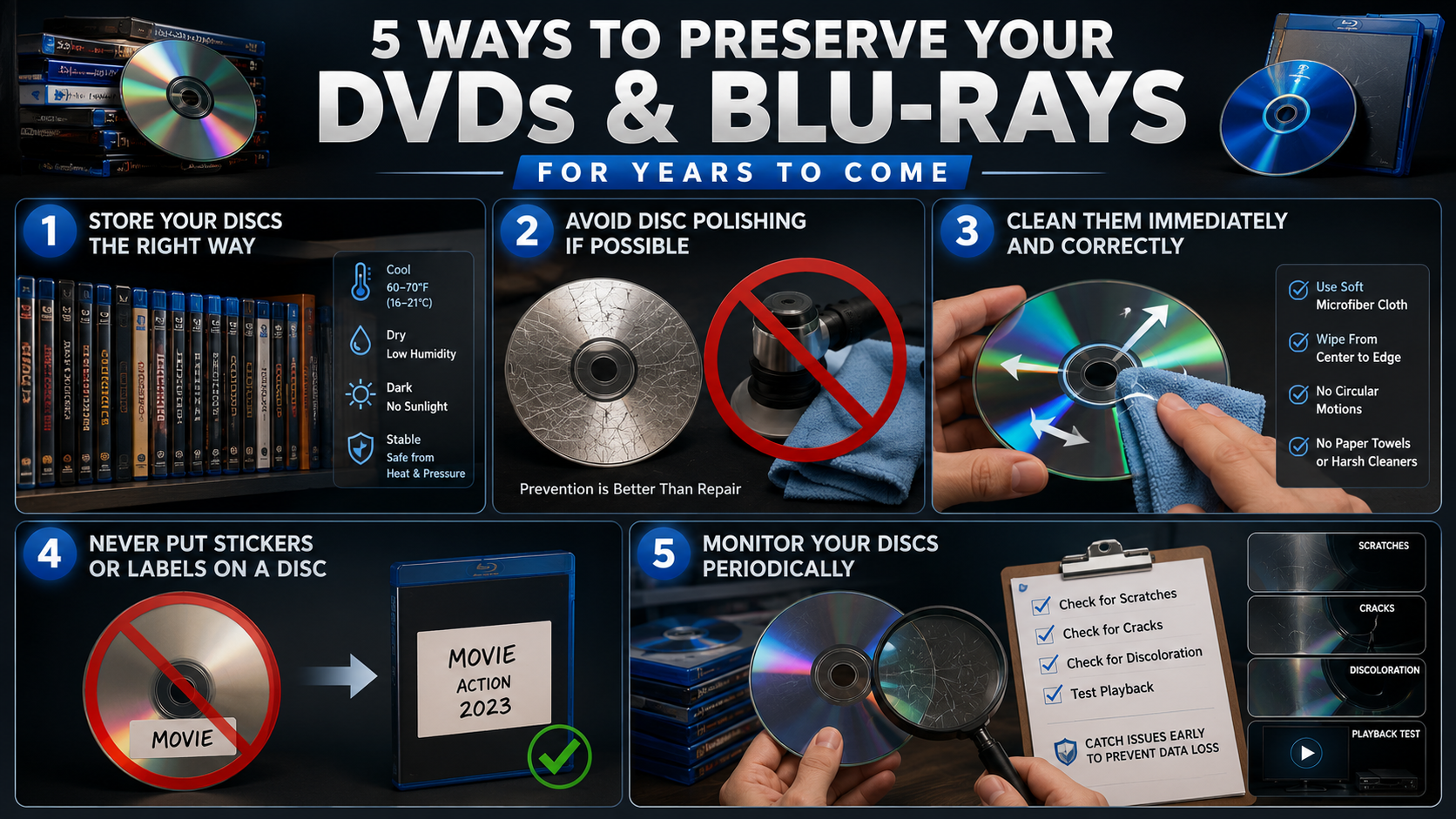

1. Store Your Discs the Right Way
Proper storage is one of the easiest ways to extend the life of your DVD and Blu-ray collection. Optical discs can deteriorate when exposed to excessive heat, moisture, sunlight, or physical pressure. A stable indoor environment is therefore essential for long-term preservation.
Keep your discs in their original cases whenever possible. These cases protect the playing surface from dust, fingerprints, scratches, and unnecessary contact. If the original case is damaged, replace it with a quality case designed for optical media.
Store cases vertically on sturdy shelving. Avoid stacking heavy objects on top of discs or leaving loose discs in piles. Long-term pressure can damage cases and increase the risk of physical problems.
Choose a location that is cool, dark, dry, and stable. Around 60–70°F (16–21°C) is a practical temperature range for home storage. Keeping humidity moderate also helps reduce moisture-related risks.
Avoid attics, garages, sheds, and damp basements. These locations can experience extreme temperature and humidity changes.
Finally, keep your collection away from windows, radiators, vents, and other heat sources. Good storage protects your discs before damage starts.
2. Avoid Disc Polishing If Possible
Polishing can sometimes improve a scratched DVD, but it should not be your first solution. Every polishing process removes or alters some of the disc’s surface material. Incorrect techniques can therefore make an already damaged disc worse.
Blu-rays require particular care because they use a protective hard coating over the reading surface. Aggressive polishing can damage this coating and create additional problems.
Avoid household remedies such as toothpaste, abrasive cleaners, or rough polishing compounds. These methods are difficult to control and may leave additional scratches or damage the protective surface.
If a disc has only light scratches, first check whether it still plays correctly. A minor cosmetic mark does not always affect playback. In that situation, there may be no reason to polish the disc at all.
For an important or rare DVD, professional resurfacing may be safer than attempting a DIY repair. However, even professional repair has limits. Deep damage or damage to critical disc layers may be permanent.
The best approach is prevention rather than repair. Store discs in protective cases and handle them by their edges or center holes.
If polishing becomes necessary, identify the disc format first. A method that may work for a DVD may not be appropriate for a Blu-ray.
3. Clean Them Immediately and Correctly
Cleaning your discs properly can prevent fingerprints, dust, and other debris from interfering with playback. However, cleaning should be gentle. Using the wrong material or technique can create scratches that are harder to remove.
If you notice fingerprints or dirt, clean the disc as soon as practical. Hold it by the outer edge or center hole. Avoid touching the playing surface with your fingers.
Use a soft, clean microfiber cloth designed for delicate surfaces. Gently wipe from the center of the disc toward the outer edge. Do not rub in circular motions around the disc.
Radial cleaning is preferable because circular scratches can follow the same path as the laser’s reading process. This can potentially make read errors more difficult to correct.
Avoid paper towels, tissues, rough fabrics, and abrasive cleaning products. These materials can leave scratches or residue behind.
For stubborn marks, follow the disc manufacturer’s recommended cleaning method. Do not soak discs or expose them to harsh chemicals.
After cleaning, allow the disc to dry completely if any suitable cleaning solution was used. Then return it to its case.
Regular gentle cleaning helps maintain your collection without unnecessary physical wear. Clean discs carefully, not aggressively, and avoid polishing unless there is a genuine need.
4. Never Put Stickers or Labels on a Disc
Adding stickers or adhesive labels to DVDs and Blu-rays may seem like an easy way to organize a collection. However, labels can create problems over time. Adhesive can deteriorate, become difficult to remove, or leave residue on the disc.
Labels can also affect the disc’s balance. Optical drives spin discs at high speeds, so uneven weight distribution may cause vibration during playback. In some cases, poorly applied labels can even become detached inside a drive.
Write-on labels can also create risks if they use unsuitable inks or place pressure on the disc surface. For valuable collections, it is safer to avoid writing directly on discs whenever possible.
Instead, identify your discs using their cases, inserts, or storage system. You can add catalog numbers to cases without changing the physical disc itself.
If you need additional information, create a separate inventory. Record the movie title, edition, purchase date, and condition in a spreadsheet or cataloging app.
Avoid removing old adhesive labels aggressively. Pulling or scraping them can damage the disc or leave residue behind.
For long-term preservation, the simplest rule is clear: keep the disc surface free from unnecessary stickers, labels, and adhesives. Your storage system should provide organization without modifying the media itself.
5. Monitor Your Discs Periodically
Long-term preservation does not end once your discs are placed on a shelf. Periodically inspecting your collection can help you identify problems before they become serious.
Check older DVDs and Blu-rays for visible scratches, cracks, discoloration, residue, or other unusual changes. Pay particular attention to discs that have been stored in less-than-ideal conditions.
You should also watch for playback problems. Skipping, freezing, slow loading, or repeated read errors can indicate that a disc needs closer inspection.
If a valuable disc becomes difficult to read, consider creating a legal backup where permitted. This provides additional protection if the physical disc eventually fails.
Recordable discs deserve extra attention. Their recording layers can have more variable lifespans than factory-pressed media. Check important CD-R, DVD-R, and Blu-ray recordable discs periodically.
Keep an inventory of rare or irreplaceable titles. Knowing which discs are most valuable helps you prioritize inspections and backups.
You do not need to examine every disc every week. A periodic review is enough for most home collections.
During each inspection, confirm that discs remain in their cases and that storage conditions are still suitable. This simple habit can catch problems early and help you preserve your DVDs and Blu-Rays for years to come.
Can DVDs Last 100 Years?
Factory-pressed DVDs can potentially last for several decades under suitable storage conditions. Some may remain readable for 100 years or longer, but no manufacturer can guarantee that lifespan for every disc.
If you want to preserve your DVDs and Blu-Rays for as long as possible, focus on stable storage conditions rather than relying on a specific lifespan estimate.
Disc rot is one possible cause of deterioration. It can occur when moisture, oxidation, manufacturing defects, or other chemical changes damage a disc’s reflective or data layers.
Recordable DVDs can be more vulnerable because they use organic dye layers. Their lifespan varies widely according to disc quality, recording method, and storage conditions.
For the best results, keep DVDs:
- In their original cases or quality archival cases.
- Away from direct sunlight and heat.
- In a cool, stable, and dry environment.
- Upright rather than under heavy pressure.
- Clean and free from fingerprints and scratches.
Good storage cannot guarantee a century of life. It can, however, significantly improve your chances of long-term readability.
How to Store DVDs Long Term
Long-term optical media storage starts with a stable environment. Anyone trying to preserve their DVDs and Blu-rays should avoid attics, garages, sheds, and damp basements.
These areas can experience extreme temperatures and humidity changes that damage discs and their cases.
A practical target is a cool room with moderate, stable humidity. Around 60–70°F (16–21°C) is a reasonable storage range for home collections.
Store discs vertically in protective cases. Avoid placing heavy objects on top of cases for long periods.
Handle every disc carefully. Touch only the outer edge or center hole. Never place fingers directly on the optical surface.
Regular cleaning also helps. Use a soft, clean microfiber cloth and wipe gently from the center toward the outer edge.
For valuable collections, consider a digital backup strategy where legally permitted. A backup provides another layer of protection if a physical disc becomes damaged or unreadable.
How Long Will a Blu-ray Last?
Factory-pressed Blu-ray discs can potentially remain readable for many decades when stored correctly. Their hard protective coating can help collectors preserve their DVDs and Blu-Rays against everyday surface damage.
Some industry estimates suggest lifespans extending well beyond 50 years. However, these figures are estimates rather than guarantees.
Blu-ray discs have an important advantage over DVDs: their hard-coat surface protection. This coating helps protect the disc against fingerprints and everyday scratches.
However, Blu-rays are not immune to damage. Heat, humidity, sunlight, manufacturing defects, and physical damage can still affect longevity.
For long-term preservation, treat Blu-rays much like DVDs. Keep them in cases, store them vertically, avoid harsh environments, and handle them by the edges.
A quality pressed Blu-ray stored under stable conditions can therefore be a strong option for long-term physical media preservation.
Is It Worth Keeping DVDs Anymore?
For many collectors, keeping DVDs remains worthwhile. Physical media provides access to movies and shows without depending on a streaming service’s current catalog.
If your goal is to preserve your DVDs and Blu-Rays, keeping rare or difficult-to-replace releases can make particular sense.
Streaming platforms can remove titles when licensing agreements expire. Movies can also move between services, become unavailable in certain regions, or disappear when a platform changes its business strategy.
Physical discs can also contain material that is unavailable on streaming platforms. Depending on the release, you may find commentaries, deleted scenes, documentaries, alternate versions, trailers, and other special features.
DVDs also work without an internet connection. Once you own a compatible player and a readable disc, you do not need a monthly subscription to watch your collection.
For many people, the best approach is selective collecting. Keep rare, favorite, or difficult-to-replace titles while reconsidering duplicates and releases you no longer want.
Is Gen Z Buying DVDs?
Interest in physical media is not limited to older collectors. Younger consumers have also shown interest in tangible entertainment formats, including vinyl records, CDs, DVDs, and Blu-rays.
Several factors can make physical media appealing. Streaming requires ongoing access to services, while a physical collection creates something people can own, display, and revisit.
Younger collectors may also discover DVDs through thrift stores, secondhand shops, family collections, and online marketplaces.
Social media has helped make physical collections more visible. Shelves filled with movies can become part of a person’s room design and online identity.
However, interest varies widely among individuals. It would be inaccurate to suggest that all Gen Z consumers are returning to DVDs.
The broader trend is better understood as renewed interest in physical ownership and collecting.
For collectors who want to preserve their DVDs and Blu-Rays, this renewed interest can make maintaining older collections even more rewarding.
Physical media therefore continues to have cultural value, even as most everyday viewing moves toward digital services.
FAQ: Preserving DVDs and Blu-Rays
What is the best temperature for storing optical discs?
The ideal storage temperature for DVDs and Blu-rays ranges between 60 and 70 degrees Fahrenheit. Extreme heat causes the plastic layers to warp and degrades the internal reflective data surfaces. Avoid storing your collection in unconditioned attics or garages where temperatures fluctuate wildly throughout changing seasonal weather patterns.
Can you repair scratched DVDs and Blu-rays?
Surface scratches on standard DVDs can often be repaired using professional disc resurfacing machines or gentle polishing methods. However, deep scratches on the label side usually cause permanent data loss. Blu-rays are much harder to scratch, but their protective coating makes DIY polishing paste ineffective if deep damage penetrates the hard layer.
Should I rip my DVDs to a hard drive for backup?
Backing up your physical DVD collection onto a digital hard drive or home server provides excellent insurance against physical loss. Digital backups let you enjoy instant streaming access across home networks while keeping delicate original discs safely stored away in long-term archive boxes.
Do burned CDR and DVDR discs last as long as pressed discs?
Home-burned recordable discs have significantly shorter lifespans than factory-pressed media, often lasting only 2 to 10 years. Burned discs rely on organic dye layers that degrade quickly when exposed to indoor lighting and ultraviolet rays. Always use high-quality archival-grade media if you plan on burning home videos.
Conclusion: Preserve Your DVDs and Blu-Rays for the Future
Learning how to preserve your DVDs and Blu-Rays can help protect your collection for decades. Good storage reduces the risks created by heat, humidity, sunlight, scratches, and careless handling.
Pressed DVDs and Blu-rays can have long lifespans, but no disc is guaranteed to last forever. Recordable media requires even more careful attention because its recording layers can deteriorate over time.
For the best results, keep discs in protective cases. Store them vertically in a cool, dark, and stable environment. Handle them by the edges and clean them gently when necessary. If you also collect premium audio equipment, you may find these headphone cleaning and maintenance tips useful for keeping your other physical entertainment gear in good condition.
Consider creating legal digital backups of especially important content. Maintain more than one copy and periodically check that your archived files remain accessible.
Physical media also offers benefits beyond durability. It can preserve special features, collector editions, artwork, and access to titles that may disappear from streaming services.
You do not need to keep every disc. Focus on the movies and shows that matter most to you.
With thoughtful storage and regular care, your physical media collection can remain a valuable part of your entertainment library for many years.