How to Choose the Right Keyboard Size: Complete Form Factor Guide
Choosing the right keyboard size depends on how you work, play, and use your desk space. Keyboard sizes are usually described by form factor percentages, rather than exact measurements. These percentages compare a keyboard with a traditional 104-key full-size layout.
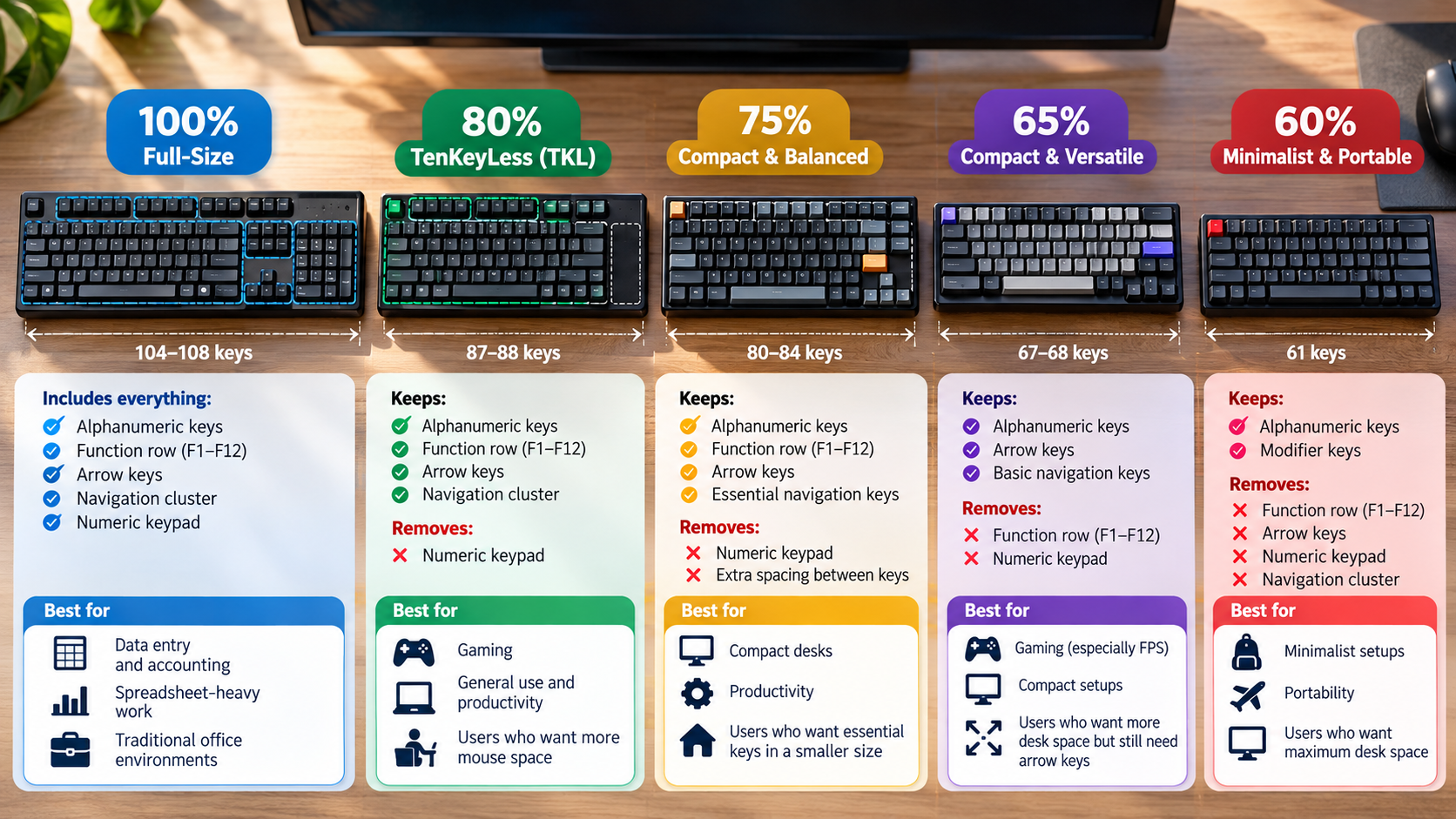
A full-size keyboard gives you every standard key, including the numeric keypad. Smaller layouts remove certain keys to save desk space. Common options include full-size, TKL, 75%, 65%, and 60% keyboards.
Your ideal keyboard should balance key access, desk space, mouse movement, and typing comfort. Ergonomic factors are also worth considering, especially if you type for long periods. The ACM SIGCHI covers research and practice related to human-computer interaction and human factors.
Understanding what each keyboard size keeps and removes makes the decision easier. The right choice depends less on popularity and more on the keys you actually use.
What Size Keyboard Is Most Popular?
Tenkeyless (TKL) and 75% keyboards are popular choices among keyboard enthusiasts, remote workers, and gamers. Full-size keyboards remain common in traditional office environments. If you are choosing a mechanical keyboard for office work, factors such as noise, comfort, and layout also matter. A mechanical keyboard for your office can be a useful option when you want a more customizable typing experience.
A TKL keyboard removes the numeric keypad but keeps the function row, arrow keys, and navigation cluster. A 75% keyboard goes further by reducing the spacing between key groups. It keeps many important keys while using less horizontal desk space.
This makes smaller layouts useful for people who want better mouse clearance. They can also work well on compact desks.
However, popularity should not determine your choice. Your workflow matters more. Consider these common layouts:
| Form Factor | Approx. Key Count | What It Keeps | What It Drops | Best For |
|---|---|---|---|---|
| Full-Size (100%) | 104–108 | Alphanumeric keys, F-row, arrows, navigation, numpad | Nothing | Accounting, data entry, office work |
| TKL (80%) | 87–88 | F-row, arrows, navigation | Numeric keypad | Office work, gaming, general use |
| 75% | 80–84 | F-row, arrows, essential navigation | Numpad and extra spacing | Compact desks, productivity |
| 65% | 67–68 | Arrows and basic navigation | Numpad and F-row | Gaming, compact setups |
| 60% | 61 | Alphanumeric block and modifiers | Numpad, F-row, arrows | Minimalist setups, portability |
Is a 65% Keyboard Too Small?
A 65% keyboard is not too small for general typing, programming, or gaming. It can be less convenient for spreadsheet work and software that relies heavily on function keys. For gaming, the choice also depends on whether you prefer mechanical or membrane switches. Understanding the differences between mechanical and membrane keyboards for gaming can help you choose beyond size alone.
A typical 65% layout keeps the main typing block, arrow keys, and several navigation keys. It removes the dedicated function row and numeric keypad.
That makes the keyboard considerably shorter than a TKL model. It also gives your mouse more usable desk space.
A 65% keyboard can work particularly well for FPS gaming. Lower mouse sensitivity often requires large mouse movements. A smaller keyboard reduces the chance of hitting its edge with your mouse.
It can also improve desk ergonomics. Your mouse can sit closer to your body instead of being pushed farther outward.
However, the compact design creates a trade-off. Many secondary functions require the Fn key.
For example, you may need Fn + 1 to access F1. This can become inconvenient if you frequently use function-key shortcuts.
A 65% keyboard is therefore best when compactness matters more than immediate access to every key.
When Does a 65% Keyboard Work Best?
A 65% keyboard works best when you mainly type, code, browse, or game without regularly using a numeric keypad. Its smaller footprint creates more room for your mouse and other desk accessories.
For competitive FPS gaming, this can be especially useful. A smaller keyboard leaves more space for wide mouse movements. That matters when players use low sensitivity for precise aiming. Some gamers also prefer wired connections for consistent performance, making it useful to understand why gamers prefer wired keyboards over wireless models.
The layout can also support a more neutral desk position. Your mouse can remain closer to your keyboard and body. This may reduce excessive outward shoulder movement during long sessions.
A 65% keyboard is also convenient for compact workstations. It can fit comfortably beside a laptop or monitor without consuming much desk space.
It is less suitable for workflows that depend on dedicated function keys. Developers, system administrators, and power users may frequently use F1 through F12.
Spreadsheet-heavy users may also miss the numeric keypad. Entering long sequences of numbers can become slower without dedicated number keys.
Before buying, identify the keys you use most often. If you rarely use the F-row or numpad, the compact design may not feel restrictive.
How Do I Know My Keyboard Size?
You can usually identify your keyboard size by checking three areas: the numeric keypad, function row, and arrow keys. These visual clues can quickly reveal the keyboard form factor.
Start on the right side. If you see a separate calculator-style number block, your keyboard is probably full-size or a compact 96% layout.
Next, check the top of the keyboard. A dedicated F1–F12 row with visible spacing usually indicates a TKL keyboard. On a 75% keyboard, the function row is generally integrated into a more compact grid.
Then check the bottom-right corner. Dedicated arrow keys usually indicate a 65% layout or larger. If the arrow keys are removed, you may have a 60% keyboard.
Use this quick guide:
- Numpad + F-row: Usually full-size.
- No numpad + F-row: Usually TKL.
- No numpad + compact F-row: Usually 75%.
- Arrow keys + no F-row: Usually 65%.
- No dedicated arrows or F-row: Usually 60%.
- Much smaller layout: Could be a specialized 40% board.
Some layouts vary by manufacturer, so key count is not always exact.
Do I Really Need a Full-Size Keyboard?
You need a full-size keyboard mainly when your daily workflow depends on fast numeric entry or dedicated keys. Accountants, bookkeepers, analysts, and data-entry workers often benefit from a physical numeric keypad.
A dedicated numpad lets you enter numbers quickly with one hand. It also provides convenient access to mathematical operators and decimal keys.
For many other users, the extra width may not provide much value. Writers, developers, general office workers, and gamers can often work comfortably with smaller layouts.
A full-size keyboard typically measures around 17 to 18 inches wide. Its numeric keypad extends considerably beyond the main typing area.
This can push your mouse farther to the right when the keyboard is centered. Some users may find that position less comfortable during long sessions.
However, this does not mean every full-size keyboard is ergonomically poor. Desk position, keyboard height, chair setup, and mouse placement also matter. Keyboard angle can also affect how your hands and wrists feel during long typing sessions, so understanding whether a physical keyboard should be flat or tilted can help you refine your setup.
If you occasionally need a numpad, consider a TKL or 75% keyboard with a separate numeric keypad. You can move the keypad aside when you do not need it.
This gives you dedicated number keys without keeping them permanently attached to your main keyboard.
What Is a Good Full-Size Keyboard?
If your workflow requires a full-size layout, look for a keyboard with reliable switches, comfortable key spacing, and suitable connectivity. Build quality also matters if you type for several hours each day.
The Keychron Q6 and Keychron V6 are examples of full-size mechanical keyboards. The Q6 uses an aluminum chassis, while the V6 uses a more accessible construction. Both support features such as hot-swappable switches and programmable layouts.
These features can appeal to users who want more customization. Compatibility with software such as QMK or VIA can also provide flexible key remapping.
For users who prefer a laptop-style typing experience, the Logitech MX Keys S takes a different approach. It uses low-profile scissor switches rather than traditional mechanical switches.
The MX Keys S supports Bluetooth and Logi Bolt connectivity. It can also connect with multiple devices.
When choosing a full-size keyboard, focus on your actual workflow. Consider switch type, key feel, connectivity, noise, build quality, and software support.
The best full-size keyboard is not necessarily the most expensive one. It should provide the keys and typing experience you actually need.
Keyboard Size Buying Decision Summary
Choosing a keyboard size becomes easier when you match the layout to your daily tasks. Full-size is the practical choice for frequent number entry, accounting, and spreadsheet-heavy work. TKL suits users who want dedicated function, arrow, and navigation keys without the numeric keypad.
A 75% keyboard is a strong middle ground. It saves desk space while retaining the F-row and dedicated arrows. Choose a 65% keyboard if you want more mouse room but still need physical arrow keys. A 60% keyboard makes the most sense when portability and maximum desk space matter more than instant access to secondary keys.
Use this quick decision guide:
- Need a numpad? Choose full-size.
- Want a familiar layout without the numpad? Choose TKL.
- Want compactness without losing the F-row? Choose 75%.
- Want dedicated arrows in a smaller layout? Choose 65%.
- Want maximum compactness? Choose 60%.
The right keyboard size is the one that keeps your essential keys within easy reach while removing the keys you rarely use.