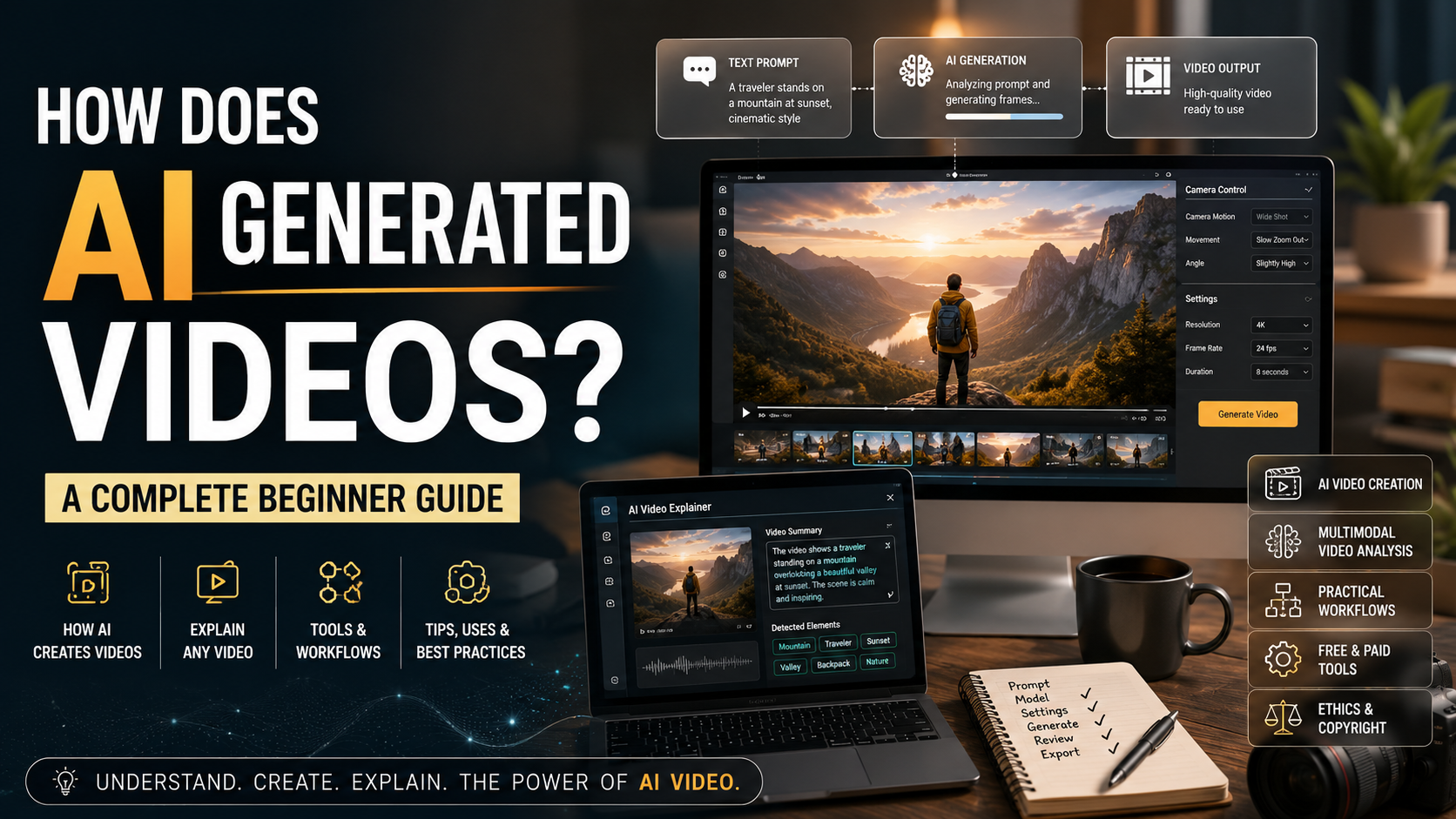
How Does AI Generated Videos? A Complete Beginner Guide
Technology continues to change how people create and consume media. AI-generated videos are now opening new possibilities for creators, marketers, educators, and businesses. These tools can turn written prompts into moving visuals within minutes.
Many people want to understand how this technology works. They also want to know how to analyze existing footage, produce AI videos, and use artificial intelligence throughout production.
Modern generative AI models learn patterns from large datasets containing visual and textual information. They use those learned patterns to generate new visual content based on user instructions. For a practical look at modern AI video workflows, NVIDIA’s AI video generation guide explains how creators can combine generative AI models with tools such as Blender and ComfyUI.
This guide explains the process in simple terms. You will learn how AI video generation works, how multimodal AI can explain videos, and how to produce your own AI video.
We will also explore common uses, production workflows, hardware requirements, copyright considerations, rendering times, and free options. By the end, you will understand the basics of modern AI video creation.
How Are AI-Generated Videos Made?
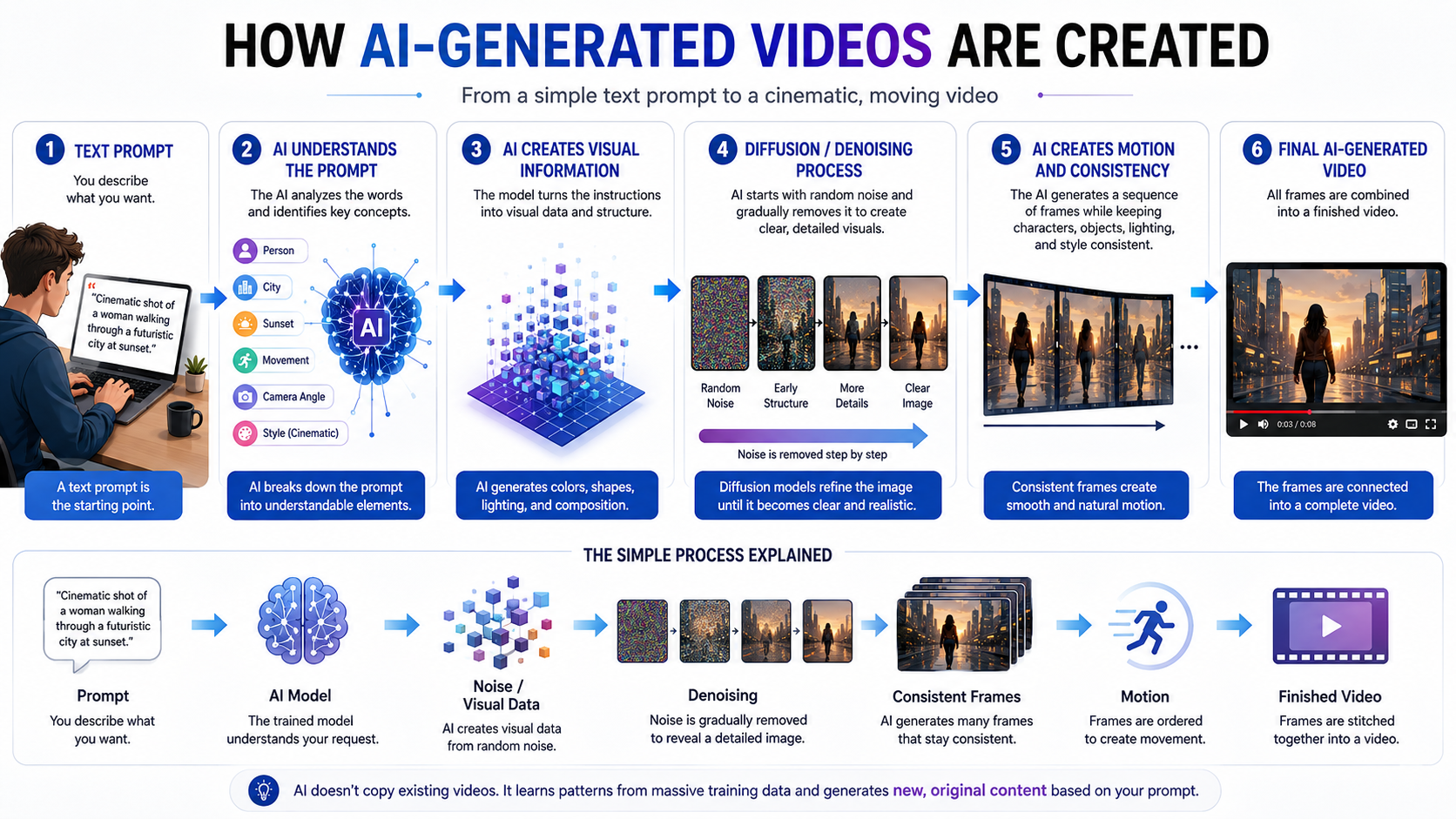
AI-generated videos are created with machine learning models trained on large collections of visual and textual data. During training, neural networks learn patterns related to movement, lighting, objects, environments, and visual styles.
When you enter a prompt, the model interprets your instructions. It then generates visual content that matches the requested scene, action, and style. Some systems generate video directly, while others create images and animate them.
Diffusion models play an important role in many modern generative systems. They learn how to remove noise from training data. During generation, the model gradually transforms noisy information into a structured visual result.
Video generation adds another challenge. Each frame must remain consistent with the frames around it. Objects, people, lighting, and camera movement should change naturally over time.
Powerful GPUs help train and operate these models. The result can range from realistic footage to highly stylized scenes. Output quality depends on the model, prompt, settings, and available computing resources, including the capabilities of Intel Core Ultra processors.
The Role of Diffusion Models
Diffusion models in generative AI are widely used in modern generative AI. They learn by adding controlled amounts of noise to training images. The model then learns how to reverse that process.
During generation, the system begins with noisy information. It gradually removes that noise while following the instructions provided in the prompt. Each step makes the result more structured and visually recognizable.
For AI-generated videos, the process becomes more complex. The system must maintain consistency across multiple frames. A person’s appearance, an object’s position, and the surrounding environment should remain coherent as the scene develops.
Video models may also learn patterns involving motion, camera movement, and temporal relationships. These capabilities help create smoother sequences rather than disconnected images.
The process can be guided by text, reference images, or other inputs. Users can describe subjects, actions, environments, lighting, and camera styles.
The model then generates a sequence that attempts to match those instructions. Better prompts can provide clearer direction, but results still vary between models and generations.
How to Make AI Explain a Video?
AI can also analyze existing videos rather than create new ones. This process usually relies on multimodal AI models that can interpret different types of information together.
A multimodal system can examine visual content while also processing spoken dialogue, subtitles, or other audio information. The video may first be divided into frames or segments. Speech can then be converted into text through automatic transcription.
The AI combines these signals to understand what happens throughout the footage. It can identify objects, actions, scenes, dialogue, and other relevant details.
You can upload a compatible video and ask targeted questions. For example, you might ask for a summary, identify specific events, or locate a particular action. The system can then provide an answer based on the available video information.
This approach can save significant review time. Researchers, educators, journalists, and content creators can use AI to examine lengthy footage more efficiently.
However, AI analysis is not always perfect. Visual ambiguity, poor audio, complex scenes, and unclear context can affect the accuracy of generated explanations.
Utilizing Multimodal AI Tools
Multimodal AI connects technologies such as computer vision, speech recognition, and natural language processing, instead of examining only text or images. These systems can work with several information types together.
When analyzing a video, the system can process visual frames and spoken language. It may also use subtitles, timestamps, or other available metadata.
The model connects visual events with language descriptions. For example, it can associate a person entering a room with dialogue heard during that moment. This helps the system create a more complete understanding of the scene.
Users can then ask questions about the footage. The AI may summarize events, describe specific scenes, or explain what happened during a particular section.
This technology is especially useful when videos contain large amounts of information. Manual review can take hours, while AI can help identify important moments quickly.
Still, users should review important outputs. AI systems can misunderstand unclear visuals, speech, or context. Human verification remains valuable when accuracy matters.
How to Produce an AI Video?
Producing an AI video involves several stages, from planning and generation to editing and export. The process usually starts with a clear concept, script, or collection of prompts.
First, define the story and visual direction. Describe the subjects, setting, actions, camera movement, lighting, and desired style. Clear instructions can help the generation system produce more useful results.
Next, choose a suitable AI video platform. Enter your prompts and generate the required clips. You may need several attempts before achieving consistent results.
After generation, bring the selected clips into an editing application. Arrange them according to your script or storyboard. You can then add voiceovers, music, sound effects, transitions, and subtitles.
A final review helps identify visual inconsistencies and timing problems. Check the audio, pacing, text, and overall storytelling before exporting the finished project.
A structured workflow makes the process easier. It also reduces wasted generations and keeps your project organized from the first prompt through final delivery.
Streamlining Your Production Workflow
An organized production workflow can make AI video creation faster and more consistent. For larger projects, optimizing AI pipelines can also help streamline processing. Start by developing your script or storyboard before generating large numbers of clips.
Create visual assets in batches when possible. Keep similar scenes together and name files using clear scene numbers. This makes it easier to locate the correct clips during editing.
Consistency also matters. Use similar descriptions for recurring characters, locations, lighting, and visual styles. This can help reduce noticeable differences between separate generations.
Once the clips are ready, move them into your editing timeline. Add voiceovers and background music after establishing the basic visual sequence. Then synchronize audio with important actions and dialogue.
Before exporting, review the complete video from beginning to end. Look for continuity problems, awkward movements, incorrect text, and audio issues.
A practical workflow can include:
- Plan: Write the script and define each scene.
- Generate: Create visual clips and supporting assets.
- Edit: Arrange clips and synchronize audio.
- Polish: Add subtitles, music, effects, and corrections.
- Export: Review the final project and render the finished video.
How Is AI Used in Videos?
Artificial intelligence is used throughout modern video production. Its applications range from planning and creation to editing, visual effects, localization, and distribution.
Creators can use AI for script development, video generation, voice production, subtitle creation, and automated editing. Visual effects teams can use machine learning for tasks such as background removal, object tracking, and image enhancement.
Marketing teams can also use AI to adapt videos for different audiences. Automated translation and dubbing can help create localized versions in multiple languages.
AI tools can also improve older footage. Upscaling technologies may increase perceived detail in low-resolution video. Other tools can help reduce noise, improve audio, or remove unwanted elements. Similar AI-powered enhancement techniques are also used in AI camera technology in smartphones.
Streaming services use artificial intelligence in another way. Recommendation systems analyze viewing behavior and other signals to suggest content to users.
These applications can reduce repetitive work and speed up production. They also give smaller teams access to capabilities that once required specialized resources.
However, AI does not eliminate the need for human direction. Creative decisions, storytelling, quality control, and ethical judgment still require human involvement.
Enhancing Post-Production Efficiency
Post-production is one of the areas where AI can save editors significant time. Many editing tasks are repetitive and require careful attention rather than creative decision-making.
AI-powered tools can automatically detect pauses, remove unwanted silence, balance audio levels, and organize footage. Some systems can also generate captions and identify speakers within recordings.
Other tools assist with color correction and visual enhancement. Automated processes can provide a useful starting point for editors, especially when working with large amounts of footage.
AI can also help locate specific moments in a video. Editors may search for spoken words, scenes, or visual elements instead of reviewing every frame manually.
These features do not necessarily replace professional editors. Instead, they can reduce routine work and allow more time for creative decisions.
A human editor can review automated changes and make the final adjustments. This approach combines machine efficiency with human judgment.
For professional projects, that balance remains important. Automated tools can accelerate the workflow, but storytelling, pacing, tone, and visual quality still benefit from experienced creative direction.
How Can I Create an AI Video?
Creating an AI video is now accessible to beginners. You do not necessarily need advanced technical skills or a powerful local computer. Many platforms provide cloud-based tools that handle the demanding processing.
Start by choosing a generative video platform that matches your goals. You can compare the best AI tools for image generation to better understand how different generative platforms and capabilities compare. Look at its available models, export options, editing features, pricing, and usage limits.
Next, write a detailed prompt. Include the subject, environment, action, camera angle, lighting, mood, and visual style. Specific instructions can give the model clearer direction.
Generate a short clip and review the result. If it does not match your expectations, adjust the prompt and try again. Iteration is a normal part of AI video generation.
After creating your clips, combine them in an editor. Add narration, music, sound effects, and subtitles as needed. Then review the final sequence for continuity and quality.
For beginners, starting with a short project is often easier. A simple scene or social media clip lets you learn the workflow before attempting a longer production.
Choosing the Right Platform
The best AI video platform depends on your project, experience, budget, and desired level of control. Different tools support different approaches to creating AI-generated videos, so choosing the right option can improve your workflow.
Some platforms specialize in quick text-to-video generation. These can work well for social media content, demonstrations, and short creative experiments.
Other platforms provide more advanced controls. They may support reference images, detailed camera instructions, character consistency, or professional editing workflows.
Before choosing a service, consider several factors:
- Generation quality: Check how realistic and consistent the output looks.
- Controls: Look for features that match your creative requirements.
- Export options: Review supported resolutions, formats, and watermark policies.
- Pricing: Compare subscriptions, credits, and generation limits.
- Ease of use: Choose an interface that fits your technical experience.
- Commercial use: Check the platform’s current licensing terms before publishing paid work.
Free trials or limited plans can help you test a platform first. Generate several sample clips before committing to a subscription.
Frequently Asked Questions
What hardware do I need to run AI video generators locally?
Running generative video models locally requires high-end hardware. You need a powerful graphics card with a large amount of video memory, a fast multi-core processor, and plenty of system RAM. Most creators avoid local hardware setups. Instead, they use cloud-based software platforms that handle heavy computational rendering on remote servers.
Can I copyright videos created with artificial intelligence?
Copyright laws regarding AI-generated media vary by region and continue to evolve rapidly. AI and copyright considerations are especially important when publishing or monetizing generated content. In many jurisdictions, works created entirely by machines without significant human creative input cannot be copyrighted. However, if you substantially edit, rearrange, or combine AI clips with your own original footage and script, you may secure copyright protection.
How long does it take to render an AI video?
Rendering times vary widely based on platform congestion, video length, resolution, and model complexity. Short clips of a few seconds can render in under a minute on modern cloud platforms. Longer, high-definition sequences with complex motion physics may take several minutes or even hours to process completely.
Are there free tools available for beginners?
Yes, many platforms offer free tiers or trial credits for beginners. These options let you test text-to-video generation without upfront financial commitment. Free plans usually include watermarks, lower export resolutions, or monthly generation limits, making them ideal for learning the basics before upgrading.
Conclusion
AI generated videos are changing how people approach content creation, storytelling, marketing, and visual production. Modern systems can generate new footage, analyze existing videos, and automate many production tasks.
This guide explored how AI video generation works and why diffusion models are important. We also covered multimodal video analysis and practical methods for producing complete AI videos.
Artificial intelligence can support many stages of production. It can help with scripts, visuals, voiceovers, subtitles, editing, localization, and post-production tasks.
However, AI works best as a creative tool rather than a complete replacement for human direction. People still provide the ideas, context, creative judgment, and quality control that shape the final result.
If you are new to AI video creation, start with a small project. Experiment with prompts, compare different outputs, and learn how your chosen platform responds to instructions.
As your experience grows, you can develop more advanced workflows. With thoughtful planning and human creativity, AI can help you create engaging video content more efficiently.