
How Cloud Computing Works: A Simple, Comprehensive Guide
How cloud computing works has transformed the way people and businesses use modern technology. Instead of storing files, running applications, or managing software only on a personal computer, cloud computing allows users to access digital resources through the internet. When you save photos online, stream videos, edit documents in a web browser, or use business applications remotely, cloud technology handles these tasks through powerful online systems. You can learn more about the basics of this technology through this detailed cloud computing definition and overview.
The basic concept of how cloud computing works is simple: large networks of servers located in data centers around the world store information and provide computing services whenever users need them. These servers process requests, manage data, and deliver services without requiring users to own expensive hardware.
Businesses no longer need to spend large amounts of money on physical servers, maintenance, and complex IT infrastructure. Instead, they can use cloud providers to access storage, computing power, and software based on their requirements. Cloud platforms such as Amazon Web Services have changed traditional computing by offering technology as a flexible, on-demand service.
Today, cloud computing supports remote work, online businesses, artificial intelligence, mobile applications, and digital transformation. Learning how cloud computing works helps individuals and organizations understand how technology improves flexibility, security, and scalability in the digital world.
Cloud Computing Architecture: Front End and Back End Explained
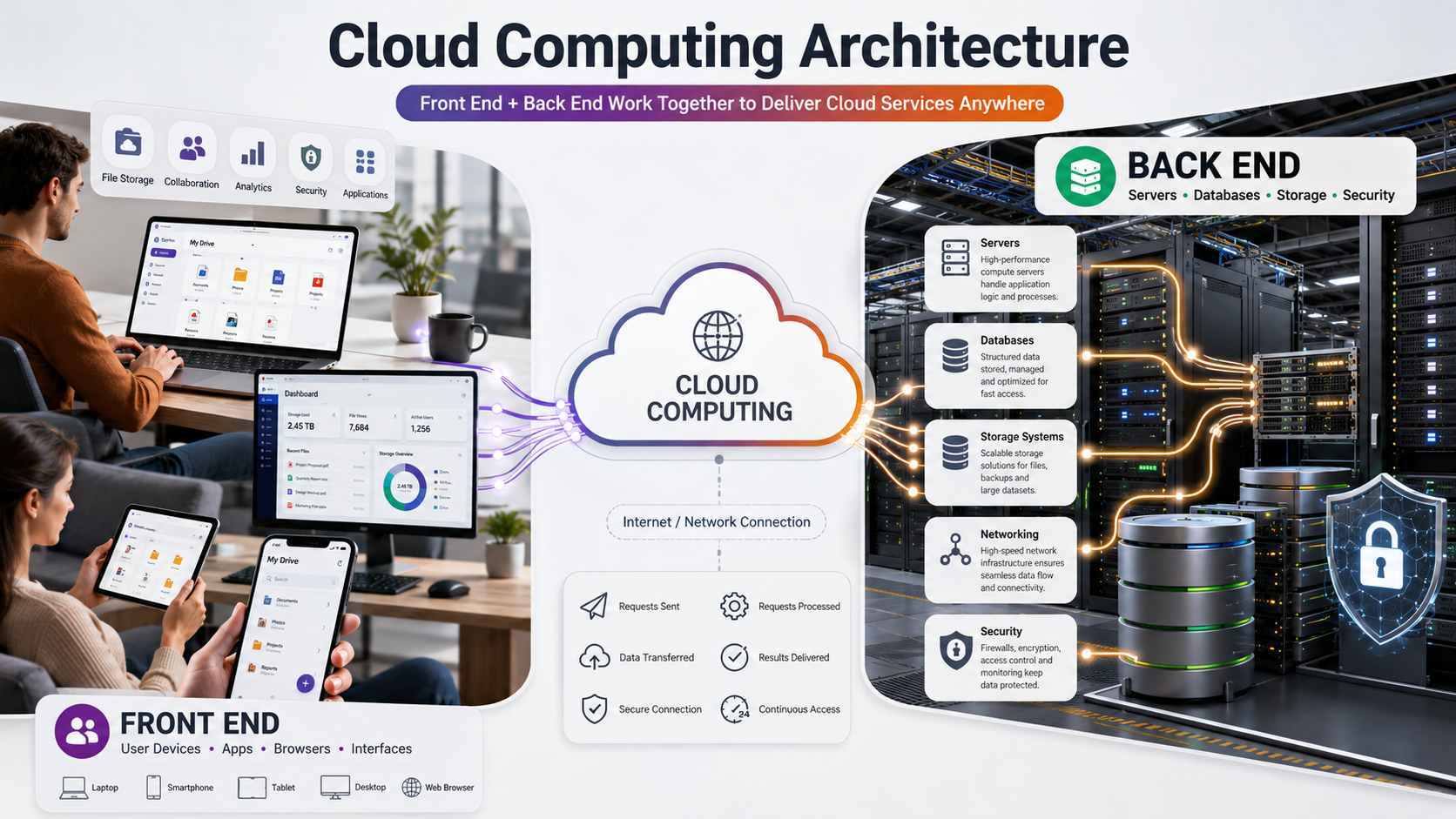
Cloud computing works through a combination of two major components: the front end and the back end. These two parts communicate with each other through the internet or another network connection. Together, they create a complete system that allows users to access cloud-based services from anywhere.
The Front End: The User Side of Cloud Computing
The front end is the part of the cloud system that users interact with directly. It includes devices such as laptops, smartphones, tablets, and desktop computers. It also includes applications, browsers, and user interfaces that allow people to send requests and receive information from cloud servers.
For example, when you open an online storage application and view your saved files, the application interface you see is part of the front end. Your device sends instructions to the cloud system, and the cloud responds by delivering the requested data.
The front end is designed to make cloud services simple and user-friendly. Users do not need to understand the complex infrastructure running behind the scenes. They only need an internet connection and an account to access powerful computing services.
The Back End: The Cloud Infrastructure
The back end is where all the major processing happens. It includes servers, databases, storage systems, networking equipment, and security technologies located inside data centers. These systems handle millions of requests from users around the world.
Cloud providers use advanced technologies to distribute workloads, protect information, and ensure reliable performance. The back end processes user requests, stores information securely, and sends results back through the network. This powerful infrastructure allows businesses and individuals to use computing resources without owning physical hardware.
How Cloud Computing Works Behind the Scenes
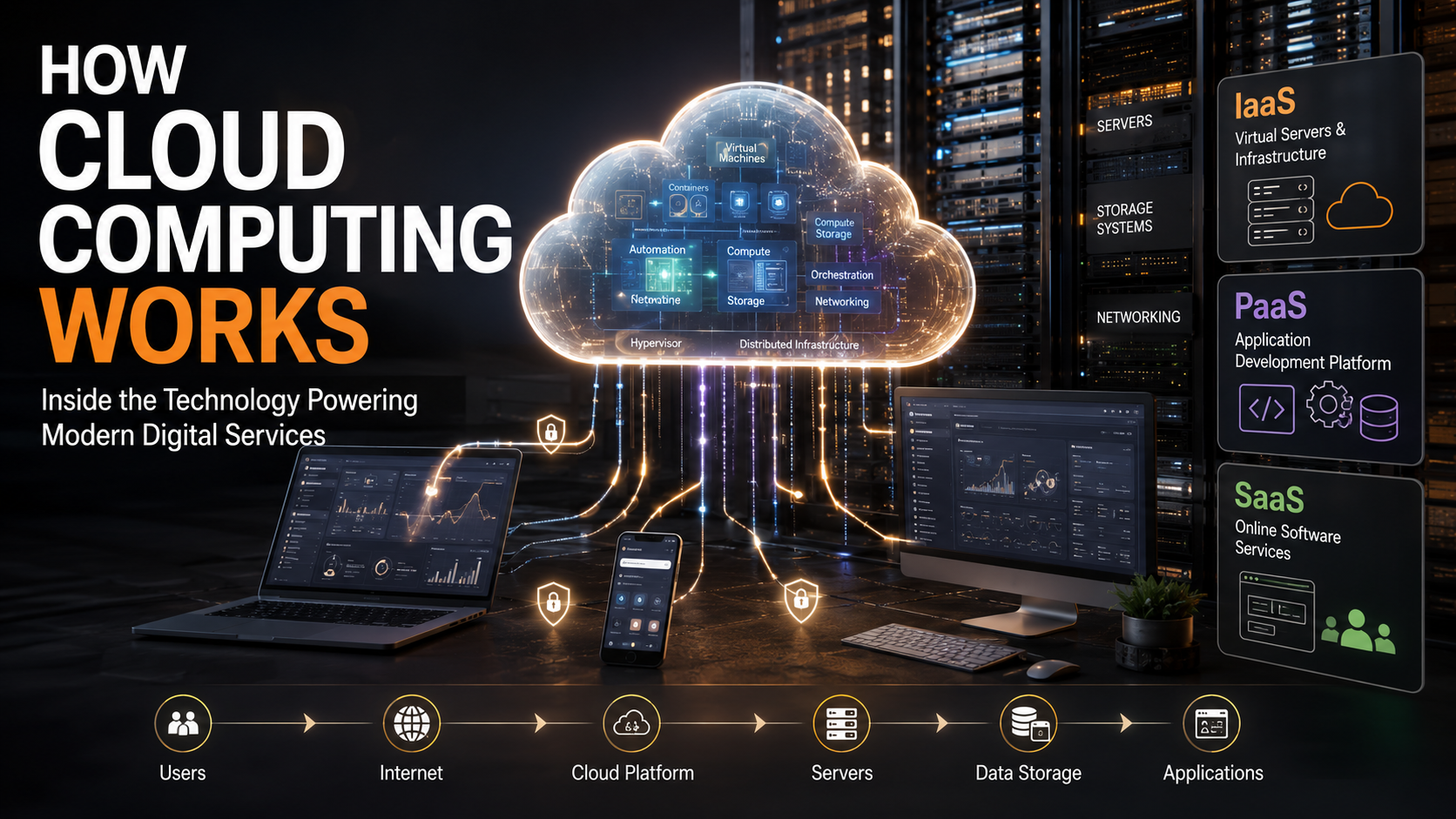
Cloud computing depends on several important technologies that allow providers to deliver fast, secure, and scalable services. The process begins when a user sends a request through an application or web browser. That request travels through the internet to a cloud data center, where it is processed and completed.
One of the most important technologies behind cloud computing is virtualization. Virtualization allows a single physical server to be divided into multiple virtual machines. Each virtual machine works like an independent computer with its own operating system and applications.
A special software layer called a hypervisor manages these virtual machines. It ensures that multiple users can share the same physical hardware safely without affecting each other. This improves efficiency because cloud providers can use their servers more effectively.
Cloud computing also relies heavily on automation and orchestration. These systems automatically assign resources, manage workloads, balance traffic, and increase capacity when demand grows. This allows cloud services to operate smoothly even when millions of users are accessing them at the same time.
The Three Main Cloud Computing Service Models
Cloud computing services are generally divided into three major categories known as service models. These models describe how much responsibility the cloud provider manages and how much control the customer has.
Infrastructure as a Service (IaaS)
Infrastructure as a Service provides basic computing resources through the internet. With IaaS, businesses can rent virtual servers, storage, and networking instead of purchasing physical equipment.
The customer manages the operating system, applications, and software, while the cloud provider manages the physical infrastructure. This model is popular among companies that need flexibility and control over their technology environment.
IaaS helps organizations reduce hardware costs and quickly increase or decrease resources based on demand.
Platform as a Service (PaaS)
Platform as a Service provides developers with a complete environment for building and deploying applications. The cloud provider manages the servers, operating systems, and development tools.
Developers can focus on writing code instead of worrying about infrastructure management. PaaS speeds up software development and makes it easier to launch applications.
Software as a Service (SaaS)
Software as a Service delivers ready-to-use applications through the internet. Users can access software directly from a browser without installing programs on their computers.
Examples include online email platforms, collaboration tools, and business management software. SaaS is the most common cloud model used by everyday consumers.
Types of Cloud Deployment Models
Organizations choose different cloud deployment methods depending on their security requirements, budget, and business goals. The three main deployment models are public cloud, private cloud, and hybrid cloud.
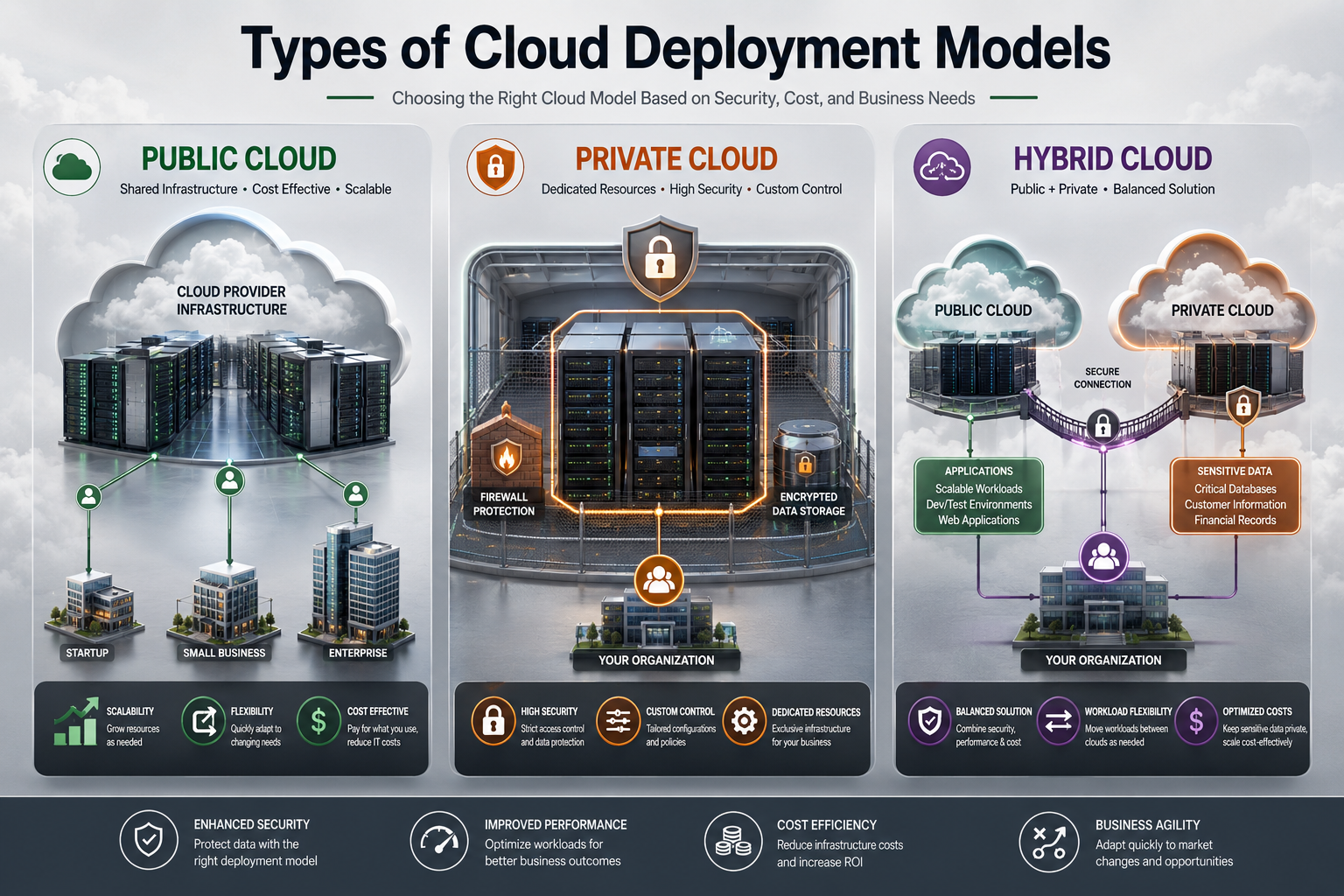
Private Cloud
FREQUENTLY ASKED QUESTIONS (FAQs)
What is the simplest definition of how cloud computing works?
Cloud computing works by allowing users to access digital resources, applications, and storage through the internet instead of depending on their own computer’s hard drive. In simple terms, cloud computing moves data and software from your personal device to powerful remote servers managed by cloud providers.
When you upload a photo, open an online application, or save a document, your device sends a request through the internet. The cloud system receives the request, processes the information using advanced servers, and delivers the result back to your device within seconds. This entire process happens in the background without requiring users to understand the complex technology behind it.
Cloud computing uses large data centers filled with servers, storage systems, and networking equipment to handle user activities. These systems help people store files, run applications, and access services from almost anywhere. Instead of purchasing expensive hardware, users can rely on cloud services and pay only for the resources they need.
This technology also helps businesses reduce costs, improve flexibility, and scale their operations quickly. Cloud computing makes digital services faster, more accessible, and easier to manage for individuals and organizations
Where is my data actually stored in the cloud?
Your data in the cloud is stored inside large facilities called data centers. These data centers contain thousands of powerful physical servers, storage devices, networking systems, and security equipment that work together to manage digital information. When you save a photo, document, video, or application data online, your device sends that information through the internet to these remote facilities.
Cloud providers operate data centers in different parts of the world to deliver faster performance and reliable access. Instead of keeping your files on a single server, cloud systems usually create multiple copies of your data and store them across different servers or locations. This approach helps protect your information from hardware problems, technical failures, or unexpected disruptions.
These facilities use advanced security measures such as encryption, monitoring systems, controlled access, and backup technologies to protect user information. The cloud does not mean your data floats somewhere in the internet; it exists on real computers inside highly managed data centers.
Is cloud computing secure for sensitive business data?
Yes, cloud computing can provide strong security for sensitive business data when organizations use proper protection methods and follow security best practices. Many cloud providers build their platforms with advanced cybersecurity systems designed to protect valuable information from unauthorized access, cyber threats, and data loss.
Cloud companies use technologies such as data encryption, firewalls, identity management systems, and continuous monitoring to secure their infrastructure. Their data centers include strict access controls, surveillance systems, and other physical security measures to protect the servers that store customer information. These security features help businesses keep important files, applications, and databases safer.
However, cloud security depends on both the provider and the user. Cloud providers protect the infrastructure, but businesses must manage their own accounts carefully. Companies should create strong passwords, enable multi-factor authentication, limit user permissions, and regularly review security settings.
Cloud computing also offers advantages such as automatic backups and disaster recovery options. If a hardware failure or unexpected event affects one system, businesses can often restore their information from secure copies. With the right security practices, cloud computing can become a reliable solution for managing sensitive business data while supporting flexibility and growth.
What is virtualization in cloud computing?
Virtualization in cloud computing is a technology that allows a single physical computer or server to create multiple independent virtual environments. Instead of using one physical server for only one task, virtualization divides its resources, such as processing power, memory, and storage, into several virtual machines.
A special software layer called a hypervisor manages this process. The hypervisor creates and controls multiple virtual machines on the same physical server. Each virtual machine works like a separate computer because it can run its own operating system, applications, and settings. Users can operate these virtual environments without knowing that they share the same physical hardware.
Cloud providers use virtualization to improve resource usage and deliver flexible services. For example, one physical server can support multiple customers at the same time while keeping each customer’s data and applications separate. This approach helps providers reduce hardware costs, improve performance, and quickly allocate resources when users need them.
Virtualization also makes cloud systems easier to manage because providers can create, move, or remove virtual machines quickly. It plays a major role in making cloud computing scalable, reliable, and cost-effective for businesses and individuals.
What happens if the internet goes down while using the cloud?
If your internet connection stops working while you are using cloud services, your access to real-time cloud applications and online features will usually become limited. Since cloud computing depends on internet connectivity, your device needs a network connection to communicate with remote servers, retrieve information, and save updates.
When the connection drops, some cloud applications may stop working immediately, while others may continue using offline features. Many modern cloud-based tools allow users to work without an active internet connection by temporarily saving files and changes on the local device. This allows users to continue editing documents, viewing certain files, or completing tasks until the connection returns.
Once the internet connection becomes available again, the application reconnects with the cloud servers and uploads the saved changes. The system then synchronizes the updated information so that the latest version appears across all connected devices.
However, not every cloud service supports offline access. Applications that require constant communication with servers, such as live collaboration platforms or real-time business systems, may not function properly without internet access.
Why do companies prefer cloud services over traditional servers?
Companies choose cloud services over traditional servers because cloud technology provides greater flexibility, cost efficiency, and faster business growth. Traditional server systems require businesses to purchase expensive hardware, build dedicated infrastructure, and hire IT teams to manage maintenance, security, and upgrades. These responsibilities can increase operational costs and slow down innovation.
Cloud computing changes this approach by allowing companies to access computing resources through a flexible, pay-as-you-use model. Instead of investing heavily in physical servers, businesses can rent storage, processing power, and software services whenever they need them. This helps organizations reduce unnecessary expenses and use their budgets more effectively.
Another major advantage of cloud services is scalability. Companies can quickly increase or decrease their resources based on customer demand, seasonal changes, or business growth. For example, an online business can add more computing power during a busy sales period and reduce resources afterward.
Cloud services also support remote work by allowing employees to access files, applications, and business tools from different locations. They improve collaboration, speed up development, and help companies launch new products faster. With better flexibility and lower infrastructure challenges, cloud computing has become an important choice for modern businesses.
CONCLUSION
Demystifying how cloud computing works reveals a highly sophisticated system built on virtualization, automation, and global infrastructure. By splitting environments into accessible front ends and powerful back ends, providers deliver computing resources exactly like a utility company delivers electricity. Whether an organization utilizes IaaS, PaaS, or SaaS, they gain the ability to innovate rapidly without the burden of physical hardware management. Embracing these cloud architectures is no longer just a luxury; it is a fundamental requirement for staying competitive in a digital-first economy.
For more insights into technology trends and computing performance, explore our guide on Microsoft CPU Speed Boost.