
DDR5 vs DDR4 in 2026: The Ultimate Memory Guide
Building a PC has always required careful planning. However, choosing between DDR5 vs DDR4 in 2026 has become more complicated than expected. Many assumed DDR4 prices would drop sharply, but market shifts have changed that. DDR5 also remains more expensive than anticipated due to global demand.
A major reason is the rise of artificial intelligence infrastructure. Large tech companies are purchasing huge amounts of high-performance memory, which reduces supply for consumer PCs. This has contributed to higher RAM prices overall.
Memory standards are defined by the JEDEC Solid State Technology Association, which governs both DDR4 and DDR5 specifications.
So why does DDR5 vs DDR4 in 2026 matter for your build? Because memory choice determines your platform. You must choose a compatible CPU and motherboard based on DDR4 or DDR5 support.
In this guide, we compare pricing, performance, and compatibility to help you decide whether DDR4 still makes sense or if DDR5 is worth the upgrade. AMD and Intel platforms like AM5 and LGA1851 increasingly favor DDR5, while DDR4 remains a budget-friendly option for older systems.
Major manufacturers such as Samsung Semiconductor and SK hynix also influence pricing and availability through their production priorities.

Evaluating DDR5 vs DDR4 in 2026: Market Price Trends
If you recently checked online computer stores, you probably noticed a massive price jump. In early 2025, modern memory kits reached an affordable sweet spot. However, prices have skyrocketed since then. A standard 32GB DDR5-6000 kit that previously cost $80 now ranges between $420 and $510.
The Impact of AI on Memory Costs
This massive price increase stems directly from enterprise data center expansion. Tech giants require immense amounts of high-performance memory for machine learning. Manufacturers like Samsung and SK Hynix focus their production lines on highly profitable server memory. This leaves significantly fewer resources for consumer PC parts.
Meanwhile, older memory prices remain steady. Warehouses still hold surplus inventory from previous production years. You can easily purchase a reliable 32GB DDR4-3200 kit for roughly $60. This massive price gap heavily influences the DDR5 vs DDR4 in 2026 debate. Budget PC builders must carefully weigh this severe cost difference before deciding to upgrade.
For a deeper breakdown, see RAM prices 2026 skyrocketing analysis.
Performance and Speed Showdown

Price alone does not tell the whole story. The performance gap between these two memory generations is substantial. Modern computer processors thrive on high memory bandwidth, and newer RAM modules deliver exactly that.
Raw Bandwidth and Architectural Differences
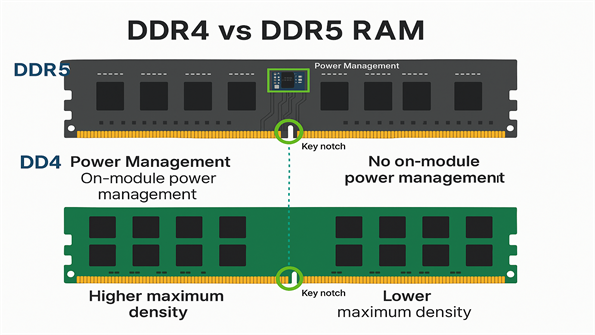
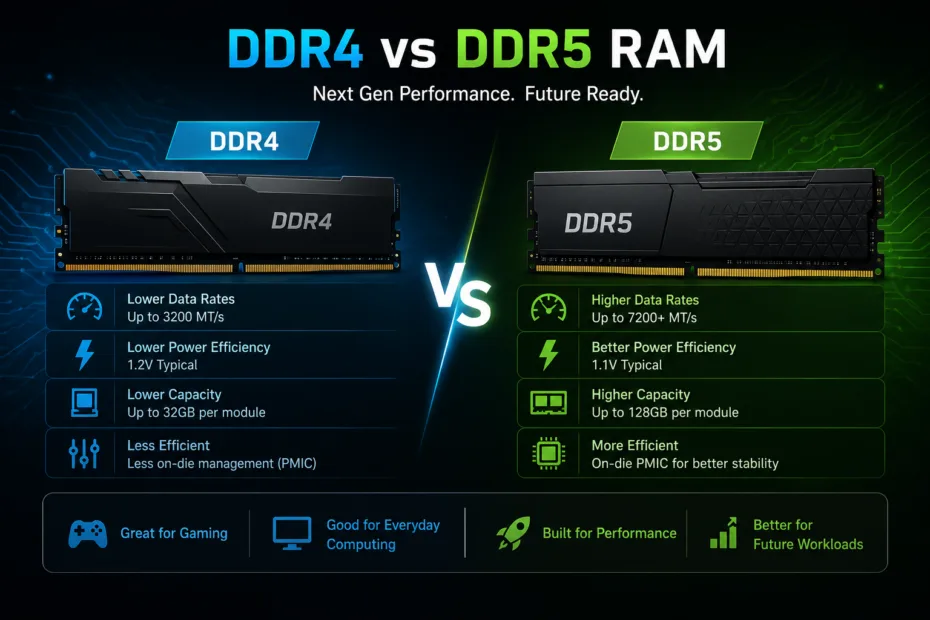
Older memory typically operates between 2133 MHz and 3600 MHz. In contrast, the newer generation starts at 4800 MHz. Enthusiast memory kits frequently push past 8000 MHz today. This incredible speed literally doubles the data transfer rate. Furthermore, the newer standard operates at a lower voltage of 1.1V compared to 1.2V. It manages power distribution directly on the module itself. This architectural shift provides better system stability and reduces overall motherboard heat.
Beyond simple frequency increases, the physical architecture changed significantly. A single modern memory stick features two independent 32-bit channels. Older sticks rely on a single 64-bit channel. This means a single newer module functions similarly to a dual-channel setup from previous generations. When you install two sticks, the system benefits from four independent channels. This fundamentally transforms how the processor requests and receives data, eliminating micro-stutters during heavy multitasking.
Real-World Gaming and Productivity
Does this massive speed boost translate to better gaming performance? The answer depends entirely on your monitor resolution and graphics card. At 1080p, ultra-fast memory increases frame rates by 10% to 15% in fast-paced esports titles like Valorant or Counter-Strike 2. However, at 1440p or 4K resolution, the graphics card becomes the bottleneck. In these high-resolution scenarios, the performance difference drops to a negligible margin.
For professional productivity, the story changes entirely. Video editors, 3D animators, and data scientists experience massive improvements. Complex software renders much faster when it accesses system memory instantly. If time equals money for your business, the expensive platform upgrade pays for itself quickly.
Platform Compatibility Updates for AMD and Intel
You cannot mix and match memory types. Your computer motherboard strictly dictates which generation you must install. In the past, companies occasionally offered transition motherboards. Today, manufacturers force a strict hardware division.
AMD AM5 and Legacy AM4 Support
AMD moved exclusively to the newer standard with its AM5 platform. Processors like the Ryzen 7000 and Ryzen 9000 series completely lack support for older memory. However, AMD surprised the market by extending support for its legendary AM4 socket. They recently released new processors for this older platform. This ensures budget gamers can still build highly capable machines using cheap older memory.
Intel LGA1851 and Older Platforms
Intel followed a similar path recently. The latest Core Ultra 200 series on the LGA1851 socket abandons older RAM entirely. If you want the absolute newest Intel chip, you must pay the premium for modern memory. Fortunately, Intel’s older LGA 1700 platform still supports both memory generations. If you buy a 13th or 14th Gen processor, you can easily pair it with an affordable legacy motherboard.
Should You Choose DDR4 or DDR5 in 2026?
Making the final choice depends entirely on your total budget, daily workflow, and upgrade cycle. Neither option is universally wrong, but one will definitely suit your specific needs better.
When the Older Generation Makes Sense
Choose the older standard if you are building a strict budget PC. The money you save on the memory and the motherboard allows you to buy a significantly better graphics card. A mid-range GPU paired with cheap memory will easily outperform a weak GPU paired with expensive memory. Additionally, if you already own an AM4 or LGA 1700 system, upgrading your CPU while keeping your current RAM makes perfect financial sense.
When the Newer Generation is Necessary
Invest in the newer standard if you are building a high-end system meant to last five years. Any flagship CPU requires top-tier bandwidth to reach its maximum computing potential. Furthermore, creative professionals must choose the faster option. The time saved during heavy video rendering easily justifies the inflated price tag. Finally, if you demand the absolute highest frame rates in competitive 1080p gaming, you truly need the extra bandwidth.
Ultimately, the computer memory market remains highly volatile. Industry analysts suggest prices might stabilize late this year as manufacturing yields improve. Until then, buyers must balance their immediate performance needs against their financial constraints. Do not overspend on memory speeds your processor cannot fully utilize. Instead, aim for the sweet spot—typically 6000 MHz for modern Ryzen chips and 6400 MHz for Intel processors.
Frequently Asked Questions
Should I go for DDR4 or DDR5 in 2026?
You should base this decision entirely on your total budget and hardware platform. If you plan to build a top-tier gaming PC or professional workstation using AMD’s AM5 or Intel’s LGA1851 sockets, you must buy DDR5. These platforms do not support older memory. However, if you are upgrading an older PC or building a strict budget system, DDR4 remains an excellent choice. The massive price difference allows budget builders to redirect funds toward a superior graphics card. Ultimately, choose the newer standard for future-proofing, but stick with the older standard for maximum value.
Is DDR5 worth it in 2026?
Yes, the newer memory generation is absolutely worth it for specific use cases. Creative professionals handling heavy video editing, 3D rendering, or complex data analysis will see massive time savings. The doubled bandwidth significantly accelerates these intensive workloads. Additionally, competitive gamers playing at 1080p resolution will enjoy higher, more stable frame rates in esports titles. However, casual gamers playing at 1440p or 4K resolution will notice very little difference. In higher resolutions, the graphics card limits performance rather than the system memory. Therefore, it is only worth the high cost if your workload demands it.
Will DDR5 RAM prices go down in 2026?
Market experts predict that prices will likely remain elevated for most of the year. The surge in demand for AI server infrastructure consumes the majority of global manufacturing capacity. Companies simply cannot produce enough memory chips to satisfy both enterprise and consumer markets simultaneously. However, some industry trackers expect a slight market correction during the fourth quarter as production yields slowly improve. Unless you are willing to wait until late 2026 or early 2027, you should not expect major price drops. Buy what you need now, rather than waiting for an unpredictable market shift.
Is 16GB DDR5 enough for 2026?
No, 16GB is no longer the ideal capacity for a modern PC build. Modern operating systems, background applications, and web browsers consume a significant amount of memory just running idle. Furthermore, new AAA video games frequently demand 16GB just for themselves. When you factor in the high cost of modern memory kits, buying a small capacity makes little financial sense. You should consider 32GB as the new baseline standard for any new computer build today. This capacity ensures smooth multitasking, eliminates micro-stutters in heavy games, and provides enough headroom for future software updates.
What is the lifespan of DDR5 RAM?
The physical lifespan of modern memory easily exceeds ten years under normal operating conditions. Memory modules contain no moving parts and generate relatively little heat compared to processors or graphics cards. The built-in power management integrated circuits (PMIC) also help regulate voltage efficiently, preventing electrical degradation. From a technological standpoint, this generation will remain the industry standard until at least 2029 or 2030, when the next iteration eventually launches. Therefore, a quality memory kit purchased today will comfortably outlast several processor upgrades and remain fully functional for the entire life of your computer.
Can I use DDR5 in a DDR4 motherboard?
No, you absolutely cannot mix memory generations on the same motherboard. The physical design of the memory sticks differs significantly. The alignment notch on the bottom edge sits in a completely different position, preventing you from inserting the wrong stick into the motherboard slot. Additionally, the two technologies operate on entirely different electrical architectures and pin layouts. Always verify your motherboard specifications before purchasing memory. If your motherboard specifies support for the older standard, you must purchase that exact generation, regardless of what processor you install into the system.
Conclusion
Navigating the complexities of PC building requires careful research, especially when deciding between DDR5 vs DDR4 in 2026. As we have explored, the landscape has changed dramatically. Artificial intelligence infrastructure demands have driven modern memory prices to unprecedented heights. Consequently, the choice between generations is no longer just about raw performance; it is heavily about budget management and platform restrictions.
If you desire maximum performance, the newer memory standard delivers incredible bandwidth and efficiency. It stands as a strict requirement for modern AMD AM5 and Intel LGA1851 platforms. For video editors, heavy multitaskers, and extreme esports gamers, the steep investment pays dividends in speed and system reliability.
Conversely, the older memory generation remains remarkably relevant. Thanks to extended support for legacy platforms like AMD’s AM4 and Intel’s LGA 1700, budget-conscious builders can still create highly capable gaming rigs. The money saved on memory easily funds a stronger graphics card, which yields far better gaming results at higher resolutions.
Ultimately, your specific needs and budget must dictate your choice. Evaluate your primary PC usage, check your motherboard compatibility, and plan your upgrades strategically. Do not overspend on memory if your processor cannot utilize the extra speed. Take a close look at your budget today, pick the platform that aligns with your goals, and start building your ideal computer with total confidence.