

Can Satellite Internet Handle Video Calls and Online Gaming?
Living in a rural area often means dealing with limited broadband options. If you rely on the internet for remote work and entertainment, you may wonder: can satellite internet handle video calls and online gaming reliably?
Traditional satellite internet had a reputation for high latency and frequent interruptions. These problems made real-time communication and competitive gaming difficult. However, advances in satellite technology have significantly improved internet performance.
Today, your experience depends largely on the type of satellite network you use. Geostationary (GEO) satellites operate much farther from Earth than Low Earth Orbit (LEO) satellites. This difference directly affects connection speed and response times.
This guide explores satellite internet performance for gaming and video calls. We examine Starlink, explain common connection problems, and compare satellite internet with 5G and Wi-Fi. By the end, you will understand which technology suits your connectivity needs.
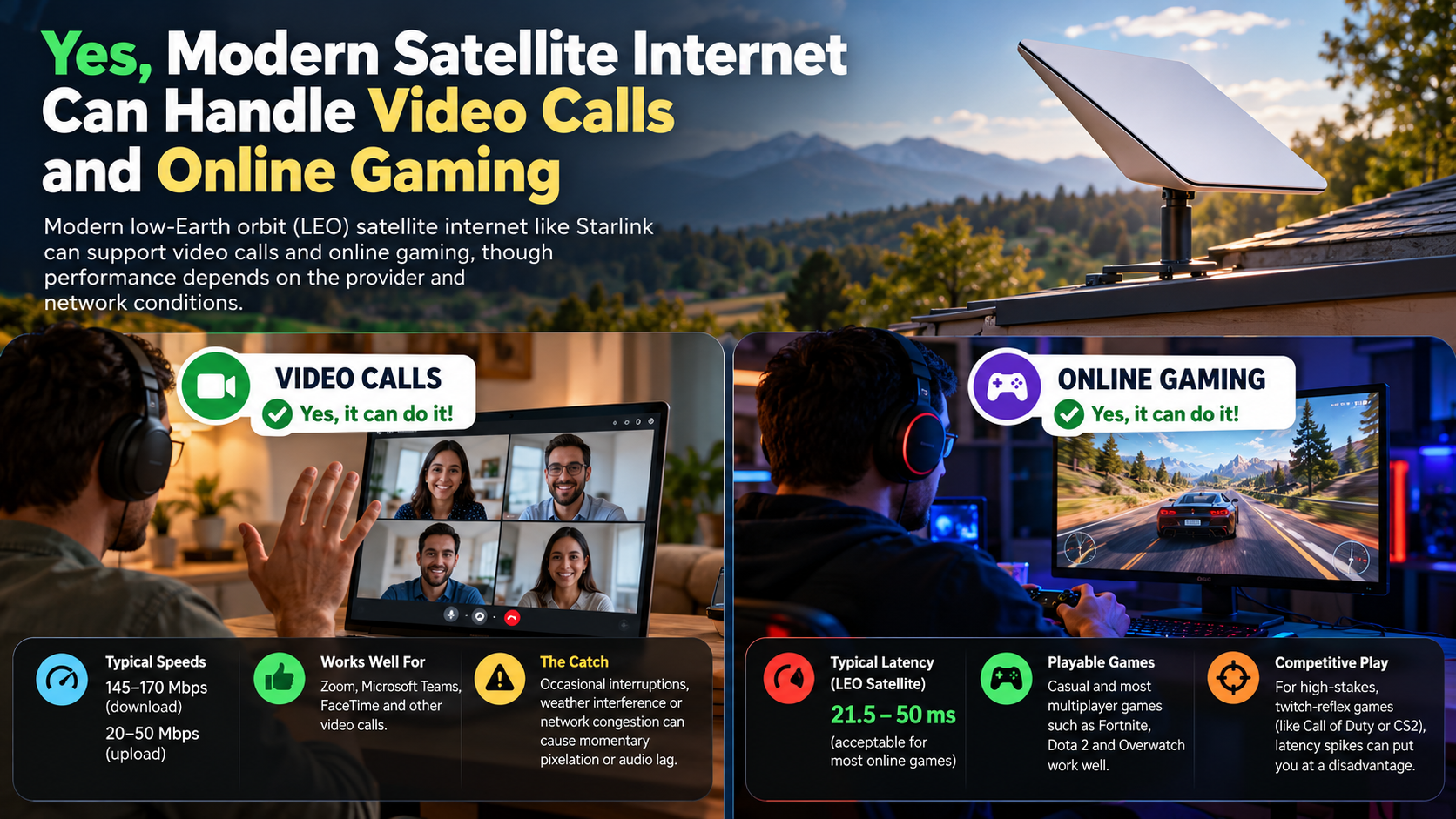

What Satellite Internet Is Good for Gaming?
Low Earth Orbit (LEO) satellite internet is generally better suited to online gaming than traditional geostationary services. Providers such as Starlink offer significantly lower latency because their satellites operate much closer to Earth. Traditional providers, including HughesNet and Viasat, use geostationary satellites approximately 22,300 miles above Earth’s surface. This distance creates substantial delays, often reaching several hundred milliseconds.
In comparison, LEO networks can deliver latency suitable for many multiplayer games. Starlink’s performance varies by location and network conditions. However, its connection can support casual and competitive gaming when stable.
Games involving slower actions are generally more tolerant of latency. Turn-based strategy games, card games, and casual role-playing games usually work well. Fast-paced shooters and competitive sports games require more consistent response times.
If you want satellite internet for gaming, consider these factors:
- Latency: Lower ping means faster responses.
- Jitter: Consistent response times help prevent sudden gameplay delays.
- Packet loss: Fewer lost packets reduce interruptions.
- Network stability: Consistent connectivity matters during multiplayer matches.
Low Latency Constellations vs. Legacy Satellites
The biggest difference between modern and traditional satellite internet is the distance signals must travel. Geostationary satellites remain in fixed positions relative to Earth. Their high orbital altitude creates considerable signal delays. This can affect gaming, video calls, and other real-time applications.
LEO satellites operate much closer to the planet. Their shorter communication paths help reduce signal travel time. Consequently, services such as Starlink can provide a more responsive connection.
However, lower latency does not guarantee perfect gaming performance. Satellite handoffs, network congestion, routing, and interference can still affect your connection. These factors may cause sudden ping increases or occasional packet loss.
For gamers, checking more than advertised download speeds is important. A connection with high bandwidth can still feel slow when latency fluctuates. Look for a provider that offers consistent ping, low jitter, and reliable service.
What Are the Disadvantages of Satellite Internet?
Satellite internet provides connectivity in areas without reliable cable or fiber infrastructure. However, it comes with several limitations that can affect everyday performance. Understanding these disadvantages helps you decide whether satellite broadband suits your household.
The most common challenges include latency, weather interference, network congestion, and equipment costs. Traditional geostationary services also experience considerably higher delays than modern LEO networks.
Here are the main disadvantages to consider:
- High latency: Traditional satellite connections can struggle with real-time applications.
- Weather interference: Heavy rain and snow can weaken satellite signals.
- Network congestion: Performance may decrease during busy periods.
- Data policies: Some providers impose data allowances or traffic prioritization.
- Equipment expenses: Satellite dishes, routers, and installation can increase initial costs.
- Obstructions: Trees, buildings, and other obstacles can interrupt signal reception.
These limitations vary between providers and service plans. Modern LEO networks address several traditional problems but cannot eliminate every connectivity issue.
Understanding the Impact of Atmospheric Interference
Weather conditions can affect satellite internet performance, particularly during heavy precipitation. Rain fade occurs when raindrops absorb or scatter radio signals. This can weaken communication between your satellite dish and the network.
Heavy snowfall may also cause problems. Snow accumulation on the dish can obstruct signal reception. Severe storms can temporarily interrupt connectivity, affecting video conferences and online gaming sessions.
Cloud cover alone does not usually cause major interruptions. However, intense weather systems often bring precipitation that can affect signal quality.
Physical obstructions are another important consideration. Trees, buildings, and roof structures can block the dish’s view of the sky. This is particularly important for LEO services because satellites move across the sky.
Before installing satellite internet, check the proposed dish location. Choose an area with a clear view of the sky. Regularly inspect the equipment for obstructions or accumulated snow. These simple precautions can help maintain a more stable connection.
Can Starlink Handle Online Gaming?
Yes, Starlink can handle online gaming, including many competitive multiplayer titles. Its Low Earth Orbit satellite network provides considerably lower latency than traditional geostationary satellite services.
Starlink’s performance depends on your location, service plan, network congestion, and equipment setup. Its published specifications describe typical land-based latency between 25 and 60 milliseconds. However, actual results can vary, particularly in remote locations.
Games such as Call of Duty, Fortnite, and Apex Legends can run on stable Starlink connections. Multiplayer adventures, sports games, and massively multiplayer online games are also practical options.
However, Starlink does not guarantee a flawless gaming experience. Temporary signal interruptions, satellite handoffs, and network congestion can cause occasional performance fluctuations.
Before choosing Starlink for gaming, consider these factors:
- Ping: Check latency during actual gameplay.
- Jitter: Watch for sudden changes in response times.
- Packet loss: Monitor whether data packets are being lost.
- Connection stability: Test performance during peak usage hours.
Starlink makes satellite gaming practical for many rural households. However, fiber and reliable cable connections remain preferable when available.
Optimizing Starlink Settings for Stable Gameplay
Your home network setup can influence gaming performance on Starlink. Even with a strong satellite connection, poor router placement or wireless interference can introduce additional delays.
Start by connecting your gaming PC or console directly to the router using an Ethernet cable. A wired connection reduces interference and avoids some problems associated with wireless networking. However, consider the drawbacks of using Ethernet cables before choosing a wired setup for your home.
You should also position your router carefully. Keep it away from thick walls, large appliances, and other sources of wireless interference. If you use Wi-Fi, select the appropriate frequency band for your device and distance.
Follow these practical steps to improve your connection:
- Use Ethernet: Connect your gaming device directly to the router whenever possible.
- Check dish visibility: Ensure trees and buildings do not obstruct the satellite dish.
- Monitor network usage: Limit large downloads while playing online.
- Check router placement: Keep your router in a central, open location.
- Monitor performance: Test ping, jitter, and packet loss during gameplay.
These adjustments cannot eliminate satellite-related interruptions. However, they can reduce avoidable problems inside your home.
Is Satellite Internet Faster Than 5G?
Satellite internet and 5G home internet offer different advantages. Their actual performance depends on location, network coverage, equipment, and congestion.
In areas with strong coverage, 5G home internet can deliver competitive download speeds and relatively low latency. Some connections reach hundreds of megabits per second. However, performance can change depending on distance from cellular towers and available network capacity.
Starlink also provides high-speed broadband in many locations. Its network can deliver speeds suitable for video calls, streaming, and online gaming. Nevertheless, satellite performance varies between regions and service conditions.
The main difference is infrastructure. 5G uses nearby cellular towers, while satellite internet communicates through orbiting satellites and ground stations.
Consider these differences when comparing both technologies:
- Coverage: Satellite internet can reach remote locations beyond cellular coverage.
- Latency: Both can support real-time applications, depending on network conditions.
- Speed: Either technology can deliver competitive download speeds.
- Availability: 5G depends on local cellular infrastructure.
- Weather: Satellite connections can experience weather-related interference.
If reliable 5G home internet is available, compare its actual performance and pricing with satellite plans before making a decision.
Proximity Benefits of Local Cellular Infrastructure
One major advantage of 5G is its use of nearby cellular infrastructure. Your device communicates with a local cell tower rather than sending signals directly to an orbiting satellite.
This shorter communication path can reduce latency. It also allows cellular networks to connect through terrestrial infrastructure, including fiber-optic backbones.
However, proximity alone does not guarantee better performance. Tower congestion, signal strength, network routing, and building materials can affect your connection.
5G performance also varies between frequency bands. Mid-band networks generally offer a balance between coverage and speed. High-band millimeter-wave networks can deliver very high speeds but have limited coverage and shorter signal ranges.
For gaming and video conferencing, consistent latency matters more than headline download speeds. Test your 5G connection during the hours when you normally use the internet.
If your cellular signal is weak or towers are overloaded, Starlink may provide a more consistent alternative. Your local network conditions should determine which service you choose.
Is Satellite Internet Better Than Wi-Fi?
Satellite internet and Wi-Fi are not competing internet technologies. They perform different functions within your home network.
Satellite internet is an internet delivery method. It connects your home to the wider internet through a satellite dish and an orbital network. Wi-Fi is a wireless networking technology that distributes your internet connection to devices inside your home.
Most modern satellite internet installations include a Wi-Fi router. This router allows smartphones, laptops, televisions, and gaming consoles to access the internet without physical cables.
Your overall experience depends on both connections. Satellite performance determines how efficiently data reaches your home. Wi-Fi performance affects how reliably that data travels between your router and connected devices. If you connect some devices through Ethernet while others use Wi-Fi, you might wonder whether Ethernet slows down Wi-Fi for others.
For example, Starlink may deliver excellent internet speeds. However, poor router placement can still cause weak signals and lag in distant rooms.
Understanding this distinction helps identify connection problems. If your satellite connection works properly but your bedroom Wi-Fi is weak, upgrading your home network may help.
How Household Wi-Fi Complements Satellite Service
Your Wi-Fi router distributes the internet connection throughout your home. It allows multiple devices to connect simultaneously without requiring individual Ethernet cables.
However, wireless performance depends on router placement, frequency bands, interference, and physical obstacles. Thick walls, floors, and nearby electronic devices can weaken Wi-Fi signals. Choosing the right router also matters, so understanding the differences between dual-band and tri-band routers can help you select equipment suited to your household’s connectivity needs.
A modern Wi-Fi 6 router can improve wireless efficiency and handle multiple connected devices. However, upgrading your router will not increase the bandwidth supplied by your satellite provider. It also cannot eliminate satellite-related latency.
For better household connectivity, consider these practical improvements:
- Choose a central location: Place your router in an open area.
- Use Ethernet: Connect stationary gaming devices directly whenever possible.
- Consider Wi-Fi 6: Upgrade if your existing equipment struggles with multiple devices.
- Reduce interference: Keep your router away from obstacles and competing wireless equipment.
- Use mesh networking: Consider a mesh system if your home has several rooms or multiple floors.
A properly configured home network helps you get more consistent performance from your satellite connection.
Final Verdict: Is Satellite Internet Good for Gaming and Video Calls?
Satellite internet has come a long way, making online gaming and video calls practical for many people, especially those living in rural areas. Modern Low Earth Orbit (LEO) services like Starlink offer lower latency and better responsiveness than traditional satellite connections. They can support popular multiplayer games, Zoom meetings, video streaming, and everyday online activities.
However, performance still depends on network congestion, weather conditions, signal obstructions, and equipment setup. While satellite internet is a useful alternative where fiber and cable broadband are unavailable, reliable 5G or fiber connections may offer better performance where accessible.
For more information, check the Federal Communications Commission (FCC) for broadband information and the official Starlink website for service details and availability.
Ultimately, satellite internet can handle video calls and online gaming, but choosing the right provider and understanding its limitations will help you get the best experience.