What AMD CPU Naming Actually Means: Numbers and Letters Explained
Shopping for a new processor can feel overwhelming when you encounter unfamiliar model numbers. Names like Ryzen 7 7800X3D and Ryzen 5 7600 might look like random combinations of letters and numbers. However, AMD CPU naming follows specific patterns that help identify a processor’s product tier, generation, architecture, and features.
Understanding these naming conventions can help you make a better buying decision. Retailers often discount older-generation processors, making it easy to confuse an older chip with a newer model. Learning how AMD names its processors helps you compare specifications before spending your money.
AMD uses different naming conventions for desktop and laptop processors. Each has its own rules, so understanding the difference is essential. You should also check official processor specifications before making a purchase.
This guide answers four important questions:
-
How does AMD CPU naming work?
-
What do the numbers mean on an AMD CPU?
-
What do the letters mean in AMD processors?
-
What does Ryzen 5 or Ryzen 7 mean?
Let’s break down each part so you can understand AMD processor names more easily.
How does AMD CPU naming work?
AMD CPU naming follows a structured format that helps identify a processor’s product family, performance tier, model, and additional features. However, the naming convention differs between desktop and laptop processors. Understanding this distinction is important when comparing AMD Ryzen CPUs.
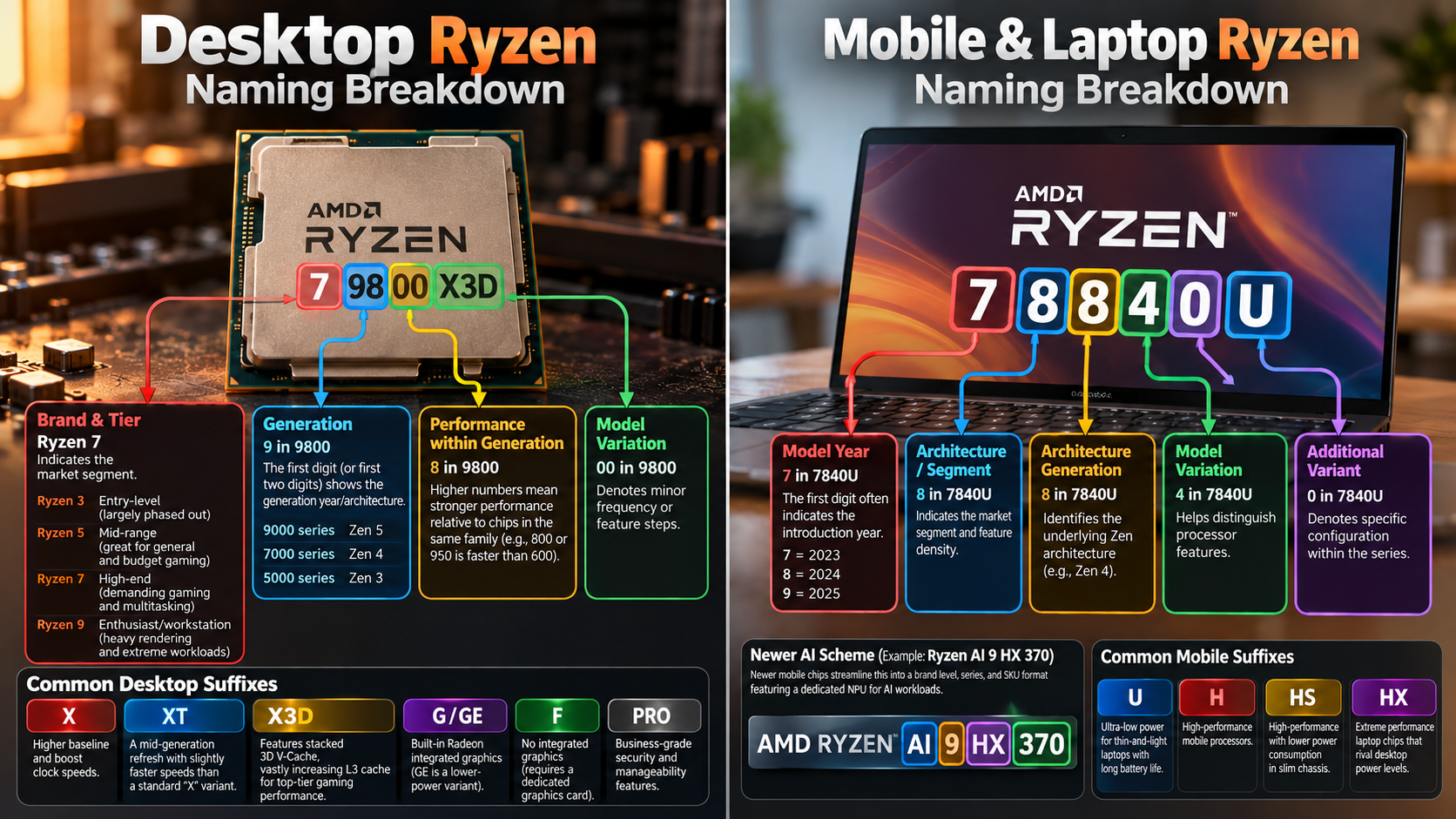
Consider the AMD Ryzen 7 7700X as an example. Each part communicates something about the processor.
-
AMD: The manufacturer.
-
Ryzen: The processor brand.
-
7: The product performance tier.
-
7700: The processor’s model number.
-
X: A suffix indicating a higher-performance desktop model.
The product tier helps you understand the processor’s market position. The model number identifies its place within the product lineup, while the suffix highlights particular characteristics.
However, these numbers do not tell you everything about performance. You should also compare core counts, clock speeds, cache, architecture, and power requirements before purchasing.
The Role of Desktop and Mobile Schemes
AMD uses different naming conventions for desktop and laptop Ryzen processors. This difference matters because the same-looking numbers can communicate different information depending on the processor type. If you’re comparing AMD processors with Intel alternatives, understanding the differences in their product lineups is equally important. Our guide to AMD Ryzen 7 vs Intel Core i7 explains how these processors compare in performance and features.
Desktop processors generally use a four-digit model number. For example, Ryzen 7 7700X belongs to AMD’s Ryzen 7000 desktop family. The first digit identifies the series, while the remaining digits distinguish models within that lineup. However, these digits do not provide a complete performance comparison.
Laptop processors introduced a more detailed naming system in 2023. For example, the Ryzen 7 7840U uses four digits with specific meanings. The first digit represents the portfolio year, the second indicates the market segment, and the third identifies the Zen architecture.
The fourth digit helps distinguish processor features. A final letter indicates its power and performance category. Therefore, always identify whether you’re comparing desktop or mobile Ryzen CPUs before interpreting their model numbers.
What do the numbers mean on an AMD CPU?
AMD processor numbers help distinguish models within a product lineup. However, their meaning depends on whether you’re examining a desktop or laptop processor.
Take the Ryzen 7 7700X as an example. The 7000 series identifies its desktop processor family. The remaining numbers distinguish its position within that family. They do not directly reveal its core count or exact processing speed.
AMD’s desktop naming system is less detailed than its newer laptop convention. Therefore, you shouldn’t assume that every digit represents a specific hardware feature.
When comparing desktop processors, pay attention to these specifications:
-
Processor generation: Helps identify the product series.
-
Core and thread count: Indicates multitasking and parallel-processing capabilities.
-
Clock speed: Shows the processor’s operating frequency.
-
Cache memory: Affects how quickly the CPU accesses frequently used data.
-
Architecture: Identifies the underlying Zen design.
These specifications provide a more reliable performance comparison than model numbers alone. Understanding CPU cores and threads also helps you evaluate multitasking capabilities and determine whether a processor suits your workload.
Why the Second Digit Matters Most
The second digit can help distinguish models within some AMD processor lineups. However, treating it as a universal performance indicator is misleading. Its meaning depends on the naming convention and processor family.
For example, desktop Ryzen processors such as the Ryzen 5 7600 and Ryzen 7 7700 belong to different performance tiers. Their second digits are different, but their product tiers already provide useful information about their market positioning.
Laptop processors follow a more structured system. In AMD’s naming convention introduced in 2023, the second digit indicates the market segment. For instance, the Ryzen 7 7840U uses an eight in this position.
However, a higher number does not automatically guarantee better performance. Architecture, core count, clock speeds, cache, and power limits also matter. Always compare the complete specifications before choosing between two AMD CPUs.
What do the letters mean in AMD processors?
The letters at the end of an AMD processor name are called suffixes. They help identify specific features, performance categories, and power characteristics. Understanding these letters makes it easier to compare desktop and laptop Ryzen processors.
Some common AMD processor suffixes include:
-
X: Indicates a higher-performance desktop model with higher boost capabilities.
-
X3D: Identifies processors featuring AMD 3D V-Cache technology. This technology adds extra cache memory to improve performance in supported workloads, particularly gaming.
-
G: Traditionally identifies desktop processors with integrated Radeon graphics.
-
U: Generally identifies lower-power laptop processors designed for thin and lightweight devices.
-
HS: Identifies performance-oriented laptop processors with an emphasis on power efficiency.
-
HX: Identifies high-performance laptop processors designed for demanding workloads.
These suffixes provide useful clues, but they don’t guarantee identical performance across different generations. For example, an X3D processor may outperform a standard model in gaming but not every productivity application. However, processor performance also depends on cooling. Understanding what happens when you run a CPU without a cooler helps explain why proper thermal management matters.
Always check the official specifications to understand a processor’s actual capabilities.
Picking the Correct Suffix for Your Rig
Choosing the right AMD processor suffix depends on how you plan to use your computer. Different suffixes indicate different performance characteristics, so selecting one without considering your workload can lead to unnecessary spending.
For gaming, an X3D processor deserves consideration. Its additional 3D V-Cache can improve gaming performance in cache-sensitive titles. However, the benefits vary between games and applications. If you’re planning a gaming build, choosing the right processor is equally important. Check out our guide on the best AMD CPUs for gaming in 2026 to explore suitable options.
If you’re building a desktop for everyday work, browsing, or general multitasking, a standard Ryzen processor may provide everything you need. You don’t necessarily need an X-series or X3D model.
For laptops, the suffix helps identify the processor’s intended power category:
-
U: Suitable for everyday laptops and battery-conscious users.
-
HS: Designed for performance-oriented, relatively efficient laptops.
-
HX: Targets high-performance gaming and workstation-style laptops.
Remember that cooling, battery capacity, and laptop design also influence real-world performance. Two laptops with the same AMD CPU can deliver different results because manufacturers configure their systems differently.
What does Ryzen 5 or 7 mean?
AMD uses Ryzen 3, Ryzen 5, Ryzen 7, and Ryzen 9 to divide its processors into different market segments. These labels help buyers understand where a processor sits within AMD’s product lineup.
Ryzen 5 targets mainstream users who need a balance of price and performance. These processors are suitable for everyday computing, multitasking, programming, and gaming.
Ryzen 7 targets users who need additional processing capability. These processors often offer more cores, higher performance, or other advantages over comparable Ryzen 5 models.
AMD also offers Ryzen 3 for entry-level computing and Ryzen 9 for high-performance desktop and laptop systems.
However, these tiers don’t guarantee a fixed number of cores. For example, many Ryzen 5 desktop models offer six cores, while several Ryzen 7 models offer eight. Core counts can vary across generations and product categories.
When choosing between Ryzen 5 and Ryzen 7, consider your applications, budget, and performance requirements. A newer Ryzen 5 can sometimes outperform an older Ryzen 7, so always compare the actual specifications.
Core Counts and Everyday Software Demands
Core count is an important factor when comparing AMD Ryzen 5 and Ryzen 7 processors. However, choosing a processor based only on its number of cores can lead to the wrong decision. Your software, workload, and overall system configuration also matter.
For everyday activities, such as browsing, watching videos, and working with documents, a modern Ryzen 5 processor is usually sufficient. It can also handle most modern games without requiring an expensive upgrade.
Ryzen 7 processors offer additional processing resources in many comparable product generations. These extra cores can benefit users who regularly perform demanding tasks.
Consider a Ryzen 7 if your workload includes:
-
Video editing: Working with large projects and rendering videos.
-
3D rendering: Processing complex models and scenes.
-
Multitasking: Running several demanding applications simultaneously.
-
Streaming: Playing games while managing background applications.
-
Software development: Running development tools, virtual machines, and other resource-intensive tasks.
However, more cores don’t automatically mean better performance in every application. Check benchmark results for your specific workload before deciding whether Ryzen 5 or Ryzen 7 offers better value.
Conclusion
Understanding AMD CPU naming makes choosing the right processor much easier. The model numbers, performance tiers, and suffix letters provide useful clues about a processor’s generation, capabilities, and intended use.
However, don’t judge a CPU by its name alone. A higher model number or performance tier doesn’t always guarantee better results. Always compare important specifications, including core count, clock speed, cache memory, architecture, and power consumption.
Before making your purchase, check the official AMD Ryzen processor specifications to compare available models and verify their features.
Whether you’re choosing a Ryzen 5 for everyday computing, a Ryzen 7 for demanding workloads, or an X3D processor for gaming, focus on your actual requirements and budget. Your graphics card also plays an important role in overall gaming performance. If you’re exploring GPU options, discover what AMD GPU names and numbers actually mean before choosing your next graphics card.
Ultimately, the best AMD processor isn’t necessarily the most expensive one. It’s the one that delivers the right performance for your needs without making you overspend.