Perplexity vs Google Search: Which Is Better?
Finding reliable information online is easier when you use the right search tool. The comparison between Perplexity vs Google Search has become increasingly relevant as AI-powered search changes how people discover information. Google helps users find websites, products, maps, videos, and other online resources. Perplexity takes a different approach by using artificial intelligence to organize information into conversational answers with citations.
Both platforms can help you research topics, but they serve different purposes. Google is particularly useful for finding specific websites and exploring multiple sources. Perplexity can save time when you need an overview of a complicated subject.
However, neither platform guarantees completely accurate results. AI-generated answers can miss context, and conventional search results can contain outdated or unreliable information. For guidance on creating useful content and improving search visibility, explore Google Search Central, Google’s official resource for website owners and SEO professionals.
In this guide, we compare Perplexity and Google Search across speed, accuracy, research capabilities, and search engine optimization. You will also discover when to use each platform and how combining them can improve your research workflow.
Is Perplexity Better Than Google Search?
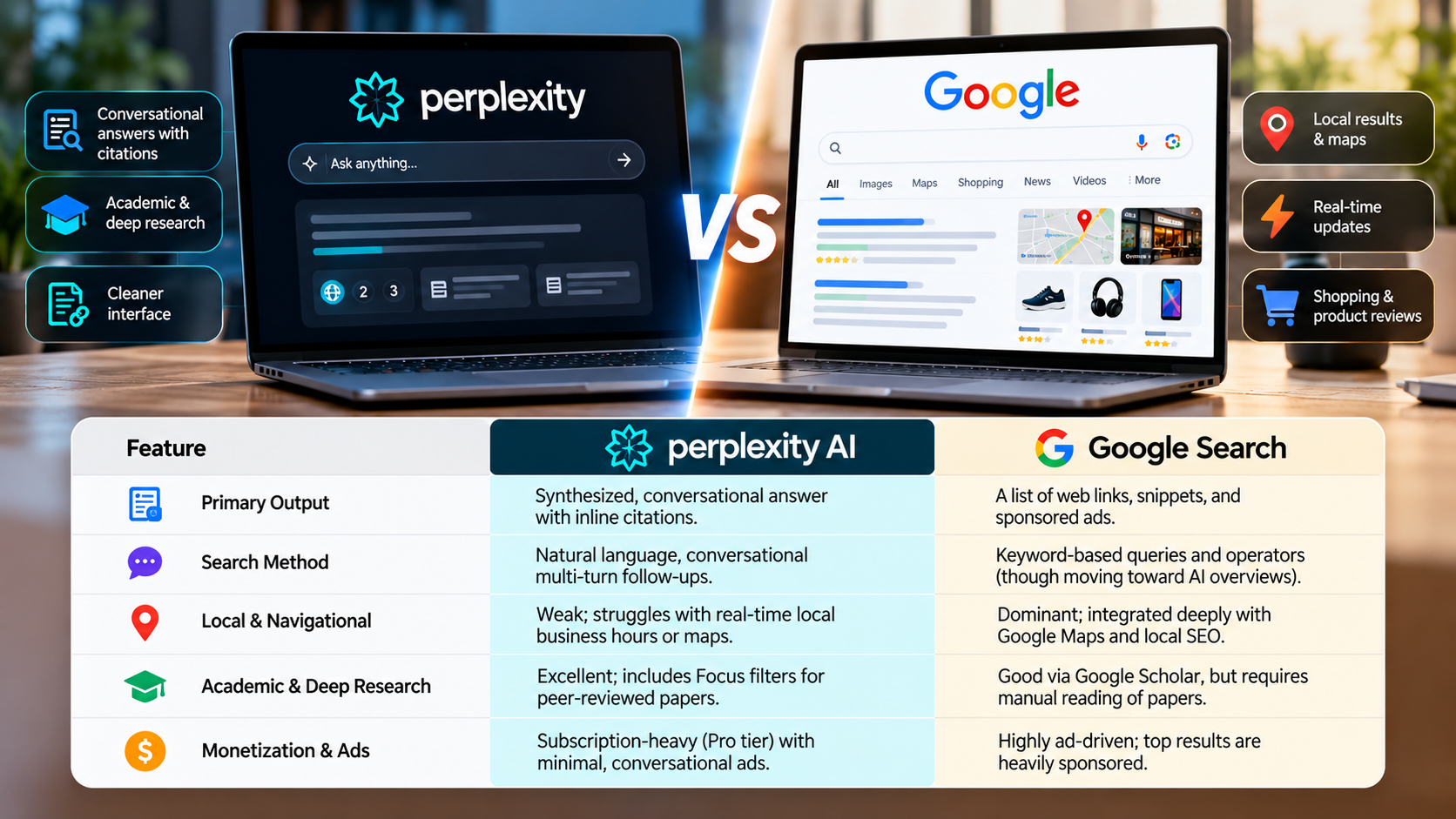
Whether Perplexity is better than Google Search depends on your goals. Google excels at helping users find specific websites, local businesses, shopping pages, maps, and multimedia content. Its search results provide multiple sources, allowing users to compare information and decide which pages deserve further attention.
Perplexity focuses on answering questions directly. It retrieves relevant information from online sources and combines findings into a conversational response. Its citations help users investigate the original material without searching for every source manually.
For example, Google is useful when you need an official website, a nearby restaurant, or a particular product listing. Perplexity can be more convenient when comparing several products or learning about an unfamiliar subject. Students comparing these approaches can also explore AI vs Google for Studying: Which Is Best? to understand how each tool supports learning and research.
The main difference is how each platform presents information. Google primarily helps you discover sources, while Perplexity emphasizes synthesized answers.
However, Perplexity’s summaries can omit important details or misinterpret evidence. Google’s results can also include unreliable pages. For important decisions, verify claims using trustworthy sources rather than relying on either platform alone.
The Impact of AI-Driven Citations on Research Speed
AI-driven citations can make online research more efficient by bringing relevant findings together in one response. Instead of opening several pages immediately, users can review a summary and identify the sources most relevant to their questions.
Perplexity displays citations alongside its answers, helping readers trace information back to its original sources. This approach can be useful for academic research, technical questions, product comparisons, and general learning.
For example, someone researching a software feature might use Perplexity to identify relevant documentation and understand the basic steps. They can then open the cited documentation to confirm the instructions.
However, citations do not automatically make an answer accurate. A source may support only part of a claim, and a summary can overlook conflicting evidence. Multiple websites may also repeat information from the same original source.
To improve reliability, check publication dates and prioritize official documentation or primary research. Understanding the difference between primary and secondary sources can also help you determine whether a citation provides original evidence or summarizes existing findings. Google can help locate additional sources and independent perspectives.
The best approach is to use AI-generated summaries to guide your research, not replace verification. This balances convenience with a more careful evaluation of the available evidence.
Is Perplexity a Good AI Search Engine?
Perplexity is a useful AI search engine for people who want direct answers supported by online sources. Instead of displaying only a traditional list of links, it retrieves relevant information and organizes it into a conversational response.
This format can simplify research on unfamiliar subjects. Users can explore historical events, investigate technical questions, compare products, or learn about developing industry trends. Follow-up questions also make it easier to examine specific details without repeating the entire search process.
Another advantage is its use of citations. Readers can investigate the underlying sources and determine whether the evidence supports the generated explanation. However, the quality of the response depends on the sources retrieved and how accurately the AI interprets them.
Perplexity may overlook important information, misunderstand a webpage, or present incomplete conclusions. Live web retrieval can help surface recent information, but it does not guarantee that every answer reflects the latest developments.
For these reasons, Perplexity works best as a research assistant rather than an unquestionable authority. It can help you understand a topic faster, but important claims still require independent verification.
Real-Time Web Retrieval and Accuracy Benefits
Live web retrieval allows Perplexity to gather information from online sources instead of relying entirely on knowledge acquired during model training. This can help when researching software updates, recent announcements, business developments, or breaking news.
The platform can combine information from several webpages into one response. Users can then review the citations to investigate specific claims or explore related details.
However, accessing current webpages does not guarantee accurate conclusions. A recently published article may contain errors, while an older official document may provide more reliable information. Several websites may also repeat the same unsupported claim. When evaluating research findings, look for the 10 signs of a reliable study to assess the quality of the evidence before accepting its conclusions.
Another limitation is source coverage. If relevant information is unavailable, inaccessible, or overlooked during retrieval, the resulting answer may be incomplete. AI systems can also misunderstand technical language or miss important qualifications.
For better results, check publication dates, compare independent sources, and consult official documentation whenever possible. Use Google to find additional reports or original documents when necessary.
Perplexity can reduce the effort involved in gathering information, but accuracy still depends on careful source evaluation. This is particularly important when researching health, financial, legal, or other high-stakes subjects.
Which Is Better Than Perplexity?
Perplexity is not the only AI tool available for research and productivity. Several alternatives offer different capabilities, so the right choice depends on your intended task rather than a universal ranking.
ChatGPT can assist with writing, brainstorming, coding, data analysis, and interactive problem-solving. Available capabilities depend on the model, plan, and enabled tools.
Claude offers writing assistance, document analysis, and coding support. Its suitability depends on the task, model, and available context.
Microsoft Copilot integrates with supported Microsoft products and services. This can help users who regularly work with Microsoft 365 applications.
Google Gemini supports research, writing, and other tasks, with integrations available through supported Google services and account configurations.
Perplexity remains useful when you want web-based research presented as a conversational answer with citations. However, another tool may suit your workflow better if you primarily create content, analyze uploaded documents, or work within a particular software ecosystem.
Before choosing an alternative, consider source verification, document support, integrations, privacy requirements, and cost. Testing tools against your actual tasks is more useful than relying on broad claims about which AI assistant performs best.
Choosing Specialized AI Tools for Document Analysis
Specialized AI tools can help professionals analyze lengthy documents without searching the public web for every answer. Depending on the platform and plan, users may upload supported PDFs, reports, spreadsheets, and other files to investigate specific questions.
For example, a financial analyst might use an AI assistant to locate figures in a lengthy report. A student could ask questions about a research paper, while a developer might examine technical documentation.
These workflows can save time, but results depend on document quality, file limits, context capacity, and the model’s ability to interpret tables or complex layouts. An AI assistant may overlook footnotes, misread figures, or combine details incorrectly.
For sensitive business information, review the platform’s data-handling policies before uploading proprietary files. It is also worth understanding AI prompt injection, a technique that can manipulate AI systems into following malicious instructions or exposing information they should not reveal. Always verify important calculations and quotations against the original document.
Perplexity may also support document-based workflows, depending on the features available to your account. The important distinction is whether your task requires public web research, analysis of supplied documents, or both.
Choose a tool based on how reliably it handles your actual materials. For complex work, use AI to locate relevant information and organize your analysis, then verify the conclusions independently.
Is Perplexity Good for SEO?
Perplexity introduces another consideration for search engine optimization: visibility within AI-generated answers. Traditional SEO focuses on helping relevant webpages appear in search results and attract visitors. AI-powered search creates another discovery channel through summarized information and citations.
For website owners, appearing in a Perplexity citation may increase brand exposure and potentially generate referral traffic. However, a citation does not guarantee a click. Some users may find the answer they need without visiting the original website.
This shift makes it important to understand how people discover and consume online information. Traditional search visibility remains valuable because users still need websites, original research, product pages, and official documentation.
Website owners should continue publishing useful, accurate content that answers genuine user questions. Clear headings, descriptive titles, logical organization, and credible evidence help readers understand the material.
Structured data can help search engines interpret eligible page elements, but it does not guarantee AI citations or prominent search placement.
The practical strategy is to build trustworthy content rather than optimize exclusively for AI mentions. Monitor organic search performance, referral traffic, and conversions where suitable analytics are available. These measurements provide a more meaningful picture of whether your content reaches the right audience.
Should I Use Perplexity or Google?
Choosing between Perplexity vs Google Search depends on what you want to accomplish. Google is particularly useful for finding specific websites, local business information, maps, shopping listings, images, and other online resources.
Perplexity is useful when you want a synthesized explanation instead of a list of pages. It can help you explore unfamiliar subjects, compare competing ideas, and organize findings from multiple sources. Its conversational format also makes follow-up research convenient.
For many users, the best approach to Perplexity vs Google Search is to use both platforms. Start with Perplexity when you need an overview or want to investigate a complicated question. Then use Google to locate official sources, verify details, and discover additional perspectives.
Your choice should also reflect the importance of the information. For health-related questions, getting health advice from AI chatbots requires particular care because generated answers may be incomplete or inaccurate. Consult authoritative sources and qualified professionals for high-stakes decisions. Neither search engine should replace careful verification.
Consider your typical tasks, research habits, and preferred way of evaluating information. If you regularly need direct explanations, Perplexity may suit your workflow. If you frequently visit specific websites or search for local services, Google may be more convenient.
Ultimately, Perplexity vs Google Search is not about choosing one platform permanently. Use the tool that helps you find relevant, reliable information efficiently for each task.
Final Verdict: Perplexity vs Google Search
The comparison between Perplexity vs Google Search does not produce one winner for every situation. Each platform approaches information discovery differently, and your needs should determine which one you use.
Google is useful for finding websites, local businesses, products, maps, and original sources. Perplexity can simplify research by combining information into conversational answers with citations.
Both platforms have limitations. Google results require careful evaluation, while AI-generated summaries can contain errors or omit important context. Neither tool should be treated as automatically reliable.
For everyday research, consider using Perplexity to explore a subject and Google to verify the findings. This combination can help you save time while maintaining control over the sources you trust.
The best choice is the one that supports your specific goals without sacrificing accuracy. By understanding the strengths and limitations of each platform, you can build a more effective search and research workflow.