How Much Does It Cost to Replace a USB Port on a Laptop?
A broken USB port can interrupt your work, prevent file transfers, and stop your accessories from connecting. Knowing how much it costs to replace a USB port on a laptop helps you choose the right repair option.
The total cost depends on your laptop model, the type of USB port, and the extent of the damage. Some problems require simple cleaning or troubleshooting, while others need professional soldering or motherboard repairs.
Before paying for a replacement, check whether the issue comes from the port itself, a faulty cable, or a software problem. This guide explains repair costs, replacement options, and the factors that affect pricing. It also helps you decide whether repairing your laptop is more practical than replacing it.
How Much Does It Cost to Replace a USB Port on a Laptop?
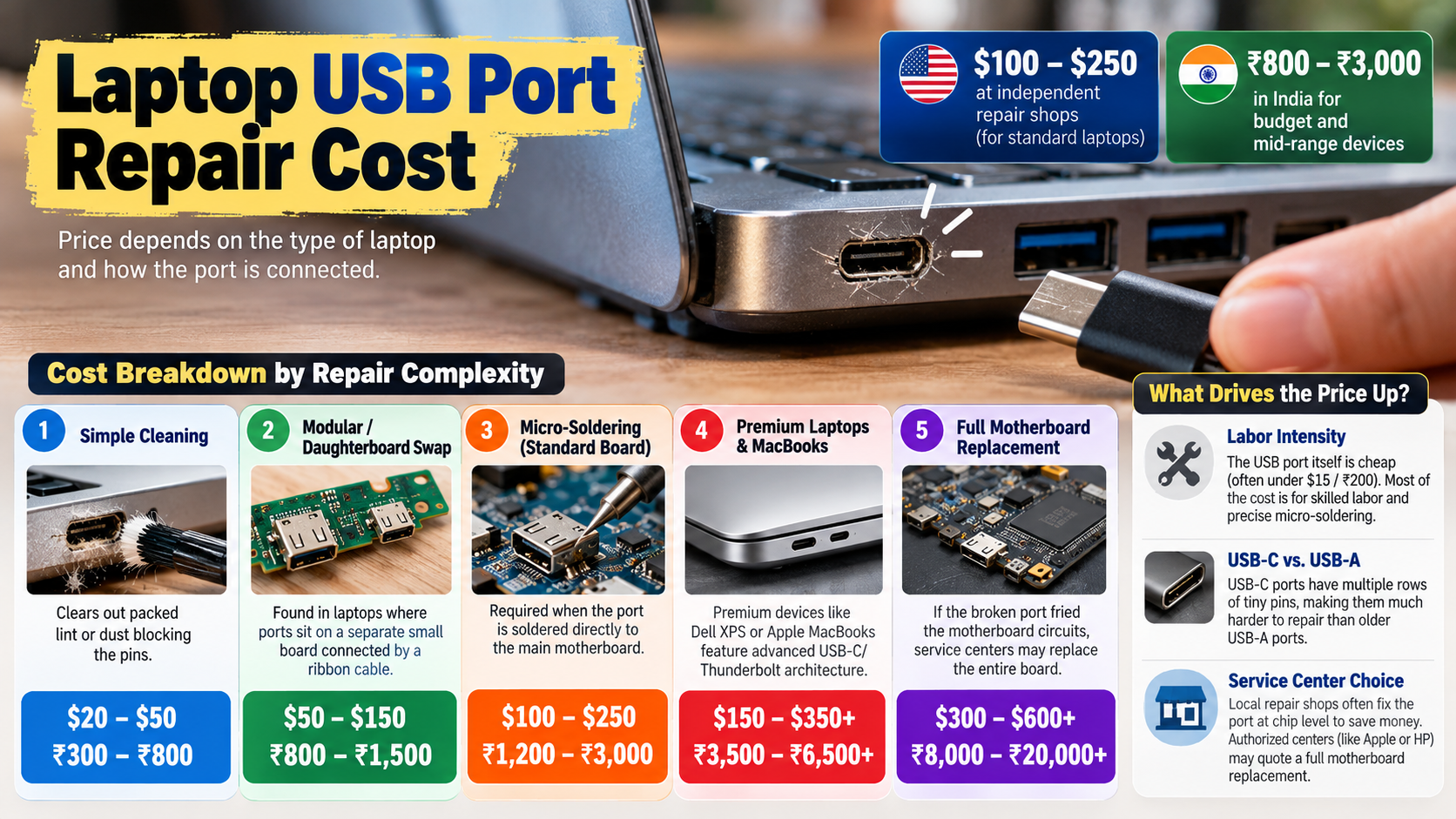
Replacing a USB port on a laptop typically costs around $70 to $150 at a professional repair shop. This estimate may include the replacement part and the technician’s labor. However, prices vary depending on the laptop model, repair location, and complexity of the work.
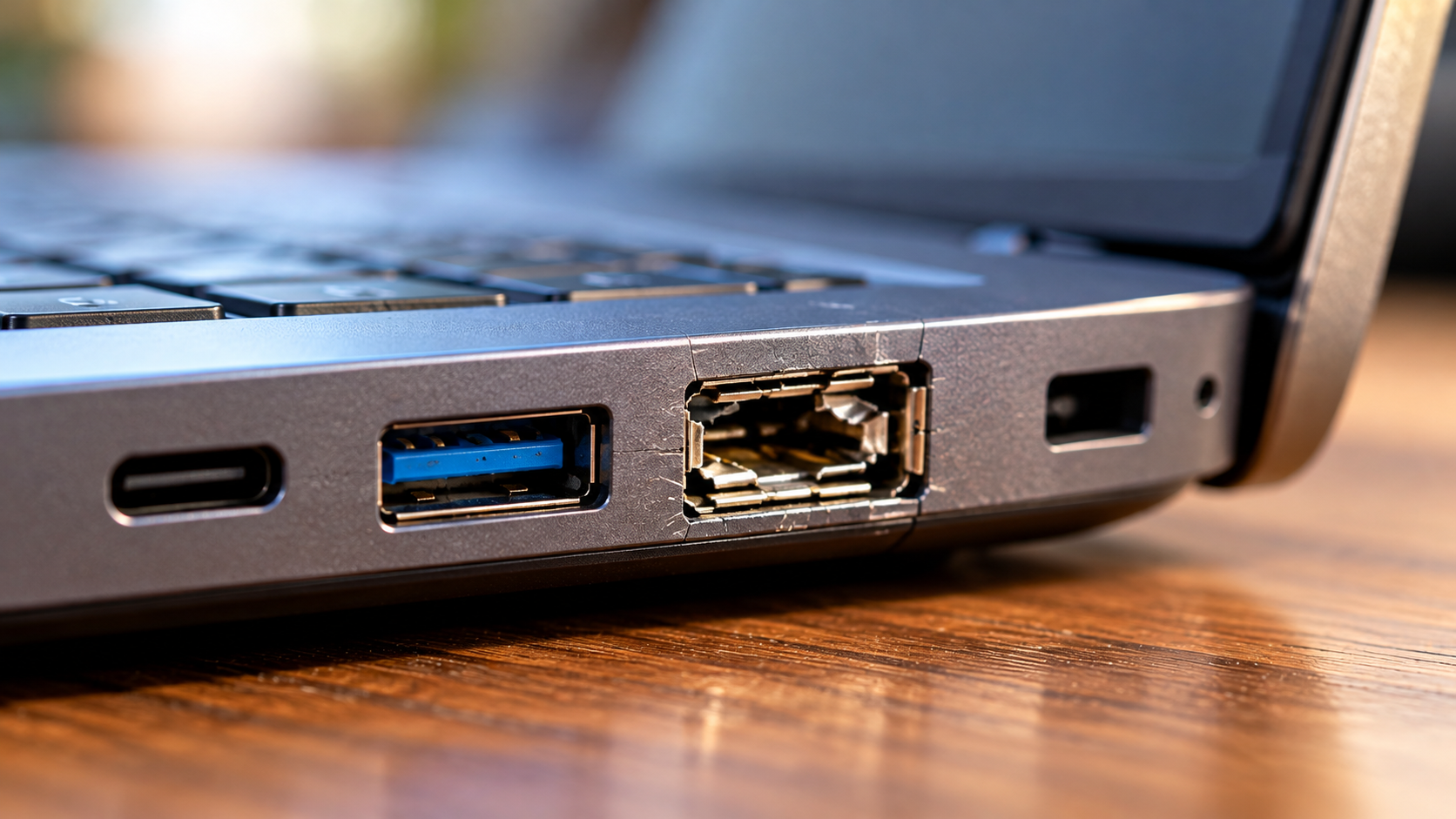
Many laptop USB ports are soldered directly onto the motherboard. To replace a USB port on a laptop with this design, a technician must disassemble the device, remove the damaged connector, and solder a compatible replacement. They must also check for damaged electrical connections.
Some laptops use separate USB daughterboards or modular port assemblies. These designs can make replacement easier and less expensive. Compact laptops with integrated components may require more labor.
Before approving the repair, request a quote that includes parts, labor, diagnostic fees, and any additional motherboard work.
Understanding Labor and Part Expenses
The replacement port usually costs much less than the labor required to install it. A basic USB connector may cost only a few dollars, while specialized connectors and complete port assemblies can cost more.
Technicians spend much of the repair time accessing the damaged port and replacing it. They may need to remove the laptop’s back cover, disconnect internal components, access the motherboard, and perform precision soldering.
Micro-soldering requires suitable equipment and careful handling. Excessive heat or incorrect soldering can damage nearby components and circuit board connections.
Your final bill may also include diagnostic testing and reassembly. Ask whether the quoted price covers testing the repaired port with different USB devices.
Can a Laptop USB Port Be Replaced?
Yes, a damaged laptop USB port can often be replaced by a qualified electronics repair technician. The exact procedure depends on how the manufacturer designed the laptop and connected its USB ports.
If the connector is soldered directly onto the motherboard, the technician must access the circuit board and remove the damaged component. They then install a compatible replacement and inspect the surrounding solder joints.
Some laptops use a separate daughterboard connected to the motherboard by a cable. In these models, the technician may be able to replace the entire board without performing complex soldering.
The repair becomes more complicated if the damage affects nearby components or motherboard traces. USB-C ports may require additional checks when they support charging, video output, or high-speed data transfer. Before troubleshooting a display connection, check whether all USB-C ports support video because capabilities vary by device.
Before choosing a repair, ask whether the port can be replaced independently or whether a larger assembly needs replacement.
The Role of Motherboard Design
Motherboard design plays a major role in determining the cost and difficulty of USB port replacement. Some laptops have accessible, modular ports, while others integrate the connectors directly into the main circuit board.
A modular USB port assembly is generally easier to replace. A soldered connector requires specialized work because the technician must remove the original port without damaging nearby circuits.
USB-C repairs can be particularly complex when the connector supports power delivery, display output, or high-speed data transfer. However, the cable also needs the right capabilities for video transmission. Learn how to tell if a USB-C cable supports video before assuming that a faulty display connection means the laptop’s port is damaged.
Damaged motherboard traces can increase repair time. In some cases, a specialist must restore the connections using fine wires and precision soldering.
The laptop’s age, parts availability, and internal layout also affect the repair decision. Request a diagnosis before assuming that the entire motherboard needs replacement.
How Much Does It Cost to Fix a USB Port?
Fixing a laptop USB port can cost roughly $50 to $200 or more, depending on the underlying problem. These figures are general estimates, not guaranteed prices. A minor issue may cost much less than replacing a damaged connector or repairing the motherboard.
For example, a port blocked by debris may need professional cleaning. If you plan to clean the surrounding computer hardware yourself, first understand whether it is safe to use alcohol to clean your PC and avoid applying liquids directly inside the USB port. A loose connector might require internal inspection and repair. If the connector is physically broken, replacement may be necessary.
Electrical damage can increase the cost considerably. A short circuit may affect the USB controller or other motherboard components. The technician must identify the faulty component before providing an accurate estimate.
Before arranging a repair, try a known-working USB device and cable. Test the device in another port if one is available. These simple checks can help rule out problems unrelated to the damaged connector.
Diagnostic Fees and Quotes
Many computer repair shops charge a diagnostic fee to identify why a USB port stopped working. Some shops waive the fee when you approve the repair, while others charge separately.
The technician may inspect the connector, test the port’s electrical behavior, and check for motherboard damage. They may also troubleshoot software issues if the physical port appears undamaged.
Before authorizing the work, request a written estimate covering:
-
Diagnostic and inspection fees
-
Replacement parts and labor
-
Additional motherboard repairs, if required
-
Warranty coverage for the repair
-
Any charges that apply if you decline the repair
A written quote helps you compare repair shops and avoid unexpected expenses if the initial diagnosis changes.
If the repair cost approaches the price of a replacement laptop, compare both options before spending the money.
If the repair approaches the cost of a replacement laptop, compare both options before spending the money.
What Is the Price of a Laptop USB Port?
The price of a replacement laptop USB port depends on its type, design, and compatibility. A basic USB-A connector may cost only a few dollars, while specialized USB-C connectors or complete port assemblies can cost more. Understanding why some USB ports are color-coded and USB-C isn’t can also help you recognize differences between common connector types.
The replacement part is only one part of the total expense. You must also consider the labor required to install it, especially when the connector is soldered directly onto the motherboard.
Some laptops use dedicated daughterboards that contain one or more USB ports. These assemblies can cost more than a single connector, but they may be easier to replace.
When buying a replacement, use your laptop’s exact model number to identify a compatible component. Similar-looking connectors may have different pin layouts or mounting dimensions.
Buying the wrong part can delay the repair and increase the overall cost. If you are unsure which component you need, ask a technician to identify it before ordering.
Sourcing Quality Replacement Parts
Choosing a compatible replacement part is essential for a reliable repair. Original equipment manufacturer (OEM) parts come from the device manufacturer, while aftermarket alternatives may offer a less expensive option.
However, the brand alone does not guarantee compatibility or quality. Check the connector’s dimensions, mounting points, pin arrangement, and electrical specifications before purchasing it.
For laptops with separate USB daughterboards, verify the board’s part number and cable connections. A component that looks similar may not work with your specific model.
Poorly manufactured connectors can cause loose connections, intermittent data transfers, or additional repair problems. Buying from a reputable supplier can reduce the risk of receiving an incompatible or defective part.
If a repair shop supplies the component, ask whether the price includes a warranty. Also confirm whether the warranty covers both the replacement part and the technician’s labor.
Can a USB Port Be Repaired?
Yes, a laptop USB port can often be repaired, but the correct solution depends on the cause of the problem. A port that appears broken may have a software issue, a damaged connector, or a fault elsewhere on the motherboard.
Start by testing a known-working USB device and cable. Restart the laptop and check whether the port works afterward. On Windows, Device Manager can help identify certain USB controller or driver problems.
If the connector is loose, bent, or physically damaged, professional hardware repair may be necessary. Understanding why a charging port feels loose can provide useful background on loose connections, although the exact causes and repair methods may differ between laptop USB ports and other charging ports. A technician can determine whether the port needs cleaning, connector replacement, or motherboard-level repair.
Avoid forcing a cable into a damaged port. This can bend the contacts further or damage the surrounding circuit board.
Repairing the existing port may be more economical than replacing a motherboard. However, the final decision should depend on the diagnosis, the quoted price, and the laptop’s overall condition.
Conclusion
Replacing a damaged USB port can restore your laptop’s connectivity without requiring an entirely new device. The repair cost depends on the connector type, motherboard design, and extent of the damage.
Before deciding to replace a USB port on a laptop, test your cables and USB devices to rule out simple problems. If the port is physically damaged, request a professional diagnosis and compare repair quotes. Consider your laptop’s age and overall condition before approving expensive motherboard repairs.
For additional troubleshooting, visit Microsoft Support for Windows-related device issues.
Compare the total repair cost with your laptop’s age and overall condition before making a decision. Repairing a faulty USB port can extend your laptop’s lifespan and help you avoid the expense of buying a new device.