What Does The Blue Light On Your Alexa Speaker Mean?
Smart speakers have become common household companions, but their light rings can still cause confusion. A sudden blue or cyan glow may make you wonder whether Alexa listens, processes a request, or has a problem. Understanding the blue light on your Alexa speaker can help you identify normal activity and troubleshoot unusual behavior.
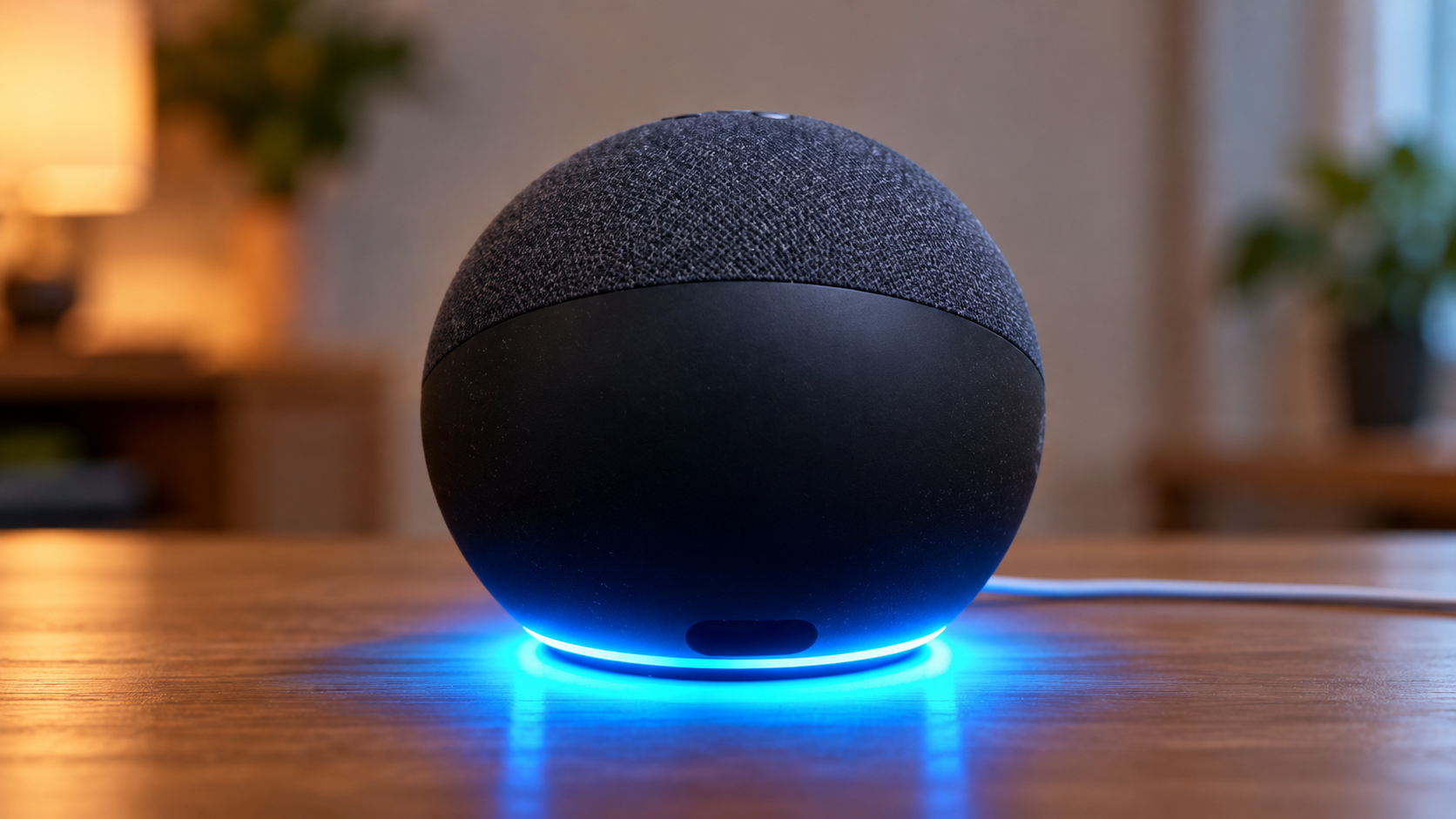
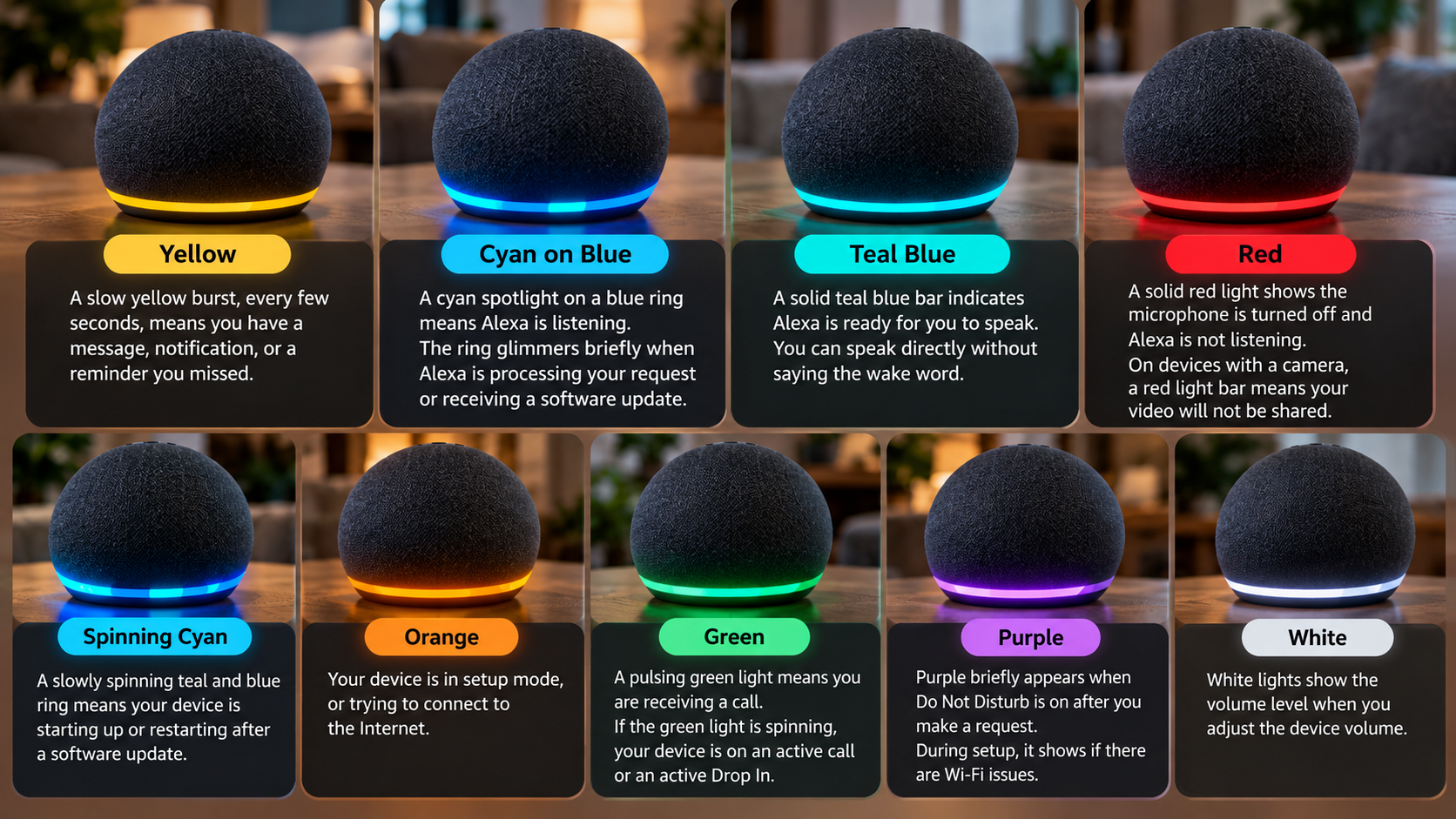
Amazon explains that different blue patterns show different stages of Alexa’s activity. A cyan spotlight on a blue ring means Alexa listens to your voice. A brief blue animation can appear while Alexa processes your request. A slowly spinning cyan and blue ring can also show that the device starts up or restarts after an update.
Most blue light activity remains normal. The important factors include the pattern and duration of the light. If the ring stays active for an unusually long time, you may need to troubleshoot the device.
This guide explains what the blue light means, how it differs from other Alexa indicators, and what to do when the light appears stuck.
Why is my Alexa Echo speaker showing a blue light?
A blue light on your Alexa speaker usually means Alexa listens, processes your request, or prepares a response. The exact meaning depends on how the light moves around the ring. Amazon identifies a cyan spotlight on a blue ring as the listening indicator. After you speak, the light can briefly glimmer while Alexa processes your request.
For example, you may see a blue ring after saying the wake word. This normally means Alexa detected you and can process your command. You may also notice the light after asking a question while Alexa prepares its response.
A slowly spinning cyan and blue ring has a different meaning. Amazon says this pattern can show that the Echo starts up or restarts after a software update. Therefore, you should not treat every blue light as an error.
If the light stays active for an unusually long time and Alexa stops responding, start troubleshooting. Check the power connection and internet connection. Also make sure the microphone works and has not been muted.
Understanding Spinning Versus Solid Cyan Rings
The movement of the light provides useful information about what your Echo does. A cyan spotlight on a blue ring means Alexa listens to your voice. The spotlight can move around the ring as Alexa detects and processes your speech.
After you finish speaking, the light may briefly glimmer while Alexa processes the request. This behavior normally ends after Alexa completes the task. You should not worry about a short blue animation during normal use.
A slowly spinning cyan and blue ring can indicate startup or a restart. This may happen after a software update. A spinning blue light therefore does not automatically mean your Echo has failed.
If the light continues for an unusually long time, check the basics. Confirm that the Echo has power and an active internet connection. Also check whether you accidentally muted the microphone.
Background noise can sometimes cause Alexa to hear something that resembles its wake word. Move the speaker away from loud televisions or other speakers. This simple change can reduce unwanted activations and improve voice recognition.
What color is Alexa if someone is listening in?
The blue light on your Alexa speaker does not indicate an active Drop In conversation. Amazon uses green indicators for calls and Drop In sessions. A pulsing green light signals an incoming call, while a spinning green light signals an active call or Drop In session.
This distinction matters if you have privacy concerns. A blue or cyan light normally relates to Alexa listening to or processing a request. A green indicator signals communication activity instead.
Drop In is an optional Alexa feature. It can connect supported Echo devices like an intercom. Household members and approved Alexa contacts can use the feature when they have the required permissions.
However, the light alone cannot show every communication permission on your account. If you rarely use Drop In, review its settings in the Alexa app. You can then decide which contacts or devices should have access.
It also helps to distinguish wake-word detection from a Drop In call. Alexa uses its microphones to detect the wake word. That process does not mean another person has connected to the speaker.
Recognizing Permitted Drop In Notifications
Drop In works differently from a normal Alexa voice request. When an approved contact starts a Drop In session, Amazon says the Echo shows a green indicator. The connection then supports two-way communication through the device.
Contact Drop In requires permission between you and the Alexa contact. Household Drop In can also connect supported Alexa devices within the same Amazon household.
If you do not want to use this feature, review your communication and Drop In settings in the Alexa app. You can restrict permissions and reduce the possibility of an unexpected communication session.
It also helps to understand the difference between listening for the wake word and a Drop In call. Alexa normally uses its microphones to detect the wake word. That process does not mean another person has connected to the speaker.
For additional privacy, press the microphone button on supported Echo speakers. Amazon says a solid red light shows that the microphone has disconnected. Alexa cannot listen for the wake word while the microphone remains off.
Why not put Alexa in the bedroom?
Putting Alexa in a bedroom does not automatically create a safety problem. However, the placement creates privacy and convenience trade-offs. The device contains microphones that detect its wake word. As a result, bedroom conversations could reach Alexa if the device activates accidentally.
The bigger concern often involves unintended activation, rather than the blue light itself. Television audio, conversations, and similar sounds can sometimes trigger Alexa. Amazon also recommends moving Echo devices away from walls, other speakers, and background noise when Alexa struggles to understand requests.
Sleep creates another consideration. Notifications can produce light or sounds at night. If those interruptions bother you, Do Not Disturb can help reduce some unwanted interruptions.
There is no universal rule that says you should never place an Echo in a bedroom. Your decision depends on your privacy preferences and how often you use the device.
Consider whether the convenience of voice alarms and bedtime commands outweighs your concerns about having a microphone near your bed.
Implementing Essential Bedroom Privacy Safeguards
If you keep an Echo beside your bed, the physical microphone control provides the simplest privacy measure. Press the microphone button on supported Echo speakers to disconnect the microphone. Amazon uses a solid red light to show this state.
You can enable the microphone again whenever you want to use Alexa. This gives you a simple way to stop the device from listening for its wake word while you sleep.
You can also review Alexa’s communication settings and decide whether features such as Drop In provide enough value. If you never use Drop In, limiting its permissions can reduce unwanted communication activity.
Do Not Disturb can also help reduce interruptions from Alexa. Amazon notes that purple indicators can appear when Do Not Disturb operates.
Finally, consider where you place the speaker. Keep it away from televisions and other sources of background noise. This placement can reduce accidental activations and help Alexa understand your commands more clearly.
How do I fix Alexa’s blue ring of death?
People commonly use the term “blue ring of death” online when an Echo appears stuck with a blue light. However, Amazon does not use this phrase as an official error name. A persistent blue light can have several causes, so troubleshoot the device systematically instead of assuming one specific failure.
First, restart the Echo. Amazon recommends unplugging the power adapter, waiting briefly, and reconnecting it when an Echo becomes unresponsive. This simple restart can resolve temporary software or connectivity problems.
Next, check the power connection and internet connection. Amazon specifically recommends using the power adapter supplied with the device. Also confirm that your Echo has an active internet connection.
If the problem continues, check the microphone and move the speaker away from background noise. Avoid jumping directly to a factory reset. Reset procedures differ between Echo models and can remove personal settings.
A model-specific troubleshooting process gives you a safer path. Start with power and connectivity before changing device settings.
Restoring Proper Power and Wi-Fi Stability
Start with the basics before you perform a factory reset. Confirm that your Echo uses the appropriate power adapter and that the connection to the outlet remains secure. Amazon recommends using the adapter that came with the device when you troubleshoot an unresponsive Echo.
Next, check your internet connection. Alexa relies on an internet connection for many functions, so connectivity problems can prevent normal responses. If other devices also have connection problems, restart your router and test the network again.
You should also check whether you muted the microphone. A red indicator means the microphone has disconnected on supported Echo speakers.
If Alexa still does not respond, restart the Echo. Disconnect the power adapter, wait briefly, and reconnect it. Amazon recommends restarting the device before you attempt a full reset.
Avoid using one universal button combination for every Echo. Reset instructions vary by model. Amazon provides different procedures for Echo Dot, Echo Pop, Echo Studio, and other devices.
Why is Alexa glowing blue but not responding?
When the blue light on your Alexa speaker stays active but Alexa does not respond, do not assume that the device waits for cloud data. Several issues can produce similar symptoms. The device may have an internet connection problem, may not hear you clearly, or may simply need a restart.
Amazon recommends checking your internet connection and confirming that you have not muted the device. It also suggests moving the Echo away from walls, other speakers, and background noise. These changes can help Alexa hear your commands more clearly.
Start by checking whether another device on your network can access the internet. If the network works normally, unplug the Echo and reconnect it. Give the device time to restart before you test another command.
If Alexa still does not respond, check the microphone indicator. A red light means you turned off the microphone on supported Echo speakers.
You can also review your Alexa Voice History to investigate recent requests and possible accidental activations. This can help you understand what happened before the device stopped responding.
Restoring Microphone Sensitivity and Cloud Connection
If Alexa’s blue indicator appears but the device does not respond, begin with the microphone and network connection. Make sure you enabled the microphone and that the device has a working internet connection. Amazon specifically lists both checks among its recommended troubleshooting steps.
Next, reduce background noise around the speaker. Keep the Echo away from televisions, other speakers, and walls where possible. This placement can make it easier for Alexa to detect your voice accurately.
You should also restart the device. Disconnect the power adapter, wait briefly, and reconnect it. Amazon recommends restarting an unresponsive Echo before you attempt a factory reset.
Do not assume that a specific Wi-Fi band, such as 5 GHz, always provides the solution. Instead, confirm that your Echo has a stable connection and that your network works normally.
If the problem continues, review Alexa Voice History for unusual activations. If necessary, consult the reset instructions for your exact Echo model. Factory reset procedures differ between devices, and a reset can erase settings and personal information.
Conclusion
The blue light on your Alexa speaker usually signals normal activity rather than a serious problem. Alexa uses blue and cyan patterns to show when it listens, processes a request, or starts up.
If the blue light stays on and Alexa stops responding, begin with simple checks. Confirm the power connection, check your internet connection, and make sure you have not muted the microphone. A restart can also resolve temporary software or connectivity issues.
Other colors can help you understand Alexa’s activity. Green relates to calls and Drop In, while red shows that the microphone has turned off on supported Echo speakers. You can check Amazon’s official Echo light indicator guide for the complete list of light colors and patterns.
If your Echo continues showing a blue light after basic troubleshooting, check the instructions for your specific model. Avoid using a generic reset combination because different Echo devices use different reset procedures.
If you also want to understand what the colored privacy indicators mean on another popular device, read our guide on what the green and orange lights on iPhone mean.