How Long Should Your Router Password Actually Be?
If you are setting up a home network or improving digital security, router password length matters. Your router controls access to your network and connects many of your devices.
If an attacker compromises your router, they may access network settings, connected devices, and poorly protected traffic. They may also change DNS settings or exploit vulnerable devices on the network.
So, how long should your router password actually be?
The answer depends on which password you mean:
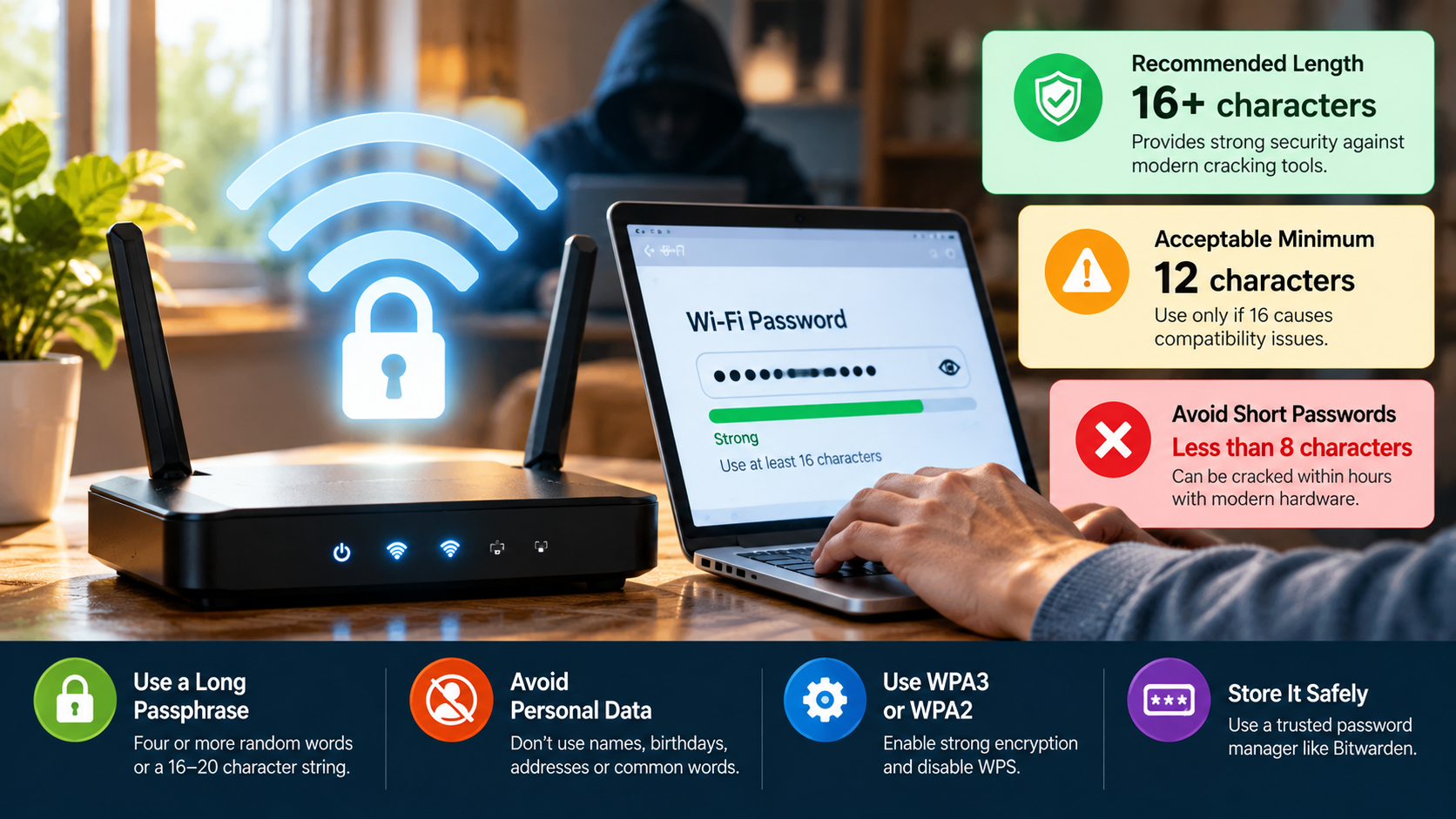
- Wi-Fi Network Password (WPA2/WPA3): Aim for at least 15 to 20 characters. WPA2 and WPA3 support passphrases between 8 and 63 ASCII characters. Longer, unique passwords provide stronger protection against guessing attacks.
- Router Admin Password: Aim for 16 or more characters. Generate it randomly and store it in a password manager when possible. This password protects the router’s administration dashboard, where you manage DNS, firewall, and remote-access settings.
Here is how password length, entropy, and modern cracking methods affect router security.
What is the 8 4 rule for passwords?
The “8 4 rule” represents an older password policy that many organizations once used. It requires a password to contain at least eight characters and characters from four common groups.
Those groups include uppercase letters, lowercase letters, numbers, and special symbols.
The rule aimed to make short passwords harder to guess. However, users often follow predictable patterns when they create passwords under these rules.
For example, someone might capitalize the first letter, replace a letter with a number, and add an exclamation mark at the end. Attackers can account for these common patterns when they test passwords.
Modern password guidance places more emphasis on length and uniqueness. A long password or passphrase can provide stronger protection than a short password with several character types.
For router security, choose a long and unique password whenever your router supports it. Avoid names, addresses, dates, common words, and predictable patterns.
Why the Rule Is Outdated
The traditional 8 4 rule focuses heavily on character types. Modern password guidance places greater emphasis on password length, uniqueness, and resistance to common guesses.
The National Institute of Standards and Technology (NIST) advises against arbitrary password composition rules. These rules can encourage predictable patterns that attackers already understand. A broader password security guide can also help you understand how length, uniqueness, and password habits affect your overall digital security.
For example, users often capitalize the first letter and add a number or symbol at the end. They may also replace familiar letters with predictable numbers or symbols.
Attackers can include these patterns in password dictionaries and cracking rules. As a result, a short password can remain predictable even when it contains several character types.
A longer passphrase can offer better protection while remaining easier to remember. You should therefore prioritize length, randomness, and uniqueness instead of following a rigid character formula.
For your router, use a long password that you do not reuse anywhere else. A password manager can also generate and store a strong random credential.
Is a 20 character password strong?
Yes, a 20-character password can provide extremely strong protection when you choose the characters randomly. Longer passwords create more possible combinations and make exhaustive guessing harder.
However, length alone does not guarantee strength. A predictable sentence, repeated pattern, or previously leaked password can remain easy for attackers to guess.
Password strength often uses entropy to describe the number of possible combinations. A simplified formula is:
E = L × log₂(R)
Here, L represents password length, while R represents the size of the character pool.
For example, a randomly generated 20-character password can provide substantial theoretical entropy. A human-created password usually provides less because people choose familiar words and predictable patterns.
For a home router, combine a long password with secure configuration. Use WPA2 or WPA3, disable unnecessary remote administration, and keep router firmware updated.
A 20-character router password can provide more than enough protection for most home users when it remains genuinely unpredictable and unique.
The Mathematics of a 20-Character Password
Password entropy estimates how many possible combinations an attacker must consider. A simplified formula can help explain how length and character selection affect that number:
E = L × log₂(R)
Here, L represents password length, while R represents the size of the character pool.
A random 20-character password using 26 lowercase letters provides about 94 bits of theoretical entropy. A random password using 62 letters and numbers provides about 119 bits.
These figures assume genuinely random selection. Human-created passwords often provide much less effective entropy because people favor familiar words, names, patterns, and substitutions.
This distinction matters for router security. A password may look complex while following an obvious pattern. Attackers can recognize and test many such patterns automatically.
Focus on length, randomness, and uniqueness instead of trying to include a specific number of symbols. A password manager can generate strong credentials and store them securely.
Practical Context: Wi-Fi vs. Web Services
Wi-Fi passwords and web-service passwords face different attack conditions. An attacker near your network may capture authentication traffic and attempt password guesses offline.
The router cannot necessarily detect or block those offline guesses. This makes password quality especially important for WPA2 and WPA3 networks.
A long, unique, high-entropy Wi-Fi password can make guessing impractical when you also use secure network settings.
Web services often provide additional defenses. These systems can use rate limits, account lockouts, multi-factor authentication, and breached-password screening. These controls can reduce the number of guesses an attacker can make directly against an account. Using multiple authentication factors can add another layer of protection when a password becomes compromised.
For your home network, do not treat router password length as your only security measure. Use a modern Wi-Fi security mode and keep your firmware updated.
You should also disable unnecessary remote administration and review connected devices regularly. A strong password protects authentication, while secure configuration protects the wider network.
What is the longest password ever?
No single password holds the title of “longest password ever” across all computing systems. Each protocol, application, and authentication system can impose its own limit.
Wi-Fi provides a useful example. WPA2 and WPA3 commonly support passphrases up to 63 ASCII characters. A 64-character hexadecimal value can also represent a raw 256-bit key in relevant configurations.
Other systems can accept much longer input. Linux authentication tools and web applications may support hundreds of characters or more, depending on their configuration.
However, extremely long passwords do not automatically provide better security. Some systems may truncate long passwords or impose processing limits.
For home security, you do not need hundreds or thousands of characters. A long, random, unique password already provides a strong foundation.
Instead of chasing the maximum possible length, ask a more practical question: What strong password length does my router support?
Choose a credential that provides strong security without creating unnecessary usability problems.
Technical Upper Limits in Consumer Systems
Consumer systems use different password limits. Wi-Fi provides a clear example because WPA2 and WPA3 commonly support passphrases up to 63 ASCII characters.
A hexadecimal representation can also represent a 256-bit key in relevant configurations.
Linux and Unix systems can support long passwords, but their behavior depends on the authentication system and configuration. Older systems often imposed much shorter limits.
Web services and APIs also set their own limits. Developers may restrict input length for compatibility, resource management, or security reasons.
These limits do not mean you should always choose the maximum length. A strong, randomly generated password between 20 and 30 characters already provides substantial protection for most home users.
Before choosing a long password, check your router’s documentation. If the router rejects the credential, shorten it while preserving randomness and uniqueness.
Do not add predictable symbols simply to reach a specific character count. Strong randomness matters more than unnecessary complexity.
Notable Extreme Passwords in History
Security professionals have experimented with unusually long passphrases for decades. These examples demonstrate that some systems can handle far more text than ordinary users need.
Some Linux and Unix authentication configurations have supported passwords containing thousands of characters. The actual limit depends on the authentication framework, configuration, and hashing system.
Security guidance has also discussed memorable sentences as alternatives to short, complicated passwords. A memorable passphrase can help users create longer credentials without relying on complex character substitutions.
However, extreme length does not automatically create better security. A long quotation from a famous book, song, or speech may remain easy to guess.
Attackers can add common quotations and phrases to their wordlists. A shorter randomly generated password may therefore provide stronger protection than a very long predictable phrase.
For router security, focus on practicality. Choose a credential that offers sufficient length, strong randomness, and uniqueness.
A password manager can generate and store that credential, so you do not need to memorize an extremely long password.
What is the most commonly hacked password?
The password “123456” has repeatedly appeared near the top of public lists of the world’s most common passwords. Other common choices include “password,” “123456789,” “qwerty,” and repeated numbers.
Attackers do not need to guess these passwords randomly. Automated tools can test common passwords, leaked credentials, and familiar patterns very quickly.
If a password appeared in a previous data breach, attackers may already have it in their password lists. Reusing that password on your router creates another security risk.
Some routers have also used predictable administrative credentials. Manufacturers have historically shipped devices with default usernames and passwords that users sometimes leave unchanged.
Change your router’s default administrator password as soon as possible if the device allows it. Choose a unique credential that you do not use for email, banking, social media, or other accounts.
A strong password cannot solve every router security problem. Firmware updates, secure Wi-Fi settings, remote-access controls, and device configuration also matter. You should also understand how malware spreads so you can recognize the broader risks that follow a compromised device.
The safest approach combines strong router password length with secure configuration and current firmware.
The Top Router-Specific Weak Passwords
Weak router credentials often follow simple patterns. Users may keep factory defaults because they provide a convenient way to access the device.
Common examples include:
- Username
admin, passwordadmin - Username
admin, passwordpassword - Username
root, passwordroot - Username
admin, password1234 - A blank username or password combined with a default value
These examples do not apply to every router. Manufacturers use different credentials and security systems across models.
Check your router’s documentation to identify its default credentials. Then change the administrator password during setup.
Keep your Wi-Fi password separate from your router administrator password. Each credential protects a different part of the system.
A unique administrator password can reduce the risk from reused or exposed credentials. A strong Wi-Fi password helps prevent unauthorized wireless access.
If your router supports password manager-generated credentials, use that option. Store the credential securely so you do not need to choose an easy password for convenience.
Never reuse your router administrator password on another service. If an attacker obtains that password elsewhere, they could try it against your router.
The Real Danger: Automated Botnet Scanning
Attackers and botnets can scan routers automatically for exposed services and weak credentials. These automated systems can examine large numbers of internet-connected devices without manually targeting each one.
The risk increases when a router exposes its administration interface directly to the internet. Attackers can identify open services and test common credentials against them.
A typical attack may follow these steps:
- The scanner identifies an accessible router service.
- It tests known default or weak credentials.
- If authentication succeeds, the attacker may change settings or install malicious software.
- The compromised router may then support additional attacks.
Changing default credentials removes one common attack path. However, an exposed or outdated router can still create security risks.
For stronger protection, disable remote administration unless you genuinely need it. Keep router firmware updated and disable unnecessary services. You should also understand malware protection tips that can help reduce the wider risks associated with compromised devices.
Use WPA2 or WPA3 and choose a long, unique Wi-Fi password. Router security works best as a layered system, rather than relying on password length alone.
Conclusion
Your router password length plays an important role in protecting your home network. However, a longer password does not automatically make your router secure.
For most users, a unique password of 15 to 20 or more characters provides a strong foundation. Choose a randomly generated credential whenever possible, and never reuse it on another service.
Avoid relying on outdated rules that focus only on uppercase letters, numbers, and symbols. Instead, prioritize length, randomness, and uniqueness.
Keep your Wi-Fi password separate from your router administrator password. This gives each security layer its own unique credential.
Password security represents only one part of router protection. Keep your firmware updated, use WPA2 or WPA3, disable unnecessary remote administration, and replace default administrator credentials.
The goal is not to create the longest password possible. The goal is to create a credential that attackers cannot easily predict.
When you combine a strong password with secure router settings, you can significantly reduce common attacks against your home network.