Is the Google Pixel 11 Waterproof?
Buying a premium smartphone is a major investment, so it is worth knowing how well it handles water. If you are searching for Google Pixel 11 waterproof protection, the key point is simple: the phone is water resistant, not waterproof.
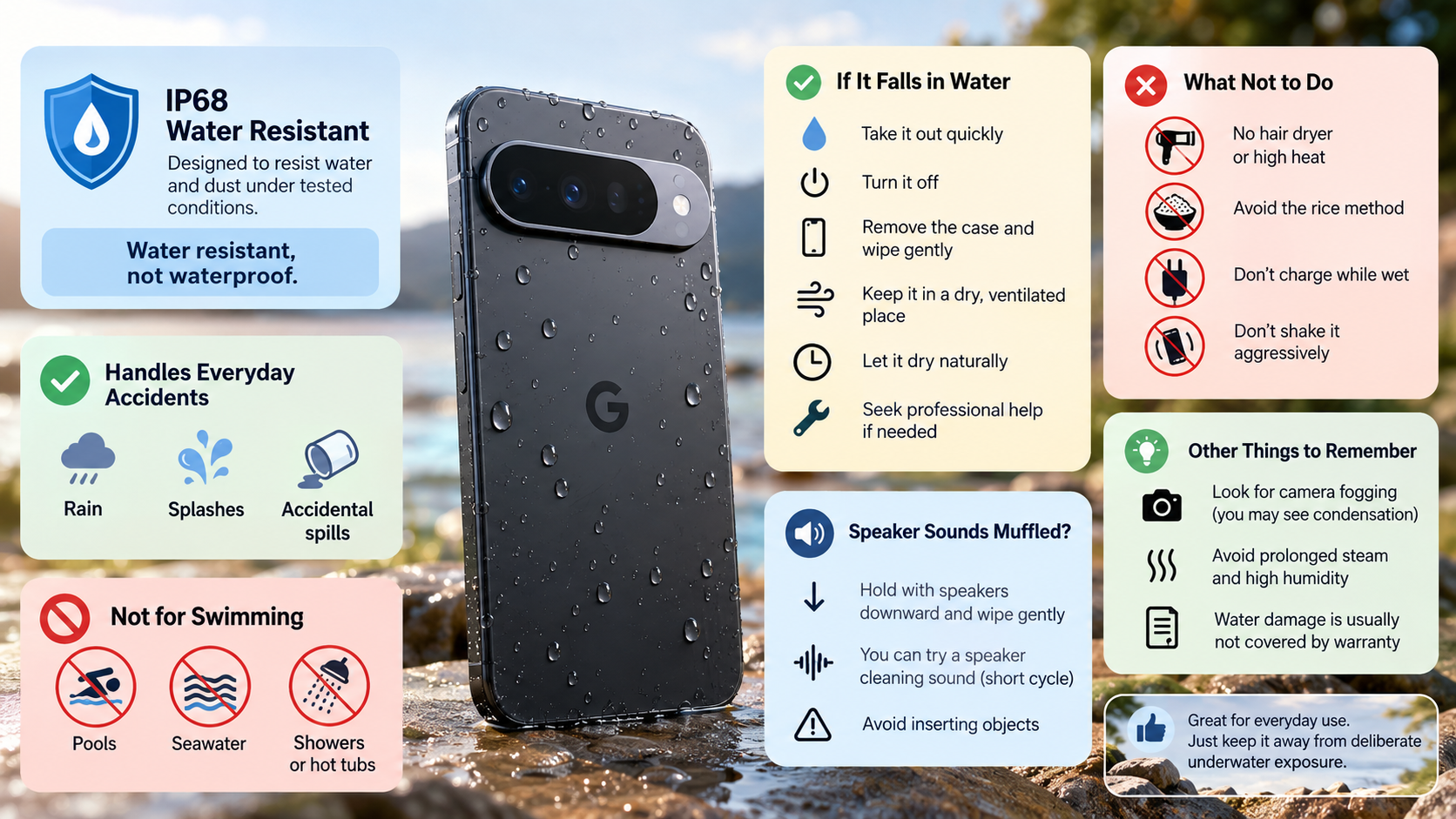
The Google Pixel 11 has an IP68 dust and water resistance rating. However, this does not mean the phone can withstand every type of liquid exposure. Water resistance can also decline over time due to normal wear, physical damage, repairs, or disassembly.
This distinction matters during everyday accidents. Your phone may handle rain or an accidental splash, but that does not make it suitable for swimming or prolonged underwater use.
This guide explains the Pixel 11 water-resistance rating, swimming risks, emergency steps after water exposure, and safe ways to deal with moisture around the speakers. It also answers common questions about charging, steam, warranty coverage, and camera condensation.
Is Google Pixel 11 good?
The Google Pixel 11 is designed as a premium flagship smartphone with high-end hardware, Google’s Tensor platform, and advanced camera features. Its combination of hardware and software makes it suitable for everyday productivity, photography, communication, and entertainment.
The phone also combines a durable exterior with IP68 dust and water resistance. That rating adds useful protection against accidental liquid exposure, although it does not make the device waterproof. Water resistance can also diminish over time.
Flagship Hardware and Software Synergy
Google develops Pixel hardware alongside Android software to create a consistent user experience. Features such as on-device intelligence, camera processing, and system optimization support everyday performance.
The Pixel 11 also receives long-term software support, helping keep the device useful beyond its initial purchase. Its durability is another practical advantage.
The device uses premium materials and includes an IP68 rating. However, durability should not be confused with complete protection from water.
For everyday use, the Pixel 11 should handle ordinary environmental exposure well. You should still avoid deliberately exposing it to excessive liquid or underwater conditions.
Is Google Pixel 11 fully waterproof?
No. The Google Pixel 11 is not fully waterproof. It has an IP68 dust and water resistance rating under defined testing conditions. The phone is designed to resist water exposure, but that protection does not make it completely impervious to liquid.
An IP67 vs. IP68 water resistance rating comparison helps explain what these protection levels actually mean. An IP68 rating means the device has been designed and tested for a specific level of protection. It does not mean the phone can safely withstand every type of liquid exposure. Real-world conditions can also differ from controlled laboratory testing.
The True Meaning of Water Resistance
Water resistance is best viewed as protection against accidental exposure. Rain, splashes, or an unexpected spill may not immediately damage a phone with an intact IP rating.
However, resistance is not permanent. Drops, repairs, disassembly, and normal wear can affect the protective seals.
You should therefore treat the IP68 rating as a layer of protection, not permission to deliberately submerge the phone.
Can I swim with Google Pixel 11?
You should not swim with the Google Pixel 11, even though it has an IP68 rating. The phone is water resistant rather than waterproof, and its protection can diminish through normal wear or physical damage.
Swimming also creates conditions that differ from controlled water-resistance testing. Moving water, splashes, impacts, and repeated submersion can increase the chance of liquid reaching vulnerable areas.
Guarding Against Dynamic Liquid Pressure
Pool water also contains chemicals, while seawater contains dissolved salts. These environments are not ideal for a smartphone, even when it has a strong water-resistance rating.
Avoid taking the bare phone into pools, oceans, hot tubs, or showers. If underwater photography is important, use a properly rated waterproof case or pouch designed for that purpose. You can also review how underwater internet cables avoid breaking to understand how underwater equipment is designed to withstand challenging environments.
The safest approach is simple: keep the Pixel 11 away from deliberate underwater exposure. Its IP68 rating is protection against accidental exposure, not a swimming feature.
My Pixel 11 fell in water. What should I do?
If your Pixel 11 falls into water, remove it from the liquid as quickly as possible. For more detailed guidance, follow the first thing you need to do if your Android is water damaged. Disconnect any cable and avoid connecting the phone to a charger while moisture may be present.
Remove the case and gently wipe the exterior with a clean, soft cloth. Do not shake the phone aggressively, as unnecessary movement can spread liquid around openings.
Follow these basic steps:
-
Turn the phone off if it is still operating.
-
Remove the case and wipe away visible moisture.
-
Keep the USB-C port free from cables and accessories.
-
Place the phone in a dry, well-ventilated area.
-
Allow it to dry naturally before attempting to charge it.
-
Seek professional service if the phone shows unusual behavior after drying.
Critical Emergency Actions to Avoid
Do not use a hair dryer, heater, or other high-heat source. Excessive heat can damage components and adhesives.
You should also avoid the common rice-drying method. Rice does not reliably remove internal moisture and can introduce particles into openings.
Most importantly, do not immediately connect a charging cable to a wet phone. Give the device time to dry naturally and inspect the charging port before reconnecting accessories.
How do I eject water from Google Pixel?
If the Pixel 11 speaker sounds muffled after water exposure, begin with gentle drying. Hold the phone with the speaker openings facing downward and wipe away visible moisture with a soft, absorbent cloth.
You may find online speaker-cleaning tools that use sound vibrations to help move moisture from speaker openings. These tools can sometimes help with residual water around the speaker, but they should not be treated as a guaranteed method for removing internal moisture.
Avoid inserting objects into the speaker grilles. Do not use compressed air or apply excessive heat.
Safe Low-Frequency Sound Evacuation Methods
If you use a speaker-cleaning tone, keep the volume at a reasonable level and use a short cycle. Stop if the speaker produces unusual distortion or vibration.
The goal is to help remove surface or speaker-opening moisture, not to force water through the phone. Sound cannot safely remove liquid that has already reached internal components.
Afterward, let the phone dry naturally in a ventilated location. Do not connect a wired charger until the USB-C port is completely dry.
If muffled audio continues after the device has dried, professional inspection is safer than repeated cleaning attempts.
Frequently Asked Questions
Does Google warranty cover water damage?
Liquid damage is generally not covered by the standard limited warranty. An IP rating also does not mean the manufacturer automatically covers water-related repairs.
Normal wear, repairs, disassembly, or physical damage can reduce the phone’s water resistance. The IP68 rating therefore describes the phone’s designed protection under specific testing conditions.
If your Pixel 11 suffers liquid damage, check the warranty terms for your region. You should also avoid opening or disassembling the phone yourself. Doing so can affect its water resistance.
Can I charge my phone right after it gets wet?
No. Do not connect a wired charger while moisture may remain around the USB-C port.
Charging a phone with a wet port can cause electrical problems and may damage the device. Let the port dry naturally before connecting a cable.
Do not rely on a fixed drying period because moisture levels can vary. Inspect the port and wait until it looks completely dry.
Does steam from hot showers harm the device?
Yes, you should avoid prolonged exposure to steam and high humidity. A bathroom environment can expose the phone to more moisture than ordinary accidental splashes.
Do not treat the Pixel 11’s IP68 rating as protection against hot, humid environments. Keeping the phone outside the shower area remains the safer choice.
How do I know if moisture is inside the camera lens?
Look for fogging or condensation beneath the camera glass. Persistent condensation can indicate that moisture has entered areas that should remain dry.
If you notice internal fogging, avoid charging the phone and let it dry naturally. If the condensation does not disappear, consider professional inspection.
Conclusion
The Google Pixel 11 is water resistant, not waterproof. Its IP68 rating provides meaningful protection against dust and water exposure under specified testing conditions. However, water resistance is not permanent and can decrease after wear, damage, repairs, or disassembly.
That makes the Pixel 11 well suited to normal everyday use, but not deliberate underwater activities. Avoid swimming, prolonged submersion, and unnecessary exposure to pools, seawater, showers, and excessive moisture.
If the phone gets wet, act quickly but gently. Disconnect accessories, remove the case, wipe the exterior, and let the device dry naturally. Avoid heat, aggressive shaking, and the rice-drying method.
For muffled speakers, gentle drying is the safest first step. Sound-based speaker-cleaning tools may help with residual moisture near the speaker opening, but they cannot guarantee removal of internal water.
Treat the Pixel 11 water resistance as useful protection rather than complete waterproofing. That approach gives you the best chance of keeping the device reliable for years.