
5 Clever Ways to Hide Ethernet Cables Around the House
Setting up a wired network delivers reliable internet, fast speeds, and ultra-low latency. These benefits make Ethernet ideal for competitive gaming, streaming, and home offices. However, long cables across hardwood floors can quickly spoil a room’s appearance. Learning how to hide Ethernet cables keeps your space tidy without sacrificing network performance. It is also worth understanding the drawbacks of using Ethernet cables for home internet before choosing a wired setup.
Proper cable management also protects network wires from foot traffic, sharp bends, pinching, and other physical stress. Exposed cables can become trip hazards for family members and pets. Damaged cables may also affect long-term network reliability.
The standard networking guidelines established by the Telecommunications Industry Association emphasize protecting transmission wires from foot traffic and mechanical stress to prevent signal degradation.
Fortunately, you do not need to remove drywall or give up gigabit speeds. Simple concealment methods can keep cables protected and nearly invisible. You can use furniture, raceways, cable clips, rugs, and wall-mounted solutions. The best choice depends on your room layout, cable length, and whether the installation is temporary or permanent.
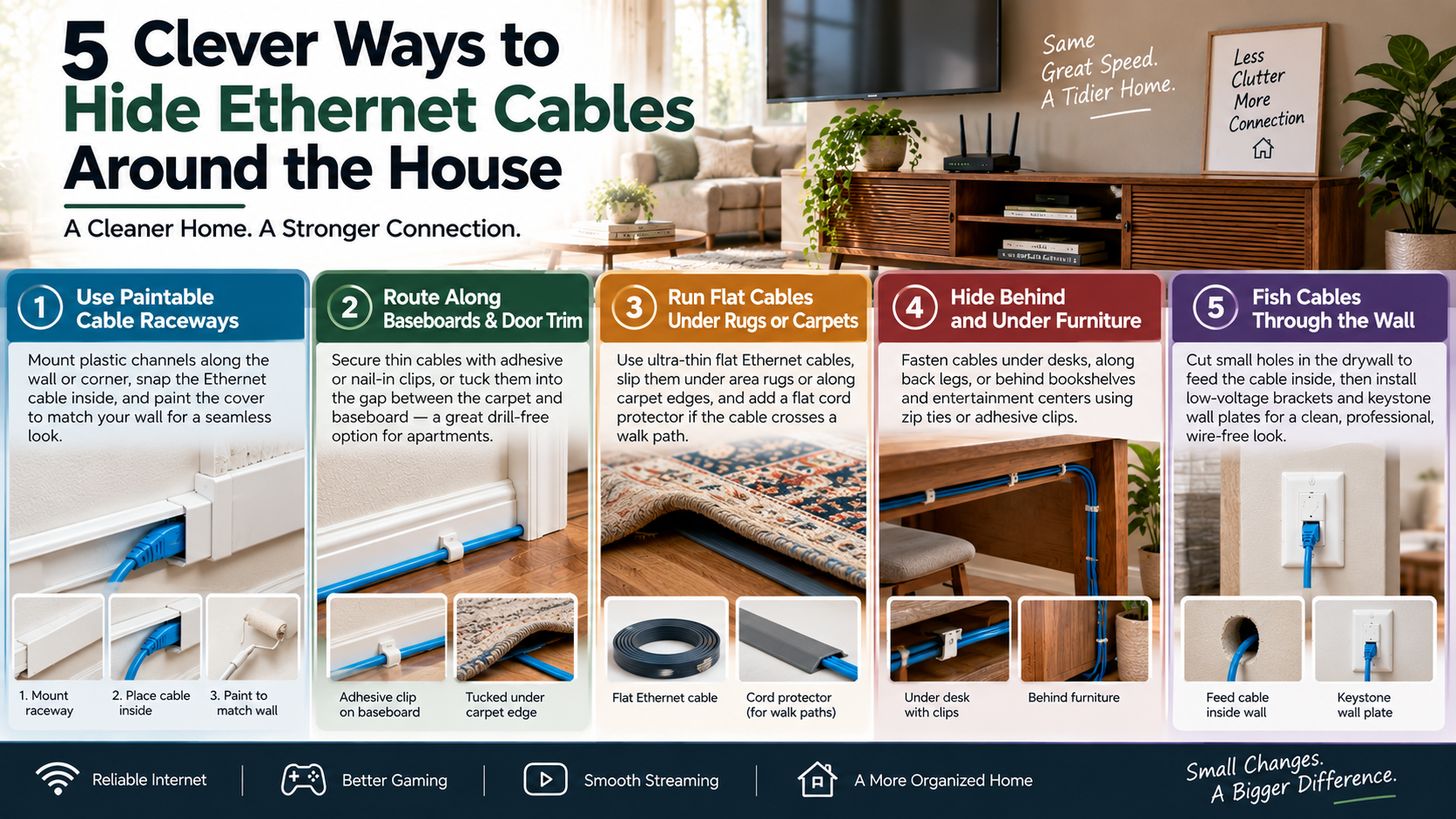
1. Use Paintable Cable Raceways
Paintable cable raceways offer one of the cleanest ways to hide Ethernet cables without cutting into your walls. These narrow channels attach directly to the wall, baseboard, or corner. They create a dedicated path that keeps your network cable organized and protected.
Start by measuring the route from your router or network switch to the destination device. Choose a raceway large enough to hold the Ethernet cable without squeezing it. Mount the channel along the wall using its adhesive backing or suitable screws.
Next, place the Ethernet cable inside the groove and snap the cover into position. Many raceways can be painted after installation. Match the paint to your wall color for a more seamless appearance.
This method works especially well in home offices, bedrooms, and entertainment areas. It also keeps cables away from pets, vacuum cleaners, and foot traffic. Removable covers make future cable changes easier, too.
For a professional finish, use corner pieces and connectors designed for the same raceway system.
2. Route Along Baseboards and Door Trim
Baseboards and door trim provide natural pathways for concealing Ethernet cables. They let you hide Ethernet cables along walls without opening drywall or making permanent changes. This makes the method particularly useful for apartments and rented homes.
Choose thin Ethernet cables when possible. Flat cables can sit closer to surfaces and are easier to disguise than bulky round cables. Use adhesive cable clips or small wire clips designed for baseboards.
Run the cable along the bottom edge of the wall. You can also guide it around door frames using small clips. In some rooms, a narrow gap between the carpet and baseboard may provide another discreet route.
Avoid forcing the cable into a tight space. Excessive pressure can damage the cable or create sharp bends. Keep the cable secured at regular intervals so it does not hang or move.
This approach requires little equipment and usually involves no drilling. It also makes the cable easy to access if you need to replace or troubleshoot it later.
3. Run Flat Cables Under Rugs or Carpets
Flat Ethernet cables can provide an effective way to hide Ethernet cables under rugs. Their slim profile makes them less noticeable than traditional round network cables. This option works best when you need to cross a room without installing a permanent cable channel.
Choose a high-quality flat Ethernet cable that is suitable for your network speed. Measure the route before installation so you avoid unnecessary excess cable. Whenever possible, position the cable along the edge of the rug rather than directly across a walking area.
If the cable must cross a lightly used path, consider adding a suitable flat cord protector. This can reduce the chance of tripping and protect the cable from repeated pressure.
Avoid placing cables beneath heavy furniture legs. Constant compression can damage the cable over time. You should also avoid sharp folds when positioning the cable beneath a rug.
For fitted carpets, routing along the perimeter can provide a cleaner alternative. Always check the cable manufacturer’s guidance before installing it beneath flooring materials.
4. Hide Behind and Under Furniture
Furniture can naturally conceal Ethernet cables without requiring wall modifications. Desks, sofas, bookshelves, cabinets, and entertainment centers can all provide useful hiding places.
For a desk setup, secure cables along the rear edge or underside of the desktop. Adhesive clips, reusable hook-and-loop straps, and suitable cable ties can keep the wiring organized. Route the cable down the back of a desk leg instead of letting it hang visibly.
Entertainment centers also provide excellent concealment. Run network cables behind the unit and secure excess slack against the rear panel. Large bookshelves can similarly hide longer cable runs between rooms or devices.
Do not place cables where furniture will crush them. Leave enough room for smooth bends around corners and edges. Avoid trapping connectors between heavy furniture and walls.
This method works particularly well when you want a quick, drill-free way to hide Ethernet cables. It also keeps the wiring accessible. You can easily reach the cable whenever you need to upgrade or troubleshoot your network.
5. Fish Cables Through the Wall
Running Ethernet cables inside the wall provides the most professional-looking solution. The cable disappears into the wall cavity, leaving only the connection points visible. This approach works well for permanent home offices, gaming rooms, and wall-mounted televisions.
Start by planning the complete cable route. Check for studs, electrical wiring, plumbing, and other obstacles before cutting any openings. Use appropriate low-voltage mounting brackets and wall plates for the installation.
Feed the Ethernet cable through the wall cavity between the two connection points. Install a suitable keystone jack or wall plate at each end. This creates a clean connection without leaving a loose cable hanging from the wall.
For in-wall installations, make sure the Ethernet cable is rated and approved for that application. Do not route low-voltage network cables through spaces that create safety or code concerns.
This method takes more planning than surface-mounted solutions. However, it delivers a clean, permanent appearance and protects the cable from everyday damage. If you are unsure about cutting into walls or identifying hidden utilities, consider hiring a qualified professional.
What Are Some Creative Ways to Hide Cables?
Creative cable management can turn messy wiring into a neat part of your room design. You can route low-profile cables along picture frames, door trim, or ceiling beams. Adhesive clips can hold cables in place while blending with existing woodwork. These options work well when you want to hide Ethernet cables without drilling into walls. If you are considering a wireless alternative, it also helps to understand why routers have external antennas and how they differ from mesh systems.
You can also run suitable flat Ethernet cables beneath low-pile rugs. Always position them carefully and avoid high-traffic areas. A dense rubber rug pad can provide additional protection.
For desks and entertainment centers, decorative boxes can hide excess cable loops. You can also match cable jackets to your wall color for a less noticeable finish. Tall artwork and furniture can conceal longer vertical runs.
Another option is hollow crown molding with an internal channel. It creates a polished appearance while providing a protected route for network cables.
What Are Some Effective Ways to Hide Network Cables?
The most effective network cable concealment methods balance appearance, protection, and accessibility. Flat Ethernet cables can sit neatly along baseboards, doorways, and other low-profile areas. Their shape makes them easier to conceal than traditional round patch cables.
Paintable surface raceways provide another reliable option. These channels protect cables from impacts while keeping them close to the wall. You can paint them to match the surrounding surface.
For larger installations, consider routing cables through suitable interior spaces. Closets, floor registers, and other accessible pathways can help conceal longer network runs. However, avoid using spaces that could expose cables to excessive heat, moisture, or mechanical damage.
Cable clips can also secure wiring beneath desks, behind furniture, or along baseboards. Use clips that hold the cable securely without crushing its outer jacket.
For permanent installations, choose cable types and pathways appropriate for the location. Planning the route first helps protect your network connection while keeping the finished installation neat. If your connection feels fast during browsing but downloads remain slow, you may also need to find out why your internet is fast but downloads are slow.
What Are Some Creative Ways to Hide Wires?
Miscellaneous wires can often disappear with a little creative cable management. TV cords, charger cables, and lamp wires do not always need permanent wall modifications. Instead, you can integrate them into furniture and room features.
Fabric cord covers work well when you want wiring to become part of the decor. Natural materials, such as jute, can complement rustic or bohemian interiors. For a cleaner appearance, choose covers that match your furniture or wall color.
Cable clips can also keep wires hidden behind desk legs, nightstands, and consoles. Positioning the clips on the rear side prevents cables from becoming visible from normal eye level.
For a more decorative approach, adhesive cord tracks can follow simple geometric patterns. This can make necessary wiring look intentional rather than messy.
Magnetic cable channels are another useful option for desks with metal frames. They collect hanging wires beneath the work surface and keep them away from the floor. These methods help hide Ethernet cables and other wires without major installation work.
What Are Some Effective Ways to Hide Cables?
The best cable concealment methods create clean lines while keeping wiring accessible. For mounted televisions, low-voltage pass-through plates can route suitable cables behind the wall. This can eliminate visible wiring between the television and entertainment equipment.
Home offices can benefit from J-channel organizers mounted beneath desks. These channels hold cables, power bricks, and excess slack against the underside of the work surface. They prevent wires from hanging toward the floor.
Floor cable covers are useful when a cable must cross an open walkway. Heavy-duty rubber covers can protect cables from foot traffic while reducing trip risks. Choose a cover designed for the type and number of cables being routed.
Good cable management should also support future changes. Avoid permanently sealing every connection behind walls if you may need access later. Keep important network connections reachable when possible.
Separating data cables from household electrical wiring is also important. Proper routing can reduce interference concerns and protect cables from physical damage. A planned installation provides both a cleaner appearance and easier maintenance.
What Can I Use to Hide My Cable?
Several inexpensive cable management products can help you hide Ethernet cables around the house. The right choice depends on whether you need a temporary setup or a permanent installation.
Paintable latching raceways are useful for cables running along walls. Split-tubing sleeves can bundle several wires together. Self-closing braided wraps provide another option when you want a flexible, organized bundle.
Cable management boxes can hide power strips and bulky adapters. Choose ventilated designs and avoid enclosing equipment that needs significant airflow.
Adhesive silicone holders work well for lightweight cables. Reusable hook-and-loop straps are better for larger bundles or setups that may change. Non-marring clips can also secure cables along furniture without creating permanent holes.
For permanent routes, baseboard cable channels provide a neat solution. Many have removable covers, making it easier to add or replace cables later.
When choosing cable-management hardware, consider cable thickness, surface type, and accessibility. Avoid products that compress the cable excessively. A good system should protect the wiring while making future maintenance simple.