5 Useful Accessories Every OnePlus Owner Needs IN 2026
Getting the most from your smartphone requires the right accessories. The best OnePlus accessories can improve charging, audio, protection, and everyday convenience. Choosing compatible hardware also helps you use your phone as intended. However, not every accessory delivers the same benefits.
Many users wonder which add-ons offer real value. Others simply want reliable replacements for worn-out cables or cases. This guide focuses on five practical accessories worth considering in 2026. The exact charging speed and compatibility can vary by OnePlus model and region.
These accessories can improve convenience without creating unnecessary clutter. They also help protect the phone during everyday use. Before buying, always check your model’s specifications and the accessory’s supported standards.
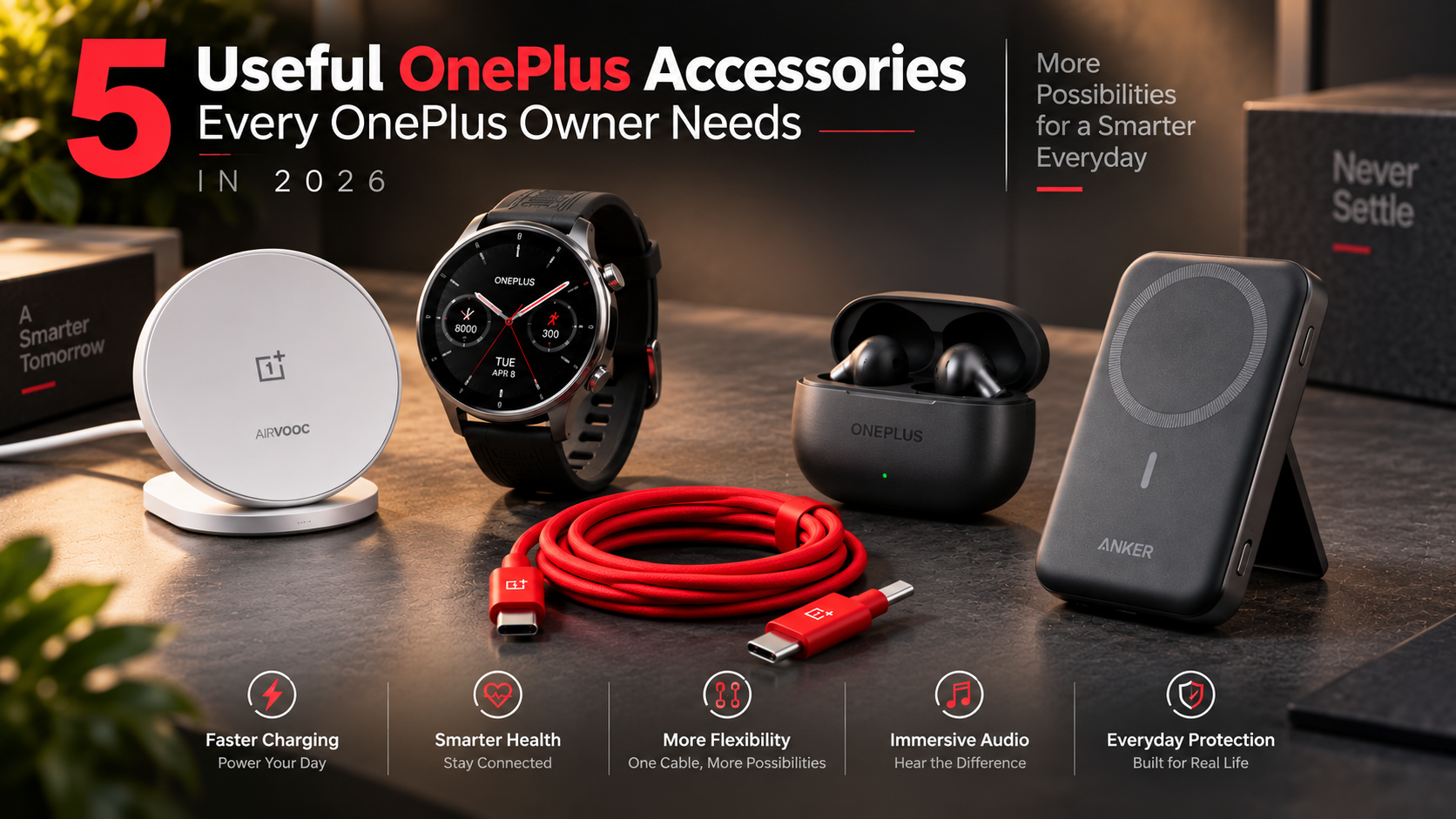
1. OnePlus AirVOOC 50W Magnetic Charger
The OnePlus AirVOOC 50W Magnetic Charger is a useful addition for compatible OnePlus devices and other supported Qi-based phones. It combines wireless charging convenience with a magnetic attachment design. This makes it easier to keep your phone aligned while charging at a desk or bedside.
For users who prefer wireless charging, the charger can reduce cable clutter. The magnetic connection also helps keep the phone positioned correctly during charging. However, charging speed depends on device compatibility and the supported wireless charging standard.
Before buying, check whether your specific OnePlus phone supports the required wireless charging features. Not every OnePlus model supports wireless charging, and some may have different power limits.
The charger is especially useful for people who frequently charge their phone during work or overnight. It can also complement a compatible magnetic case or accessory.
If wireless charging is part of your daily routine, this accessory offers a convenient alternative to repeatedly connecting a USB-C cable.
2. OnePlus Watch 4
The OnePlus Watch 4 extends the OnePlus experience beyond the smartphone. It is designed for users who want quick access to notifications, calls, fitness information, and other everyday functions from their wrist.
A smartwatch can reduce the need to check your phone repeatedly. You can view notifications, monitor activity, and access supported features without reaching for your handset. This makes the watch particularly useful during workouts, commutes, or busy workdays.
Its value also depends on how deeply you use the wider OnePlus ecosystem. Users who already own a OnePlus smartphone may appreciate the connected experience between compatible devices.
Before purchasing, check compatibility with your phone and the availability of specific features in your region. Smartwatch functions can vary depending on the connected device and software version.
For OnePlus owners who want more than traditional phone accessories, the Watch 4 provides a practical way to expand their connected setup. It turns the smartphone experience into something that is more accessible throughout the day.
3. OnePlus 2-in-1 SuperVOOC Cable
The OnePlus 2-in-1 SuperVOOC Cable is designed for users who want more flexibility when charging compatible devices. Instead of carrying multiple separate cables, a two-in-one design can simplify your everyday setup.
This can be particularly useful if you regularly charge more than one compatible device. Keeping one versatile cable in your office, travel bag, or car can reduce cable clutter. It can also make packing easier when travelling.
However, cable compatibility is important. The maximum charging performance depends on the connected devices, charger, and supported charging protocol. A cable cannot increase the maximum charging capability of a phone beyond what the device supports.
Users should also check connector compatibility before purchasing. Different OnePlus generations may support different charging requirements.
For people who rely heavily on fast charging, choosing the correct cable is just as important as choosing the right power adapter. A suitable SuperVOOC cable helps ensure that compatible devices can take advantage of their supported charging performance while keeping your setup simple.
4. OnePlus Buds 4
The OnePlus Buds 4 are a natural companion for users who want wireless audio alongside their OnePlus smartphone. They provide a convenient way to listen to music, podcasts, videos, and calls without dealing with a wired connection.
Wireless earbuds are particularly useful for commuting, exercising, and working. A compact charging case also makes them easy to carry throughout the day. When paired with a compatible OnePlus phone, users can benefit from ecosystem-focused features and streamlined connectivity.
Audio features can vary depending on the connected phone, software version, and region. It is therefore worth checking the specifications before purchase, especially if features such as advanced noise cancellation or spatial audio are important to you.
The Buds 4 also complement the broader OnePlus ecosystem. They give users a simple audio solution without requiring a separate brand ecosystem.
If you frequently use your phone for calls or entertainment, wireless earbuds can be one of the most practical OnePlus accessories to add to your daily setup.
5. Anker MagGo Power Bank
The Anker MagGo power bank is a useful option for OnePlus users who need extra battery capacity while travelling or away from a wall outlet. Its magnetic design can make portable charging more convenient on compatible devices and cases.
A power bank is particularly valuable during long journeys, busy workdays, or outdoor activities. Instead of searching for a charging socket, you can carry additional power with you.
However, compatibility should be checked carefully before buying. Magnetic attachment and wireless charging depend on the phone, case, alignment, and supported standards. Some OnePlus models may require a compatible magnetic case or accessory for the best experience.
The power bank can also serve as a backup charging solution when fast wired charging is unavailable. For users who spend long periods away from home, that extra battery capacity can provide useful peace of mind.
When choosing an Anker MagGo power bank, check its capacity, charging output, physical size, and compatibility with your specific OnePlus phone. This ensures you get a practical portable power solution without unnecessary bulk.
What are must-have OnePlus accessories?
The most useful OnePlus accessories focus on charging, protection, audio, and display safety. Start with a compatible SUPERVOOC charger if your phone supports the standard. A suitable charger can unlock the phone’s advertised fast-charging capability when paired with the correct cable.
A protective case is another practical purchase. OnePlus offers model-specific cases designed around the camera module, buttons, ports, and Alert Slider. A good case should provide grip without making the phone unnecessarily bulky.
A high-quality USB-C cable is equally important. For fast charging, choose a cable rated for the required current and charging standard. Generic cables may charge normally but may not support your phone’s maximum charging rate.
Wireless earbuds can also improve daily convenience. OnePlus Buds models offer features such as quick pairing and spatial audio on supported devices. A screen protector is another useful addition. It can reduce everyday scratches and help preserve the display’s appearance.
When choosing OnePlus accessories, focus on compatibility rather than simply buying the most expensive option. Your phone model determines which charging speeds, cases, cables, and wireless features will work correctly.
Prioritizing Authentic SuperVOOC Hardware
Fast charging is one of OnePlus’s most recognizable strengths. However, charging performance depends on the phone, charger, cable, region, and supported charging protocol. A third-party USB-C charger can safely charge many OnePlus phones. It may not, however, deliver the same proprietary charging speed.
For supported models, an official or properly compatible SUPERVOOC charger is the better choice when maximum charging performance matters. The charger and cable work with the phone’s charging system to deliver the supported power level. Always check your exact model’s specifications before purchasing an adapter.
Avoid assuming that a higher-wattage charger automatically means faster charging. The phone controls how much power it accepts. Heat, battery level, software settings, and charging conditions can also affect real-world speeds.
A certified, compatible charger is therefore more important than simply choosing the highest wattage. The same principle applies when buying OnePlus charging accessories. Choose a cable that supports your phone and charger.
It also makes sense to replace damaged cables promptly. Frayed cables can create unreliable connections and should not be used for high-power charging.
Why is OnePlus falling?
The idea that OnePlus is simply “falling” oversimplifies the company’s position. The brand has changed considerably since its early “flagship killer” era. Its first phones attracted enthusiasts with premium specifications, aggressive pricing, and a strong community focus.
As the brand matured, its flagship phones moved into higher price categories. That placed OnePlus in more direct competition with established premium brands. At the same time, the smartphone market became increasingly crowded, especially in the value and upper-mid-range segments.
Software strategy also changed. OxygenOS became more closely aligned with Oppo’s software foundation. That shift disappointed some long-time enthusiasts who preferred the earlier, lighter OxygenOS experience.
However, OnePlus continues to release premium phones, tablets, wearables, and audio products. Its current lineup still emphasizes performance, fast charging, displays, and design, with new devices such as the OnePlus N6x adding to the company’s evolving product range.
Therefore, brand evolution provides a better explanation than a simple decline. OnePlus has broadened its product range and target audience. Its accessories ecosystem has expanded as well, covering chargers, watches, earbuds, cases, and other connected products.
For buyers, the key question is whether the current OnePlus experience matches their needs. Older brand perceptions should not replace comparisons of current hardware, software, pricing, and the best budget smartphones under ₹30,000.
The Impact of Unified Software
The closer relationship between OxygenOS and ColorOS remains an important part of OnePlus’s software history. Earlier OxygenOS versions were known for a relatively clean Android experience. They also developed a strong following among users who wanted speed without excessive customization.
The later software consolidation created criticism among some enthusiasts. Users pointed to changes in menus, interface design, preinstalled applications, and the overall look and feel. These changes made the software feel less distinct from Oppo’s ColorOS.
That criticism does not mean modern OxygenOS is inherently poor. The software continues to evolve and includes features designed around multitasking, customization, performance, and device connectivity. OnePlus now positions newer OxygenOS releases around a broader ecosystem experience.
The important distinction is between software identity and software quality. Some users may prefer the older OxygenOS philosophy. Others may value the newer feature set and closer ecosystem integration.
The same ecosystem approach extends beyond phones. OnePlus accessories such as earbuds, watches, and chargers can add convenience for users with compatible devices. For buyers, the best approach is to test the current software experience rather than judge the phone only by its historical reputation.
What are some unique features of the OnePlus phone?
OnePlus phones combine several hardware and software features that help distinguish them from other Android devices. One of the most recognizable is the three-position Alert Slider. On supported models, it provides quick access to Ring, Vibrate, and Silent modes without opening the Settings menu. You can also explore hidden OnePlus features and settings to get more from supported devices.
Another notable feature is Open Canvas, which improves multitasking on supported OnePlus devices. It lets users work with multiple applications in a more flexible split-screen layout. Availability can vary by device and software version.
Some newer OnePlus phones also use Aqua Touch technology. This feature is designed to improve touchscreen responsiveness when the display is wet. It can be particularly useful when using the phone in light rain or with damp fingers.
Other OnePlus strengths include high-refresh-rate displays, advanced cooling systems, large batteries, and fast charging. Exact specifications differ between models.
The broader ecosystem also adds value. Compatible OnePlus accessories can extend the phone’s functionality through wireless audio, wearable devices, fast charging, and portable power.
Therefore, users should check their specific phone’s specifications before assuming a feature is available. Compatibility remains important when choosing accessories for a particular OnePlus model.
Mastering the Physical Alert Slider
The Alert Slider remains one of OnePlus’s most recognizable hardware features. It provides a physical way to change the phone’s sound profile without opening the display. This can be especially useful when entering meetings, classrooms, theaters, or other quiet environments.
Its simplicity is the main advantage. Instead of unlocking the phone and navigating quick settings, you can move the slider directly. The three positions typically correspond to Ring, Vibrate, and Silent modes on supported devices.
The physical control can also be useful when the phone is in a pocket or bag. Its position allows many users to adjust it by touch alone. That makes it faster than navigating an on-screen control in some situations.
The exact behavior can vary with software settings and device generation. Some versions may offer additional sound or notification controls through OxygenOS.
If your slider feels stiff, avoid forcing it. Keep the surrounding area clean and use only gentle cleaning methods recommended for the device.
For many OnePlus owners, the Alert Slider remains a practical feature that separates the brand from many competitors. It also works well alongside other OnePlus accessories, particularly cases designed specifically around the slider’s placement.
What is the OnePlus secret code?
OnePlus phones support several dialer codes, but their availability can vary by model, software version, and region. One commonly reported code is *#899#, which can open a service or diagnostic interface on supported devices. It can provide access to hardware tests and device checks.
Available options may include touchscreen, display, camera, speaker, microphone, sensor, and connectivity tests. However, users should not assume every test will appear on every OnePlus phone. Older models can use different codes or diagnostic menus.
The *#06# code is more widely used. It displays the device’s IMEI information on compatible phones. Unlike service menus, it is primarily an identification tool.
Older OnePlus devices have also used codes such as *#808# for factory or hardware testing. These codes are not universal across the OnePlus lineup.
If a code does not work, do not attempt to bypass security protections or modify system parameters. Diagnostic menus should be treated as testing tools rather than performance-tuning utilities.
For routine troubleshooting, the phone’s built-in Settings and official support resources remain the safest options. Your choice of OnePlus accessories will not affect whether these codes work. Their availability depends mainly on the phone’s software and hardware configuration.
Safe Navigation in EngineerMode Menus
Diagnostic menus can help identify hardware problems, but they are not designed for casual experimentation. If your OnePlus phone supports *#899# or another service code, use the available testing options carefully.
The safest approach is to run passive tests. Check the touchscreen, speakers, microphone, cameras, sensors, or other components when troubleshooting a specific problem. Avoid changing calibration values or engineering parameters unless you have the required technical knowledge and service documentation.
Incorrect changes can affect hardware behavior or system stability. Some menus may also contain options intended for technicians rather than regular users. A setting that appears harmless can have unexpected consequences.
For this reason, follow these simple rules:
- Use diagnostic menus only when you understand the test.
- Avoid changing factory calibration values.
- Do not alter network or radio parameters without proper guidance.
- Exit the menu after completing your checks.
- Contact official OnePlus support if a hardware problem continues.
The diagnostic menu can be useful, but it should not replace professional service. If your phone has serious charging, display, battery, or network problems, official support is the better route.
Likewise, do not assume that replacing OnePlus accessories will solve an internal hardware fault. Test chargers, cables, and other external components first, then seek professional assistance if the problem remains.
Who is the CEO of OnePlus?
Pete Lau is the founder of OnePlus and remains one of the company’s key executives. He helped launch OnePlus in 2013 after working at Oppo. The brand quickly gained attention through online sales, competitive pricing, enthusiast marketing, and its “Never Settle” philosophy.
Lau became closely associated with the company’s early identity. Under his leadership, OnePlus focused heavily on performance, design, community feedback, and value. Those priorities helped the company establish itself in the global smartphone market.
His responsibilities later expanded within the wider OPlus structure. That broader role connected OnePlus more closely with related businesses and product planning. The company’s current strategy reflects a larger ecosystem that includes smartphones, tablets, wearables, and audio products, including newer tablet offerings that can be compared with alternatives such as the OnePlus Pad Lite and iPad Air.
OnePlus has therefore evolved beyond its original startup image. It now competes across several product categories and price segments. That broader strategy is also visible in its accessories lineup, which includes chargers, earbuds, watches, and other connected products.
For readers researching the company, it is useful to separate Pete Lau’s role as OnePlus founder and executive from the company’s broader corporate structure. Leadership responsibilities can change, so current company information should always be checked against official sources.
The Pete Lau Product Philosophy
Pete Lau’s influence is closely linked to the “Never Settle” philosophy that helped define OnePlus. The idea emphasizes continuous improvement rather than accepting average results. It became a central part of the brand’s identity during its early years.
The company’s product approach has often focused on performance, smooth software, fast charging, display quality, and practical design. These priorities helped OnePlus appeal to users who cared about specifications without wanting to compromise on everyday usability.
Lau has also emphasized details beyond raw specifications. Build quality, materials, ergonomics, weight, and the overall feel of a device can strongly affect how people use it. That approach helped OnePlus develop a recognizable product identity.
The philosophy has evolved as the company has expanded. Modern OnePlus products target a broader audience and form part of a wider device ecosystem. Even so, performance remains a major part of the brand’s positioning.
This philosophy also influences the company’s OnePlus accessories. Chargers, earbuds, watches, cables, and cases are designed to complement the broader device experience.
For consumers, the useful takeaway is simple: OnePlus continues to balance hardware performance and user experience. The exact priorities differ between models, so buyers should compare features rather than rely solely on the brand’s historical reputation.
Frequently Asked Questions
Can I charge my phone using third-party USB-C adapters?
Yes, you can charge your device with standard third-party USB-C power bricks. However, charging speeds will stay limited to basic USB Power Delivery standards, typically between 15W and 30W. To access rapid SuperVOOC fast charging up to 80W or 100W, you must use proprietary charging adapters and original high-amperage cables. Standard plugs charge the device safely, but they cannot replicate brand speeds.
Do older Dash Charge cables work on modern devices?
Older Dash Charge and Warp Charge cables will supply power safely, but they cannot achieve modern peak SuperVOOC speeds. Recent models require specialized high-current cables rated for higher amperage to negotiate maximum wattage. While legacy cables work fine for overnight top-ups, upgrading your physical cords ensures your device charges from empty to full in under thirty minutes.
Does the Alert Slider wear out over years of use?
The physical Alert Slider features durable mechanical switches tested for hundreds of thousands of actuation cycles. Regular pocket lint or dust can occasionally accumulate within the slider track, preventing complete mechanical clicks into silent mode. Cleaning the groove gently with a wooden toothpick or compressed air quickly restores original click action and smooth physical travel.
Are original protective cases worth the premium price?
Original cases provide superior cutouts tailored precisely around the camera housing and Alert Slider. Generic third-party alternatives often feature overly thick borders that make sliding the physical toggle difficult. Original sandstone and aramid fiber options offer slim profiles, integrated internal shock absorption, and secure textured grip without adding unnecessary bulk to your daily carry.
Conclusion
The right accessories can make a OnePlus phone more convenient, durable, and enjoyable to use. The most useful upgrades usually involve charging, protection, audio, and display care. Instead of buying every available add-on, focus on accessories that can deliver useful features without Apple’s premium pricing, where compatible alternatives make sense.
A compatible SUPERVOOC charger and suitable USB-C cable can help supported phones achieve their intended charging performance. A well-designed case protects the phone while preserving access to essential controls. Wireless earbuds can improve everyday audio, while a quality screen protector helps reduce cosmetic damage.
It is also useful to understand the phone itself. Features such as the Alert Slider and Open Canvas can improve everyday productivity. Diagnostic codes may help with basic hardware testing, but they should be used carefully.
Finally, remember that OnePlus has changed considerably since its early “flagship killer” days. Its modern product range serves a broader market while retaining a strong focus on performance.
Before buying new OnePlus accessories, check your exact model and supported specifications. That simple step helps you avoid incompatible products and get more value from your setup.
This version keeps your original H2/H3 hierarchy and topic coverage, while making model-dependent claims more precise and improving scanability, keyword placement, and sentence length.