
Why Do Laptop Chargers Have A Box In The Middle Of The Cable?
Have you ever wondered why laptop chargers have a box in the middle of the cable? That familiar plastic block is an important part of your laptop’s charging system. It helps convert electricity from a wall outlet into a form your laptop can safely use.
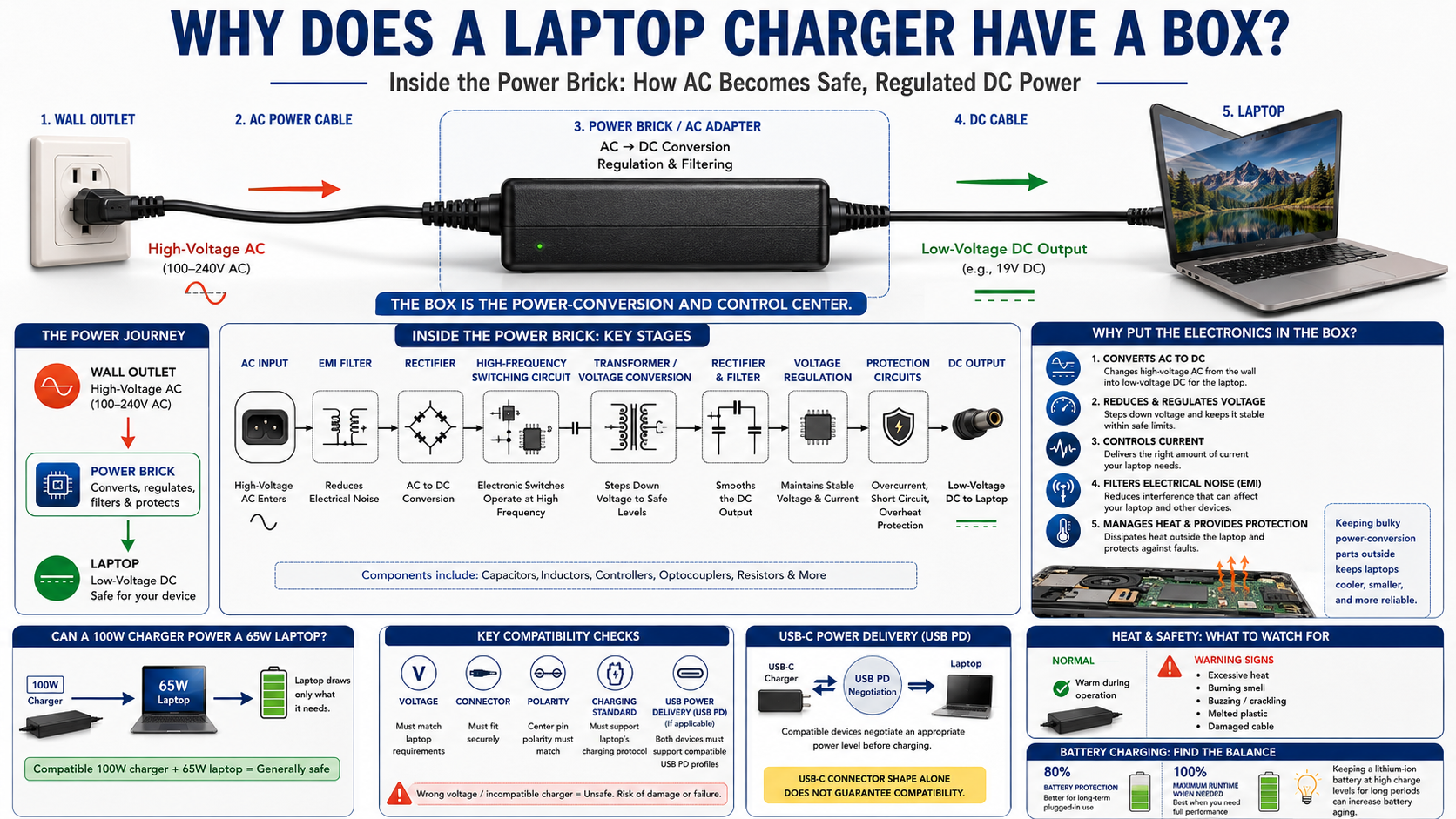
A standard household outlet supplies high-voltage alternating current (AC). A laptop needs lower-voltage direct current (DC). The box, often called a power brick or AC adapter, manages this conversion before electricity reaches your computer.
Without this conversion, raw wall power could severely damage your laptop’s internal components. The charger also regulates voltage and current while helping reduce electrical interference.
To learn more about electrical safety standards and device power management, you can read the guidelines provided by the Occupational Safety and Health Administration.
Understanding why laptop chargers have a box makes it easier to appreciate the engineering behind everyday technology. In this guide, we will explain what the box does and why manufacturers use this design.
Why do laptop chargers have a block in the middle?
Laptop chargers have a block in the middle because wall outlets supply high-voltage AC power. Laptops need much lower-voltage DC power to operate safely. The block contains the electronics that convert and regulate this incoming electricity. This is the main reason laptop chargers have a box between the wall plug and the computer.
This conversion is essential for protecting your laptop. Sending household voltage directly to a laptop would cause severe electrical damage. The charger instead reduces the voltage and provides a controlled output.
The power brick also helps manage current and electrical fluctuations. It keeps the power delivered to the laptop within the required range. This protects sensitive components such as the motherboard, processor, memory, and storage.
Manufacturers also place much of the power-conversion hardware outside the laptop. This keeps additional heat away from the computer’s internal components.
The external design offers several benefits:
- Voltage conversion from AC to DC.
- Current regulation for stable power delivery.
- Electrical filtering to reduce unwanted interference.
- Heat management outside the laptop chassis.
- Protection circuits against certain electrical faults.
The Role of Magnetic Interference Mitigation
The charger box can also contain components that reduce electromagnetic interference (EMI). Switching electronics naturally produce electrical noise during power conversion.
Special filters help suppress this unwanted interference. They can reduce disruption to nearby electronic equipment, including radios and wireless devices.
These components also help maintain cleaner power output. However, they do not replace proper surge protection or guarantee protection from every electrical event.
In simple terms, the box does more than reduce voltage. It also helps control electrical noise and maintain stable power.
What is the box in the middle of a laptop charger?
The box in the middle of a laptop charger is commonly called a power brick, AC adapter, or power supply. Many modern laptop adapters use a switched-mode power supply (SMPS).
Inside the enclosure are several electronic components. These may include transformers, capacitors, rectifiers, switching circuits, filters, and control chips. If you’re interested in the warning signs that can indicate a laptop or its components need attention, you can link to a related article here.
The adapter first processes the incoming AC electricity. A rectifier converts it into DC electricity. Switching circuits then operate at high frequencies to control the power efficiently.
A transformer or other conversion stage reduces the voltage to the required level. Filtering components then smooth the output. Regulation circuits keep the voltage and current within appropriate limits.
The complete process happens continuously while the charger supplies power. Built-in protection circuits can also respond to problems such as excessive current, short circuits, or overheating.
This compact design allows the charger to handle substantial power without taking up space inside the laptop.
Understanding Internal Power Conversion Stages
Modern power bricks use high-frequency switching technology. Electronic switches rapidly turn electrical current on and off. This allows the adapter to use smaller components while maintaining efficient power conversion.
The adapter also monitors operating conditions. Protection circuits can shut down the output when certain unsafe conditions occur.
These features make modern laptop chargers smaller and more efficient than older linear power supplies. However, they still produce some heat during normal operation.
For this reason, you should keep the power brick uncovered and allow air to circulate around it.
What happens if I use a 100W charger for a 65W laptop?
Using a 100W charger with a 65W laptop is generally safe when the charger is electrically compatible. A charger rated for 100 watts does not automatically force 100 watts into your computer. For more information about battery health and charging cycles, you can link to your related article here.
Instead, the laptop draws the amount of power it needs. The higher wattage rating simply means the charger can provide more power when required.
However, wattage is not the only factor that matters. You must also check the voltage, connector, polarity, and charging standard.
For compatible USB-C laptops, USB Power Delivery can allow the charger and computer to negotiate an appropriate power level. The laptop requests a supported voltage and current based on its requirements.
Remember these important points:
- A higher wattage charger is usually fine when it is compatible.
- The required voltage must match the laptop’s specifications.
- The connector must be compatible.
- USB-C chargers should support the required USB Power Delivery standard.
- Poor-quality adapters can create safety and performance risks.
Using the original charger or a reputable compatible replacement is usually the safest choice.
Smart Power Negotiation Protocols
Modern USB Power Delivery (USB PD) allows compatible chargers and devices to communicate before selecting a charging level.
The laptop can request an appropriate voltage and current from the charger. The charger then supplies power according to the agreed charging profile.
This process helps prevent unsuitable power levels. It also allows one compatible USB-C charger to support devices with different power requirements.
However, USB-C does not automatically mean universal compatibility. The charger still needs to support the laptop’s required power profile.
Why do computer chargers have a box?
Computer chargers have a box because power conversion requires electronic components and produces heat. Keeping these components outside the laptop helps manufacturers manage both space and temperature.
Modern laptops have limited internal space. Their processors, graphics systems, batteries, and other components already generate heat. Adding a large power-conversion circuit inside the chassis could make thermal management more difficult.
The external box provides room for transformers, switching circuits, capacitors, filters, and protection components. It also gives heat a larger external surface through which to dissipate.
This design provides several advantages:
- Better thermal management inside the laptop.
- More internal space for computing components.
- Thinner laptop designs with fewer bulky power components.
- Easier charger replacement if the adapter fails.
- Greater regional flexibility through replaceable power cords.
An external power brick also allows manufacturers to design laptops that remain relatively lightweight and portable.
Managing Thermal Dissipation and Airflow
Power conversion is not completely efficient. Some electrical energy becomes heat during switching and other conversion processes.
The charger box releases much of this heat outside the laptop. This helps prevent unnecessary thermal stress on sensitive internal components.
You should always keep the power brick in an open area. Avoid placing it under blankets, clothing, or other materials that restrict airflow.
Some warmth is normal during charging. However, extreme heat, burning smells, buzzing, melted plastic, or visible damage can indicate a serious problem. If you’re concerned about laptop overheating and ways to keep your laptop cooler, you can link to a related guide here.
If your charger shows these warning signs, stop using it and replace it with a suitable certified adapter.
Is charging a laptop to 100% bad?
Charging a modern laptop to 100% is not immediately harmful. However, keeping a lithium-ion battery at maximum charge for long periods can increase battery aging.
Lithium-ion batteries experience more chemical stress when they remain at high charge levels. Heat can increase this stress further.
Many modern laptops therefore include battery health features. These features can limit charging to around 80% during regular plugged-in use.
An 80% charging limit can be useful if you spend most of your time near a power outlet. It reduces the amount of time the battery remains at a high state of charge.
You do not need to avoid 100% charging completely. A full charge is useful when you expect to work away from an outlet.
For better battery care:
- Use battery protection features when available.
- Avoid exposing the laptop to excessive heat.
- Charge to 100% when you need maximum runtime.
- Avoid unnecessary full charge cycles.
- Keep the laptop and charger properly ventilated.
Implementing Battery Protection Thresholds
Many laptop manufacturers offer software that lets you set a maximum charging level. Some systems provide an 80% limit or similar battery protection mode. You can also learn more about Windows 11 and safely upgrading your laptop’s operating system in this related guide.
This feature can benefit people who keep their laptops connected to power throughout the day. Instead of remaining at full charge continuously, the battery stays below its maximum level.
Charging limits differ between manufacturers and laptop models. Check your device’s battery settings or official support software to find the available options.
These features cannot stop battery aging entirely. However, they can reduce prolonged high-charge conditions and support better battery longevity.
Frequently Asked Questions
Can I use any laptop charger as long as the plug fits?
No. A plug that fits physically does not guarantee that the charger is electrically compatible.
Check the required voltage, current, polarity, and connector type before using a replacement charger. For USB-C laptops, also confirm that the adapter supports the required USB Power Delivery specifications.
When possible, use the original charger or a reputable replacement designed for your laptop model.
Do laptop charger boxes consume electricity when plugged in?
Yes. A laptop charger can use a small amount of electricity while plugged into the wall, even when it is not charging a computer.
This standby consumption is sometimes called vampire power. Modern chargers generally keep this consumption low.
Unplugging the adapter when you do not need it eliminates its standby electricity use.
Why does the power brick get so warm during use?
Power bricks become warm because electrical conversion is not completely efficient. Some energy is released as heat during the conversion and switching process.
Moderate warmth is usually normal. However, excessive heat can indicate a failing charger, blocked ventilation, or another problem.
Stop using the charger if it becomes unusually hot or develops a burning smell, unusual noise, or visible damage.
Can I repair a damaged laptop charger box?
You should not attempt to open or repair a damaged laptop charger yourself. These sealed adapters can contain components that present serious electrical hazards.
A cracked enclosure, damaged cable, exposed wiring, or burning smell can indicate an unsafe charger.
Replace a damaged power brick with a suitable certified replacement. Do not continue using an adapter that shows signs of electrical or physical damage.
Conclusion
Understanding why laptop chargers have a box in the middle of the cable reveals the engineering behind a common computer accessory.
The power brick converts high-voltage AC electricity into lower-voltage DC power. It also regulates output, filters electrical noise, manages heat, and provides important protection features.
A higher-wattage compatible charger is generally safe because the laptop draws only the power it needs. However, voltage, connector type, polarity, and charging standards must still match.
Battery care also matters. Charging to 100% is useful when you need maximum runtime. For everyday plugged-in use, a charging limit can help reduce long-term battery stress.
Knowing why laptop chargers have a box helps you understand how your charger protects your computer. Choosing the correct charger and using it properly can support safer and more reliable everyday charging.