

What Could Happen to Your Google Account After Death?
Most people store years of memories and important information in Gmail, Google Drive, and Google Photos. Without proper planning, family members may struggle to retrieve these files. They may also face privacy restrictions and legal complications when requesting access.
In this guide, we explain what happens to a Google account when its owner dies. We cover Google’s inactivity policy, Inactive Account Manager, legal options for families, and reported employee death benefits. You’ll also learn how representatives can request account closure or access to specific data.
What Happens to a Google Account After Death?
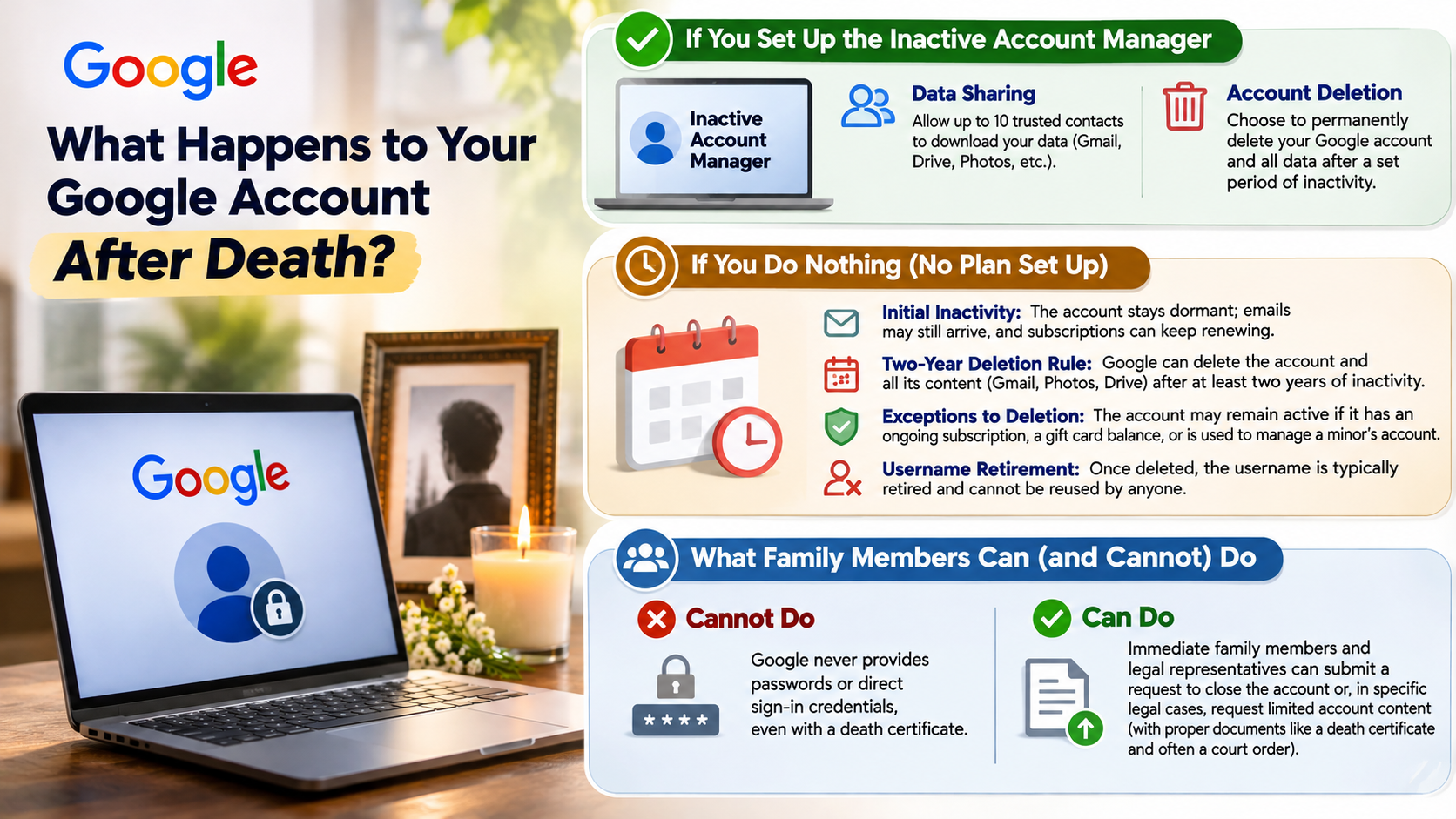
When someone dies, Google does not automatically transfer their account to family members. The company protects the deceased user’s information and follows its privacy policies. It does not provide passwords or direct login credentials to relatives. However, immediate family members and legal representatives can submit requests for account closure or specific data.
If the account owner previously configured Inactive Account Manager, Google follows their selected instructions when the account becomes inactive. Otherwise, Google’s general inactivity policy may apply. Under this policy, Google reserves the right to delete personal accounts after two years of inactivity.
However, deletion is not necessarily automatic on the exact two-year anniversary. Google sends notifications before taking action. Certain accounts also qualify for exceptions under its policy.
Understanding these rules helps families prepare for potential data loss and explore available options.

How Google’s Inactive Account Manager Works
Google provides a feature called Inactive Account Manager to help users plan their digital legacy. It allows account owners to decide what happens to their information when they stop using their accounts.
Users can select an inactivity period of 3, 6, 12, or 18 months. They can also choose up to 10 trusted contacts to receive notifications.
The available options include:
- Notify trusted contacts: Google sends selected contacts an email when the inactivity period ends.
- Share account data: Users can allow trusted contacts to download selected information, including Gmail, Google Drive, and other supported services.
- Delete account information: Users can instruct Google to delete their accounts after the selected inactivity period.
Google also sends advance notifications before activating the selected plan. Users can change their settings whenever necessary.
One important distinction is that Inactive Account Manager does not replace Google’s general two-year inactivity policy. The two mechanisms operate separately.
Is It Illegal to Use a Deceased Person’s Email?
Accessing a deceased person’s email account without proper authorization can create legal and privacy problems. However, whether it is illegal depends on the applicable laws, account terms, and circumstances. Simply knowing someone’s password does not automatically grant legal permission to access their account after death.
In the United States, laws such as the Computer Fraud and Abuse Act (CFAA) regulate certain forms of unauthorized computer access. However, it would be inaccurate to say that every login using a deceased person’s password automatically violates this federal law.
State laws and digital estate regulations may also affect access rights. For example, the Revised Uniform Fiduciary Access to Digital Assets Act addresses how authorized representatives can manage certain digital assets.
Google also maintains strict account access policies. It does not provide passwords or login credentials to relatives, even after verifying someone’s death.
Therefore, families should use Google’s official request process instead of attempting unauthorized access.
Legal Alternatives for Accessing a Loved One’s Data
Families do not need to guess passwords or attempt direct account access. Google provides an official process for handling requests involving deceased users. Immediate family members and legal representatives can request account closure, specific information, or eligible funds. If the request involves a payment balance, understanding the difference between Google Pay and Google Wallet can help clarify which service is relevant.
To begin, visit Google’s deceased user’s account request page.
Depending on the request, Google may require documents such as:
- A copy of the deceased person’s death certificate.
- Your government-issued identification.
- Proof of your relationship with the deceased.
- Court-issued documents establishing your legal authority, where applicable.
- Additional information requested by Google’s review team.
Google evaluates every request individually. Providing documents does not guarantee access to the requested information.
Importantly, Google may provide certain account contents in appropriate circumstances. However, it never provides passwords or direct login details.
If you need access to important financial or personal records, consider consulting an estate lawyer. The applicable legal requirements may differ depending on your country or state.
What Are Google’s Employee Death Benefits?
Google has received attention for its reported employee death benefits. These benefits provide financial support to eligible families when a full-time employee dies. They are separate from Google’s policies for managing a personal Google account after death.
According to published reports, the company offers continued financial assistance to surviving spouses or domestic partners. The reported package includes 50% of the deceased employee’s base salary for ten years. It also includes the immediate vesting of unvested company stock.
Eligible surviving children may receive additional monthly financial support. Reports mention payments of $1,000 per month until age 19, or age 23 for full-time college students.
These benefits are notable because reports suggest employees may qualify regardless of their length of service. However, these figures should not be treated as guaranteed current benefits. Families should verify eligibility and payment conditions through Google’s official human resources team.
Eligibility and Additional Family Support
Google’s reported employee death benefits include several forms of financial assistance. These arrangements aim to help surviving family members manage expenses after an unexpected loss.
The reported benefits include:
- Spouse or domestic partner support: Payments equal to 50% of the employee’s base salary for ten years.
- Stock benefits: Immediate vesting of the deceased employee’s unvested company stock, according to published reports.
- Children’s support: Monthly payments of $1,000 for each eligible child until age 19, or age 23 for full-time college students.
Published reports also suggest that employees do not need to complete a minimum service period to qualify.
However, actual benefits may depend on employment terms and applicable company policies. Families should contact Google’s human resources or benefits department for confirmation.
It is important to distinguish these employment benefits from Google’s digital legacy policies. Employee benefits concern financial support, while a Google account after death involves personal data, privacy, and account access.
What Happens to a Google Account After Someone Dies?
When someone dies, Google follows its privacy and account security procedures. Their account does not automatically become accessible to relatives or executors. Instead, Google considers the user’s existing instructions and requests from authorized representatives.
If the deceased person configured Inactive Account Manager, Google may notify selected contacts and share approved information. Without these settings, Google’s general inactivity policy may eventually apply.
Family members can also submit an official request to Google. The company reviews the submitted documents before deciding whether to close the account or provide specific information.
However, Google does not guarantee access to every requested file. Its decision depends on the circumstances, applicable legal requirements, and privacy policies.
Understanding what happens to a Google account after death helps families avoid unnecessary delays. It also allows them to make informed decisions about preserving important digital information.
Options Available to Verified Representatives
Google allows eligible family members and legal representatives to submit requests concerning a deceased person’s account. The available options depend on the circumstances and supporting documentation.
Representatives can generally request the following:
- Close the account: Request permanent closure of the deceased person’s Google account.
- Obtain account data: Request specific information, such as emails, photos, and other stored content. Google reviews each request individually.
- Request funds: Submit a request concerning eligible funds associated with the deceased person’s Google account.
Google may require a death certificate, government-issued identification, and documents establishing legal authority. Additional paperwork may also be necessary.
There is one important limitation. If you request permanent account closure first, Google states that it cannot process a later request to release the account’s contents.
Therefore, families should consider whether they need important information before requesting account deletion.
Final Takeaway
Your Google account contains more than emails and documents. It may hold financial records, family photographs, personal memories, and information your loved ones may need later.
Setting up Inactive Account Manager helps you prepare for unexpected circumstances. You can choose trusted contacts, select the information they can access, and decide when Google should take action.
Include your digital assets in your broader estate planning. Review your account settings regularly and make sure trusted family members understand your preferences.
Taking these steps can make managing your Google account after death easier for your loved ones. It also helps protect your privacy and preserve important digital memories.