
Scammer Got Your Email? Here’s What to Do Immediately
If a scammer got your email address, you might worry about your privacy and online security. However, someone knowing your email address does not automatically mean your account has been hacked. Scammers also use AI to make fraudulent messages more convincing, as explained in 4 Ways Scammers Are Using AI To Trick You.
Scammers can use your address to send phishing emails, impersonate you, or attempt to access your other online accounts. They may also exploit passwords exposed in previous data breaches.
The good news is that you can take practical steps to reduce these risks. This guide explains what to do if a scammer gets your email, what they can do with your address, and how to recover a compromised inbox.
You will also learn how to recognize email spoofing, secure your account settings, and remove unauthorized access. Acting promptly can help protect your personal information and prevent further damage.

What to Do If a Scammer Gets Your Email
If a scammer has your email address, start by checking whether they have accessed your account. Receiving suspicious messages alone does not prove that someone has gained access.
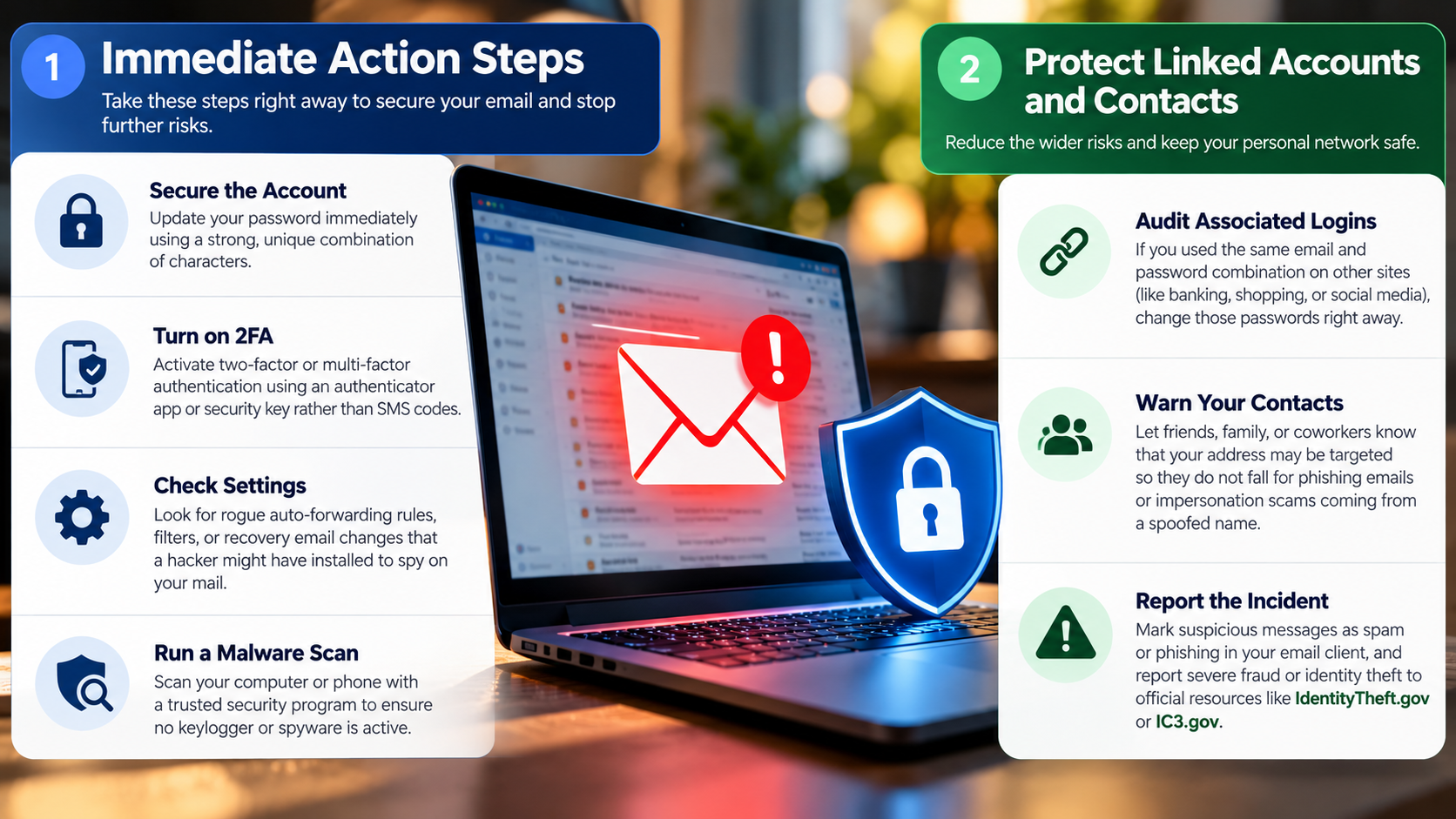
Follow these steps to protect your email account and reduce potential risks:
- Check for suspicious activity. Review recent sign-ins, unfamiliar devices, and security alerts from your email provider.
- Change your password if necessary. If your password was exposed, reused, or your account shows suspicious activity, replace it with a strong, unique password.
- Enable two-factor authentication. Use an authenticator app or a passkey when supported. This adds protection beyond your password.
- Review recovery settings. Check your backup email address, recovery phone number, and other account recovery options.
- Check your sent messages. Look for unfamiliar emails, deleted messages, and unexpected changes to your account settings.
- Remove suspicious access. Revoke unfamiliar third-party app permissions and sign out unknown sessions.
- Warn your contacts if necessary. If someone sent fraudulent messages from your account, tell recipients not to click suspicious links or share sensitive information.
You do not need to panic or delete your email account simply because a stranger knows your address. Focus on the evidence of compromise and secure any accounts that may be affected.
Secure Your Account Settings
Your email account contains sensitive information and often serves as the recovery method for other online services. Protecting its settings is essential, especially if you suspect unauthorized access.
Open your email provider’s official security dashboard. Review the following settings carefully:
- Recent activity: Look for unfamiliar sign-ins, devices, locations, or security alerts.
- Connected applications: Remove apps you no longer use or do not recognize.
- Recovery information: Confirm that your backup email and phone number belong to you.
- Forwarding rules: Check whether messages are being redirected to an unfamiliar address.
- Filters and rules: Look for settings that automatically archive, delete, or hide security notifications.
- Active sessions: Sign out devices you cannot identify.
If you discover unauthorized changes, secure your account immediately. Change your password from a trusted device and enable multifactor authentication.
Use your provider’s official recovery process if you cannot access the account. Avoid following security links in suspicious emails. Instead, open the provider’s website or app directly.
What Should I Do If a Scammer Is Using My Email Address to Email Me?
Receiving an email that appears to come from your own address can be frightening. Scammers sometimes claim they have hacked your account and demand money to prevent the release of supposedly private information.
In many cases, this is email spoofing. It allows someone to forge the sender information displayed in an email without gaining access to your actual inbox.
Do not reply, open unexpected attachments, click suspicious links, or pay ransom demands. If you accidentally open a suspicious link, follow these steps to stay safe after clicking on a suspicious link. Mark the original message as spam or phishing using your email provider’s reporting tools.
Next, check your account’s recent activity and sent folder. Look for unfamiliar sign-ins, messages, forwarding rules, and password reset notifications.
A clean sent folder is reassuring, but it does not prove that your account is secure. An attacker may delete sent messages or access your account without sending anything.
If the message contains an old password, remember that it may have come from a previous data breach. Change that password anywhere you still use it, and secure your email account.
Spotting Email Spoofing Tactics
Email spoofing involves falsifying sender information to make a message appear to come from a trusted person or address. To recognize these deceptive messages, learn how to identify a phishing attack email and spot the warning signs before responding.
Watch for these common warning signs:
- Messages claiming your account has been hacked without providing verifiable evidence.
- Threats involving private photos, browsing history, or personal information.
- Urgent demands for cryptocurrency, gift cards, or other difficult-to-reverse payments.
- Suspicious links, unexpected attachments, or unusual requests for personal information.
- Messages displaying your own address as the sender but containing threats or generic claims.
For additional verification, inspect the message’s full email headers if your provider makes them available. These headers can reveal information about the sending servers and authentication checks.
Look for SPF, DKIM, and DMARC results, which help receiving systems evaluate whether a message is authorized by the claimed domain. However, these checks are not definitive proof of safety or fraud.
If you find suspicious account activity alongside the message, treat it as a potential compromise rather than assuming spoofing is the only explanation.
Can a Scammer Do Anything With Just Your Email?
A scammer who knows only your email address generally cannot directly access your bank account or read your inbox. Your address is not a password, and knowing it alone does not grant account access.
However, it can provide a starting point for further attacks. Scammers may send convincing phishing emails, attempt password resets, or search for information connected to your address.
They might also test passwords exposed in previous data breaches. This technique, called credential stuffing, becomes especially dangerous when people reuse the same password across multiple websites.
Your email address may also appear in data broker listings, public profiles, or leaked databases. Scammers can combine these details to create messages that appear more personal and believable.
To reduce these risks, use unique passwords for every account and enable multifactor authentication. Avoid sharing verification codes, and never approve unexpected login requests.
If a scammer has your email address but you have not noticed suspicious activity, there is usually no need to abandon the account. Instead, strengthen your security and remain alert for unusual messages or login alerts.
The Threat of Credential Stuffing
Credential stuffing occurs when attackers use previously exposed username and password combinations to attempt logins on other websites. Automated tools can test large numbers of combinations quickly.
For example, imagine that your email address and password were exposed in a shopping website’s data breach. If you reused that password for your email account, a scammer might try the same combination there.
This is why password reuse creates a serious security risk. One compromised service can potentially expose several other accounts.
Protect yourself by following these practices:
- Create a different password for every website and application.
- Use a reputable password manager to generate and store strong passwords.
- Enable multifactor authentication on your email, banking, and social media accounts.
- Change passwords that have appeared in known breaches, especially if they are reused.
- Never share one-time verification codes with someone who contacts you unexpectedly.
- Review important accounts for unfamiliar sign-ins and security changes.
If you suspect credential stuffing, prioritize your email account and any services using the same password. Secure those accounts individually, starting with the ones that could expose financial information or enable further password resets.
How Do I Unhack My Email Account?
If someone has gained unauthorized access to your email, you need to regain control and prevent them from returning. The exact process depends on whether you can still sign in.
If you can access your account, open your provider’s official security settings. Change your password to a strong, unique one, then enable multifactor authentication.
Next, review recent sign-ins, recovery information, connected applications, and active sessions. Remove unfamiliar devices and revoke unauthorized access. Check forwarding rules and filters that could hide security messages or send copies of your emails elsewhere.
If you cannot sign in, use your provider’s official account recovery page. Follow the verification steps and use a trusted device whenever possible.
Also, secure other accounts that share the compromised password. If your email was used to reset another account’s password, check that service for unauthorized changes.
Run a security scan on devices that may contain malware, particularly if you suspect someone captured your password. Once you regain control, monitor your account for unusual activity and respond promptly to further security alerts.
Check Hidden Email Forwarding Rules
Email forwarding rules can allow an attacker to receive copies of your messages without repeatedly signing in to your account. This can expose sensitive information, including password reset links, invoices, and private conversations.
After recovering your email account, open its settings and inspect the forwarding options. Remove any destination address you do not recognize or intentionally use.
Next, examine your filters, inbox rules, and blocked sender settings. Attackers may create rules that automatically archive or delete security alerts, making unauthorized activity harder to notice.
Check whether your account has unfamiliar delegates or shared mailbox permissions, if your provider supports them. Also review connected apps that can read or manage your email.
After removing suspicious settings, change your password again if an attacker had access during the recovery process. Sign out all other sessions where possible, and confirm that multifactor authentication remains enabled.
Do not assume that changing your password automatically removes every form of unauthorized access. Reviewing forwarding rules, sessions, recovery options, and application permissions helps close additional routes an attacker may have established.
How to Clean Your Email From Hackers
Cleaning up after an email compromise involves more than deleting suspicious messages. You must also remove unauthorized access, secure affected accounts, and check the devices you use.
Start by securing your email account and reviewing its security settings. Remove unfamiliar forwarding rules, filters, connected applications, and active sessions.
Next, inspect your inbox, sent folder, trash, and archived messages for signs of unauthorized activity. Report phishing messages and delete unwanted emails after preserving any evidence you may need.
If you suspect malware or a stolen password, update your device’s operating system and run a reputable security scan. Remove suspicious browser extensions and applications you do not recognize.
You should also check other online accounts linked to your email address. Look for unexpected password resets, changed recovery details, unauthorized purchases, or unusual login alerts.
Finally, continue monitoring your account for suspicious activity over the following weeks. Pay attention to unexpected verification codes, security notifications, and messages you did not send.
Remember that deleting emails does not repair a compromised account. Securing access and removing unauthorized settings must come first.
Revoking Unfamiliar App Permissions
Third-party applications can sometimes access your email to provide additional features, such as scheduling, productivity tools, or message organization. However, an application with excessive or compromised permissions can expose sensitive information.
Open your email provider’s security dashboard and find the section listing connected applications or third-party access. Review each application and remove permissions for anything unfamiliar, unnecessary, or no longer in use.
Be especially cautious with applications that can read, send, delete, or manage messages. These permissions can create significant risks if the application is malicious or its account has been compromised.
You should also review connected accounts and sign-in integrations on other websites. If an attacker accessed your email, they may have used it to establish unauthorized access elsewhere.
After revoking suspicious permissions, change your password if you have not already done so. Enable multifactor authentication and review recent account activity again.
Keep your applications updated and avoid granting unnecessary permissions to unfamiliar services. These precautions help reduce the risk of another compromise and protect your email from unauthorized access.
Conclusion
If a scammer got your email address, there is no need to panic, but you should take your online security seriously. Having your email address alone does not mean someone has hacked your account. However, scammers may use it for phishing attacks, password guessing, and identity fraud attempts.
Start by reviewing your account activity, changing compromised passwords, enabling two-factor authentication, and removing unfamiliar app permissions. If your account has been hacked, use your email provider’s official recovery process and check for suspicious forwarding rules or unauthorized changes.
For additional guidance, read the Federal Trade Commission’s guide on what to do if you were scammed. If you use Gmail, Google’s Security Checkup can also help you review your account protection.
Most importantly, use unique passwords for every account and stay alert to unexpected messages or security alerts. Taking these precautions can help protect your personal information and reduce the risk of future cyberattacks.