

Claude Users Say These Are the Most Useful Skills
If you use Anthropic’s Claude regularly, generic prompting may not be enough for complex, repetitive tasks. Claude skills can help you create repeatable workflows for writing, coding, research, document analysis, and other professional tasks.
Instead of repeating lengthy instructions every time, you can use specialized instructions and workflows to guide Claude through familiar tasks. This makes it easier to maintain consistent formatting, follow project requirements, and produce useful results with less manual effort.
The most effective workflows focus on specific problems. Developers might need help reviewing code or writing tests. Researchers may want to extract information from lengthy documents. Content teams may need consistent brand voice and formatting across multiple articles.
In this guide, we’ll explore useful Claude skills, explain how they work, and examine their practical benefits. We’ll also clarify the differences between Claude Skills, Projects, Artifacts, and integrations. Finally, we’ll compare Claude’s capabilities with similar features in ChatGPT.
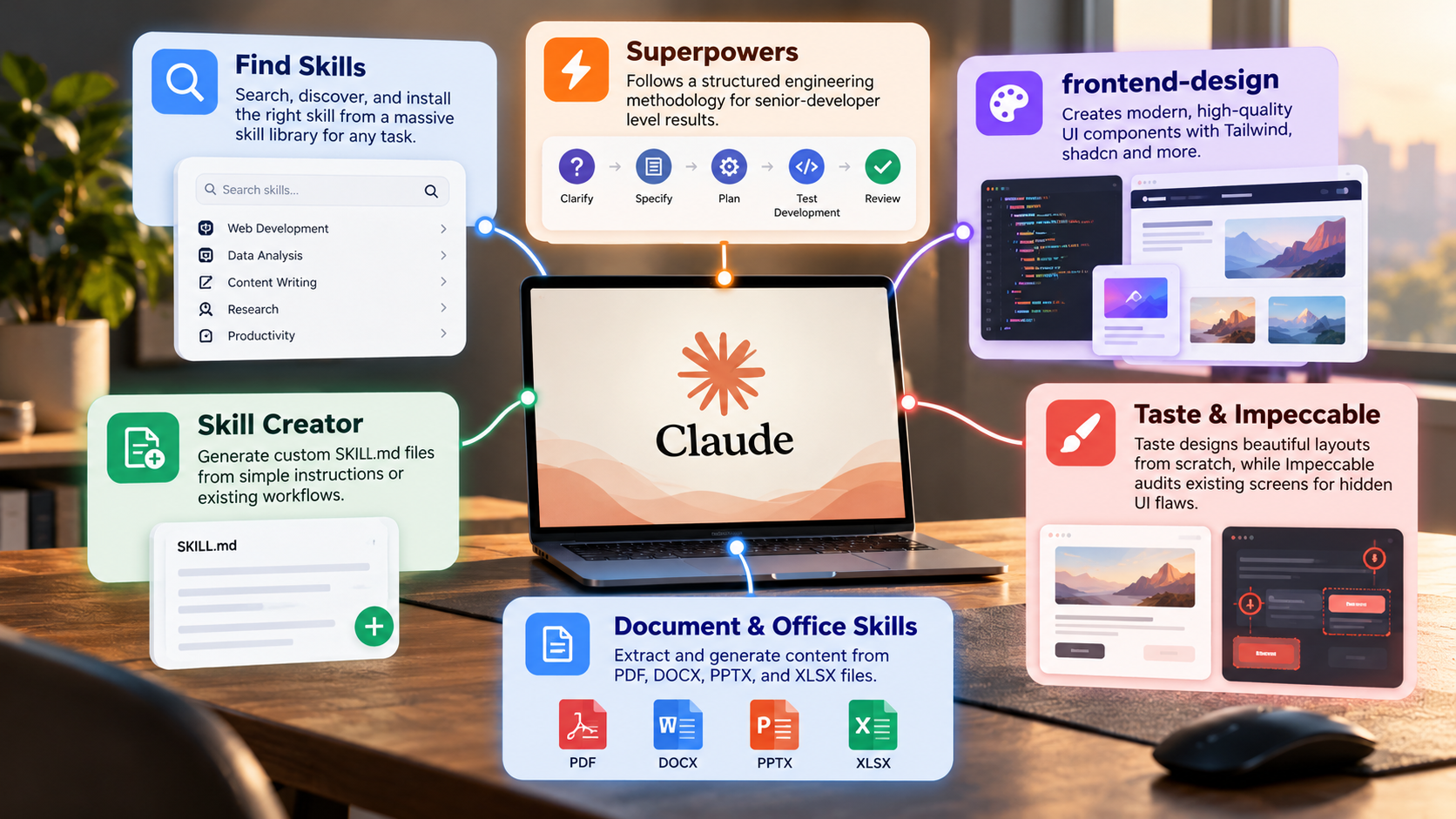

What Are the Most Useful Skills for Claude?
The most useful Claude skills depend on your work and the tasks you repeat most often. Developers, researchers, writers, and business professionals can all benefit from specialized workflows. These workflows provide Claude with instructions, reference materials, and procedures tailored to a specific task. Content creators can also explore a free AI writing tool that requires no signup to simplify everyday writing tasks.
For example, a developer might use a workflow to review pull requests, identify potential bugs, and suggest relevant tests. A researcher could use one to extract information from reports and organize findings into a structured summary. Content creators might use reusable instructions to maintain a consistent tone across articles, emails, and marketing materials.
When choosing Claude skills, focus on practical value rather than complexity. A useful workflow should save time, reduce repetitive instructions, or improve output consistency.
Consider starting with these common use cases:
- Code review: Identify potential bugs, review changes, and suggest tests.
- Document analysis: Extract key information from PDFs, reports, and other files.
- Research assistance: Organize findings, compare sources, and summarize evidence.
- Content writing: Apply consistent tone, formatting, and editorial guidelines.
- Data analysis: Structure information and explain patterns in supported datasets.
Automated Code Architecture and Verification
Software developers can use Claude to understand codebases, investigate errors, and improve existing applications. With clear instructions and access to relevant files, Claude can explain how different components interact. It can also identify potential dependencies, suggest architectural improvements, and help developers understand the consequences of proposed changes.
A reusable code-review workflow can establish a consistent process for examining pull requests. For example, it might instruct Claude to check error handling, security concerns, naming conventions, and test coverage. It can also ask Claude to explain each finding and distinguish serious problems from optional improvements.
However, Claude’s suggestions should not replace proper engineering checks. Generated code can contain bugs, and architectural recommendations may overlook important project constraints. Developers should validate changes through automated tests, code review, and relevant security checks.
For better results, provide the necessary project context, coding standards, and expected behavior. You can also specify the programming language, framework, and testing tools. This helps Claude produce recommendations that fit your existing development environment instead of offering generic solutions.
Are Claude Skills Actually Useful?
Claude skills can be useful when they address tasks you perform repeatedly. Their value comes from making workflows more consistent, not from guaranteeing perfect answers. A well-defined workflow can remind Claude to follow particular procedures, use approved reference materials, and produce information in a predictable format.
For example, a content team may repeatedly need articles checked against the same editorial guidelines. A reusable skill can provide those instructions without requiring someone to paste them into every conversation. Similarly, a research workflow can establish how to summarize documents, record evidence, and identify unanswered questions.
However, skills do not automatically eliminate mistakes or prevent hallucinations. Claude can still misunderstand instructions, overlook information, or generate incorrect conclusions. Understanding the disadvantages of using Claude can help you recognize these limitations and decide when additional verification is necessary. You should review important outputs, especially when they affect financial, legal, security, or business decisions.
Before creating a skill, identify a task that consumes time or produces inconsistent results. Then test whether reusable instructions improve the outcome.
A practical evaluation should consider:
- Time saved compared with ordinary prompting.
- Consistency across repeated tasks.
- Accuracy and completeness of the results.
- Amount of human review still required.
- Ease of maintaining and updating the workflow.
Standardizing Team Output and Brand Voice
Teams often struggle to maintain consistent quality when several people create similar documents. Different writers may use different terminology, formatting, tones, or levels of detail. Reusable Claude workflows can help establish shared standards for these tasks.
For example, a marketing team could define its preferred tone, target audience, formatting rules, and terminology. Claude could then use these instructions when drafting product descriptions, email campaigns, and blog content. A technical team could establish a similar workflow for release notes, troubleshooting guides, and internal documentation.
The main benefit is consistency. Team members spend less time repeating instructions and correcting predictable formatting differences. They can also use shared reference materials to make outputs more aligned with internal standards.
However, standardized instructions still require maintenance. Outdated guidelines can spread errors across multiple documents. Teams should periodically review their workflows, update approved terminology, and test outputs against real examples.
Claude can assist with following editorial and technical standards, but human review remains important. This is particularly true for factual claims, sensitive information, and content that requires organizational approval.
How Does Claude Know Which Skills to Use?
Claude’s ability to use a skill depends on how that skill is configured and made available. In supported Claude environments, skills provide instructions and resources for particular tasks. Claude can determine when an available skill is relevant by considering the user’s request and the skill’s description.
For example, a request to analyze a spreadsheet may match a workflow designed for data analysis. A request to review a software change may be better suited to a code-review skill. Clear descriptions help Claude identify the intended use of each workflow.
Tool integrations work somewhat differently. When tools are available, Claude can select an appropriate tool based on the task and its documented capabilities. Depending on the integration, the tool may retrieve information, process data, or perform an action.
This process is not infallible. Claude may choose an unsuitable workflow, misunderstand a request, or lack the necessary permissions and information. You can improve reliability by writing precise skill descriptions, defining clear boundaries, and providing examples of successful outputs.
Improving Dynamic Routing With Explicit Skill Descriptions
Clear descriptions make it easier for Claude to distinguish between similar skills. If two workflows have vague or overlapping purposes, Claude may struggle to identify which one best fits the request. Specific descriptions reduce this ambiguity.
When creating a skill, explain its purpose, intended users, and typical tasks. State when it should be used and identify situations that fall outside its scope. Include the expected output format whenever consistency matters.
For example, a research skill might specify that it extracts claims from supplied documents, organizes supporting evidence, and flags missing information. A separate writing skill might use those findings to create a structured article. Keeping these responsibilities distinct makes each workflow easier to understand and maintain.
You should also provide clear procedures for handling incomplete information. A skill can instruct Claude to identify uncertainty instead of inventing missing facts. For important workflows, include examples and test the skill against several realistic requests.
Remember that better descriptions improve routing but do not guarantee correct decisions. Review the results and refine the instructions when Claude repeatedly selects the wrong workflow or produces inconsistent outputs.
What Are Claude’s Official Skills?
Claude Skills are reusable, specialized instructions and resources that help Claude perform particular tasks. Anthropic’s documentation describes skills as a way to package procedural knowledge for workflows such as document creation, data analysis, and software development. If you’re evaluating Claude’s overall capabilities, an in-depth review of Anthropic Claude can provide additional context about its strengths and limitations.
It is important to distinguish skills from other Claude features. Projects provide a workspace for related conversations, instructions, and reference materials. Artifacts offer a dedicated interface for viewing and working with certain generated outputs, including code, documents, and interactive content. These features complement skills but are not interchangeable with them.
Integrations provide another layer of functionality. The Model Context Protocol (MCP) is an open standard that connects AI applications with external tools and data sources. Depending on the setup, an integration may allow Claude to access relevant information or interact with connected services.
Availability varies by product, account, and configuration. Therefore, users should check Anthropic’s current documentation before assuming that a particular capability is available in their environment.
To explore these features, start with the official Anthropic documentation. It provides guidance on Claude’s supported capabilities and developer integrations.
Accelerating Production Workflows With Dedicated Interactive Artifacts
Claude Artifacts can make certain tasks easier by presenting generated content in a dedicated workspace. Instead of keeping everything inside a long conversation, users can work with supported outputs in a more focused interface.
For example, Claude may generate a document, a code sample, a visualization, or an interactive prototype. The Artifact interface lets users inspect the result and request changes through conversation. This can be useful when developing a small application, exploring an idea, or refining a structured document.
Artifacts and skills serve different purposes. An Artifact is primarily a way to present and work with generated content. A skill supplies reusable instructions and resources that guide Claude through a task. A skill might help Claude follow a particular process while an Artifact displays the resulting application or document.
Artifacts should not be confused with fully deployed software. Generated prototypes may still need testing, security reviews, hosting, and integration work before production use.
For recurring work, consider combining reusable instructions with an appropriate output format. This can make the workflow easier to repeat while keeping the final result accessible for review and refinement.
What Is the ChatGPT Equivalent of Claude Skills?
ChatGPT offers several features that overlap with Claude Skills, although the products do not work identically. Custom GPTs let users create specialized assistants with tailored instructions, reference files, and supported capabilities. They are useful when you want a dedicated assistant for a recurring task. To understand how these tools fit into the wider AI landscape, explore this guide to large language models, including ChatGPT and other leading models.
ChatGPT also supports Projects, which help organize related conversations and reference materials. Depending on the available tools and configuration, users can connect external services or build workflows that interact with other systems.
Claude Skills focus on packaging procedural instructions and resources into reusable capabilities. Custom GPTs provide a way to configure a specialized assistant around a particular purpose. Both approaches can reduce repeated prompting, but their setup, execution, and integration options differ.
The best choice depends on the task rather than the product name. If you need a dedicated assistant with a defined role, a Custom GPT may fit your workflow. If you want reusable procedural knowledge within Claude, a skill may be more appropriate.
Before choosing either option, compare availability, setup effort, access permissions, maintenance requirements, and the quality of the resulting work.
Comparing Custom GPT Actions With Open Protocol Standards
Custom GPTs and the Model Context Protocol address related but different needs. Custom GPTs let users configure specialized ChatGPT assistants with instructions, reference materials, and supported integrations. They provide a convenient way to create an assistant for a defined task.
MCP, by contrast, is an open protocol for connecting AI applications with external tools and data sources. It defines a structured way for compatible applications and servers to communicate. It does not function as a customized assistant or automatically provide access to every external system.
Claude can use MCP-compatible integrations in supported environments, while ChatGPT offers its own tools and integration options. The available features depend on the product, account, and implementation.
For individuals, a specialized assistant or reusable skill may be sufficient for routine work. Developers and organizations building connected workflows may need to evaluate protocol support, authentication, permissions, and data security. It’s also worth considering whether paying for an AI subscription is worthwhile based on the features, integrations, and usage limits you actually need.
Neither approach guarantees better results by itself. Choose based on the workflow you need to support, the systems you must connect, and the amount of technical control required.
Conclusion
The most useful Claude skills are those that solve recurring problems, simplify complex workflows, and deliver consistent results. Whether you’re using Claude for coding, research, document analysis, or content creation, reusable instructions can reduce repetitive work and improve productivity. Features such as Projects, Artifacts, and MCP integrations offer additional ways to organize tasks and connect Claude with external tools.
However, no skill guarantees accurate results every time. Clear instructions, relevant context, and human review remain essential for reliable outcomes. Start by identifying one time-consuming task, create a focused workflow, and test whether it improves your results. As your needs evolve, refine your instructions and explore other capabilities.
Ultimately, learning how to use Claude skills effectively is less about collecting more tools and more about building practical workflows that save time, maintain quality, and support your everyday goals.