
How Hackers Steal Data Online: Understanding Modern Cyber Threats
Every day, billions of digital activities happen across the internet. Each action creates a trail of personal information, including login details, financial records, browsing habits, and private messages. Understanding how hackers steal data is the first step toward protecting your online identity and reducing security risks.
Cybersecurity organizations such as the Cybersecurity and Infrastructure Security Agency regularly warn users about increasingly advanced cyber threats. Modern attackers no longer rely only on technical skills. They combine software exploits with psychological tricks to access sensitive information.
Data breaches are not limited to large companies or financial institutions. Everyday internet users are also targeted through fake emails, unsafe applications, weak passwords, and unsecured networks. A single mistake can expose personal information to criminals.
Once attackers obtain stolen data, they may sell it on illegal marketplaces, commit identity fraud, access financial accounts, or impersonate victims online. The impact can continue long after the original breach occurs.
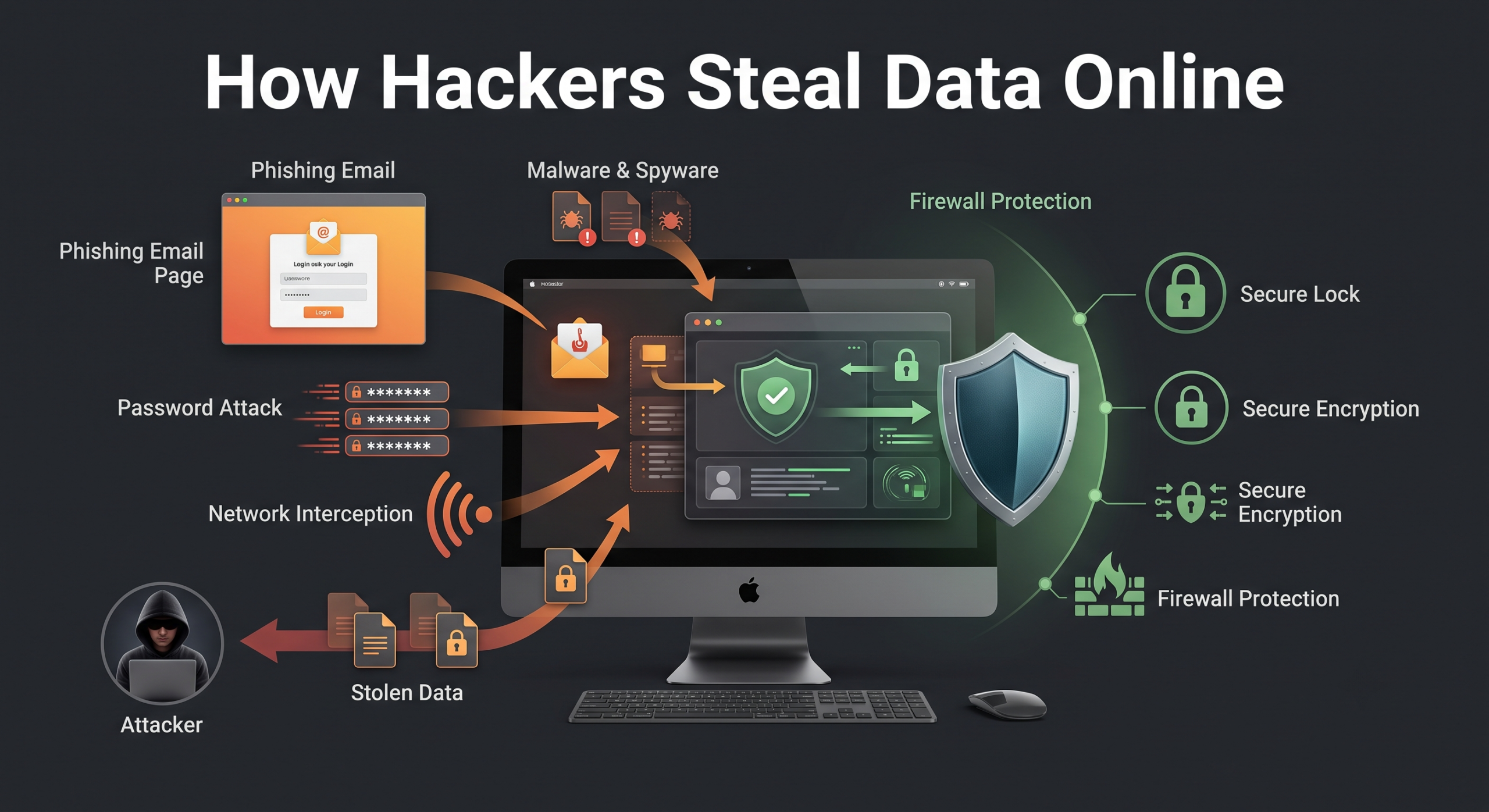
This guide explains the most common methods cybercriminals use to steal information. You will learn how phishing attacks, malware, password attacks, and network interception work. You will also discover practical steps to improve your digital security and protect your personal data.

How Hackers Steal Data Through Social Engineering Attacks
Technology is only one part of modern cybercrime. Many successful attacks happen because criminals manipulate human behavior. Instead of breaking through advanced security systems, attackers often convince users to provide access themselves.
Social engineering is the practice of influencing people through deception. Hackers use trust, urgency, fear, and curiosity to make victims take unsafe actions. These techniques are effective because they target natural human reactions rather than technical weaknesses.
Cybercriminals may pretend to be customer support agents, coworkers, delivery companies, or trusted online services. Their goal is usually the same: collect passwords, payment details, security codes, or access to private systems.
Common social engineering methods include:
- Phishing: Fake messages designed to steal login information.
- Pretexting: Creating a false identity or story to gain trust.
- Baiting: Offering something attractive to convince users to install harmful files.
- Scare tactics: Using fake warnings to pressure victims into quick decisions.
Attackers often combine these methods with technical tools. For example, a fake email may contain malware or direct users to a cloned website. This combination makes cyberattacks harder to recognize.
Learning how manipulation works is an important part of cybersecurity. When users understand common tricks, they are more likely to identify suspicious requests before sharing sensitive information.
Phishing Attacks and Fake Websites: The Most Common Data Theft Method
Phishing is a major example of how hackers steal data because it targets users instead of directly attacking security systems.. Instead of attacking a system directly, criminals create fake messages that appear to come from trusted organizations.
These messages often imitate banks, online shopping platforms, email providers, or subscription services. They may claim that an account has been locked or requires immediate verification. The goal is to create pressure and encourage users to act without thinking.
A typical phishing attack follows this pattern:
Phishing Email → User Clicks Link → Fake Login Page → Credentials Captured
After clicking the malicious link, victims are redirected to a website that looks almost identical to the real service. The page may copy logos, colors, and layouts to appear legitimate.
When users enter their username and password, attackers collect the information instantly. They can then access accounts, steal additional data, or attempt the same credentials on other platforms.
Signs of a phishing attempt often include:
- Unexpected messages asking for urgent action.
- Suspicious links or unfamiliar website addresses.
- Requests for passwords or security codes.
- Poor grammar or unusual formatting.
- Offers that seem too good to be true.
Avoiding phishing requires careful attention. Always verify the sender, check website addresses, and avoid clicking unknown links. Using multi-factor authentication (MFA) also reduces the damage caused by stolen passwords.
Baiting and Pretexting: How Hackers Build Fake Trust
Social engineering attacks often go beyond simple phishing emails. Hackers frequently create detailed stories to gain a victim’s confidence. Two common techniques are pretexting and baiting.
Pretexting involves creating a believable false situation. An attacker may pretend to be an IT technician, bank employee, or company representative. They then ask for sensitive information while appearing helpful or professional.
For example, a fake support worker might claim they need remote access to fix an account problem. If the victim trusts the attacker, they may unknowingly provide access to private systems.
Baiting uses curiosity or rewards to influence decisions. Attackers may offer free software, exclusive downloads, or infected storage devices. The victim believes they are receiving something valuable but actually installs harmful programs.
Common baiting examples include:
- Fake software updates.
- Free tools containing malware.
- Unknown USB drives left in public areas.
- Pirated applications with hidden threats.
These attacks succeed because they exploit emotions. Fear, curiosity, and helpfulness can override security awareness. Staying cautious with unexpected offers and requests is essential for preventing social engineering attacks.
How Hackers Steal Data Using Malware and Spyware
Malware shows another important side of how hackers steal data, as malicious programs can secretly collect information from infected devices.
Unlike social engineering attacks, malware often works silently after installation. Victims may not notice anything unusual while malicious programs collect files, record activity, or send private information to attackers.
Cybercriminals spread malware through many channels. Common delivery methods include fake applications, infected email attachments, unsafe downloads, malicious advertisements, and compromised websites. Once installed, malware can perform different actions depending on its design.
Some common malware types include:
| Malware Type | How It Steals Data |
|---|---|
| Keyloggers | Records keyboard activity to capture passwords, messages, and payment details. |
| Spyware | Monitors browsing habits, screenshots, and personal information. |
| Trojans | Disguises itself as legitimate software to gain system access. |
| Ransomware | Encrypts files and demands payment for restoration. |
Many malware infections begin with a small mistake. A user may open a suspicious attachment, install an unofficial application, or click a dangerous advertisement.
Keeping software updated, downloading files from trusted sources, and using reliable security tools can greatly reduce malware risks. Early prevention is often easier than recovering stolen data after an infection occurs.
Keyloggers and Spyware: Hidden Tools for Data Collection
Among the most dangerous malware categories are keyloggers and spyware. These programs are specifically designed to monitor users and collect sensitive information without their knowledge.
A keylogger records every keyboard input made on an infected device. This can include passwords, banking information, private conversations, and security codes. The captured information is then sent to an external server controlled by attackers.
Spyware works differently but can be equally harmful. Instead of focusing only on keyboard activity, it monitors a wide range of user behavior. It may track browsing history, capture screenshots, access stored browser passwords, or collect personal files.
Attackers often use spyware to maintain long-term access to a victim’s device. They may quietly monitor activity for weeks or months before using the stolen information.
Warning signs of spyware infections can include:
- Unusual device slowdowns.
- Unexpected battery drain.
- Unknown applications running in the background.
- Increased data usage.
- Strange account activity.
To reduce the risk of spyware and keyloggers:
- Install applications only from trusted sources.
- Review app permissions regularly.
- Keep operating systems updated.
- Avoid clicking unknown email attachments.
- Use security software that detects suspicious activity.
Strong security habits make it much harder for hidden monitoring tools to collect personal information.
Exploiting Zero-Day Vulnerabilities: How Hackers Attack Unknown Weaknesses
Software is created by humans, and even carefully developed programs can contain security weaknesses. These flaws may exist in operating systems, applications, websites, and connected devices.
A zero-day vulnerability is a security weakness that developers do not know about or have not fixed yet. The name refers to the fact that software vendors have had zero days to create a patch before attackers discover and exploit the issue.
Hackers constantly search for these weaknesses because they can provide direct access to systems. A successful zero-day attack may allow criminals to install malware, steal information, or control affected devices.
Unlike phishing attacks, zero-day exploits may require little or no action from users. Attackers can sometimes compromise systems simply by sending specially designed data or targeting vulnerable services.
Common targets include:
- Web browsers.
- Operating systems.
- Business applications.
- Network devices.
- Internet-connected equipment.
Software companies regularly release security updates to fix discovered vulnerabilities. Installing updates quickly is one of the most effective ways to protect against known threats.
Users should also reduce unnecessary risks by:
- Removing unused applications.
- Enabling automatic updates.
- Using security settings recommended by software providers.
- Avoiding unsupported operating systems.
Although zero-day attacks are difficult to predict, strong security practices can limit their impact.
How Hackers Steal Data Through Network Interception Attacks
Your devices constantly exchange information with online services. Every time you visit a website, send a message, or access an account, data travels between your device and remote servers.
When those connections are poorly protected, attackers may intercept the information during transmission. This type of attack is commonly known as a Man-in-the-Middle (MitM) attack.
In a MitM attack, criminals position themselves between a user and the intended destination. Instead of communicating directly with a trusted service, the victim’s information passes through the attacker’s system.
The attacker may then:
- Read unencrypted information.
- Capture login credentials.
- Modify website content.
- Redirect users to malicious pages.
These attacks are especially common on unsecured networks. Public Wi-Fi connections in airports, hotels, and cafes can create opportunities for attackers if proper security measures are missing.
Using encrypted connections, checking for HTTPS websites, and avoiding sensitive activities on unknown networks can help reduce exposure.
Unsecured Public Wi-Fi Risks: Protecting Data on Shared Networks
Public Wi-Fi provides convenience, but it can also create security challenges. Attackers may create fake wireless networks designed to look like legitimate hotspots.
For example, a criminal may create a network named “Free Airport Wi-Fi” or “Cafe Guest Network.” When users connect, their internet traffic may pass through the attacker’s device.
This technique allows criminals to monitor online activity and collect valuable information. They may target login credentials, payment details, or private messages.
Even legitimate public networks can be risky. Poorly secured connections may allow attackers to use packet-sniffing tools. These tools capture data traveling across a network.
To stay safer on public Wi-Fi:
- Avoid accessing banking accounts on unknown networks.
- Confirm the official network name before connecting.
- Use websites with HTTPS encryption.
- Enable a trusted Virtual Private Network (VPN) when appropriate.
- Turn off automatic Wi-Fi connections.
Public networks are useful, but users should treat them carefully. A few simple precautions can prevent attackers from accessing private information.
Packet Sniffing and Unencrypted Websites: How Data Gets Exposed
Internet traffic moves between your device and online services through networks. When that communication is properly encrypted, attackers have a much harder time reading the information being transferred. However, weak security settings can expose sensitive data.
Packet sniffing is a technique attackers use to capture and analyze network traffic. Criminals may use specialized tools to collect information traveling across unsecured connections. If the data is not encrypted, they may be able to view usernames, passwords, messages, and other private details.
One major risk occurs when users visit websites that do not use HTTPS encryption. Older HTTP connections send information without strong protection, meaning attackers monitoring the network may read the transmitted data.
Modern browsers usually warn users when websites are unsafe. However, users should still develop secure browsing habits.
Important online safety practices include:
- Check that websites use HTTPS before entering sensitive information.
- Avoid logging into important accounts on unknown networks.
- Do not ignore browser security warnings.
- Use encrypted applications and trusted services.
Encryption acts like a protective barrier around your information. It does not prevent every cyberattack, but it makes stolen data much harder for attackers to understand and misuse.
How Hackers Steal Data Through Password Attacks
Many hackers do not manually guess passwords. Instead, they use automated tools that can test thousands or even millions of login combinations quickly.
Weak passwords and reused passwords create major security risks. If attackers obtain leaked credentials from one website, they often test those same details on other platforms.
This process allows criminals to compromise multiple accounts from a single data breach. A password used for a small website could eventually expose email accounts, financial services, or social media profiles.
Common automated password attacks include:
- Credential stuffing: Testing stolen username and password combinations across different websites.
- Brute force attacks: Trying many possible password combinations until one works.
- Password spraying: Testing common passwords against many accounts.
Attackers use automation because many users still create predictable passwords. Simple combinations, repeated passwords, and outdated credentials remain common targets.
Strong password practices significantly reduce these risks. Users should create unique passwords for every account and avoid using personal information, such as birthdays or names.
A password manager can help generate and store complex passwords securely. Combined with multi-factor authentication, it creates a much stronger defense against automated attacks.
How Credential Stuffing Works: Turning Data Breaches Into New Attacks
Credential stuffing is one of the most common ways hackers exploit stolen information. This attack method depends on a simple habit: password reuse.
When a company experiences a data breach, stolen usernames and passwords may appear online. Criminals collect these leaked databases and use automated software to test the credentials on other websites.
For example, if someone uses the same password for a shopping account and an email account, a breach from the shopping website could expose the email account as well.
The process usually follows these steps:
- Hackers obtain leaked login credentials.
- Automated tools test the information on popular websites.
- Successful logins provide access to personal accounts.
- Stolen accounts are used for fraud or further attacks.
Credential stuffing is dangerous because attackers do not need to break encryption. They simply take advantage of existing passwords.
To protect yourself:
- Use different passwords for every account.
- Enable multi-factor authentication.
- Monitor account activity regularly.
- Change passwords after security breaches.
- Avoid saving passwords in unsecured locations.
A single reused password can create a chain reaction across multiple accounts. Unique credentials prevent one breach from becoming a much larger problem.
Password Spraying Attacks: How Hackers Target Weak Login Habits
Password spraying is another automated technique used to break into accounts. Unlike brute force attacks, which try many passwords against one account, password spraying uses a small number of common passwords across many accounts.
Attackers use this method because it helps avoid account lockouts. Instead of repeatedly attacking one user, they test weak passwords against thousands of accounts.
Common examples include passwords based on:
- Common words.
- Seasonal phrases.
- Company names.
- Simple number patterns.
- Frequently used combinations.
If even a few users have weak passwords, attackers can gain unauthorized access.
Organizations are especially vulnerable because employees may use predictable passwords across workplace systems. Once attackers access one account, they may attempt to move through connected systems.
Protection methods include:
- Creating long, unique passwords.
- Blocking commonly used passwords.
- Using multi-factor authentication.
- Monitoring unusual login attempts.
- Applying account security policies.
Password security remains one of the simplest and most effective ways to reduce cyber risks. Strong authentication makes automated attacks far less successful.
How to Prevent How Hackers Steal Data and Protect Your Information
Protecting your personal information does not require advanced technical skills. Most successful defenses come from consistent security habits and smart online decisions.
Cybercriminals often depend on mistakes, outdated software, weak passwords, or careless clicks. By improving everyday digital practices, you can significantly reduce your chances of becoming a victim.
Follow these essential security steps:
- Enable Multi-Factor Authentication (MFA)
Add an extra verification layer beyond your password. Even if attackers steal your login details, they still need the second authentication step. - Use a Password Manager
Create strong, unique passwords for every account. Password managers help store credentials securely and prevent password reuse. - Keep Software Updated
Install updates for operating systems, browsers, and applications. Updates often fix security weaknesses before attackers can exploit them. - Use Encrypted Connections
Protect your internet activity with secure networks and trusted VPN services when using public Wi-Fi.
Strong cybersecurity comes from small actions repeated consistently. These habits create multiple barriers that make unauthorized access much more difficult.
Essential Digital Hygiene Habits for Everyday Security
Good digital hygiene means maintaining safe online habits that protect your accounts and personal information. Just like physical hygiene prevents illness, cybersecurity habits reduce exposure to digital threats.
Start by reviewing your current security practices. Many users discover they have old passwords, unused accounts, or unnecessary permissions that increase risk.
Important digital hygiene habits include:
- Use strong, unique passwords: Avoid repeating the same password across multiple platforms.
- Enable MFA whenever possible: Protect important accounts with additional verification.
- Download carefully: Install apps and files only from trusted sources.
- Review permissions: Check which applications can access your data.
- Update devices regularly: Install security patches as soon as they become available.
- Back up important files: Keep copies of valuable information in secure locations.
Security is not a one-time task. Threats continue changing, and attackers constantly develop new methods.
By staying informed and practicing safe online behavior, you can reduce the chances of data theft and maintain better control over your digital identity.
Frequently Asked Questions About How Hackers Steal Data
How do hackers get your personal information so easily?
Hackers often steal personal information by combining technical methods with social engineering. First, they search for simple weaknesses, because many attacks succeed through human mistakes rather than advanced techniques. For example, phishing emails, fake websites, and suspicious messages can trick users into revealing private details. Additionally, criminals use stolen usernames and passwords from previous breaches, especially when people reuse the same passwords across multiple accounts. Furthermore, malware, unsafe downloads, and outdated software can create security gaps. However, users can reduce these risks by following basic safety practices. Strong passwords, multi-factor authentication, regular updates, and careful browsing habits provide better protection. Therefore, staying alert online is one of the most effective ways to prevent unauthorized access to personal data.
Can hackers steal data from your phone without you knowing?
Yes, hackers can sometimes access smartphone data without creating obvious signs. Initially, attackers may use malicious applications, spyware, or fake updates to collect information quietly in the background. Moreover, phones store valuable details, including photos, messages, passwords, location data, and financial information. As a result, mobile devices are attractive targets for cybercriminals. However, certain warning signs may appear, such as unusual battery drain, increased data usage, unknown applications, or slower performance. Additionally, unsafe public Wi-Fi networks can expose users to further risks. To improve protection, users should install apps only from trusted sources, review permissions carefully, and keep operating systems updated. Therefore, combining careful habits with device security features can significantly reduce the chances of mobile data theft.
What is the most common method hackers use to steal passwords?
Phishing remains one of the most common methods hackers use to steal passwords. Instead of breaking into secure systems directly, attackers usually manipulate users into sharing their login information. Typically, they send fake emails, messages, or websites that appear to come from trusted organizations. Furthermore, these messages often create urgency by claiming that an account needs immediate verification. When users enter their details on fake pages, attackers can capture the information. However, people can avoid many phishing attempts by checking website addresses, avoiding unexpected links, and refusing to share authentication codes. Additionally, using multi-factor authentication provides another security layer. Therefore, even if a password becomes compromised, extra verification steps can prevent criminals from accessing important accounts.
How do I know if my data has been stolen in a breach?
Identifying stolen data early can help prevent additional problems. First, users should watch for unusual account activity, including unfamiliar login alerts, unexpected password reset emails, or suspicious financial transactions. Additionally, messages sent from your accounts without permission may indicate unauthorized access. Many companies also notify customers when they discover security breaches; however, users should monitor their accounts independently as well. Furthermore, breach-checking services can help determine whether email addresses or passwords have appeared in known leaks. If information has been exposed, change affected passwords immediately and avoid reusing them elsewhere. Moreover, enable multi-factor authentication and review account settings carefully. Therefore, quick detection and fast action can limit the damage caused by stolen personal information.
Is public Wi-Fi safe for online banking?
Public Wi-Fi can be convenient; however, it may create security risks when handling sensitive information. First, attackers can sometimes create fake networks that look similar to legitimate café, airport, or hotel connections. Additionally, unsecured networks may allow criminals to monitor online activity or attempt to intercept private information. Therefore, users should be careful before accessing banking accounts or entering sensitive details on public networks. Whenever possible, use mobile data for financial transactions or connect through trusted networks. Furthermore, checking for HTTPS encryption and using reliable security tools can provide additional protection. Although public Wi-Fi is useful, it should not automatically be considered private or safe. Consequently, cautious online behavior is essential when using shared internet connections.
What should I do immediately after my data gets stolen?
If you believe your data has been stolen, immediate action can reduce potential harm. First, change compromised passwords and create unique replacements for every account. Additionally, enable multi-factor authentication to add another layer of protection. Next, contact banks, payment providers, or other important services if financial information may be affected. Furthermore, review account activity carefully to identify unusual logins, purchases, or settings changes. You should also scan your devices using updated security software because malware may be involved. Moreover, remain cautious after a breach because criminals may use stolen information for additional phishing attempts. Therefore, quick responses, careful monitoring, and improved security habits can greatly reduce the impact of data theft and help protect your digital identity.
Conclusion: Protecting Yourself From Modern Data Theft Threats
Understanding how hackers steal data is increasingly important in today’s digital environment. Cybercriminals use various techniques, including phishing, malware, password attacks, and unsafe network exploitation. However, many successful attacks can be prevented through simple security habits. For example, creating unique passwords, enabling multi-factor authentication, and updating software regularly can provide strong protection. Additionally, avoiding suspicious links, downloading applications carefully, and monitoring accounts can reduce risks. Furthermore, cybersecurity requires continuous attention because threats continue to change over time. Therefore, users should stay informed and practice responsible online behavior. Although no system can guarantee complete protection, consistent security practices make unauthorized access much more difficult. Small protective steps today can help safeguard personal information and maintain a safer digital future.
If your device is already infected, taking quick action is essential. Learn how to identify and remove harmful software safely with our guide on removing malware from Windows 11 without losing data to protect your system and recover from malware threats effectively.