
4 Disadvantages Of Using Bluetooth For Everything
The disadvantages of using Bluetooth become easier to notice when you depend on wireless connections for everything. Bluetooth connects headphones, speakers, keyboards, cars, and smart devices without cables. That convenience is useful, but it can also create battery, audio, connection, and range problems.
Understanding the disadvantages of using Bluetooth helps you choose the right connection for each situation. Bluetooth works well for many everyday tasks. However, a wired connection can sometimes provide better reliability, lower latency, or simpler operation.
According to the Bluetooth Special Interest Group, billions of devices rely on this standard globally, making it a massive target for interference and potential exploits.
The four disadvantages of using Bluetooth for everything below explain the main drawbacks. They also show when switching to a wired connection may make more sense.
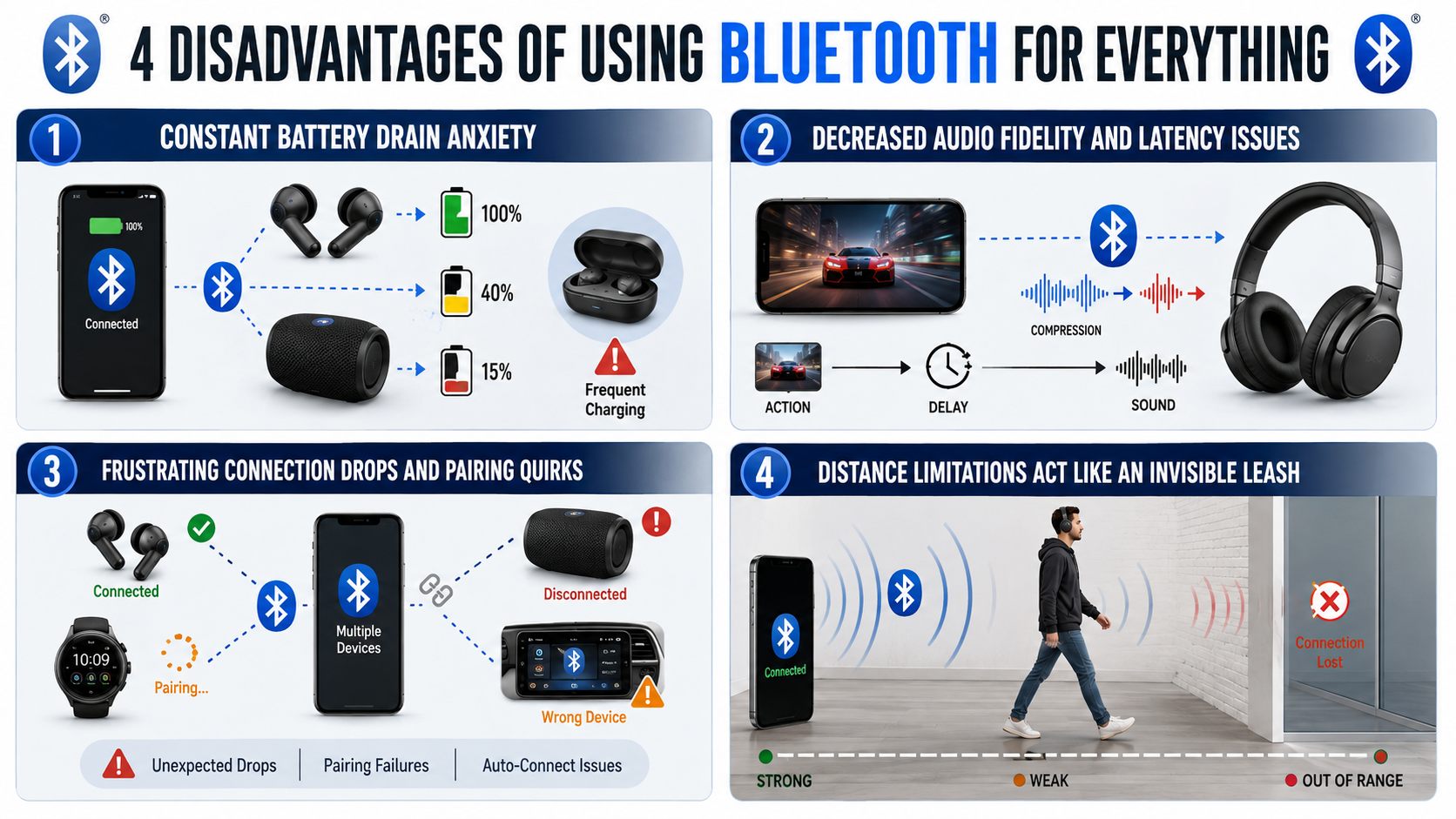

1. Constant Battery Drain Anxiety
One of the biggest disadvantages of using Bluetooth for everything is the extra battery demand. Bluetooth uses power when it communicates with connected devices. Modern Bluetooth Low Energy technology has reduced this consumption considerably.
Simply leaving Bluetooth enabled usually does not cause major battery drain. Active connections can use more power, however. Streaming music, making calls, or using wireless accessories for hours can gradually increase energy consumption.
Wireless accessories also need their own power sources. Earbuds, headphones, speakers, keyboards, and mice may require regular charging. This creates another task that wired accessories can eliminate.
Battery concerns become more important during travel. A phone with limited battery power may need to conserve every possible percentage. This is where the disadvantages of using Bluetooth become more noticeable.
You can reduce unnecessary power consumption by:
- Turning Bluetooth off when you do not need it.
- Disconnecting accessories after use.
- Keeping your phone and accessories updated.
- Choosing newer devices with efficient Bluetooth hardware.
Bluetooth remains relatively power-efficient. However, depending on several wireless devices can still increase charging requirements.
2. Decreased Audio Fidelity And Latency Issues
Audio quality and latency are other disadvantages of using Bluetooth that some users notice. Bluetooth audio travels wirelessly between your device and headphones or speakers. Depending on the hardware and codec, the audio may be compressed before transmission.
Modern Bluetooth codecs can provide excellent sound quality. Most people will find Bluetooth audio more than adequate for music, podcasts, and calls. However, some listeners still prefer wired headphones for consistent audio performance.
Latency can be more noticeable than sound-quality differences. Bluetooth audio requires encoding, transmission, and decoding. This process can introduce a small delay between the original signal and the sound you hear.
The delay rarely matters when listening to music. However, gamers and video editors may notice it more easily. Precise audio timing can be important during competitive gaming or professional editing.
Bluetooth performance also depends on device compatibility. Your phone and headphones may support different codecs or Bluetooth features. This can affect audio quality, latency, and overall performance.
Wired headphones avoid most of these Bluetooth limitations. They require no wireless compression, pairing, or headphone battery, and proper headphone maintenance can help preserve their performance over time.
For everyday listening, Bluetooth remains highly convenient. However, wired equipment can be preferable when audio consistency and low latency matter most.
3. Frustrating Connection Drops And Pairing Quirks
Connection problems are another practical disadvantage of using Bluetooth for everything. Bluetooth usually works reliably, but pairing failures and unexpected disconnections can still happen.
Your phone might fail to recognize your headphones. A speaker could disconnect during playback. Your car system might connect automatically when you wanted to use another accessory.
These problems become more frustrating when you regularly use several Bluetooth devices. Your phone may remember headphones, speakers, cars, watches, keyboards, and other accessories. Choosing the correct device can sometimes require manual troubleshooting.
Wireless interference can also affect Bluetooth performance. Crowded environments may contain many nearby wireless devices. Physical barriers and compatibility issues can further reduce connection stability.
Common Bluetooth connection problems include:
- Unexpected disconnections during calls or music.
- Accessories failing to appear during pairing.
- Automatic connections to the wrong device.
- Audio switching between connected accessories.
- Pairing failures after software updates.
Restarting devices often fixes simple problems. Removing old pairings can also improve device management. Firmware updates may resolve compatibility or stability issues.
Still, troubleshooting remains one of the notable disadvantages of using Bluetooth. A wired accessory usually requires no pairing process. You connect the cable and start using the device.
4. Distance Limitations Act Like An Invisible Leash
Bluetooth removes cables, but it cannot remove physical distance limits. Distance limitations are another disadvantage of using Bluetooth for everything, especially when you expect freedom across larger spaces.
Bluetooth range depends on the device, Bluetooth class, antenna design, environment, and implementation. Walls, furniture, metal objects, and other obstacles can weaken the signal.
This can become frustrating with headphones and speakers. Walking into another room may reduce connection quality. Moving farther away can eventually cause audio interruptions or disconnect the accessory. How noise cancellation works can also be useful to understand when choosing headphones for different listening environments.
Different Bluetooth products also offer different ranges. Some are designed for short-range personal connections. Others can provide greater range under suitable conditions.
Advertised range should therefore not be treated as a guaranteed distance. Real-world conditions can produce different results. Your environment may reduce the range considerably.
Before buying an accessory, consider where you plan to use it. Short-range devices work well with phones, earbuds, keyboards, and similar products.
For larger spaces, another connection method may work better. Wired connections do not suffer from Bluetooth range limits. This makes distance one of the most noticeable disadvantages of using Bluetooth for certain setups.
Which Is Safer: Wi-Fi or Bluetooth?
Wi-Fi and Bluetooth have different security designs, so neither is automatically safer in every situation. Bluetooth usually operates over a shorter range than Wi-Fi. That can reduce the distance from which an attacker may interact with a device. However, Bluetooth still uses wireless communication and can have vulnerabilities.
Modern Bluetooth connections use authentication and encryption. Their effectiveness depends on the device, Bluetooth version, security mode, and implementation. Older devices may provide weaker protection. Security flaws can also appear when manufacturers fail to patch firmware.
Wi-Fi networks can use modern protections such as WPA3 encryption. Routers can also provide firewall features and other network controls. However, public or poorly secured Wi-Fi networks can expose users to significant risks.
Rather than asking which technology is always safer, consider these factors:
- Use devices with current security updates.
- Avoid pairing with unfamiliar devices.
- Use strong authentication where available.
- Disable unnecessary connections when practical.
- Avoid relying on outdated Bluetooth or Wi-Fi hardware.
Understanding Range and Vulnerability Differences
Bluetooth’s shorter range can reduce some forms of remote exposure. However, range is not a complete security measure. Attackers can sometimes use specialized equipment to communicate over greater distances than normal users expect.
Wi-Fi generally covers larger areas. A home router may serve several rooms, while public networks can cover offices, airports, restaurants, or other large spaces. This creates a broader wireless environment.
Bluetooth connections also use different security mechanisms from Wi-Fi networks. Bluetooth pairing, authentication, encryption, and device permissions all affect protection. A vulnerable accessory can therefore create problems even when your phone itself is secure.
The key lesson is simple: shorter range does not equal complete security. Both technologies require responsible configuration and regular updates.
Is It Unsafe to Have Bluetooth On All the Time?
Leaving Bluetooth enabled does not automatically make your phone unsafe. Modern smartphones use security features that reduce many common Bluetooth threats. However, keeping the radio active can increase your exposure to nearby devices and potential attacks.
Some Bluetooth attacks target vulnerabilities in the operating system, Bluetooth stack, or connected accessories. These attacks are uncommon for typical users, but security researchers have repeatedly discovered Bluetooth vulnerabilities. Installing operating system and firmware updates is therefore important.
Bluetooth discovery also deserves attention. Modern devices often use privacy features, including address randomization, to make tracking harder. This means the claim that Bluetooth creates a permanent, easily traceable beacon is too broad.
You can still reduce unnecessary exposure by:
- Turning Bluetooth off when you do not need it.
- Keeping your phone and accessories updated.
- Rejecting unexpected pairing requests.
- Removing old devices from your paired-device list.
- Avoiding connections with unknown accessories.
Disabling Bluetooth is an optional precaution, not a requirement for everyday safety.
Are Wired Headphones Safer Than Bluetooth?
Wired headphones offer several practical advantages beyond security. They do not require Bluetooth pairing and usually do not need a separate battery. They can also avoid some wireless connection problems, such as interference, pairing failures, and Bluetooth-related audio delays, which helps explain why wired headphones are becoming popular again.
That does not make wired headphones completely immune to security problems. The connected phone, computer, or audio source can still contain malware or other vulnerabilities. A wired connection also does not guarantee privacy if someone gains access to the device producing the audio.
Wired headphones offer several practical advantages beyond security. They do not require Bluetooth pairing and usually do not need a separate battery. They can also avoid some wireless connection problems, such as interference, pairing failures, and Bluetooth-related audio delays.
Bluetooth headphones remain useful for people who value convenience and freedom of movement. They can be especially practical during exercise, commuting, or travel.
For maximum protection against wireless audio interception, wired headphones are the simpler option. For everyday use, however, a modern Bluetooth headset with updated firmware can provide a reasonable level of security.
Is It Better to Keep Bluetooth On or Off?
For most people, keeping Bluetooth on is reasonably safe when devices are updated and properly configured. Modern smartphones are designed to manage Bluetooth connections efficiently. Bluetooth Low Energy also helps reduce power consumption compared with older wireless technologies, and improving iPhone battery life can further help users manage daily battery demands.
Still, switching Bluetooth off when you do not need it can reduce unnecessary wireless activity. It may also prevent accidental connection attempts and unwanted pairing prompts. The battery savings are usually small, especially on modern smartphones.
Security is a more useful reason to disable Bluetooth. Turning it off removes Bluetooth communication from the device until you enable it again. This can be helpful in situations where you want to minimize wireless exposure.
If you leave Bluetooth enabled, follow basic security practices:
- Keep your operating system updated.
- Install firmware updates for Bluetooth accessories.
- Reject unexpected pairing requests.
- Remove unused paired devices.
- Avoid pairing with unknown hardware.
In short, Bluetooth does not need to remain off permanently. Use it when needed, and disable it when the additional wireless connectivity offers no benefit.
Why Do People Turn Off Bluetooth?
People turn off Bluetooth for several practical reasons. Some want to reduce wireless exposure. Others want to prevent accidental connections, conserve a small amount of battery power, or avoid unnecessary notifications.
Bluetooth can sometimes create confusing connection problems. A phone may reconnect to a car, speaker, or headset automatically when the user expects another audio device. Turning Bluetooth off can quickly prevent these unwanted connections.
Privacy is another consideration. Disabling Bluetooth reduces the device’s participation in Bluetooth communication while it remains off. This can be useful when traveling or when users want to minimize unnecessary wireless activity.
However, claims about constant malicious pairing requests or widespread Bluetooth tracking should be treated carefully. Modern phones include security and privacy protections that reduce many of these risks.
Common reasons for disabling Bluetooth include:
- Reducing wireless exposure
- Avoiding accidental connections
- Saving a small amount of battery
- Preventing unwanted pairing attempts
- Troubleshooting connection problems
- Limiting unnecessary wireless activity
Ultimately, Bluetooth is a useful technology rather than an inherently dangerous one. Good security habits matter more than simply keeping the feature permanently disabled.
Frequently Asked Questions
Does leaving Bluetooth on drain phone battery quickly?
Leaving Bluetooth on does consume battery power, though the impact is relatively minor on modern devices due to Bluetooth Low Energy technology. However, continuous background scanning for accessories still draws unnecessary power. Turning it off when not in use helps maximize overall daily battery efficiency and device performance.
Can someone hack my phone through Bluetooth without permission?
While sophisticated exploits exist, successful hacks generally require your device to be in pairing mode or running severely outdated firmware. Modern operating systems require explicit user authorization for new connections. Keeping your software updated drastically reduces any risk of unauthorized remote access or data theft.
Do wireless headphones emit harmful radiation?
Wireless headphones emit very low levels of radiofrequency electromagnetic radiation, well below safety limits established by international health organizations. Studies consistently show that this non-ionizing radiation lacks the energy required to damage cellular DNA. Wired options remain the only absolute way to avoid wireless emissions entirely.
How can I make my Bluetooth connections more secure?
You can significantly improve your security by turning off your adapter when not actively using peripherals. Avoid pairing unknown devices in public spaces, keep your operating system updated with the latest security patches, and periodically clear your paired device list to remove old, forgotten connections safely.
Conclusion
Bluetooth offers excellent convenience, but using it for everything has some disadvantages. The main concerns include security vulnerabilities, privacy considerations, battery consumption, connection problems, and hardware dependence.
These risks should remain in perspective. Modern Bluetooth technology includes strong security features, and most everyday users can safely use it with sensible precautions. Keeping devices updated is more important than avoiding Bluetooth altogether.
Wired accessories can still make sense when you want a physical connection. They remove Bluetooth-specific risks and eliminate the need for wireless pairing or an accessory battery.
For everyday Bluetooth use, follow a few simple habits:
- Keep your devices and firmware updated.
- Reject unfamiliar pairing requests.
- Remove unused paired devices.
- Turn Bluetooth off when you do not need it.
- Consider wired accessories for situations requiring minimal wireless exposure.
The goal is not to abandon wireless technology. Instead, understand the disadvantages of using Bluetooth and choose the connection method that best fits your security, privacy, battery, and convenience needs.