How to Tell Which Generation AirPods I Own: A Complete Guide
Figuring out which generation AirPods I own can be surprisingly difficult. Apple maintains a similar white design across several generations. However, small hardware differences can help you identify your exact model. Whether you found an old pair, purchased secondhand earbuds, or need replacement accessories, knowing your AirPods generation matters.
Every AirPods model has specific hardware identifiers. You can use these numbers to identify your earbuds and charging case accurately.
Choosing compatible accessories becomes easier when you know your exact model. Different generations use different charging cases and ear tip designs. Features such as Active Noise Cancellation and Spatial Audio also vary between models.
In this guide, we explain how to identify your AirPods using an iPhone, Mac, or physical inspection. We also cover AirPods 4 pricing, the A2084 model number, and the differences between AirPods Pro 2 and AirPods Pro 3.
How do I tell which generation AirPods I own?
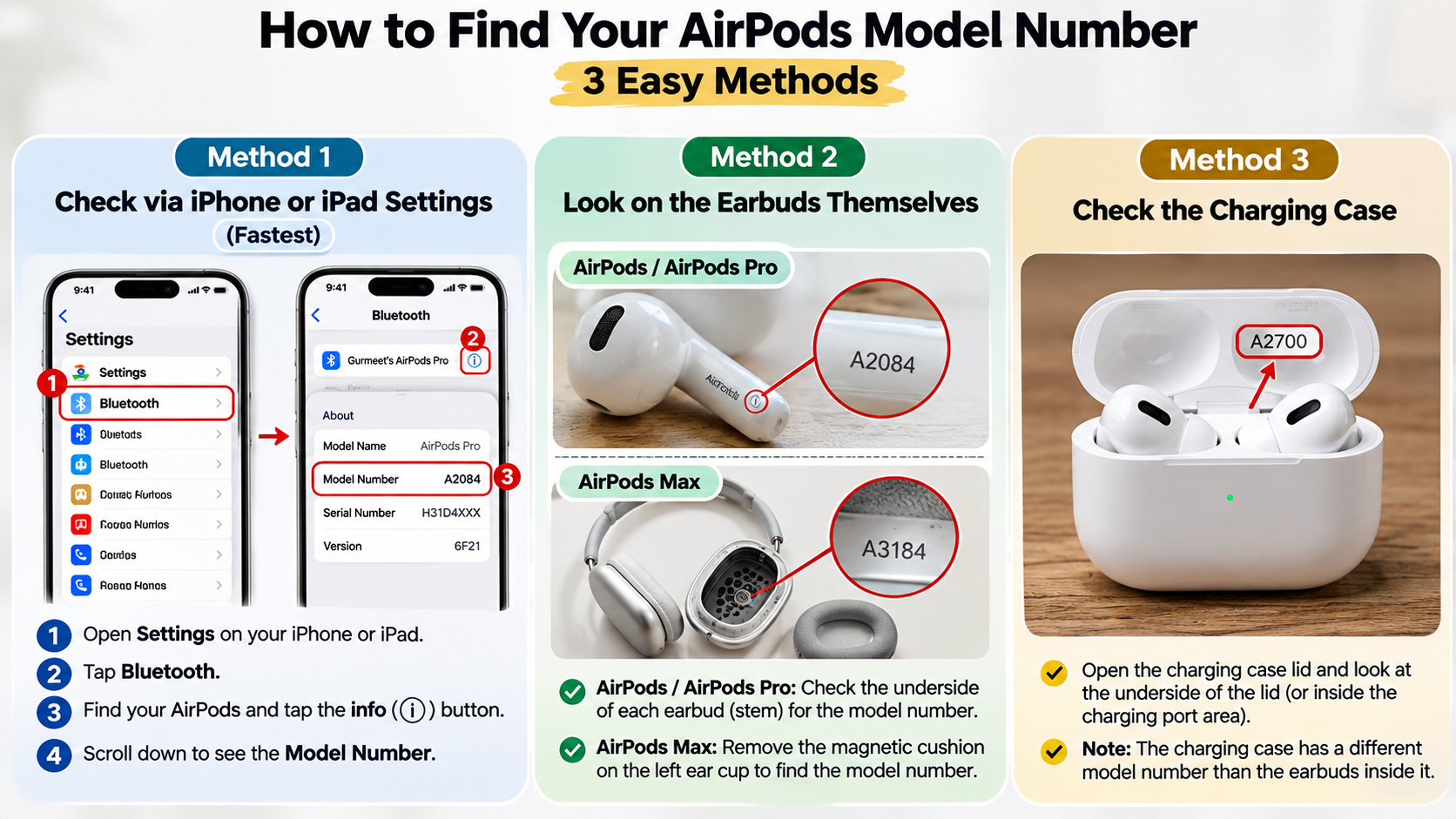
The quickest way to identify which generation AirPods I own is through your iPhone’s Bluetooth settings. First, connect your AirPods to your iPhone. Then open Settings and select Bluetooth. Find your AirPods in the connected devices list and tap the information icon beside their name.
Your device displays important information, including the model name and model number. Look for the model number beginning with the letter A. You can compare this number with Apple’s official identification list to determine your exact generation.
If your AirPods cannot connect, inspect the physical earbuds instead. Apple prints the model number on the underside of each earbud. You can also check the charging case for its separate model number. Remember that the earbuds and charging case have different identifiers. Checking both helps prevent mistakes when purchasing replacement accessories.
Checking Visual Case and Stem Clues
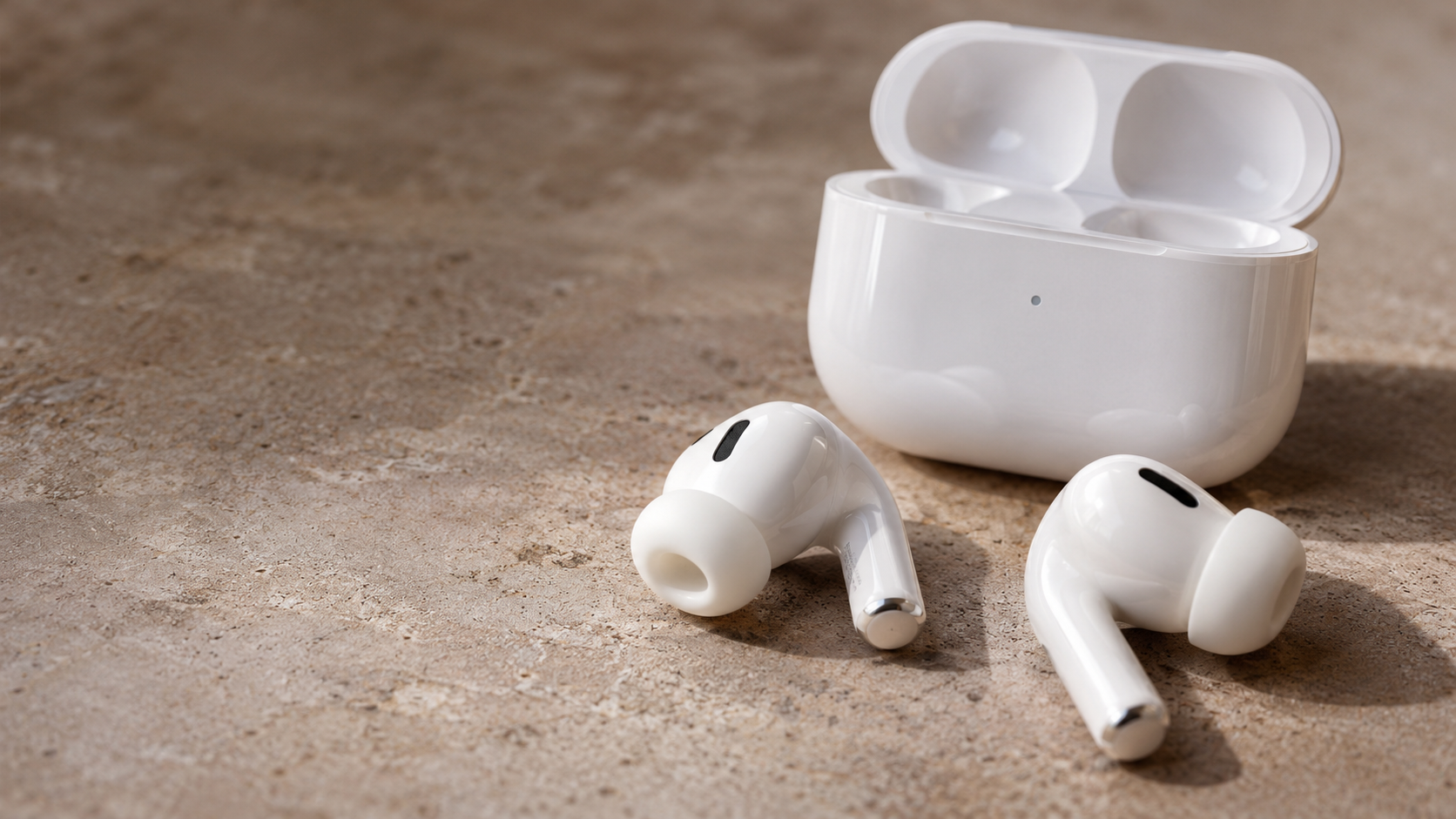
Physical design offers another way to identify your AirPods generation. Although Apple maintains a similar appearance across its products, several details distinguish older and newer models.
First and second-generation standard AirPods have longer stems and taller charging cases. AirPods 3 and AirPods 4 feature shorter stems and wider cases. Their designs look closer to the AirPods Pro lineup.
AirPods Pro models have removable silicone ear tips. These tips provide a different fit compared with standard AirPods. Their charging cases also have distinct features depending on the generation.
Here are some useful visual differences:
- AirPods 1 and 2: Longer stems and a traditional rounded charging case.
- AirPods 3: Shorter stems and a wider charging case.
- AirPods 4: Short stems and a compact, redesigned charging case.
- AirPods Pro 1, 2, and 3: Silicone ear tips and model-specific charging cases.
Visual clues are useful for initial identification. However, always verify the model number before ordering replacement parts.
Why are AirPods 4 so cheap?
AirPods 4 have a lower starting price because Apple offers a standard version without Active Noise Cancellation. The company also sells a more expensive version with additional audio and charging features.
In the United States, the standard AirPods 4 launched at $129. AirPods 4 with Active Noise Cancellation launched at $179. These prices reflect their different feature sets rather than a difference in generation.
The standard model still includes Apple’s H2 headphone chip. It supports features such as Personalized Spatial Audio and Voice Isolation. However, it does not include Active Noise Cancellation, Adaptive Audio, or Transparency mode.
Its charging case also lacks wireless charging and the external speaker available on the ANC version. Both models use USB-C charging. Therefore, the standard version offers essential AirPods features at a lower starting price.
Comparing the Two AirPods 4 Tiers
Apple offers two AirPods 4 configurations. They share a similar earbud design but differ in noise control and charging features. Understanding these differences helps you choose the correct version.
The standard AirPods 4 cost less and suit people who prefer a simple listening experience. They provide good everyday functionality without additional noise-control features.
AirPods 4 with Active Noise Cancellation offer more advanced capabilities. Their additional features make them suitable for commuting, travelling, and noisy environments. Understanding noise cancellation and Adaptive Audio modes can also help you understand how these features improve your listening experience.
Here is a quick comparison:
| Feature | AirPods 4 | AirPods 4 with ANC |
|---|---|---|
| H2 chip | Yes | Yes |
| Active Noise Cancellation | No | Yes |
| Adaptive Audio | No | Yes |
| Transparency mode | No | Yes |
| USB-C charging | Yes | Yes |
| Wireless charging | No | Yes |
| Find My case speaker | No | Yes |
| Launch price (US) | $129 | $179 |
The $50 launch-price difference mainly reflects the additional features. Choose the standard version if you do not need noise cancellation. Consider the ANC version if you regularly use your earbuds in noisy surroundings.
Is A2084 1st or 2nd gen?
The model number A2084 identifies the first-generation AirPods Pro. Specifically, Apple assigns A2084 to one earbud and A2083 to the other. These models were introduced in October 2019.
They are not standard first-generation or second-generation AirPods. They belong to Apple’s original AirPods Pro lineup, which introduced silicone ear tips and Active Noise Cancellation.
You can confirm this identification by checking the model number underneath your earbud. Look for the small printed code and compare it with Apple’s official identification page.
The first-generation AirPods Pro also support Transparency mode and wireless charging. However, they lack some newer features introduced with subsequent Pro generations. These include the newer charging case features and upgraded audio capabilities available on later models.
If you find A2084 printed on your earbud, you have an original AirPods Pro earbud, not an AirPods Pro 2.
Matching Your Charging Case to A2084
If you own an A2084 AirPods Pro earbud, you should also check your charging case. The original AirPods Pro charging case carries model number A2190. Apple introduced this case alongside the first-generation AirPods Pro in 2019.
The case supports Qi-certified wireless charging and uses a Lightning connector. It does not have the external speaker and lanyard loop found on later AirPods Pro charging cases.
Apple also introduced a MagSafe-compatible version of the A2190 case in 2021. Therefore, the same case model number can relate to different charging capabilities.
Check these details before purchasing a replacement:
- Earbud model: A2084 or A2083.
- Charging case model: A2190.
- Charging connector: Lightning.
- Wireless charging: Qi-compatible.
- External speaker: Not included.
Do not identify your earbuds using the charging case alone. Always check the individual earbud model numbers. This is particularly important when buying secondhand AirPods or replacement charging cases.
How can I find out which model my AirPods are?
You can identify your AirPods through an iPhone, iPad, Mac, or physical inspection. The iPhone method is usually the easiest because it displays your connected earbuds’ model information directly.
On an iPhone or iPad, connect your AirPods and open Settings. Select Bluetooth or tap your AirPods’ name in Settings. Next, tap the information icon to view the available device details.
Mac users can also check their connected AirPods. Wear your earbuds, open System Settings, and select your AirPods from the sidebar. You may need to scroll down to find their name.
If your earbuds cannot connect, inspect the printed model number underneath each earbud. You can also examine the charging case for its separate identification code.
These methods help you identify the exact hardware without relying on appearance alone. Always compare the model number with Apple’s official identification directory.
Using the Serial Number on Apple’s Website
Your AirPods serial number provides additional information about your device. You can find it in your iPhone’s Bluetooth settings or through your Mac’s device settings. Apple also prints the serial number inside the charging case lid on supported models.
After locating the serial number, visit Apple’s Check Coverage website. Enter the number to check available coverage and warranty information. If you want additional protection for your Apple devices, explore AppleCare coverage, costs, and plans in India before deciding which protection option suits your needs.
However, there is an important distinction. The Check Coverage website is primarily designed for warranty and service information. It should not be your only method for identifying the exact AirPods generation.
For accurate model identification, use the A-number printed underneath your earbuds. Compare it with Apple’s official AirPods identification directory.
You should also remember that the charging case has its own serial number. For this reason, check the serial number and model number carefully when purchasing used AirPods. These checks provide useful information, but they do not guarantee that secondhand hardware is genuine.
How do I tell if I have AirPods Pro 2 or 3?
Identifying whether you own AirPods Pro 2 or AirPods Pro 3 is easier when you check their model numbers. Apple introduced AirPods Pro 2 in 2022 and AirPods Pro 3 in 2025.
AirPods Pro 2 have several model identifiers, depending on the version. Their earbud model numbers include A2698, A2699, A2931, A3047, A3048, and A3049. These identifiers cover different regional and hardware variants.
AirPods Pro 3 use model numbers A3063, A3064, and A3065. You can find these codes underneath the earbuds or through your connected Apple device.
Another important difference is health monitoring. AirPods Pro 3 include a built-in heart rate sensor for workouts. They also offer an updated acoustic design and improved dust and water resistance.
The charging cases provide additional clues. AirPods Pro 3 include a USB-C charging case with a speaker and lanyard loop. However, some AirPods Pro 2 versions share similar features. Therefore, model numbers remain the most reliable identification method.
Key Hardware Upgrades on AirPods Pro 3
AirPods Pro 3 introduce several hardware improvements over AirPods Pro 2. These upgrades focus on sound quality, noise cancellation, comfort, and additional health-related features.
One major addition is the built-in heart rate sensor. It measures heart rate during supported workouts. This feature expands the functionality beyond traditional wireless listening.
Apple also redesigned the acoustic architecture to improve Active Noise Cancellation. The third-generation model provides stronger noise reduction than its predecessor. Its redesigned fit also aims to improve comfort and sound isolation.
Other notable upgrades include:
- Five silicone ear tip sizes: XXS, XS, S, M, and L.
- IP57 resistance: Improved dust, sweat, and water resistance.
- Heart rate monitoring: Tracks heart rate during supported workouts.
- Improved ANC: Offers stronger Active Noise Cancellation.
- Updated charging case: Includes USB-C charging, a speaker, and a lanyard loop.
AirPods Pro 2 remain capable wireless earbuds. However, AirPods Pro 3 offer additional hardware features and updated technology. Check the model number before deciding which generation you own.
Conclusion
Identifying which generation AirPods you own does not have to be complicated. You can quickly check your model through your iPhone’s Bluetooth settings, inspect the model number printed on each earbud, or examine the charging case. These methods help you identify your exact AirPods model without relying on appearance alone.
For accurate identification, refer to Apple’s official AirPods identification guide. It provides a complete list of AirPods models and their corresponding model numbers, making it easier to verify your device.
Before purchasing replacement accessories, charging cases, or ear tips, always confirm your model number. This is especially important when comparing standard AirPods, AirPods Pro 2, and AirPods Pro 3.
The easiest way to identify your AirPods is to check their model number against Apple’s official support guide. A quick check can save you money and help you choose compatible accessories.