The Ultimate Gaming Mouse Guide for Better Performance
Choosing the right gaming mouse can improve comfort, control, and responsiveness. This gaming mouse guide explains the specifications that matter most when upgrading your setup. Whether you play competitive shooters or casual games, understanding your mouse’s features helps you make an informed decision.
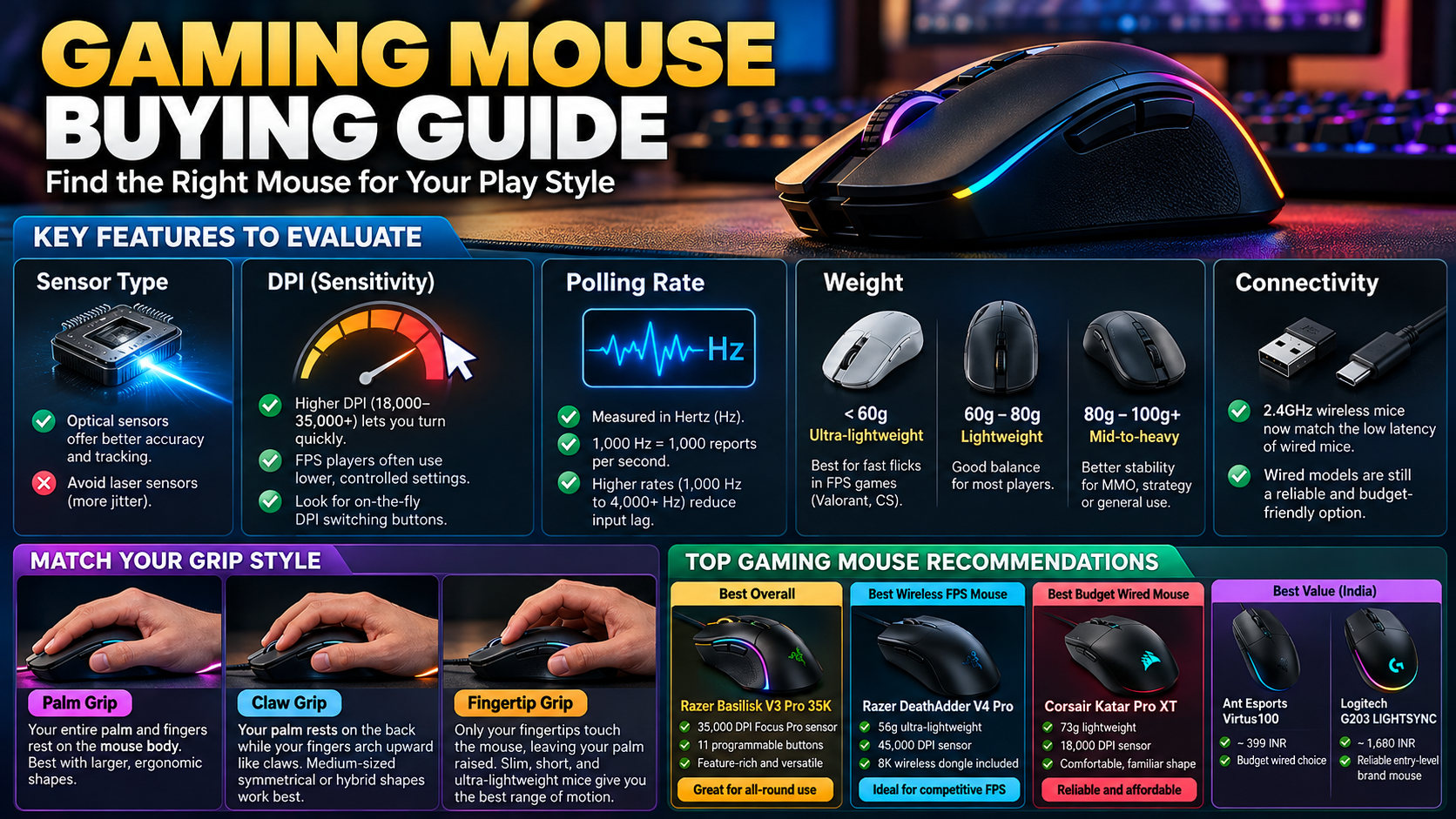
Two commonly discussed specifications are polling rate and DPI. Polling rate measures how frequently your mouse reports its position to your computer. DPI determines how far the cursor moves relative to physical mouse movement. Sensor quality, mouse weight, shape, and grip style also influence your experience.
However, higher numbers do not automatically mean better performance. A 4,000Hz polling rate or a 20,000 DPI sensor may sound impressive, but these specifications offer limited benefits for many players. This guide explains how to choose the right settings, compare polling rates, and find a mouse that suits your gaming style without overspending.
Should I Use a 1000Hz or 2000Hz Polling Rate?
Choosing between 1000Hz and 2000Hz depends on your hardware, gaming style, and personal preferences. The polling rate determines how frequently your mouse reports its position to your computer. At 1000Hz, the mouse reports approximately every millisecond. At 2000Hz, it reports every half-millisecond.
The difference is measurable, but it may not be noticeable to every player. Competitive gamers using high-refresh-rate monitors may benefit from slightly lower input latency and smoother cursor movement. If you’re comparing display options, explore how to choose the perfect gaming monitor to understand which monitor features matter for gaming. Casual players will often find 1000Hz more than sufficient.
Understanding CPU Impact at Higher Polling Rates
Higher polling rates increase the amount of mouse input data your computer processes. Modern gaming systems can generally handle 2000Hz without significant difficulty. However, performance varies depending on the processor, game, background applications, and mouse implementation.
If you experience stuttering or inconsistent frame rates, test your mouse at different polling rates. Compare performance in your usual games rather than relying on specifications alone.
For most players, 1000Hz offers a practical balance between responsiveness and system resources. Choose 2000Hz if your hardware supports it and you notice a meaningful improvement.
How Do I Choose the Right Gaming Mouse?
Choosing the right gaming mouse involves more than comparing DPI numbers or polling rates. Your hand size, grip style, preferred games, and comfort should guide your decision. It’s also worth comparing optical and laser mouse technology to understand how different sensor types can affect your choice. A mouse that feels natural during long sessions can help you maintain consistent control.
Start by considering the shape and dimensions. Palm-grip users often prefer mice that support most of their hands. Claw-grip users may benefit from a shape that supports the rear of the palm while allowing flexible finger movements. Fingertip users often prefer smaller, lighter designs.
Weight also matters. Lightweight mice can make rapid movements easier, while heavier models may feel more stable to some players. Neither option guarantees better accuracy.
Evaluating Grip Styles and Hand Dimensions
Measure your hand from the wrist crease to the tip of your middle finger. Use this measurement as a starting point when comparing mouse sizes. Always check the manufacturer’s dimensions because sizing categories vary between brands.
Consider these common grip styles:
- Palm grip: Your palm rests against the mouse, providing broad hand support.
- Claw grip: Your palm touches the rear while your fingers arch over the buttons.
- Fingertip grip: Your fingertips control the mouse with minimal palm contact.
Also examine sensor consistency, button placement, switch quality, and cable flexibility. For wireless models, check battery life and charging options. The best gaming mouse is one that fits comfortably, tracks consistently, and suits your budget.
Is 4000Hz Better Than 1000Hz?
A 4000Hz polling rate allows a mouse to report its position approximately every 0.25 milliseconds. By comparison, a 1000Hz mouse reports every millisecond. This reduces the interval between reports, but it does not automatically make every game feel four times more responsive.
The practical difference depends on your monitor, game, system performance, and mouse movements. Players using high-refresh-rate displays may notice smoother tracking in some situations. Others may struggle to identify a consistent improvement during normal gameplay.
A 4000Hz gaming mouse can also demand more processing resources and consume more battery power, particularly in wireless mode. The actual impact varies by device and system configuration.
Battery Life and Resource Costs
Higher polling rates can reduce wireless battery life because the mouse and receiver handle data more frequently. Some models also require compatible receivers or specific connection modes to reach their maximum polling rates. If you’re checking connection options for wired mice or wireless receivers, understanding why USB ports are color-coded and USB-C isn’t can help you learn more about common USB connection standards.
Before upgrading, consider the following:
- Performance: Test whether higher polling rates improve your experience.
- Battery life: Check manufacturer estimates for each polling-rate setting.
- Compatibility: Confirm that your mouse, receiver, and computer support the desired rate.
- Value: Compare the price difference with the benefits you can actually notice.
For most users, 1000Hz remains a sensible starting point. Consider 4000Hz when you have compatible hardware and want to experiment with lower input latency.
Is a 4000 DPI Mouse Good for Gaming?
Yes, a mouse supporting 4000 DPI can be suitable for gaming. However, maximum DPI is not the same as the setting you should use. DPI measures how far the cursor moves for a given amount of physical mouse movement. Higher settings produce faster cursor movement when other sensitivity settings remain unchanged.
Many competitive players prefer settings such as 400 or 800 DPI, combined with suitable in-game sensitivity. Others use 1600 DPI or higher. The right setting depends on the game, display resolution, mouse control, and personal preference.
A mouse capable of 4000 DPI gives you flexibility to experiment with different sensitivity levels. You do not need to use its maximum setting to benefit from its sensor.
Balancing Sensitivity and Control
Finding the right sensitivity involves balancing speed with precise control. Lower sensitivity generally requires more physical mouse movement to turn or aim. This can help players make controlled adjustments in tactical shooters, although it requires enough desk space.
Higher sensitivity requires less movement, which can be useful when space is limited or quick turns are important. However, excessive sensitivity may make small adjustments harder for some players.
Try these steps to find a comfortable setting:
- Start with a moderate DPI setting, such as 800 or 1600.
- Adjust your game’s sensitivity to match your preferences.
- Practise tracking targets and making small aiming corrections.
- Change one setting at a time and test it consistently.
Avoid changing sensitivity constantly. Give yourself time to adapt before deciding whether a setting works. Consistent practice and comfortable control matter more than choosing an impressive DPI number.
Is 20,000 DPI Too Much?
A 20,000 DPI sensor offers more sensitivity than most players need for everyday gaming. However, having a high maximum DPI does not make a mouse worse. The important distinction is between the sensor’s maximum capability and the setting you actually use.
At very high DPI settings, small physical movements can cause large cursor movements. This may make precise aiming more difficult, particularly when your in-game sensitivity is also high. Many competitive players therefore prefer lower DPI settings that provide predictable control.
A mouse with 20,000 DPI can still be useful because you can select a lower setting whenever necessary. Its maximum specification simply gives you more adjustment options. It does not guarantee better accuracy, faster reaction times, or superior sensor performance.
The Reality of Modern Sensor Specifications
Manufacturers often highlight maximum DPI because it is easy to compare across product listings. However, maximum DPI alone tells you little about overall gaming performance. To understand another aspect of optical mouse technology, explore why optical computer mice use red lights and how their tracking systems work.
When evaluating a gaming mouse, consider these factors:
- Sensor tracking: Look for consistent tracking without unwanted acceleration or skipping.
- Lift-off distance: Check how the sensor behaves when you lift and reposition the mouse.
- Polling rate: Consider how frequently the mouse reports movement.
- Ergonomics: Choose a shape and weight that suit your hand.
- Build quality: Examine the buttons, scroll wheel, cable, and wireless connection.
For most players, a reliable sensor with comfortable ergonomics is more valuable than an extremely high DPI ceiling. Choose a mouse based on its complete performance rather than one headline specification.
Final Thoughts
Choosing the right gaming mouse requires balancing responsiveness, comfort, accuracy, and price. A 1000Hz polling rate is sufficient for many players, while 2000Hz and 4000Hz offer shorter intervals between reports. Whether those differences matter depends on your hardware and individual experience.
DPI deserves the same practical approach. A 4000 DPI mouse can work well, while a 20,000 DPI maximum is unnecessary for most gaming situations. You can use lower settings on either device to find a comfortable level of control.
Before purchasing, compare the mouse’s shape, weight, sensor performance, connectivity, and battery life. You can also explore the official USB Implementers Forum (USB-IF) website to learn more about USB standards and device connectivity.
Ultimately, the best gaming mouse is the one that fits your hand, tracks reliably, and helps you play comfortably and consistently. Prioritize features you will actually use instead of paying extra for specifications that offer little practical benefit.