Why Are Some Locations Blurred Out on Google Maps?
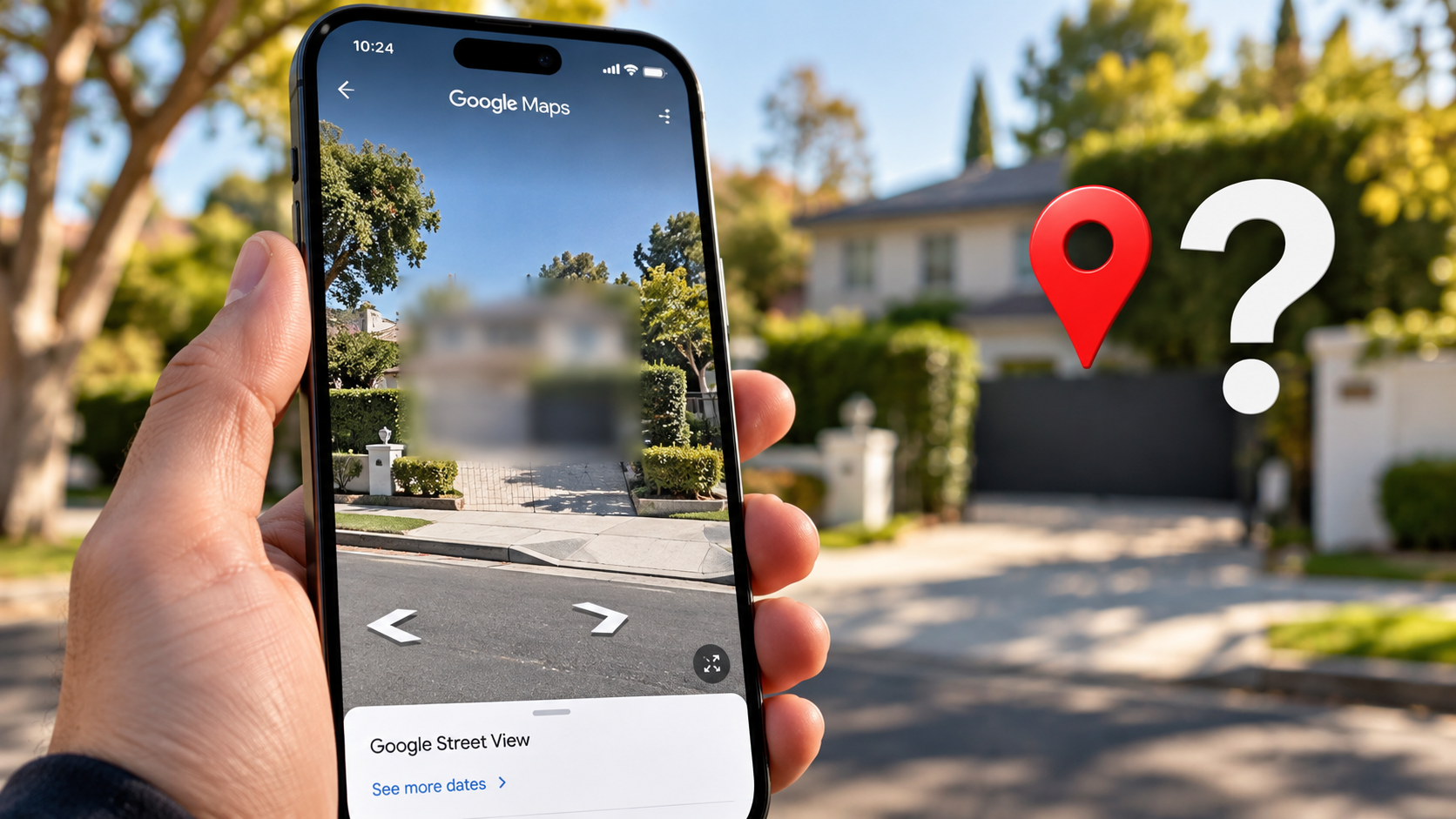
Have you ever explored your neighborhood on Google Maps and noticed a pixelated building or an entire property? It can feel puzzling to see a blurred area where a house, vehicle, or other structure should appear.
There are several reasons why locations appear blurred out on Google Maps. Google automatically blurs identifiable faces and license plates in Street View imagery to protect people’s privacy. People can also explore how Google Maps differs from Google Earth when comparing street-level imagery with satellite views.
However, a blurred building does not necessarily indicate a security threat. A privacy request, an imagery limitation, or another issue may explain what you see.
Understanding these reasons helps you learn how Google Maps handles privacy and sensitive information. This article explains why locations appear blurred, whether celebrity homes receive special treatment, and how you can request a blur for your own house.
Why Are Some Locations Blurred Out on Google Maps?
Google Maps blurs certain objects and locations to protect privacy and limit the exposure of sensitive information. The platform automatically blurs recognizable faces and vehicle license plates in Street View imagery. Understanding what the camera symbol on Google Maps means can also help users interpret other visual indicators they encounter while exploring the map.
Property owners can also request additional blurring for eligible homes and other details. Google reviews these requests and decides whether the content meets its privacy guidelines.
Here are some common reasons for blurring:
- Personal privacy: Google blurs faces and license plates to help protect people’s identities.
- Property privacy: Eligible property owners can request additional blurring of their homes.
- Security concerns: People may request a blur to limit public access to detailed exterior imagery.
- Imagery limitations: Image quality, coverage, and other technical issues can affect what appears on the map.
Privacy Safeguards and Public Requests
Google uses privacy safeguards to reduce the exposure of personal information in Street View. Automatic blurring protects identifiable faces and license plates, while additional requests allow people to seek protection for certain properties.
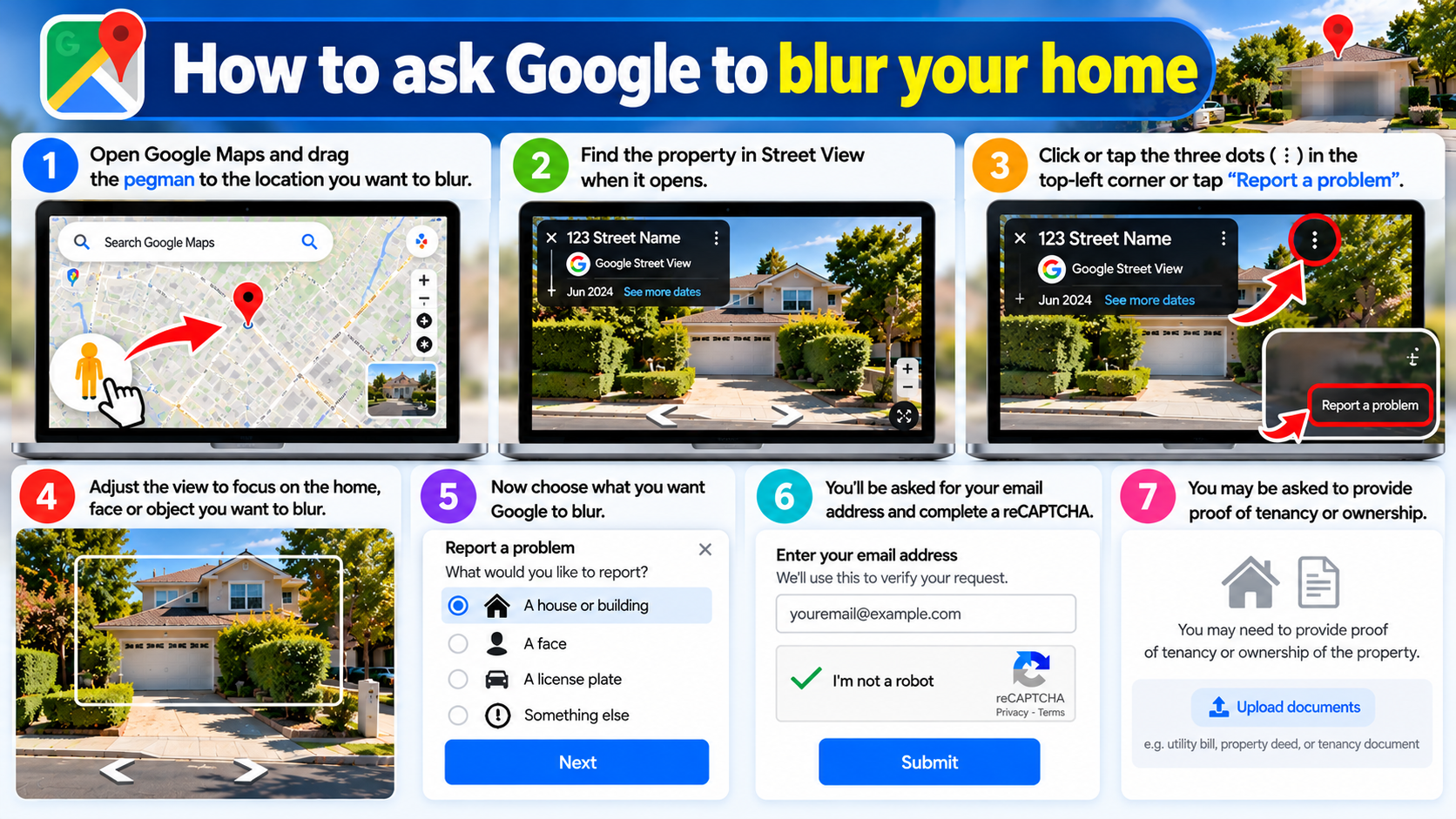
If you want to blur your house, open Google Maps and locate your property in Street View. Select the option to report a problem, identify the area you want Google to blur, and explain your request.
Google reviews the submission before deciding whether to apply the requested change. Approval is not guaranteed, so do not assume that every request will result in a blur.
Are Celebrity Houses Blurred on Google Maps?
Google does not automatically blur celebrity homes simply because their owners are famous. Actors, musicians, athletes, and other public figures generally follow the same available privacy-request process as other property owners.
Consequently, some celebrity homes remain visible in Street View, while others appear partially or completely blurred. The result may depend on an approved privacy request and the imagery available for that location. If you also use competing navigation apps, comparing Apple Maps and Google Maps can help you understand the differences between their mapping experiences.
A visible celebrity home does not necessarily indicate poor security. Similarly, a blurred mansion does not prove that its owner faces a specific threat.
Paparazzi Deterrence and Security
Public figures often face unwanted attention, making residential privacy an important concern. Street View imagery can reveal visible entrances, driveway layouts, and other exterior features that people may prefer to keep less accessible.
A property blur can reduce the visual details available through Google Maps. Some homeowners may consider this step to discourage unwanted visits or limit unnecessary exposure of their surroundings.
However, blurring a home does not make the property completely invisible online. Address details, social media posts, property listings, and photographs from other websites may remain accessible.
For this reason, map blurring works best as one part of a broader privacy strategy. Public figures and other homeowners should also consider what personal information they share across the internet.
Is It a Good Idea to Blur Out Your House on Google Maps?
Whether you should blur your house on Google Maps depends on your privacy concerns and personal circumstances. Some homeowners prefer visible Street View imagery because it helps visitors, delivery drivers, and service providers recognize their properties.
Others feel uncomfortable when detailed exterior images of their homes appear online. This concern may matter more to people experiencing harassment, unwanted attention, or specific security risks.
Consider these factors before requesting a property blur:
- Privacy: You may prefer to limit public access to detailed images of your home.
- Security: A blur can reduce visual information, although it cannot prevent every potential threat.
- Convenience: Visitors may find it harder to recognize your property using Street View.
- Long-term preferences: Google generally treats approved property-blurring requests as permanent, so consider your decision carefully.
Weighing Security Versus Delivery Convenience
Blurring your home can make it harder for visitors to compare your property’s exterior with Street View imagery. Delivery drivers and ride-share passengers may need extra directions to identify the correct entrance.
However, a blur does not necessarily prevent people from finding your address. Google Maps may still display the street name, building location, and surrounding map information. If you regularly use navigation apps, comparing Google Maps and Waze can help you understand which app better suits your everyday driving needs.
If you decide to blur your property, consider providing clear delivery instructions. You can describe nearby landmarks, explain which entrance to use, or share a location pin with trusted visitors.
These simple steps can reduce confusion without compromising your privacy preferences. Ultimately, weigh the potential benefits against the practical limitations before submitting a request.
Why Would Someone’s Whole House Be Blurred on Google Maps?
An entire house may appear blurred on Google Maps because someone requested additional privacy protection for its Street View imagery. Google may apply the blur after reviewing and approving an eligible request.
Homeowners may seek this protection because they worry about personal privacy, unwanted attention, harassment, or other security concerns. However, the blur itself does not reveal who submitted the request or why.
Other imagery issues can also affect how a property appears online. Differences in image quality, available coverage, and updates may change what users see when exploring a location.
Stalking Prevention and Personal Safety
People who experience stalking, harassment, or unwanted attention may want to reduce the amount of information available about their homes. Street View imagery can reveal exterior features that they prefer to keep less accessible.
A property blur may reduce the visibility of those details on Google Maps. However, it cannot erase information that other websites have already published, including property listings, photographs, and social media posts.
Anyone facing a specific safety threat should not rely on map blurring alone. Depending on the circumstances, useful steps include reviewing public social media posts, limiting unnecessary personal information online, and contacting the appropriate authorities when necessary.
A property blur can support a broader privacy strategy, but it cannot guarantee complete protection. It also does not prove that the homeowner has experienced a particular incident.
Can I Unblur My House on Google Maps?
If Google has approved a request to blur your house in Street View, do not assume that you can reverse the change later. Google generally treats approved Street View blurring requests as permanent to help protect the privacy of the person who requested the change.
This policy matters if you plan to sell your home, move elsewhere, or change your mind about online privacy. A new owner should not expect to restore the original imagery simply by contacting Google. You can also learn how Google Maps knows a business is busy to better understand the information and signals that mapping services use to inform users.
If you have questions about an existing blur, consult Google’s official Maps support resources. Check the current policy and available options rather than assuming that Google offers a reversal process.
Permanent Digital Redaction Policies
Google’s approach to permanent blurring helps protect people who request additional privacy for their properties. Restoring the original imagery could expose details that someone deliberately chose to conceal.
For this reason, consider the long-term implications before requesting a property blur. Check the correct location, identify the imagery you want Google to blur, and explain your concerns clearly when submitting the request.
If Google approves your request, plan on the blur remaining in place. Do not rely on a future reversal to restore the original Street View imagery.
For the latest information about privacy requests and existing property blurs, visit the Google Maps Help Center.
Conclusion
Locations blurred out on Google Maps can reflect automatic privacy protections, approved property-blurring requests, or other imagery limitations. A blur does not necessarily indicate a security threat or reveal why someone chose to obscure a property.
If you worry about your home’s visibility, review Google’s Street View reporting options and current privacy policies. Consider both the potential benefits and the practical limitations before submitting a request.
Remember that map blurring only reduces the visibility of certain imagery. It does not remove every online reference to a property or guarantee complete privacy. Combining sensible digital privacy practices with appropriate security precautions offers a more comprehensive way to protect personal information.