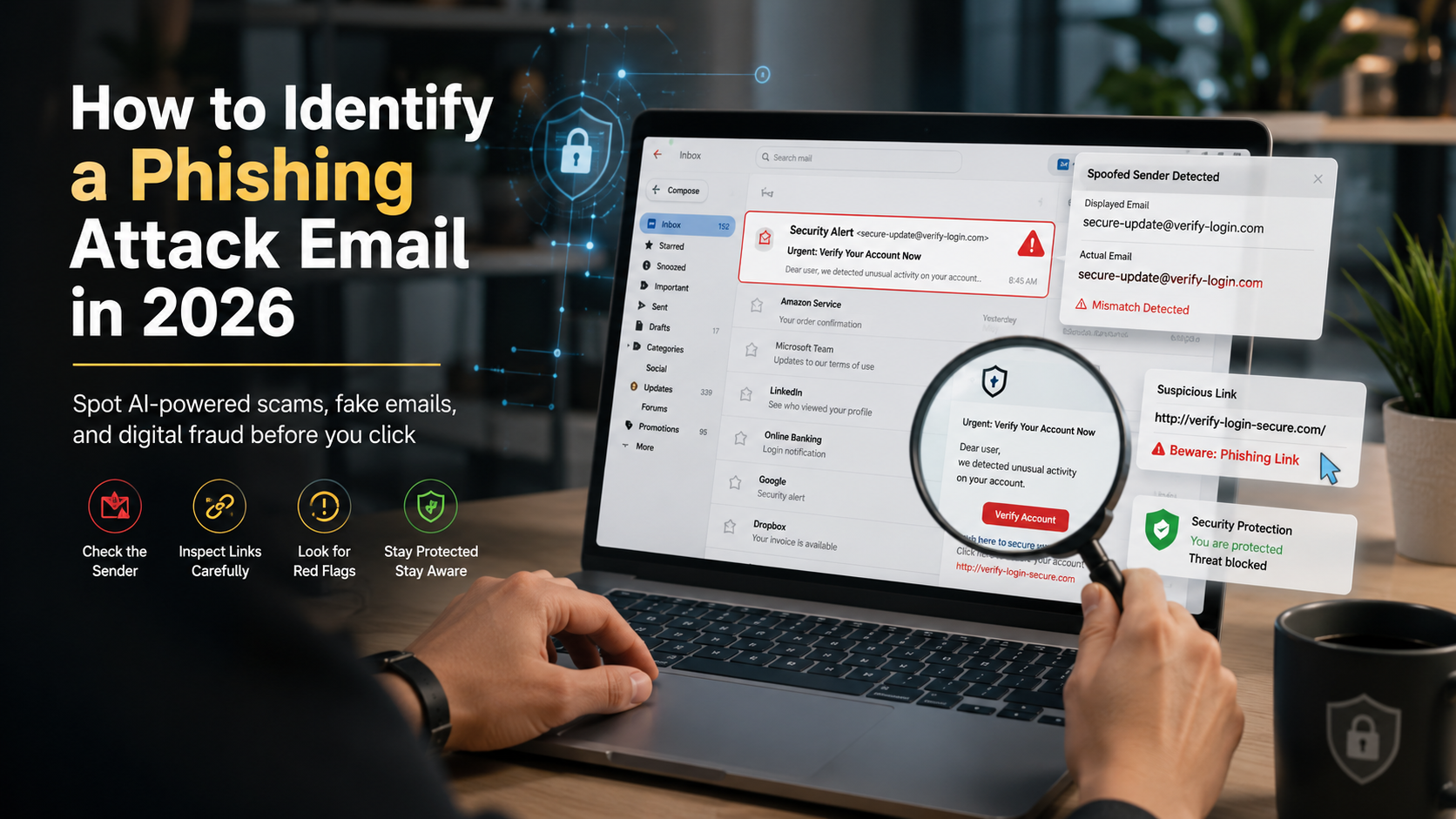
How to Identify a Phishing Attack Email Before Clicking Any Links in 2026
The digital landscape has shifted dramatically, making inbox security more challenging than ever. Today, cybercriminals use sophisticated artificial intelligence to craft highly personalized scams that easily bypass traditional spam filters. To safeguard your personal data and corporate assets, learning how to identify a phishing attack email before interacting with any malicious elements is an absolute necessity. Organizations like the Cybersecurity and Infrastructure Security Agency (CISA) continuously warn that social engineering remains the primary entry point for major network breaches globally.
Understanding these evolving digital threats allows you to protect your identity and finances effectively. Phishing is no longer just about poorly written messages containing obvious spelling mistakes. This comprehensive guide explores modern deceptive tactics and provides actionable strategies to identify a phishing attack email instantly.
The New Face of Cybercrime in 2026
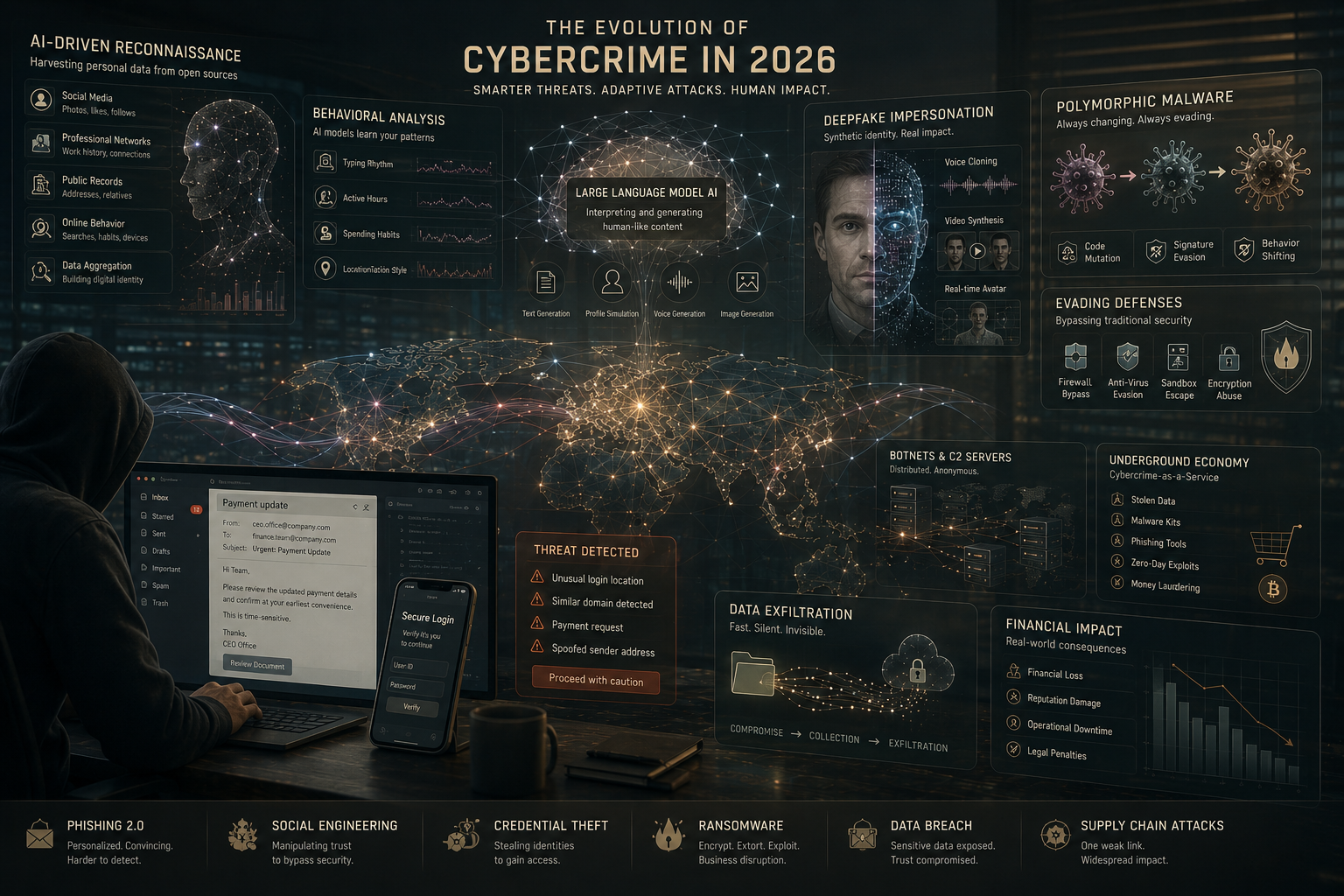
In 2026, cybercrime has taken a more sophisticated and adaptive form, making digital environments increasingly difficult to trust. Moreover, phishing attacks have shifted from broad, mass-blast emails to highly targeted operations that rely on personal data. Furthermore, attackers now use advanced large language models to analyze social media profiles and extract detailed behavioral insights. In addition, they generate highly convincing contextual messages tailored specifically to individual victims. Meanwhile, criminals deploy hyper-realistic deepfake audio and video to impersonate executives or family members. Consequently, these tactics significantly increase trust and reduce the victim’s suspicion during attacks. However, automated polymorphic code constantly alters malicious links, allowing them to bypass traditional security filters.
In addition, deepfake audio and video are now used to impersonate trusted individuals. Therefore, it becomes even more difficult to identify a phishing attack email without careful verification. As a result, user awareness is now more important than ever.
7 Critical Signs to Identify a Phishing Attack Email
Evaluating the technical and contextual elements of your incoming messages helps you spot hidden dangers. Look closely for these seven telling indicators of an email scam.
1. Mismatched or Spoofed Sender Domains
Always carefully inspect the full sender email address instead of trusting only the display name. Moreover, attackers frequently create spoofed or look-alike domains that closely resemble legitimate companies by changing letters, adding extra characters, or using misleading subdomains. For instance, “[email protected]” may look real but actually be fake. Therefore, these small differences are easy to miss during a quick glance. In addition, some phishing emails even pass basic filters. Consequently, verifying the domain directly helps prevent deception and ensures you only trust authentic communication sources.
2. Urgent or Threatening Language
Phishing emails often rely on urgency and fear to manipulate users into acting quickly without thinking. Moreover, they may include threats such as account suspension, legal action, or financial penalties to create panic. In addition, this psychological pressure is designed to bypass logical decision-making. For example, messages like “Act within 24 hours or your account will be locked” are common tactics. Therefore, users may respond impulsively. However, legitimate organizations rarely use such aggressive language. Consequently, verifying the message calmly through official channels is always safer.
3. Hyper-Personalized Yet Suspicious Requests
Modern phishing attempts often include personal details gathered from social media, professional profiles, or public data. Moreover, this makes the message appear more authentic and trustworthy at first glance. In addition, scammers may reference your name, job role, or recent activity to gain credibility. However, despite this personalization, the request usually involves sensitive actions like sharing passwords or banking information. Therefore, this combination should raise suspicion. Consequently, even if the message feels relevant, it should always be independently verified before responding.
4. Obfuscated and Shortened Hyperlinks
Phishing emails frequently hide malicious links using URL shorteners or misleading text that does not match the actual destination. Moreover, attackers design these links to look safe while redirecting users to harmful websites. In addition, hovering over a link often reveals the real URL, which may look completely different from the displayed text. For example, a link may appear to be a bank login page but actually lead elsewhere. Therefore, checking URLs before clicking is essential. Consequently, this simple step helps prevent unauthorized access or malware infections.
5. Unusual or Automated Attachments
Unexpected attachments in emails can be highly dangerous, especially when they come from unknown or suspicious sources. Moreover, attackers often disguise malware as invoices, resumes, or official documents to trick users into opening them. In addition, some files may ask users to enable macros or install external software, which can execute harmful scripts. Therefore, even common file types like PDFs or Word documents should be treated carefully. Consequently, it is important to verify the sender and context before downloading or opening any attachment.
6. Inconsistencies in Branding and Formatting
Legitimate organizations maintain consistent branding across all official communications, including logos, fonts, and layouts. Moreover, phishing emails often contain subtle inconsistencies such as misaligned text, outdated logos, or uneven formatting. In addition, attackers may copy real templates but fail to perfectly replicate design details. Therefore, these small errors can signal that the email is not authentic. Consequently, comparing suspicious messages with previous official emails is helpful. Ultimately, noticing branding inconsistencies can significantly reduce the risk of falling victim to scams.
7. Requests for Multi-Factor Authentication (MFA) Codes
Phishing attacks increasingly target multi-factor authentication (MFA) systems by tricking users into revealing their codes. Moreover, attackers may use fake login pages or impersonate support staff to request real-time verification codes. In addition, once they obtain these codes, they can bypass even strong security protections and gain full account access. Therefore, this tactic is extremely dangerous. Consequently, users must remember that legitimate companies never ask for MFA codes via email or messaging. Always treat such requests as fraudulent and report them immediately.
How to Verify a Suspicious Email Safely
If an email looks suspicious, it is important to verify it carefully without interacting with any links or attachments inside the message. Moreover, you should never click buttons, download files, or reply directly, since these actions can expose you to risk. Instead, always treat the message as untrusted until confirmed. In addition, take a cautious and structured approach before taking any action.
Navigate independently: Open a new browser window and manually type the official website address of the organization. Moreover, avoid using links provided in the email, since they may redirect to fake pages. Therefore, direct navigation ensures you reach the legitimate site safely.
Use alternative communication channels: Contact the organization using verified phone numbers or official apps. In addition, you can use internal company communication tools if available. Consequently, this helps confirm whether the request is genuine or part of a phishing attempt.
Inspect email headers: Check authentication protocols such as DKIM, SPF, and DMARC in your email settings. Moreover, these security checks help identify whether the email truly originated from the claimed domain. Therefore, reviewing headers provides an extra technical layer of verification.
FAQ: Understanding Modern Email Security
What are the new phishing techniques in 2026?
How to check if an email is a phishing email?
To check if an email is a phishing attempt, you need to examine both technical signals and behavioral cues carefully. Moreover, start by inspecting the sender’s actual email address, not just the display name, since attackers often use spoofed or look-alike domains to appear legitimate. In addition, verify email authentication details such as SPF, DKIM, and DMARC, because failed checks can indicate spoofing. Therefore, these technical indicators provide an important first layer of defense.
What to know about cybercrime in 2026?
Cybercrime in 2026 is increasingly driven by automation and artificial intelligence, making attacks faster, more scalable, and harder to detect. Moreover, criminals now use advanced AI tools to create highly convincing phishing messages that closely imitate natural human tone and writing style. In addition, these attacks are no longer random; instead, they are carefully personalized to exploit human emotions such as trust, urgency, curiosity, and fear. Consequently, victims often respond without careful verification.
Furthermore, deepfake technology and real-time voice synthesis are widely used to impersonate coworkers, executives, or even family members. Therefore, attackers can combine text, audio, and video deception to make scams more believable. In contrast, traditional spam filters and basic security tools are no longer enough. As a result, cybersecurity now relies heavily on user awareness, strict verification practices, and layered defenses. Overall, cautious behavior and independent verification are essential for staying safe online
Conclusion
Mastering the ability to identify a phishing attack email serves as your strongest defense against modern digital fraud. As artificial intelligence continues to refine the tactics used by cybercriminals, relying solely on automated spam filters is no longer sufficient. By maintaining a skeptical mindset, scrutinizing sender details, and verifying unusual requests through independent communication channels, you can effectively neutralize these sophisticated digital threats. Stay vigilant, pause before you click, and always prioritize proactive verification to keep your data secure.
For more practical guidance on avoiding modern online scams, you can read here:
Avoid Remote Job Scams Guide